
- Catalogs
- 3Disc Imaging
- HERON IOS

HERON IOS

HERON IOS
The Heron™ IOS is an intraoral color impression scanner designed to enhance patient comfort, streamline lab communication, and simplify dental practice operations. It offers a combination of affordability, ease of use, and advanced technology, making it a valuable investment for dental professionals.
- Patient Comfort: Lightweight and ergonomic design with a rotating tip for ease of use and increased patient comfort.
- Cost Efficiency: One-time payment with no additional license or case fees, and free software updates, ensuring low total cost of ownership.
- Ease of Use: Quick setup with minimal learning curve, allowing staff to operate the scanner efficiently.
- Durability: Features a durable design with no moving parts except the fan, reducing downtime.
- Open System Architecture: Compatible with most dental CAD systems, facilitating seamless integration into existing workflows.
- Design: Compact and sleek with a total weight of 150 grams.
- Scanning: Active stereo imaging with 24-bit color scanning, no powder or spray required.
- Software Requirements: Compatible with Windows 10, requiring ≥ 100 GB of free disk space and a USB 3.0 port.
- Hardware Recommendations: 16 GB RAM, Intel i7 processor, and NVIDIA GeForce Graphics Processor.
- HeronClinic Software: Intuitive case management and scanning software with touchscreen functionality and cloud-based file sharing.
- Open Format: Supports STL, PLY, and OBJ file formats for maximum flexibility.
- Case Management: Simplified navigation and management of patient information and scanning steps.
The Heron™ IOS complies with US FDA regulations and is CE marked per EU Medical Device Directive 93-42-EEC. It is licensed for sale in Canada and registered in Australia.
The Heron™ IOS offers a comprehensive solution for modern dental practices, combining advanced technology with user-friendly features to improve patient care and operational efficiency.
Catalog excerpts

An Intraoral Color Impression Scanner Solution
Open the catalog to page 1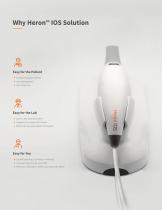
■ Increased patient comfort ■ Less waiting time ■ Less chair time ■ Quick, clear communication ■ Support for multiple file formats ■ Work with any open dental CAD system ■ Up and scanning in a matter of minutes ■ Low learning curve for your staff ■ Meet your restoration needs now,
Open the catalog to page 2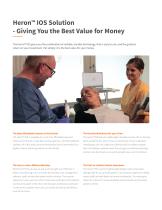
Heron™ IOS Solution - Giving You the Best Value for Money The Heron™ IOS gives you the combination of reliable, durable technology, that is easy to use, and the greatest return on your investment. Put simply: it is the best value for your money. The Most Affordable Scanner on the Market The Durable Workhorse for your Clinic The Heron™ IOS is available for a one-time affordable payment. The Heron™ IOS features a lightweight, durable scanner with no moving There are no license or case fees. And you get free, unlimited software parts, except the fan, which means no downtime. It’s pre-calibrated,...
Open the catalog to page 3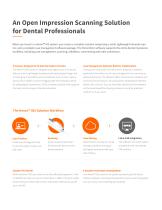
An Open Impression Scanning Solution for Dental Professionals When you invest in a Heron™ IOS system, you receive a complete solution comprising a small, lightweight intraoral scanner, and a complete case management software package. The HeronClinic software supports the entire dental impression workflow, including case management, scanning, validation, commenting and order submission. A Scanner Designed to Fit into the Modern Practice Case Management Software Built for Collaboration The Heron™ IOS scanner is designed with ergonomics in mind and The scanner comes with The HeronClinic Software,...
Open the catalog to page 4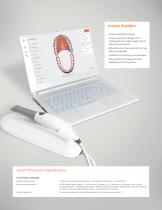
Solution Highlights ■ Compact and sleek design. ■ Unique ergonomic design with a rotating tip and a total weight of only 150 grams/5.3 ounces ■ Affordable one-time payment incl. free software upgrades ■ Excellent scan accuracy and precision ■ Open system architecture that fits seamlessly into the practice Heron™ IOS Solution Specifications PC SOFTWARE / HARDWARE Software Requirements Windows 10 (excluding Windows 10 S) • ≥ 100 GB of free disk space • 1x USB 3.0 port Recommended Hardware 16 GB of RAM (DDR4 or better) • ≥ 4 Core Intel i7 or greater (e.g. i7 7800) with ≥ 2.1Ghz base clock, ≥ 4.0Ghz...
Open the catalog to page 5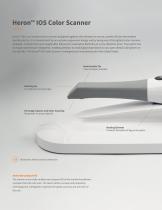
Heron™ IOS Color Scanner Heron™ IOS is an intraoral color scanner designed together with dentists to ensure a perfect fit into the modern dental practice. It is characterized by an exclusive ergonomic design and by being one of the lightest color scanners available. It boasts the most sought-after features for restorative dentistry at a very attractive price. The system has true open architecture integration, enabling dentists to send digital impressions to any open dental CAD system on the lab side. The Heron™ IOS Color Scanner is designed and manufactured in the United States. Autoclavable Tip...
Open the catalog to page 6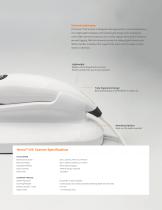
The Hand-held Scanner The Heron™ IOS scanner is designed with ergonomics in mind and features a slim, lightweight handpiece with optimal grip design and a rotating tip. It also offers premium features such as color capture and a built-in heater to prevent fogging. With this intraoral scanner for taking digital impressions, 3DISC provides a solution that supports the most common types of restorations in dentistry. Lightweight Weighs only 150 grams/5.3 ounces Ensures strain-free use in any scenario Truly Ergonomic Design Best possible grip and flexibility in daily use Mounting Options Base can be...
Open the catalog to page 7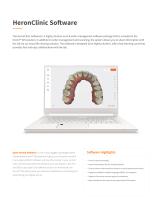
HeronClinic Software The HeronClinic Software is a highly intuitive scan & order management software package that is included in the Heron™ IOS solution. In addition to order management and scanning, the system allows you to share information with the lab via our cloud file-sharing solution. The software is designed to be highly intuitive, with a fast learning curve that provides fast and easy collaboration with the lab. Open Format Software is one of your biggest advantages when Software Highlights choosing the Heron™ IOS system as it gives you the option to work in any open platform software...
Open the catalog to page 8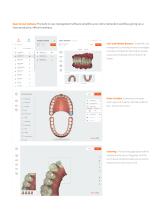
Open Format Software The built-in case management software simplifies your entire restoration workflow, giving you a more productive, efficient workday. Case and Patient Browser Simplified case management, providing an easy-to-navigate overview of all patient information. Quickly access scanning steps and the built-in 3D viewer. Order Creation Easily select the restoration type and material. Add the preferred lab – all from one screen. Scanning The Scanning page places all the necessary tools at your fingertips. And the Live Preview window enables you to see the results of your scan as you work....
Open the catalog to page 9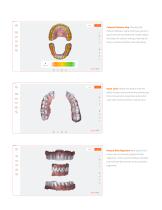
Colored Distance Map Visualize the distance between upper and lower jaw for a quick estimate of preparation shape. Adjust the values for custom setting of desired distances, intuitive interface with easy setup. Open Jaws Added new feature with the ability to open and examine the patients jaw from occlusal side. Especially useful when used with colored distance map function. Manual Bite Alignment New option that allows user to manually adjust the bite alignment , with a simple interface. Dentists can verify the lab receives an accurate bite alignment.
Open the catalog to page 10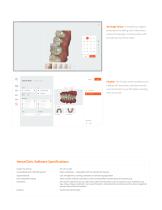
2D Image Viewer Complete your digital prescription by adding color information, notes and drawings. Communication with the lab has never been easier. Finalize The Finalize screen enables you to validate all information, add attachments and comments to your files before sending them to the lab. HeronClinic Software Specifications Output File Format Compatibility with CAD/CAM Systems Open architecture • Compatible with most dental CAD systems Supported tasks Case management, scanning, validation and lab sharing application Cloud-based file sharing Allows transfer of dental restoration case from...
Open the catalog to page 11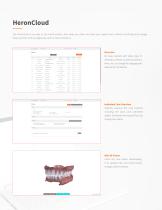
HeronCloud The HeronCloud is an easy to use cloud solution, that helps you share and store your digital scans, without sacrificing local storage. Share your files with any digital lab, with no inbox limitations. Overview All cases received with status, type of restoration, dentist id, date and delivery times. You can change the language and add partner connections. Individual Case Overview Instantly examine the case contents including the scans and comments added. Download the needed files and change case status. Web 3D Viewer Check the case before downloading it to validate files and communicate...
Open the catalog to page 12