
- Catalogs
- Adam, Rouilly
- AR28 AR28-B

AR28 AR28-B
AR28 AR28-B
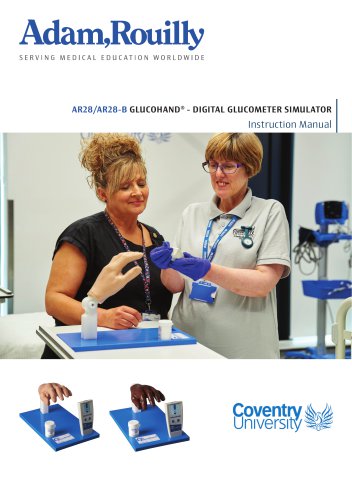
The AR28/AR28-B GlucoHand® is a digital glucometer simulator designed for training and patient education in diabetes management. It replicates real glucometer functions and is suitable for scenario-based simulations.
- Realistic adult left hand with removable blood pads for sampling.
- Simulated glucometer with readings in mmol/L or mg/dL.
- Pre-programmable for high, medium, low, or random glucose readings.
- Reusable test strips and refillable blood pads using mock blood.
- Patient communication and glucometer handling.
- Aseptic technique for blood sampling.
- Interpreting glucose readings for treatment planning.
- Treat the simulator with care similar to a patient.
- Use lancet devices of 28G or smaller with a maximum depth of 1.8 mm.
- Remove batteries before prolonged storage.
- Do not disassemble the glucometer.
- Mix blood concentrate and fill fingertips with mock blood.
- Insert fingertips into the simulated hand.
- Install a 9V battery in the glucometer.
- Access settings to change unit display and pre-program glucose levels.
- Insert a test strip into the glucometer.
- Milk a blood sample from the fingertip onto the test strip.
- Read the glucose level displayed on the glucometer.
- Clean test strips for reuse.
- Empty and flush fingertips with fresh water.
- Use only with the GlucoHand® model for training and education.
- Contact sales for replacement parts.
Emptying and Flushing Fingertips: After use, empty the fingertips of mock blood and flush with clean water to prevent mold growth. Repeat for each fingertip using fresh water.
Cleaning the Simulated Hand and Glucometer: Use a mild detergent solution and a soft cloth to clean the simulated hand, fingertips, and glucometer. Avoid harsh chemicals.
Cleaning Test Strips: Wipe mock blood from test strips with a damp cloth. Use a mild detergent if necessary. Allow strips to dry fully before reuse. Avoid immersing or using harsh chemicals on test strips to prevent damage.
- Ensure all components are completely dry before storage.
- Store the model in a location free from extreme temperatures, humidity, and magnetic fields to protect sensitive electronic parts.
Adam,Rouilly Limited, located in Sittingbourne, Kent, UK, has over 100 years of experience in providing quality medical models and simulators. They offer a 2-year guarantee on their products, covering durability and functionality when used correctly.
For further inquiries, contact the Sales Department at [email protected] or visit their website at www.adam-rouilly.co.uk.
Catalog excerpts

AR28/AR28-B GLUCOHAND® - DIGITAL GLUCOMETER SIMULATOR Instruction Manual
Open the catalog to page 1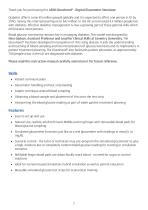
Thank you for purchasing this AR28 GlucoHand® - Digital Glucometer Simulator. Diabetes affects some 415 million people globally and it is expected to affect one person in 10 by 2040, raising this international figure to 642 million. In the UK an estimated 4.5 million people live with diabetes. Effective diabetes management is now a growing part of those general skills which all clinicians must possess. Blood glucose monitoring remains key in managing diabetes. This model was designed by Nina Godson, Assistant Professor and Lead for Clinical Skills at Coventry University. The GlucoHand® has been...
Open the catalog to page 2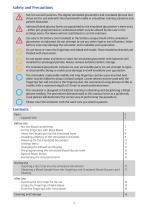
Not for use with patients. The digital simulated glucometer and simulated glucose test strips are for use only with the GlucoHand® model in simulation training scenarios and patient education. Indicated blood glucose levels are populated by the simulated glucometer’s electronics - either pre-programmed or randomised which may be altered by the user in the settings menu. The device will not read blood or control solutions. Use only lx 9V battery (not included) in the battery compartment of the simulated glucometer as indicated. Do not attempt to use any other type or size of battery. Other battery...
Open the catalog to page 3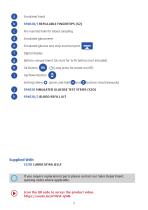
Simulated hand Pre-inserted hole for blood sampling Simulated glucometer Simulated glucose test strip insertion port Digital display Battery compartment (at rear) for 1x 9V battery (not included) Up/Down Button Settings Menu (Long press for power on/off) buttons simultaneously) SPAR28 SIMULATED GLUCOSE TEST STRIPS (X20) Supplied With S321B LUBRICATING JELLY If you require replacement parts please contact our Sales Department, quoting codes where applicable. Scan the QR code to access the product video. https://youtu.be/nTrbSF-q5iM 5
Open the catalog to page 5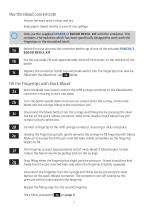
Mix the Blood Concentrate Ensure the work area is clean and dry. Keep paper towels nearby in case of any spillage. Only use the supplied SPAR28/2 BLOOD REFILL KIT with the simulator. This contains a formulation which has been specifically designed to work with the fingertips in the simulated hand. Before first use unscrew the connector bottle cap of one of the included SPAR28/2 BLOOD REFILL KIT Set the cap aside. Fill with approximately 40ml of fresh water, to the neckline of the bottle. Replace the connector bottle cap and shake well to mix. The fingertips may now be filled with the blood mix,...
Open the catalog to page 7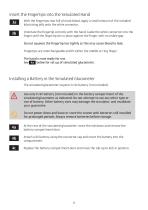
Insert the Fingertips into the Simulated Hand 3a With the fingertips now full of mock blood, apply a small amount of the included lubricating jelly onto the white connector. Orientate the fingertip correctly with the hand. Guide the white connector into the finger until the fingertip sits in place against the finger, with no visible gap. Do not squeeze the fingertip too tightly as this may cause blood to leak. Fingertips are interchangeable and fit either the middle or ring finger. The hand is now ready for use. See 4a below for set up of simulated glucometer. Installing a Battery in the Simulated...
Open the catalog to page 9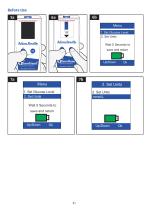
Menu 1. Set Glucose Level 2. Set Units Wait 5 Seconds to save and return 1. Set Glucose Level 2. Set Units Wait 5 Seconds to save and return
Open the catalog to page 10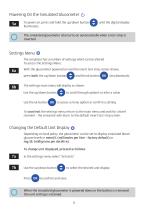
Powering On the Simulated Glucometer 5a To power on, press and hold the up/down button illuminates. until the digital display The simulated glucometer also turns on automatically when a test strip is inserted. Settings Menu The simulator has a number of settings which can be altered. To access the Settings Menu: With the glucometer powered on and the insert test strip screen shown, press both the up/down button The settings main menu will display as shown. Use the up/down button Use the ok button to scroll through options or alter a value to access a menu option or confirm a setting To save/exit...
Open the catalog to page 11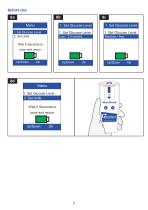
Wait 5 Seconds to save and return Wait 5 Seconds to save and return
Open the catalog to page 12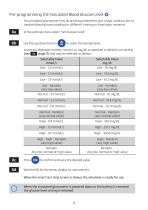
The simulated glucometer may be pre-programmed to give a high, medium, low or random blood glucose reading for different training or simulation scenarios. In the settings menu select "Set Glucose Level” to select the desired level. Levels are displayed in either mmol/L or mg/dL as specified in default unit setting (see page 11) and may be selected as follows: When the simulated glucometer is powered down or the battery is removed the glucose level setting is retained.8c 8d Press to confirm and save the desired value. Wait briefly for the menu display to save and exit.
Open the catalog to page 13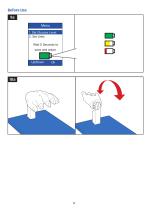
Before Use 9a Menu 1. Set Glucose Level 2. Set Units Wait 5 Seconds to save and return
Open the catalog to page 14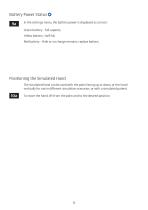
Battery Power Status 9a In the settings menu, the battery power is displayed as an icon: Green battery - full capacity Yellow battery- half full Red battery - little or no charge remains, replace battery Positioning the Simulated Hand The simulated hand can be used with the palm facing up or down, or the hand vertically for use in different simulation scenarios, or with a simulated patient. To move the hand, lift from the palm and to the desired position.
Open the catalog to page 15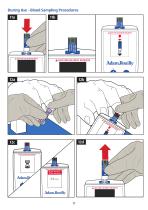
During Use - Blood Sampling Procedures 11a
Open the catalog to page 16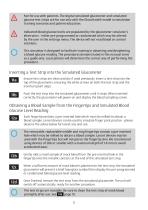
Not for use with patients. The digital simulated glucometer and simulated glucose test strips are for use only with the GlucoHand® model in simulation training scenarios and patient education. Indicated blood glucose levels are populated by the glucometer simulator’s electronics - either pre-programmed or randomised which may be altered by the user in the settings menu. The device will not read blood or control solutions. This simulator is designed to facilitate training in obtaining and deciphering a blood glucose reading. The procedures demonstrated in this manual serve as a guide only. Local...
Open the catalog to page 17
Cleaning the Test Strips for Re-use 13a After use, promptly wipe mock blood samples from the test strips with a damp cloth. A mild detergent solution can be used if necessary. Allow to dry fully before use. Some colour transfer from mock blood is normal and will not affect performance of the test strip. Do not use harsh chemical cleaners or immerse to clean the test strips. This could damage the strips and cause a malfunction Empty the Fingertips of Mock Blood Blood remaining in fingertips can be placed back in the blood refill kit bottle, ready for the next training session. Before storage,...
Open the catalog to page 19All Adam, Rouilly catalogs and technical brochures
 AR68
AR6820 Pages
 AR402/AR402-B
40 Pages
 AR331
AR33120 Pages

Archived catalogs
 Anthropology Models
4 Pages
 AK102
AK1024 Pages
- Training phantom
- General care phantom
- Upper body simulator
- Training manikin
- Surgical phantom
- Pad simulator
- Injection simulator
- Portable simulation unit
- Monitoring simulator
- Silicone simulator
- Female simulator
- Lower body simulator
- General care training manikin
- Puncture simulator
- Upper body training manikin
- Whole body simulator
- Catheterization simulator
- Suture simulator
- Plastic simulator
- Adult simulator