- Catalogs
- Advanced Bionics
- Naída CI Q30


Naída CI Q30

Naída CI Q30
The Naída CI Q30 Sound Processor User Guide provides comprehensive instructions for the use and maintenance of the Naída CI Q30 sound processor and its accessories. It includes safety warnings, assembly instructions, and operational guidelines.
The guide emphasizes understanding labeling symbols, such as the CE Mark, and provides warnings about potential hazards, including choking risks and interference with pacemakers. Users are advised to store the device within specified temperature and humidity ranges and avoid exposure to water.
Users are cautioned against improper use of the device and accessories, such as placing them in the mouth or using unauthorized power supplies. Specific warnings are provided for users with pacemakers and for the safe handling of batteries to prevent leakage and overheating.
The guide outlines scenarios that may generate static electricity, which can damage the sound processor. Recommendations include discharging static by touching metal surfaces before handling the device.
While metal detectors and ultrasonic sensors do not damage the implant system, they may affect sound quality. Users are advised to adjust volume settings or remove the headpiece when passing through such environments.
The guide provides step-by-step instructions for assembling the Naída CI Q30, including connecting and removing the headpiece and T-Mic 2/Earhook. It also covers the use of clips for wearing the device and details on powering the processor, including battery replacement.
Instructions are provided for changing programs, volume, and sensitivity on the Naída CI Q30. The guide also explains the significance of LED indicators and internal alarms.
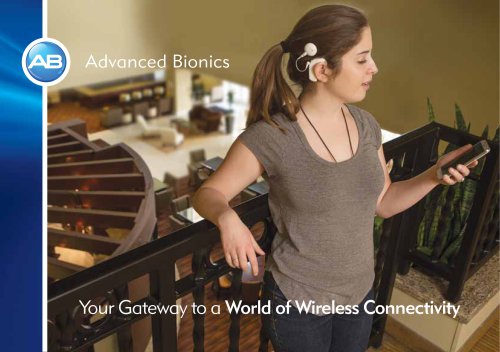
The guide discusses the connectivity features of the Naída CI Q30, including the use of accessories like the AB myPilot and ComPilot for enhanced functionality.
The Naída CI Q30 is part of a cochlear implant system that includes the Implantable Cochlear Stimulator (ICS), headpiece, and headpiece cable. It features multiple battery options, including rechargeable PowerCel™ batteries and a Zn-Air Battery Pak. The processor can be used with the AB myPilot remote control and Phonak ComPilot for enhanced functionality.
The Naída CI Q30 includes programmable LEDs and internal alarms for status updates and troubleshooting. It supports up to five user-selectable programs and can be programmed bilaterally. The Universal Headpiece transmits sound signals and power to the implant and includes a microphone for sound input.
The AB myPilot remote control allows for wireless communication and control of the Naída CI Q30, including program and volume adjustments. The ComPilot enables wireless connectivity to Bluetooth® devices and FM receivers, providing bilateral streaming for bimodal wearers.
The AquaCase™ Container offers protection for the processor in various environments, while the Phonak DECT phone streams wirelessly to implants. The Naída CI Q30 also includes UltraZoom technology for focusing on voices from the front.
The Naída CI Q30 is equipped with advanced sound processing technology and offers multiple wearing configurations. It can be worn on the ear, off the ear using a clip, or partially off the ear with the power source attached elsewhere. The device supports a range of battery options and includes a programmable LED system for status indication.
The user guide provides detailed instructions on attaching and removing various components such as the Universal Headpiece (UHP) Color Caps, T-Mic 2/Earhook, and battery cartridges. It emphasizes the importance of using the provided tools for these tasks to avoid damage.
Users are cautioned about the choking hazard posed by small parts and advised to operate power supplies in open areas to prevent overheating. The guide also recommends regular inspection of RF cables and proper adjustment of headpiece magnet strength to ensure comfort and retention.
The Naída CI Q30 features a programmable LED system that provides visual cues for battery status, program position, and error conditions. Internal alarms complement the LED indications, offering auditory feedback for program changes and low battery alerts.
The guide advises replacing the T-Mic 2 cover every 3-4 months and consulting a hearing care professional for adjustments to magnet strength. It also highlights the importance of using the correct tools for component adjustments to maintain device integrity.
The Naída CI Q30 sound processor allows users to switch between different programs using a program button. Changes to volume or sensitivity are retained across program changes. The program button also enables entry into Standby Mode, a low power state to conserve battery life, which can be activated by holding the button for four seconds.
Volume adjustments can be made using the volume control on the device or the AB myPilot remote control. Sensitivity, which affects the softest sound detectable by the microphone, can be adjusted by a hearing care professional or via the remote control.
The Naída CI Q30 supports FM/Roger systems to improve hearing in noisy environments. Users can connect these systems via the ComPilot streamer, telecoil, or directly through the Roger 17 receiver. Proper attachment and detachment procedures are outlined to prevent damage.
The AB myPilot remote control must be paired with the Naída CI Q30 within a five-minute window after the processor starts. This allows for remote control of multiple devices, which is useful in settings like classrooms.
The Naída CI processors include a test mode for listening to various sound sources. This can be done using the AB myPilot remote control or manually through program configurations.
The document mentions various methods for using the telephone with the Naída CI Q30, though specific details are not provided in the excerpt.
- Telephone Receiver: Place the receiver over the T-Mic 2, processor microphones, or headpiece microphone. Experiment with different phones and providers for optimal signal.
- T-coil: Programmable via SoundWave™ software. Consult with a hearing care professional to ensure activation and proper program settings.
- Bluetooth®: Sync compatible devices to the ComPilot for direct streaming. The phone can be 15-30 feet away.
- Patch Cable: Connects directly to phones via the headset jack and ComPilot auxiliary jack. Consult a professional for more information.
- Speaker Phone: Use without additional equipment by turning on the speaker phone.
- Practice with familiar speakers and topics.
- Try different phones to find the best fit.
- Visit TheListeningRoom.com for support and exercises.
- Provides wireless access to compatible phones and induction-loop systems.
- Consult a professional to activate and program the telecoil.
- Susceptible to magnetic noise from certain devices.
- Compatible with Zn-Air batteries, rechargeable Lithium Ion PowerCels, AAA PowerPak, and PowerCel Adapter.
- Do not recharge disposable batteries or use chargers not provided by Advanced Bionics.
- Charge PowerCels every three months to maintain capacity.
- Blue: Charging
- Green: Fully charged
- Red: Fault condition
- Do not recharge disposable batteries or expose them to heat.
- Dispose of leaking batteries properly.
- Use only recommended chargers.
- Includes ComPilot, MLxi, Universal Headpiece, and more.
- Consult a professional for included accessories and usage instructions.
- Color customization options available.
- Includes a carrying case and drying system for storage and moisture removal.
The Naída CI Q30 sound processor is rated IP57, indicating protection against solid objects larger than 1.0 mm and immersion in water up to 1 meter for 30 minutes.
To maintain optimal performance, clean the Naída CI Q30 with a damp cloth and avoid solvents. Change the microphone cover every three months or sooner if sound quality degrades.
Use the provided tool to remove and replace the microphone cover, ensuring proper alignment and seating.
Operating temperature: 0°C to 45°C. Storage temperature: -20°C to 55°C. Approved power sources include PowerCel and Zn-Air batteries.
Guidelines are provided for issues such as no sound, static, distorted sounds, and LED or internal alarm malfunctions. Steps include checking connections, replacing components, and verifying settings.
The Naída CI Q30 complies with RF emissions standards and is suitable for use in various environments. Recommended separation distances for RF equipment are provided to prevent interference.
The Naída CI Q30 sound processor must provide auditory stimulation within safe amplitudes as per IEC 60601 requirements. Electromagnetic fields from fixed transmitters can affect its operation, and an electromagnetic site survey is recommended if field strengths exceed 3 V/m in the 150 kHz to 80 MHz range.
The Naída CI Q30 is compatible with various implant types and requires specific versions of SoundWave software for optimal performance. Compatibility tables outline the necessary software and hardware configurations.
Regular cleaning with a soft cloth is advised, and components should undergo a drying cycle nightly. Batteries should be stored properly to avoid debris accumulation and should not be exposed to heat.
The HiRes 90K Advantage implant supports advanced sound processing strategies. Clinical studies show improved speech perception scores with HiRes 120 compared to baseline HiRes scores.
The device complies with FCC and Industry Canada regulations, ensuring it does not cause harmful interference and can accept interference.
Users should avoid exposing the device to extreme temperatures and static electricity. Proper handling and storage of batteries and accessories are crucial to prevent damage or injury.
Advanced Bionics provides contact details for customer support in Switzerland and the United States.
Catalog excerpts

Naída CI Sound Processor user guide English, Français, Español, Deutsch, Nederlands, Portuguê
Open the catalog to page 1
user guide for the Naída CI Q30 Sound Processor
Open the catalog to page 2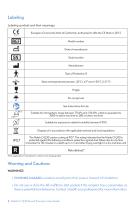
Labeling Labeling symbols and their meanings: European Community Mark of Conformity. Authorized to affix the CE Mark in 2015 Model number Date of manufacture Serial number Manufacturer Type of Protection: B Store at temperatures between -20˚C (-4˚F) and +55˚C (131˚F) Fragile Do not get wet See Instructions for Use Suitable for atmospheric range between 70 kPa and 106 kPa, which is equivalent to 3000 m above sea level to 380 m below sea level Suitable for exposure to relative humidity between 0-95% Dispose of in accordance with applicable national and local regulations The Naída CI Q30 carries...
Open the catalog to page 3
not use a ComPilot if recipient has a pacemaker, as there is potential for interference. Contact a health care professional for more information. appropriate supervision when child is wearing the Naída CI Q30 sound processor and accessories. • Keep batteries and accessories out of children’s reach as they may pose a choking hazard. • If any parts are swallowed consult a physician or hospital immediately. • Do not leave children unattended with or allow them to play with batteries. • Do not place batteries in your mouth. • Do not chew or swallow batteries. If this occurs, seek immediate medical...
Open the catalog to page 4
CAUTIONS • Remove external equipment to stop stimulation if sounds cause discomfort. • It is important for the headpiece to have the correct magnet strength to avoid discomfort or retention issues. If an insufficient number of magnets are used, the headpiece may fall off more than is acceptable. If too many magnets are used, the recipient may experience irritation or discomfort. Consult a clinician if there are any concerns regarding magnet strength. If deemed appropriate, an audiologist may insert additional magnets or remove magnets from the headpiece. Do not place additional magnets in the...
Open the catalog to page 5
while stimulating the implant. Doing so could cause the implant and sound processor to lose lock. If this happens, power down the processor and power back on (by disengaging the battery and reattaching). • The digitally-coded, inductive transmission technology used in this device is extremely reliable and experiences virtually no interference from other devices. It should be noted, however, that when operating the device near a computer terminal or other strong electromagnetic fields, it may be necessary to be at least 24” (60 cm) away to ensure proper operation. If the Naída CI Q30 does not...
Open the catalog to page 6
• Touch metal surfaces with your hand prior to allowing equipment to contact the metal surface. This is particularly important on the playground where high levels of static electricity can be generated. It is important to discharge any static electricity by touching a metal surface with your hand prior to allowing the sound processor, cable, or headpiece to come into contact with the metal surface. • Take care to avoid contact between your cochlear implant equipment and metal surfaces when exiting a vehicle. • Remove cochlear implant equipment prior to removing clothing that may contain electric...
Open the catalog to page 7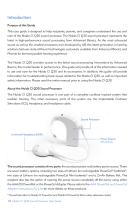
Introduction Purpose of this Guide This user guide is designed to help recipients, parents, and caregivers understand the use and care of the Naída CI Q30 sound processor. The Naída CI Q30 sound processor represents the latest in high-performance sound processing from Advanced Bionics. As the most advanced sound as well as the smallest processors ever developed by AB, this latest generation in hearing solutions features state-of-the-art technologies exclusively available from Advanced Bionics and Phonak for the best possible hearing experience. The Naída CI Q30 provides access to the latest sound...
Open the catalog to page 11
The Naída CI Q30 includes programmable, multi-color light-emitting diode (LED) indicators and programmable internal alarms for easy status updates and troubleshooting information. Additional features include remote control access through the AB myPilot remote control and the ability to stream from the Phonak ComPilot. The Naída CI Q30 Sound Processor This section will familiarize you with the Naída CI Q30 Sound Processor and Accessories Volume Control Volume Control and Tri-Colored LEDs (green, orange, red) Program Button Phonak Dual-Microphone Technology (front and back microphones) AB’s Patented...
Open the catalog to page 12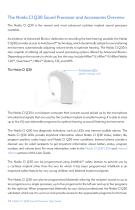
The Naída CI Q30 Sound Processor and Accessories Overview The Naída CI Q30 is the newest and most advanced cochlear implant sound processor available. As evidence of Advanced Bionics’ dedication to providing the best hearing possible, the Naída CI Q30 provides access to AutoSound™ technology, which dynamically adapts to every listening environment, automatically adjusting volume levels to optimize hearing. The Naída CI Q30 is also capable of utilizing all approved sound processing options offered by Advanced Bionics. Depending on the country in which you live, this may include HiRes™-S, HiRes™-P,...
Open the catalog to page 13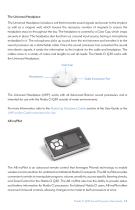
The Universal Headpiece The Universal Headpiece includes a coil that transmits sound signals and power to the implant, as well as a magnet well, which houses the necessary number of magnets to ensure the headpiece stays on throughout the day. The headpiece is covered by a Color Cap, which snaps securely in place. The headpiece also functions as a sound input source, having a microphone embedded in it. The microphone picks up sound from the environment and transfers it to the sound processor via a detachable cable. Once the sound processor has converted the sound into electric signals, it sends...
Open the catalog to page 14
The ComPilot allows unparalleled connectivity for Naída CI recipients, connecting them wirelessly to Bluetooth® enabled phones and devices or MP3 players for speech or stereo music. It is also compatible with Phonak’s portfolio of FM receivers via a euro socket. Additionally, when unpaired, the ComPilot is able to stream to compatible Phonak instruments. This allows bimodal wearers -- people who wear a Naída CI on one ear and a Phonak compatible hearing instrument on the other ear -- access to bilateral wireless streaming. When the ComPilot is paired to the Naída CI, it provides remote control...
Open the catalog to page 15Archived catalogs
 Hear Your Best brochure
32 Pages
 SOUND SOLUTIONS
6 Pages
 Off-the-Ear Power Options
2 Pages
 USER GUIDE HARMONY®
54 Pages
 USER GUIDE PLATINUM SERIES?
40 Pages
 HiRes 90K Implant Family
40 Pages
 Advanced Bionics
12 Pages
 hear your best
20 Pages
 Products & Accessories
42 Pages
 NEPTUNE User Guide
54 Pages
 Naida CI Q70
18 Pages
 hear your world
44 Pages
 hear more of your world
8 Pages
 Bring on the Water brochure
16 Pages
 Bring on the Performance (Q70)
24 Pages
 Neptune_Wearing
16 Pages
 Bring on the Performance (Q90)
24 Pages
 Bring on the Performance (Q30)
20 Pages
 HiFocus™ Mid-Scala Electrode
8 Pages
 Naída CI Q70
67 Pages
 AquaCase
12 Pages
 Naída CI Q90
392 Pages
 Neptune Brochure
6 Pages
 Product Catalog
32 Pages