


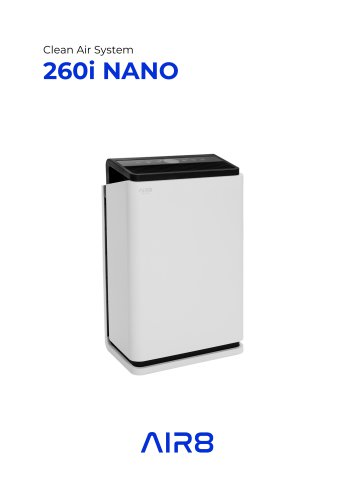
280 NANO

280 NANO
Upon unpacking, inspect for transportation damage and ensure the order is complete. Retain original packaging for potential returns and dispose of materials responsibly, keeping them away from children.
Read safety instructions thoroughly to prevent electric shock, fire, or injury. Do not attempt repairs; contact AIR8 specialists. Key points include disconnecting the plug before opening, checking voltage, and ensuring the device is fully assembled before use. Avoid placing the device near heat sources or in damp environments, and keep it out of children's reach.
The air purifier is designed for indoor air cleaning with good circulation. It should only be used as intended, and misuse may result in damage or injury.
Product Name: 280 NANO
Voltage: 220-240V - 50 Hz
Power Rating: 15 – 53W
CADR: 280 m3/h
Timer: 1-10 hours
Weight: 6.8 kg
Dimensions: 64 x 35 x 19 cm
Noise Emission: 34 – 53dB
The device includes a control panel and display indicators for various functions such as power, auto mode, timer, ionizer, sterilization, sleep mode, speed control, filter reset, and lock function. A remote control is also available.
Ensure the device is disconnected before opening. Remove protective packaging from filters before use. Filters should be changed after 3000 hours of use.
Connect the device and use the power switch to operate. Auto mode adjusts fan speed based on air quality, displayed in color codes. Timer, ionizer, sterilization, sleep mode, and speed functions are available for customization.
Clean the outer surface with a soft cloth. Clean the pre-filter with warm soapy water and ensure it is dry before reinserting. Use a vacuum to clean the dust sensor. Replace filters as needed, ensuring the device is unplugged during maintenance.
For serious issues like blown fuses or damaged cords, contact AIR8 specialists. For minor issues, ensure the device is plugged in, check for blockages, and ensure filters are correctly installed.
The air quality is displayed both quantitatively and qualitatively. The display shows:
- Good: Green, Low speed
- Moderate: Orange, Medium speed
- Very Moderate: Red, High speed
- Unhealthy: Flashing red, Very high speed
The timer allows you to set the device's runtime between 1 and 10 hours.
Press the button to toggle the ionizer function on or off when the device is in normal or automatic mode.
Press the button to toggle the UVGI sterilization function on or off when the device is in normal or automatic mode.
In sleep mode, the device operates at the lowest fan speed to minimize noise. All displays except the sleep display are turned off. To exit sleep mode, press the sleep button or the speed button.
Press the Speed button to adjust the fan speed from 1 to 4 in Normal or Auto mode. The current fan level is visible on the display.
If the light is red, it indicates that the filters need to be replaced. After replacement, reset the filter life indicator by pressing the timer button for 5 seconds.
Pressing the lock button disables other buttons. To unlock, press the lock button for 5 seconds.
Use the buttons for the respective function. Point the remote at the air purifier when using it.
This product should not be disposed of with household waste. It must be taken to a collection point for electronic and electrical equipment.
Catalog excerpts
Unpacking Warning After unpacking the device, make sure there is no damage from transportation and that your order is complete. In the event of damage or an incomplete delivery, contact us at [email protected] or +34 933 028 640. Do not throw away the original box instantly. It can be reused for packing in the event you need to return the device. Dispose of the packaging material responsibly. Packaging materials should be kept away from children. Safety instructions Read the safety instructions carefully before installing and starting the device. By not following the safety instructions you may...
Open the catalog to page 4
Do not cover the air inlet or outlet. This can destroy the motor of the ventilator. Do not operate the device near heat sources such as heaters, open fires or direct sunlight. The plastic parts can become deformed. The unit does not serve as a fan replacement as it considerably shortens the service life of the filter. The device must not be used in an environment containing high levels of dust or chlorine. Do not place heavy objects on top of the unit. Keep the device out of the reach of children. If the supply line is damaged, stop the device and replace it immediately. If the device is malfunctioning,...
Open the catalog to page 5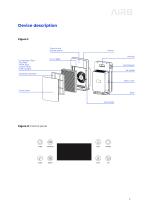
Device description Figure 1: Figure 2: Control panel
Open the catalog to page 6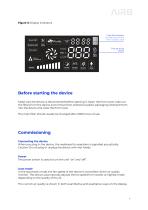
Figure 3: Display indicators Before starting the device Make sure the device is disconnected before opening it. Open the front cover, take out the filters from the device and remove their protective plastic packaging. Reinsert them into the device and close the front cover. The main filter should usually be changed after 3000 hours of use. Commissioning Connecting the device When you plug in the device, the readiness for operation is signalled acoustically. Caution: Do not plug or unplug the device with wet hands. Power The power switch is used to turn the unit “on” and “off”. Auto mode In the...
Open the catalog to page 7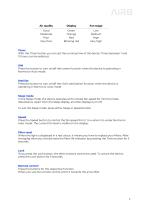
Good Moderate Poor Very Poor Green Orange Red Blinking red Low Medium High Very high Timer With the Timer button you can set the running time of the device. Times between 1 and 10 hours can be selected. ION Press the button to turn on/off the ioniser function when the device is operating in Normal or Auto mode. Sterilize Press the button to turn on/off the UVGI sterilization function when the device is operating in Normal or Auto mode. Sleep mode In the Sleep mode, the device operates at the lowest fan speed for minimal noise disturbance. Apart from the Sleep display, all other displays turn...
Open the catalog to page 8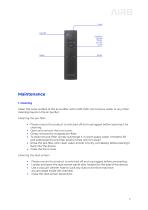
Maintenance 1. Cleaning Clean the outer surface of the air purifier with a soft cloth. Do not pour water or any other cleaning liquid on the air purifier. Cleaning the pre-filter: • Please ensure the product is switched-off and unplugged before opening it for cleaning. • Open and remove the front cover. • Gently remove the reusable pre-filter. • To clean the pre-filter, simply submerge it in warm soapy water. Smoothly lift and submerge the pre-filter several times until it is clean. • Rinse the pre-filter with clean water and let it to dry completely before placing it back into the device. •...
Open the catalog to page 9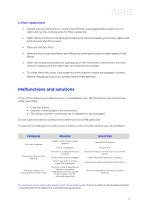
Please ensure the product is switched-off and unplugged before opening it or dismantling the components for filter replacing. With the front of the unit facing forward, pull the lid towards you at the upper end and remove the front cover. Remove the combined filters by lifting and pulling the tabs on both sides of the filters. After removing the protective packaging of the new filters, insert them into the device, making sure the side tabs are towards the outside. To close the front cover, first make sure the bottom hooks are properly in place before snapping it up to its upright and locked position....
Open the catalog to page 10
Advertencia de desembalaje Tras desempaquetar el dispositivo, asegúrese de que no haya daños ocasionados por el transporte y de que su pedido esté completo. En caso de daños o de una entrega incompleta, contáctenos a través de [email protected] o en el +34 933 028 640. No tire la caja original de inmediato. Puede ser reutilizada en caso de que necesite devolver el dispositivo. Deseche los residuos y el material de embalaje de forma responsable. El material de embalaje debe mantenerse lejos del alcance de los niños. Instrucciones de seguridad Lea atentamente las instrucciones de seguridad antes...
Open the catalog to page 12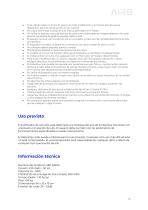
Si se utilizan velas u hornos de gas en la misma habitación y al mismo tiempo que el dispositivo, abra las ventanas de vez en cuando. No cubra la entrada o salida de aire. Esto puede destruir el motor. No utilice el aparato cerca de fuentes de calor como calentadores, fuegos abiertos o luz solar directa. Las piezas de plástico pueden deformarse. El aparato no sirve como sustituto de un ventilador ya que acorta considerablemente la vida útil del filtro. El dispositivo no debe utilizarse en un entorno con altos niveles de polvo o cloro. No coloque objetos pesados sobre la unidad. Mantenga el dispositivo...
Open the catalog to page 13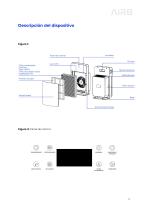
Figura 2: Panel de control
Open the catalog to page 14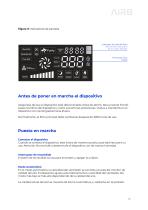
Figura 3: Indicadores de pantalla Antes de poner en marcha el dispositivo Asegúrese de que el dispositivo esté desconectado antes de abrirlo. Abra el panel frontal, saque los filtros del dispositivo y retire sus láminas protectoras. Vuelva a insertarlos en el dispositivo con las lengüetas hacia afuera. Normalmente, el filtro principal debe cambiarse después de 3000 horas de uso. Puesta en marcha Conectar el dispositivo Cuando se conecta el dispositivo, este indica de manera acústica que está listo para su uso. Atención: No enchufe o desenchufe el dispositivo con las manos húmedas. Interruptor...
Open the catalog to page 15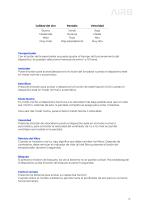
Buena Moderada Mala Muy mala Verde Naranja Roja Roja parpadeante Baja Media Alta Muy alta Temporizador Con el botón del temporizador se puede ajustar el tiempo de funcionamiento del dispositivo. Se pueden seleccionar tiempos de entre 1 y 10 horas. Ionizador Pulse el botón para activar/desactivar la función del ionizador cuando el dispositivo esté en modo normal o automático. Esterilizar Presione el botón para activar o desactivar la función de esterilización UVGI cuando el dispositivo esté en modo normal o automático. Modo Noche En modo noche, el dispositivo funciona a la velocidad más baja posible...
Open the catalog to page 16All AIR8 catalogs and technical brochures


- Gas filter
- Healthcare facility air sterilizer
- Air filter
- Hospital air recirculator
- Medical filter
- UV air recirculator
- Air purifier with HEPA filter
- Mobile air sanitizer
- Compact air sterilizer
- HEPA filter
- Medical monitoring system
- Portable air sanitizer
- Air purifier with touchscreen
- Ozone air sterilizer
- Stand-alone air purifier
- Temperature monitoring system
- Medical gas monitoring system
- Air purifier with ionization module
- Humidity monitoring system
- Air quality monitoring system