
- Catalogs
- Allengers Medical Systems
- Photon F80


Photon F80
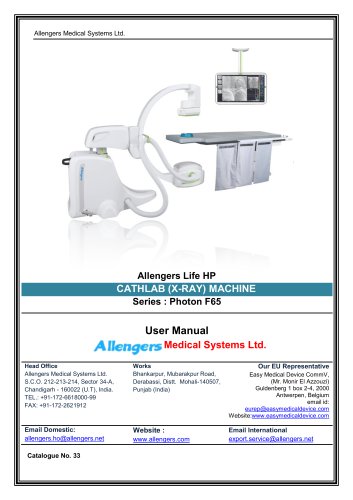
Photon F80
- About Us: Allengers Medical Systems Ltd., founded in 1987, is a leading Indian company in medical diagnostic systems and IT solutions, operating in over 70 countries. The company focuses on innovation and customer satisfaction, holding a significant market share in India.
- About the User Manual: This manual ensures the safe operation of the Allengers Life HP Cathlab (X-Ray) Machine, providing safety instructions and operational guidelines.
- General Safety: Importance of following safety protocols to prevent accidents.
- Emergency Procedures: Steps to take in case of emergencies.
- Radiation Safety: Guidelines to minimize radiation exposure.
- Equipment in Examination Room: Details components and setup required.
- Console Room: Describes configuration and equipment.
- Application View: Overview of the software interface and functionalities.
- Worklist Management: Instructions on managing patient worklists and exams.
- Operation Modes: Describes different modes of operation for the X-Ray machine.
- Instructions to Start Procedure: Step-by-step guide to initiate a procedure.
- Cleaning & Disinfection: Guidelines for maintaining hygiene and cleanliness of the equipment.
- Inspecting the System: Regular inspection protocols to ensure system functionality.
- Environmental Requirements: Specifies necessary conditions for optimal operation.
- Technical Specifications: Detailed technical data of the X-Ray machine.
- Compliance: Information on compliance with international standards and regulations.
Outlines user responsibilities, emphasizing compliance with local regulations and restricting unauthorized access. Users must be trained in radiation protection and system operation.
Warnings highlight potential serious outcomes if not observed. Cautions indicate the need for special care to prevent moderate injury or system damage.
The machine is a Digital Cardiovascular Angio System for cardiac procedures, not intended for mammography or use on pregnant women. Expected service life is 10 years with maintenance.
Aids in diagnosing coronary artery disease, valve disease, and heart muscle function, determining the need for further treatment.
Guidance on KV and mAs settings for various body parts, with adjustments based on operator skill and patient physique.
Special protocols to minimize radiation exposure, with specific settings for different age groups.
Training is mandatory for safe system operation. The system should not be used with unapproved parts.
Users must understand all safety instructions to prevent injury or misdiagnosis. Emergency procedures include moving the patient table and using emergency stop buttons.
Serious incidents must be reported to the manufacturer and relevant authorities.
Guidelines include proper grounding, cable management, and avoiding multiple socket outlets. The system must be turned off before cleaning.
Compliance with IEC 60601-1 standards is required. Only authorized personnel should remove unit covers, and external electrical equipment should not be connected to the system's socket-outlet.
In case of electric shock, switch off the power supply, protect yourself with insulating material, and pull the victim away from the conductor.
Equipment must be installed according to the standard room layout to avoid collisions.
Follow ALAP principles to minimize radiation exposure. Use protective measures to avoid exposure to ionizing radiation.
Use the lowest dose settings and minimize exposure time.
Operators should use radiation protection features, wear lead aprons, and monitor radiation exposure.
Avoid using mobile devices near the system to prevent electromagnetic interference.
Proper disposal methods should be followed for materials harmful to the environment.
Do not use the system in environments with explosive gases or vapors.
In case of an electrical fire, switch off the power, use appropriate fire extinguishers, and evacuate personnel.
The system includes an X-ray tube, flat panel detector, high-frequency generator, and monitors.
The system consists of a C-Arm, flat panel detector, tube head assembly, and control panels.
Allows exposure activation with pedals configured for Fluoro, Cine, and Roadmap functions.
Adjustable via a control module, supporting up to 250 kg.
Includes joysticks and switches for table movements.
Displays controls for kV adjustments, heat display, exposure time, and mode settings.
Primary monitor displays various views; a backup monitor is available in case of failure.
Allows for monitor movement and rotation.
Contains monitors for DICOM viewing and communication systems for operator interaction.
Instructions for starting and stopping the system.
UPS allows for procedure completion during power failure.
- Launch the application and login as Technician or Manager.
- Initialization tasks include settings for various components.
- Identify patients manually or through the Query Panel.
- Register new patients and manage emergency registrations.
- Real-time image viewing and processing tools for diagnosis.
- Multiple view modes and advanced analysis tools.
Users select frames for EDV and ESV, calculate SV and EF, and perform QLVA measurements.
Process of adding annotations and using image manipulation tools.
Settings for optimal image visualization and dynamic viewing of stent images.
DSA images can be captured, and pixel shift tools correct motion defects.
Provides critical information and allows for user preferences adjustments.
Details on managing patient images and using image processing tools.
- Options for sending images to Synergy Viewer.
- Provides economical storage and access to cardiac images.
- Login with assigned credentials and manage patient studies.
- Load patient images and use IP Tools for image operations.
- Print images, burn to CD/DVD, and export in various formats.
- View multiple images in different layouts and capture selected screen areas.
Details on acquisition modes and frame rates for different procedures.
Indicate modes and system status.
System parameters can be customized.
Guidelines for cleaning, inspection, and consumable parts replacement.
Proper disposal and security measures are emphasized.
Details on the use of PMMA blocks and key parameters for various procedures.
Details on digital radiography parameters and exposure limits.
Explanation of labels and symbols used on equipment.
Guide for common issues and suggested actions.
Compliance with international and national standards.
Guidance for electromagnetic emissions and immunity.
Recommendations for power supply and electromagnetic environment.
Designed for specific electromagnetic environments.
Guidelines based on IEC 60601-1-2:2014.
List of abbreviations used in the manual.
Contact details for Allengers Medical Systems Ltd.
Warranty details and exclusions.
Catalog excerpts
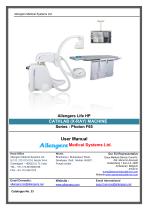
Allengers Medical Systems Ltd. Head Office Allengers Medical Systems Ltd. S.C.O. 212-213-214, Sector 34-A, Chandigarh - 160022 (U.T), India. TEL.: +91-172-6618000-99 FAX: +91-172-2621912 Bhankarpur, Mubarakpur Road, Derabassi, Distt. Mohali-140507, Punjab (India) Easy Medical Device CommV, (Mr. Monir El Azzouzi) Guldenberg 1 box 2-4, 2000 Antwerpen, Belgium email id: Email Domestic: Website : Email International [email protected] www.allengers.com [email protected]
Open the catalog to page 1
This page is intentionally left blank
Open the catalog to page 2
User Manual Rev. 05 Effective Date 07.06.2023 Page | 1
Open the catalog to page 3
User Manual Manual No. AMSL/UM/ALLENGERSUFEHP/PHOTONF65/33 Rev. 05 Effective Date 07.06.2023
Open the catalog to page 4
User Manual Word of thanks We very much appreciate your business and now that you are a valuable customer of Allengers Medical Systems Ltd., we would like to hear from you, because your feedback or suggestions are important for us. If you have comments, please don’t hesitate to contact us. Copyright © Allengers owns all rights of this unpublished work and has the right to maintain this work as confidential. This publication is to be used solely for the purposes of reference, operation, maintenance and repair of Allengers Cathlab (X-Ray) Machine. Allengers owns all rights to this work. Those having...
Open the catalog to page 5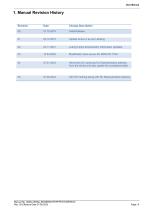
User Manual 1. Manual Revision History Revision Date Change Description 01 02.12.2019 Update Annex A as per Labeling 02 03.11.2021 Loding Factor & Dosimetric Information Updated 04 07.01.2023 Removed CE marking & EU Representative address from the device and also update the compliance table 05 07.06.2023 Add CE marking along with EU Representative address Manual No. AMSL/UM/ALLENGERSLIFEHP/PHOTONF65/33 Rev. 05 Effective Date 07.06.2023
Open the catalog to page 6
User Manual Established in 1987, Allengers is a leading Indian name in the realm of medical diagnostic system & IT solutions in more than 70 countries worldwide. With a vision to develop strategic long term relationships with clients, we are committed to bringing to life; medical products & solutions and serving the humanity by delivering excellent patient care. An Indian market share of more than 35%, ever-rising exports to foreign governments & clients, innumerable national & international awards, all bear a testimony to the immense customer satisfaction our offerings deliver. Guided by our...
Open the catalog to page 7
User Manual 2.3 Intended Use The Allengers Cathlab Machine is Digital Cardiovascular Angio System with HF X-Ray Generator for applications in Cardiac Angiographies, Valvuloplastic & Stenting. Cathlab (X-Ray) Machine is high power X-Ray equipment used in catheterization labs. This equipment uses high power X-Ray pulses and digital imaging system including Dynamic Flat panel detector to visualize the vascular structures of human body. It is designed for use in medical clinic, hospital & veterinary application. This Machine should be handled by persons who have been briefed in its professional handling...
Open the catalog to page 8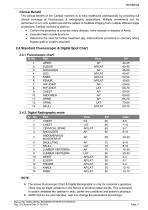
User Manual The clinical benefit of the Cathlab machine is to help healthcare professionals by providing full clinical coverage of Fluoroscopic & radiographic applications. Multiple movements can be performed on a C-arm system around the patient to facilitate imaging from multiple different angle projections. Cathlab machine is used to: • Confirm the presence of coronary artery disease, valve disease or disease of Aorta. • Evaluate heart muscle functions. • Determine the need for further treatment (Eg. Interventional procedure or coronary artery bypass graft or surgery required) Sr.No. Part View...
Open the catalog to page 9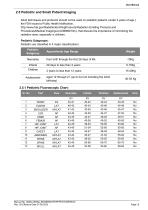
User Manual 2.5 Pediatric and Small Patient Imaging Adult techniques and protocols should not be used on pediatric patients (under 2 years of age.) the FDA issued a Public Health Notification, http://www.fda.gov/RadiationEmittingProducts/Radiation Emitting Products and Procedures/Medical Imaging/ucm298899.htm), that discuss the importance of minimizing the radiation dose, especially in children. Pediatric Subgroups: Pediatric are classified in 4 major classifications: from birth through the first 28 days of life 29 days to less than 2 years 2 years to less than 12 years Adolescents aged 12 through...
Open the catalog to page 10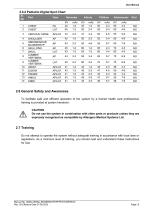
User Manual 2.5.2 Pediatric Digital Spot Chart Part View Neonates Infants Children Adolescents Grid KV mAs 3 CERVICAL SPINE AP/LAT 43 2-3 4 SHOULDER ABDOMEN/KUB BLADDER/IVP 2.6 General Safety and Awareness To facilitate safe and efficient operation of the system by a trained health care professional, training is provided at system handover. Do not use the system in combination with other parts or products unless they are expressly recognized as compatible by Allengers Medical Systems Ltd. 2.7 Training Do not attempt to operate the system without adequate training in accordance with local laws...
Open the catalog to page 11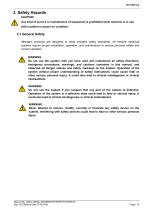
User Manual 3. Safety Hazards CAUTION: Any kind of service or maintenance of equipment is prohibited while machine is in use with a patient or power on condition. 3.1 General Safety Allengers products are designed to meet stringent safety standards. All medical electrical systems require proper installation, operation, and maintenance to ensure personal safety and correct operation. WARNING Do not use the system until you have read and understood all safety directions, emergency procedures, warnings, and cautions contained in this manual, and observed all danger notices and safety markings on...
Open the catalog to page 12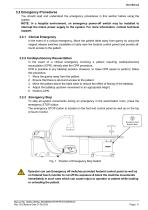
User Manual 3.2 Emergency Procedures You should read and understand the emergency procedures in this section before using the system. NOTE: In a hospital environment, an emergency power-off switch may be installed to interrupt the mains power supply to the system. For more information, contact technical support. 3.2.1 Clinical Emergency In the event of a clinical emergency, Move the patient table away from gantry by using the magnet release switches (available on table near the footend control panel) and provide allround access to the patient. 3.2.2 Cardiopulmonary Resuscitation In the event...
Open the catalog to page 13All Allengers Medical Systems catalogs and technical brochures
 Photon F65 (Mobile Cathiab)
60 Pages
 Proxima CS 3D
85 Pages
 Proxima CS 3D
161 Pages
 CATHLAB (X-RAY) MACHINE
145 Pages
 AngioTab 9030 DRF
8 Pages
 AngioVision 9090 DRF
3 Pages
 Cath Lab Mini
8 Pages
 Cath Lab Mobile - Photon
8 Pages
 Cath Lab - Altima Series
16 Pages
 Cath Lab Proxima CS
12 Pages
 C-Arm with Image Intensifier
2 Pages
 Digiscan V20/V30 C-Arm
8 Pages
 Digiscan S20/S30 C-Arm
8 Pages
 Multiproduct Brochure
40 Pages
 C-Arm Digiscan Compact
6 Pages


- Trolley-mounted laser
- Allengers digital radiography system
- EKG
- Digital electrocardiograph
- Allengers multipurpose radiography system
- Allengers X-ray system
- Millisecond laser
- Multi-parameter monitor
- Allengers multipurpose radiography X-ray system
- Surgical laser
- Multi-parameter O2 monitor
- Pulse oximetry multi-parameter monitor
- Multi-parameter ECG monitor
- Blood pressure multi-parameter monitor
- Compact multi-parameter monitor
- 12-channel electrocardiograph
- Multi-parameter NIBP monitor
- Electrocardiograph with printer
- TEMP multiparameter monitor
- Allengers radiography system with floor-standing bucky