
- Catalogs
- AMACO GmbH
- D-FLEX TWO COLOR G4

- Products
- Catalogs
- News & Trends
- Exhibitions
D-FLEX TWO COLOR G4

D-FLEX TWO COLOR G4
The D-FLEX TWO COLOR G4 is a digital piezo DOD inkjet printer by AMACO GmbH. The manual highlights copyright protection for operating instructions and software, and disclaims liability for deviations from described hardware/software.
The printer uses DOD Piezo Inkjet technology, with a maximum print length of 400 mm and a resolution of 360 x 360 DPI. It supports flexible print formats and data transfer via USB and Ethernet, operating at 220/240 V with a power consumption of 0.6 kVA.
Operators must follow safety guidelines, including using the printer in a dry environment, connecting to an earthed power line, and avoiding unprotected ink contact. Safety signs should remain intact, and original spare parts must be used.
The printer is modular and customizable, featuring components such as a printer head, assembly frame, operator panel, hydraulic control system, ink cartridge, and electrical panel.
Installation involves unpacking, mechanical assembly, and making electrical and pneumatic connections. The printer should be installed parallel to the packaging machine and secured with M8 screws.
Initial setup includes ink loading, printhead alignment, print positioning, and network connection.
The panel allows control over printer features, user management, artwork settings, and printhead options.
Regular maintenance includes printhead cleaning, nozzle cleaning, and ink bottle replacement.
Information on printer status, notes, and alarms are provided for operational monitoring.
Sections address common hardware and software queries.
The printer complies with EMC directives, ensuring electromagnetic compatibility.
The printer operates with an external system using 24V DC signals unless specified otherwise. It requires a 230V AC power supply and can send and receive synchronization signals.
1. Loosen the 4 M6 screws to remove the guard protecting the electrical panel.
2. Connect the power supply cable to a stable electricity source, preferably with a safety switch or designated fuse.
3. Connect the signal cable from the printer to the packaging machine.
Input Signals: Start printing: Set between 0.2 and 0.5 seconds. Status: Indicates operations in progress, optional and disabled by default.
Output Signals: Stop printing: Informs the completion of a printing cycle. Alarm: Indicates a fault status to stop the packaging machine. Ink low: Non-blocking warning for low ink alerts.
Connect the branch board for ink level signals as per the wiring diagram. The ink pump can automatically top up ink or be manually activated if the LOW INK alarm is displayed.
Connect the compressed air hose to the electrical panel and adjust pressures for the printhead plate and film brake as specified.
Remove the heat-shrink sheath from the bottle needle carefully. The printer will suggest the NO LAYOUT status if turned on without pre-loaded artwork.
Adjust delay and overlap values for each printhead. Print positioning can be adjusted based on the type of paper and presence of positioning marks.
Connect the printer to the local network using an RJ45 Ethernet cable. Default IP address is 192.168.0.150, communicating via port 13001.
The 8” touch-screen panel displays real-time printer status, ink levels, speed counters, and allows access to various menus for settings and user management.
Three user levels: Administrators, Technicians, and Operators, each with different access rights.
Artworks can be loaded via USB or network. Options include immediate loading, automatic loading, and copying between sources.
Includes label length, feed speed, printing delays, and ink system timings. Default values are provided for optimal operation.
Settings include color selection, alignment, drop size, and temperature. Adjustments can be made for better color alignment.
Printhead maintenance involves cleaning ink residues and checking for printing issues by printing a full square.
The supplier and installer of auxiliary components or assemblies must ensure compliance with the EMC directive. Non-compliance may result in liability and prosecution by authorities.
It is strongly recommended that all personnel involved in system installation are familiar with the EMC directive and trained in proper installation methods to ensure compliance.
Guidelines provided are intended to highlight important rules of good practice for installing the D-FLEX TWO COLOR G4 AMACO device. However, they do not replace the need for knowledge of the directive or relieve the installer of liability.
Catalog excerpts

Stand: 2020 | V. 1.3.19 flexible printing solutions
Open the catalog to page 1
Changing thee ink bottle 37 - 38 flexible printing solutions
Open the catalog to page 2
Flow diagram HMI print 43 - 43 Schema print systm 44 - 44 flexible printing solutions
Open the catalog to page 3
AMACO GmbH Dornbirner Str. 19 6890 Lustenau | Austria www.amaco-solutions.com Copyright ©2018-2020 by AMACO Operating instructions, manuals and software are protected by copyright. Copying, copying, translating or converting to any electronic medium or machine-readable form in whole or in part is not permitted. All other rights to the software are set out in the license terms. The naming of non-AMACO products is for informational purposes only and does not constitute a trademark abuse. AMACO makes no warranty as to the selection, performance or usability of these products. All rights reserved....
Open the catalog to page 4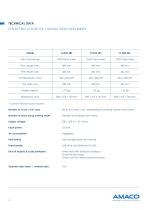
* Custom versions upon request. Number of cycle / min. max. Number of lanes along printing width Supply voltage Input power Air consumption Print format Data transfer Kind of objects & code printables Up to 30 cycles / sec. depending on printing density and format Flexible according to print area 220 / 240 V | 50 / 60 Hz 0.6 kVA Negligible Fully configurable via software USB drive and Ethernet 10/100 Fixed texts with TrueType typeface Graphics and logos Linear and two-dimensional barcodes Operator data input | variable data flexible printing solutions
Open the catalog to page 5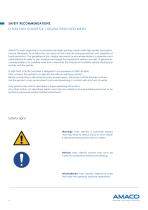
SAFETY RECOMMENDATIONS D-FLEX TWO COLOR G4 | DIGITAL PIEZO DOD INKJET AMACO‘s main objective is to manufacture inkjet printing systems with high quality and performance standards. To achieve this, we carry out strict checks during production and assembly of the final product. The guidelines in this chapter are meant as recommendations to operators and administrators in order to use, maintain and repair the equipment without any risks. A general recommendation is to carefully read and understand this chapter in its entirety before starting any activity with the printer. D-FLEX TWO COLOR G4 printer...
Open the catalog to page 6
Working conditions Before performing any operation with and on the printer and during its operation, the following working conditions must be adhered to in order to assure safety and prevent subsequent interference by using our devices. Our devices are only to be shipped and stored in their original packaging. Installation and initial start-up of the printer module are only allowed if all the working conditions and relevant safety guidelines are adhered to. Initial operations, programming, standard operation, cleaning and maintenance on our printer are recommended only after carefully studying...
Open the catalog to page 7
Carefully read and understand the content of the specific Material Safety Data Sheet (MSDS) for your application. A safety data sheet is provided for every type of ink or purge primer used with the printer, which must be read and understood by the operator before using it. A copy of the MSDS should also be stored in an area near the machine if you plan to store a large amount of liquids in your production plant. Every ink or primer order comes with a copy of the MSDS: please check if you received the right fluid and if the safety data sheet refers to the actual product shipped. If the safety...
Open the catalog to page 8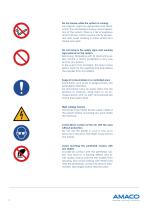
Do not smoke while the system is running. ink vapours might be generated and dissolved in the atmosphere during normal operation of the system. There is a risk of explosion and/or flames, which must be strictly prevented. Also avoid smoking in areas where ink is stored and used. Do not remove the safety signs and warning signs placed on the system. Removing, tampering with or obstructing safety advice is strictly prohibited in any way and for any reason. in the event of an accident, this may involve serious harm for the operator and shall relieve the supplier from any liability. Keep all consumables...
Open the catalog to page 9
D-FLEX TWO COLOR G4 printers are modular systems that can be configured to adapt to a wide range of applications. Some main models can be defined based on the number and type of their components. To be able to adapt to any custom application, it is possible to customise the printer by number and type of components after discussing this with AMACO‘s technical department. flexible printing solutions
Open the catalog to page 10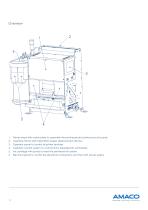
1. Printer head with matrix plate to assemble the printheads and printed circuit boards. 2. Assembly frame with intermittent paper displacement device. 3. Operator panel to control all printer features. 4. Hydraulic control system to control ink for piezoelectric printheads. 5. Ink cartridge with pump to feed the printhead ink system. 6. Electrical panel to control the electrical connections and the main power supply.
Open the catalog to page 11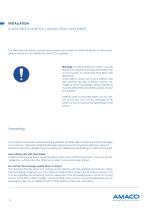
INSTALLATION D-FLEX TWO COLOR G4 | DIGITAL PIEZO DOD INKJET The following instructions concern the standard procedure to install the printer on the packaging machine if no installation by AMACO is required. Warnings: to follow these instructions, you are required to adhere to the general safety rules of your country or community throughout the operation. To be able to carry out a more efficient job and prevent the risk of injuries and/or damage as much as possible, these operations must be performed simultaneously by at least two people. AMACO shall not be held liable, for any reason and in any...
Open the catalog to page 12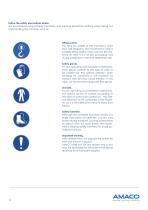
Follow the safety precautions below. We recommend using suitable machinery and wearing protective clothing when taking out and handling the machine, such as: Lifting system. The total dry weight of the machine is more than 100 kilograms. We recommend using a suitable lifting system when moving the machine to take it out of the packaging and during installation in the final destination site. Safety gloves. For all unpacking and installation operations, wear gloves suitable to the type of work to be carried out. Pay special attention when handling ink contained in the machine, as contact with skin...
Open the catalog to page 13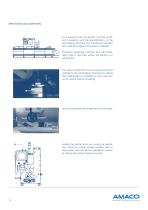
Mechanical assembly As a general rule, the printer must be installed in keeping with the specifications of the packaging machine, by checking its position and assembly against the layout supplied. Standard fastening involves four M8 threaded holes in the area where the printer is to be placed. Pay special attention to ensuring the printer is parallel to the packaging machine, by taking the sealing bell as a reference. Also use a level to assure perfect levelling. X mm X mm Secure the printer with 4 M8 screws in the holes. Isolate the printer from any source of electricity. Stand in a safe, steady...
Open the catalog to page 14All AMACO GmbH catalogs and technical brochures
 D-MOTION SINGLE COLOR G4
49 Pages