
- Catalogs
- AMACO GmbH
- D-MOTION SINGLE COLOR G4

- Products
- Catalogs
- News & Trends
- Exhibitions
D-MOTION SINGLE COLOR G4

D-MOTION SINGLE COLOR G4
The D-MOTION SINGLE COLOR G4 is a digital piezo DOD inkjet printer by AMACO GmbH. The manual highlights intellectual property protection and disclaims liability for deviations from the described hardware/software.
The printer operates at 220/240 V with a maximum input power of 0.6 KVA. It supports print resolutions up to 360 x 360 DPI, with a maximum print length of 500 mm and width of 280 mm. It can accommodate up to four print heads.
Operators must follow safety guidelines, use the printer in dry environments, ensure all connections are grounded, and only trained personnel should operate the printer. Protective gear is recommended when handling inks.
The printer is modular and customizable, featuring components like a hydraulic box, ink bottle holder, and touchscreen panel, utilizing DOD Piezo Inkjet technology.
Installation involves mechanical assembly, electrical, and pneumatic connections, aligning the printer with the packaging machine using M8 screws, while adhering to safety rules.
Includes procedures for ink loading, printhead alignment, and network connection, emphasizing the importance of following the manual for optimal operation.
Details the user interface, artwork settings, and printhead options, providing guidance on adjusting settings for different printing needs.
Outlines cleaning and maintenance tasks such as printhead cleaning, nozzle purging, and ink bottle refilling to ensure longevity and performance.
Divided into hardware and software sections, offering solutions for common issues encountered during operation.
The printer complies with EMC directives, ensuring it meets safety and performance standards.
Emphasizes the importance of using quick-release pins for cables to prevent incorrect connections and highlights the need for regular maintenance to avoid damage.
Instructions for connecting the printer to an external system, specifying a 24V DC signal voltage, and requiring a 230V AC power supply. Detailed steps for connecting power and signal cables are included.
Describes input signals like 'Print Start' and output signals like 'Print End', facilitating communication between the printer and the packaging machine.
Guidelines for maintaining the ink system, including procedures for ink loading and handling low ink alarms.
The printer is equipped with a network card for remote support and can be connected to a local network using an RJ45 ethernet cable. The control panel features an 8” touch screen.
There are three user levels: Administrators, Technicians, and Operators, each with different access rights.
Instructions for loading and managing artwork files, including options for automatic loading and file management via USB or network.
Details various settings for optimizing print quality, including alignment, overlap, and ink pump settings.
Options for handling paper splices and network communication, along with system language settings and remote assistance capabilities.
Regular cleaning of the printheads is essential. If ink residues are detected, perform print cycles and inspect for thin lines. For effective cleaning, activate 'PURGE MODE'.
Allows for ink bottle replacement during operation to prevent production halts. Use latex gloves for safety. The system alerts with a 'LOW INK' message if levels are inadequate.
Common issues include white lines on prints and layout misalignment. Solutions involve purging printheads and checking paper tension.
The printer complies with FCC Part 15 and European directives. Modifications may result in non-compliance and legal liability.
Catalog excerpts

Stand: 02.2019 | V. 1.2.1 flexible printing solutions
Open the catalog to page 1
Description Technology Overview Local network connection 29 - 30 Troubleshooting Hardware section Software section flexible printing solutions
Open the catalog to page 2
AMACO flexible printing solutions
Open the catalog to page 3
AMACO GmbH Dornbirner Str. 19 6890 Lustenau / Austria www.amaco-solutions.com D-MOTION SINGLE COLOR G4 Copyright ©2018-2020 by AMACO Operating instructions, manuals and software are protected by copyright. Copying, copying, translating or converting to any electronic medium or machine-readable form in whole or in part is not permitted. All other rights to the software are set out in the license terms. The naming of non-AMACO products is for informational purposes only and does not constitute a trademark abuse. AMACO makes no warranty as to the selection, performance or usability of these products....
Open the catalog to page 4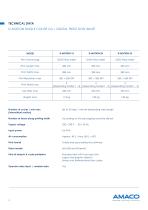
Number of cycles / min max. [Intermittent motion] Number of lanes along printing width Supply voltage Input power Air consumption Print format Data transfer Kind of objects & code printables Operator data input | variable data Up to 20 step / minute depending web length According to the packaging machine die-set 220 / 240 V - 50 / 60 Hz 0.6 KVA Approx. 40 L / hour [60 L. x XP] Totally free area edited by software slot USB and Ethernet. Standard text with true type font Logos and graphic objects Linear and bidimensional bar codes Yes flexible printing solutions
Open the catalog to page 5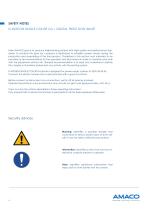
SAFETY NOTES D-MOTION SINGLE COLOR G4 | DIGITAL PIEZO DOD INKJET Main AMACO goal is to produce inkjet-printing systems with high quality and performance standards. To achieve this goal our company is dedicated to establish severe checks during the production and assembling of the final product. Guidelines in this section must intended to be provided as recommendations for the operators and technicians in order to maintain and work with the equipment without risk. General recommendation is to read and understand carefully this chapter in its entirety before start any activity with the printing...
Open the catalog to page 6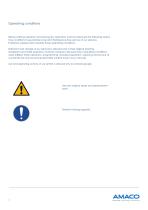
Operating conditions Before starting operation and during any operation must be observed the following operating conditions to guarantee save and interference-free service of our devices. Therefore, please read carefully these operating conditions. Shipment and storage of our devices is allowed only in their original packing. Installation and initial operation of printer module is allowed only if operating conditions were fulfilled. Initial operation, programming, standard operation, cleaning and service of our printer are only recommended after careful study of our manuals. Use and operating...
Open the catalog to page 7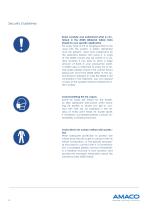
Security Guidelines Read carefully and understand what is contained in the MSDS [Material Safety Data Sheet] for your specific application. For every type of ink or purging primer to be used with the system, a safety datasheet must be present, read and understand by the operators before start using it. A copy of the MSDS should also be stored in a nearby location if you plan to stock a large amount of fluids in your production plant. A MSDS copy is attached to every ink or primer order: please check if the correct fluid is being sent and if the MSDS refers to the actual product shipped. In case...
Open the catalog to page 8
Apply your local rules to safely dispose the ink containers or exhaust ink. Every ink container or ink residual, from normal use or as result of a purge procedure, must be disposed following your local rules. Never dispose the containers or the ink in the public water distribution system or toilet places. For any doubt please contact your local special product disposing agency. Store all the consumable articles in a controlled area. Some fluids like ink or purging primer are potentially dangerous. Ink and primer fluids also have an expiry date and relative humidity sensitive. Store them in a...
Open the catalog to page 9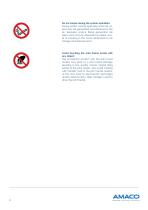
Do not smoke during the system operation. During system normal operation some ink vapors may be generated and dissolved in the air. Explosion and/or flame generation risk exists, and must be absolutely avoided. Avoid to smoking in the locals dedicated to ink storage and disposal area. Avoid touching the print heads nozzle with any object. The accidental contact with the print head nozzles may lead to a print head damage resulting in less quality and/or missing firing bands of the print heads. Also avoid working with metallic tools in the print heads nearby, as this may lead to electrostatic discharges...
Open the catalog to page 10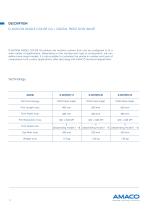
D-MOTION SINGLE COLOR G4 | DIGITAL PIEZO DOD INKJET D-MOTION SINGLE COLOR G4 printers are modular systems that can be configured to fit a wide variety of applications. Depending on the number and type of components, we can define some major models. It is also possible to customize the printer in number and type of components to fit custom applications, after discussing with AMACO technical department. flexible printing solutions
Open the catalog to page 11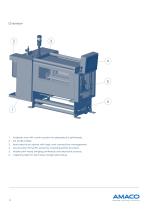
1. Hydraulic box with control system for piezoelectric printheads. 2. Ink bottle holder. 3. Main electrical cabinet with logic and connections management. 4. Touchscreen Panel PC panel for checking printer functions. 5. Mobile print head bringing printheads and electronic boards. 6. Adjusting roller for print layout longitudinal setup.
Open the catalog to page 12
INSTALLATION D-MOTION SINGLE COLOR G4 | DIGITAL PIEZO DOD INKJET Following instructions must be intended as the standard procedure for installing the printer on the packaging machine, where it is not expected an installation work provided by AMACO. To perform these instructions you must follow, for the whole time of the operation, the general safety rules of your State or community. In order to do a more efficient job and to avoid as much as possible the risk of damage, these instructions must be executed by at least two (2) people, operating simultaneously. For no reason and in no form AMACO...
Open the catalog to page 13
Don not turn upside-down or roll the package. The machine has some ink tanks communicating with open air. During the package opening you may notice some ink/solvent smell. That is normal due aforementioned reason, especially if the transportation taken a long time or the package was left under the direct warming of sun. If such the case, please vent the package appropriately before proceeding further in unpacking the machine. Follow the safety precautions below. We recommend to wear protective garments while unpacking and handling the machine such as: Protective gloves: Ink contained in the machine...
Open the catalog to page 14All AMACO GmbH catalogs and technical brochures
 D-FLEX TWO COLOR G4
46 Pages