
- Catalogs
- Andor Technology PLC
- Kymera_328i


Kymera_328i

Kymera_328i
The document is a comprehensive user guide for the Andor Kymera 328i spectrograph, detailing technical support, disclaimers, copyright information, and a packing list. It also lists optional and additional accessories available for the device.
Product Overview
This section describes the external features and model options of the Kymera 328i, including signal and power connections, power supply, and gas purge port.
Installation
Guidance is provided for the installation process, including software installation, camera attachment, and connecting the spectrograph to a microscope. It also covers the installation of accessory parts such as grating turret replacement and filter wheel installation.
Operation
Operational instructions cover emergency mains disconnection, detector controls, spectrograph controls, grating turret control, and other controls like slit drive, filter wheel, and shutter control. The use of the dispersion optimiser is also included.
Maintenance
Maintenance guidelines include regular checks, annual electrical safety checks, fuse replacement, and cleaning. Instructions for grating adjustment and electrical connections for accessories are provided.
Troubleshooting
This section offers troubleshooting tips for common issues that may arise during the use of the Kymera 328i.
Specifications
The specifications section outlines the electrical, environmental, and optical specifications of the Kymera 328i.
Safety and Warning Information
This section emphasizes the importance of following specified controls and procedures to avoid hazardous radiation exposure and other risks. It includes detailed safety instructions and warnings about the use of the equipment, handling, and environmental conditions.
Safety Symbols
Explanations of safety symbols used in the document are provided, highlighting potential hazards such as electric shock, hot surfaces, and pinch hazards.
Specifications and Handling
The spectrograph weighs over 18 kg and requires two people for lifting due to its unbalanced load. Proper manual handling techniques are emphasized to prevent injury and ensure product integrity. Lifting straps are provided for safe handling.
Regulatory Compliance
The Kymera 328i complies with EU Electromagnetic Compatibility and Low Voltage Directives, specifically EN61326-1 and EN61010-1. It requires a DC power supply that is polarity sensitive.
Safety Warnings
Users are cautioned about potential hazards associated with gases used in the spectrograph, such as nitrogen, which can cause asphyxiation. Adequate ventilation is recommended.
Unpacking and Inspection
Upon receiving the spectrograph, users should carefully unpack and inspect the unit for damage. All items listed on the packing list should be present, and any missing items should be reported to the local sales outlet.
Power Supply
The spectrograph is powered by an external PSU with specific requirements for mains power supply and output. The power connection must be easily accessible for disconnection.
Gas Purge Port
The spectrograph features a gas purge port to reduce absorption in air, particularly in the UV or IR regions. An inert gas like nitrogen or argon should be used, and precautions must be taken to avoid asphyxiation.
Software Installation
The installation of Solis or SDK software is required for operating the spectrograph. The process involves running the setup from the provided CD and following on-screen prompts. After installation, the software icon should appear on the desktop.
Technical Support
Contact information for technical support is provided for various regions, including Europe, USA, Asia-Pacific, and China.
Disclaimer and Copyright
The document includes a disclaimer of warranties and liabilities, along with copyright and trademark information. Users are advised that the information is provided "as is" without any warranty.
Attaching a Camera to a Kymera or Shamrock Spectrograph
This section provides instructions for attaching a camera to a spectrograph. Key steps include removing blanking plates, installing support brackets for iStar models, and aligning the camera using a spectral light source. Specific mounting flange kits are required for different camera models.
Connecting the Camera via USB
Instructions for connecting a camera to the spectrograph using USB include connecting shutter, USB, and power cables. The process for safely disconnecting the USB interface is also detailed.
Connecting the Camera via I2C
When using I2C, connect the I2C cable between the camera and spectrograph, and the power cable between the spectrograph and PSU. The shutter cable is not required.
Adjusting the Level and Height of the Spectrograph
The Kymera 328i features adjustable feet for leveling and height adjustment. Instructions are provided for using standard feet and optional spacers to match optical height with other system components.
Standalone Spectrograph
For standalone spectrographs, a camera flange is provided for attaching a camera. Installation and alignment instructions are referenced.
Connecting the Spectrograph to a Microscope
Guidelines for connecting the spectrograph to a microscope include adjusting the optical axis height using feet and spacers, and ensuring all components are level.
Installation of Accessory Parts
This section covers the installation and replacement of optional accessories such as grating turrets, filter wheels, shutters, and motorized slits.
Grating Turret Replacement
Grating turrets can be interchanged easily, with settings stored for up to three turrets. The procedure includes safety warnings and steps for replacing the turret.
Installing a Filter Wheel
Instructions for installing a filter wheel include aligning it with mounting holes and connecting it to the spectrograph electronics.
Accessing and Changing Filters
Filters can be added or replaced via the filter access hole. The procedure includes using a filter removal tool and synchronizing the filter wheel with the software interface.
Shutter
Accessing the shutter requires removing slit mechanisms, spacers, and filter wheels. Safety warnings are provided regarding the shutter assembly's heat during operation.
Specifications and Procedures
The document provides detailed instructions for handling and operating the Kymera 328i spectrograph. Key procedures include careful handling of motorized input accessories to avoid cable stress, accessing electrical connectors for shutters, and installing slits using supplied screws. A warning is issued regarding the wide aperture slit, which poses a pinch hazard.
Operation
The spectrograph is controlled via the Dashboard interface, which allows users to manage hardware components and acquisition parameters. The interface displays only installed accessories, with options to show all panels for demonstration purposes. Emergency disconnection involves removing the mains power cord.
Detector Controls
Exposure time can be set between a minimum value and 3600 seconds using an edit box or slider bar. The Read Mode Control offers four modes: Full Vertical Binning, Image Readout, Single Track, and Multi-track, each affecting data display differently.
Spectrograph Controls
Reset options are available for wavelength, slit width, and flipper mirror positions. The Wavelength Drive Control sets the system to target wavelengths and controls grating selection. The Step and Glue function allows for composite spectrum creation by merging overlapping spectra.
Grating Turret Control
The Grating Turret Control allows selection of new gratings by rotating the turret. Up to two gratings can be fitted at a time, with additional turrets available for swapping. The software indicates busy status during grating changes.
Key Warnings and Recommendations
- Avoid placing fingers in the input/output slits to prevent injury.
- Ensure proper emergency disconnection procedures are followed.
- Use the appropriate filters to avoid invalidating Relative Efficiency Correction (REC) due to second-order light.
Grating Information and Offset Adjustment
The document describes the process of changing gratings in the Kymera series spectrographs, which takes approximately 20 seconds. Grating information is stored in the spectrograph's EEPROM and can be updated. Each grating turret is equipped with an RFID tag that updates the spectrograph with the new grating information.
The Offset Adjustment function allows calibration adjustments for detector and grating offsets. Detector offsets correct mechanical shifts affecting the displayed spectrum, while grating offsets are specific to each grating. The procedure involves using a spectral light source, resetting offsets, and adjusting them to align spectral lines with the CCD center.
Focus Mirror and Slit Drive Control
The focus mirror function enables precise focus adjustments, either manually or via Auto Focus, which optimizes the focus using an algorithm. Focus positions are stored in the EEPROM.
The Slit Drive Control manages motorized slit assemblies, allowing slit width adjustments between 10 μm and 2500 μm. Narrower slits improve resolution but reduce throughput. Slit width can be adjusted through various methods, including direct input and graphical manipulation.
Filter Wheel and Shutter Control
The Filter Wheel Control manages optional filter wheel accessories, storing filter details in EEPROM. Filters can be selected and modified through a graphical interface.
The Shutter Control offers six modes, including Always Open, Always Closed, and Fully Automatic. Shutter operation can also be managed via external TTL signals, allowing synchronization with other equipment.
Flipper Mirror and Dispersion Optimizer
The Flipper Mirror Control allows rapid selection of input or exit ports by clicking on the desired port.
The Dispersion Optimizer function recalibrates the spectrograph if needed, using multiple wavelengths to ensure accuracy across the spectrum. The process involves selecting gratings and wavelengths, optimizing, and adjusting offsets if necessary.
Section 5: Maintenance
- General Maintenance: The spectrograph contains no user-serviceable parts. Tampering with marked screws voids the warranty. Contact Andor for service.
- Regular Checks: Regularly inspect the product, especially the power supply and mains cable. Ensure the AC mains plug is accessible for disconnection.
- Annual Electrical Safety Checks: Conduct annual checks on insulation and protective earth, but avoid frequent dielectric strength tests to prevent insulation damage.
- Fuse Replacement: Use a SIBA type 70-001-40 4A Ultra Fast fuse internally. For the UK and similar regions, use a BS 1362 type fuse with specific characteristics.
- Cleaning: Use a dry, lint-free cloth for cleaning. If necessary, use a mild detergent solution. Avoid alcohol, solvents, or aerosol cleaners.
- Grating Adjustment: Adjustments may be needed after shipping. Yaw is software-corrected, while roll and tilt require manual adjustment using specific screws.
- Warnings: Removing the lid exposes moving parts and potential pinch points. Follow safety procedures if the lid is removed.
- Unit Power Issues: Ensure the power lead is correctly connected. Check internal and mains plug fuses if the unit does not power on.
- Grating Information Issues: Check the RFID tag for damage, ensure the turret is correctly mounted, and try restarting the unit.
- Electrical and Environmental: The spectrograph operates on 100-240V AC, with a power consumption of 21W. It is designed for indoor use, up to 2000m altitude, and within 0°C to 30°C operating temperature.
- Optical Specifications: Includes shutter specifications with a maximum repetition rate of 40 Hz and a minimum open/close time of 6 ms. The focal plane size is 30 x 16 mm.
Provides standard configuration drawings with dimensions and weight details.
Appendix B: Other InformationIncludes terms and conditions of sale and warranty information, along with WEEE disposal regulations.
Catalog excerpts

The Kymera 328i Version 1.2 revised 22 July 2019 User Guide andor.com
Open the catalog to page 1
AN OVERVIEW FOR GETTING STARTED WITH YOUR KYMERA 328I SPECTROGRAPH ���� 19 3.1.1 3.1.2 Attaching the Camera ��������������������������������������������������������������������
Open the catalog to page 2
Accessing and Changing the Filters ������������������������������������������������������� 31 Initializing the Filter Wheel ���������������������������������������������������������������������� 32 Filter Wheel Control and Updating the Filter Details in the Spectrograph Memory ����������������������������������������������������������������������������� 32 Changing the Wavelength Range ������������������������������������������������������������ 38 Relative Efficiency Correction ����������������������������������������������������������������� 41
Open the catalog to page 3
Kymera 328i Revision History Version Initial release. Updated USA and Asia-Pacific addresses (page 11) and technical drawings (page 62) Updated reference on page 34, updated table in section 3.4.6
Open the catalog to page 5
Kymera 328i Safety and Warning Information PLEASE READ THIS INFORMATION FIRST CAUTION – USE OF CONTROLS OR ADJUSTMENTS OR PERFORMANCE OF PROCEDURES OTHER THAN THOSE SPECIFIED HEREIN MAY RESULT IN HAZARDOUS RADIATION EXPOSURE. 1. If the equipment is used in a manner not specified by Andor, the protection provided by the equipment may be impaired. 2. Do not position this product so that it is difficult to operate the mains disconnecting device. See “Section 4.1 Emergency Mains Disconnection”. 3. Before using the system, please follow and adhere to all warnings, safety, manual handling and operating...
Open the catalog to page 6
Kymera 328i 18. Optical surfaces are delicate and should never be touched. To avoid accidental damage, and to minimise dust settling on the optical surfaces, always keep the turret lid on and avoid exposure to a dusty environment. 19. Use gloves to remove grating turret and further minimize the risk of damage to the gratings. Store unused grating turrets in a dust-free environment, ideally a desiccator. 20. There are no user-serviceable or replaceable parts inside the product beyond those specified in this manual. Only authorised service personnel may service this equipment. 21. Do not touch...
Open the catalog to page 7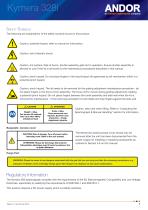
Kymera 328i Safety Symbols The following are explanations of the safety symbols found on this product: Caution, potential hazard, refer to manual for information. Caution, risk of electric shock. Caution, hot surface. Risk of burns- shutter assembly gets hot in operation. Ensure shutter assembly is allowed to cool if the lid is removed for the maintenance procedures described in this manual. Caution, pinch hazard. Do not place fingers in the input/output slit aperture(s) as slit mechanism within is a potential pinch hazard. Caution, pinch hazard. The lid needs to be removed for the grating adjustment...
Open the catalog to page 8
Kymera 328i Shipping & Storage Precautions Unpacking and Inspection: • Carefully unpack the unit and retain packaging to return equipment for servicing as shown in the following section. If the equipment appears damaged in any way, return it to sales outlet in its original packaging. No responsibility for damage arising from the use of non-approved packaging will be accepted. Ensure all items and accessories specified at the time of ordering and as detailed on the packing list are present: if any items are missing, please contact your local sales outlet. Unpacking the Spectrograph & Manual Handling...
Open the catalog to page 9
Kymera 328i SECTION 1: INTRODUCTION Thank you for choosing an Andor Kymera 328i spectrograph. Please read this user guide before using your spectrograph. Figure 1: Andor Kymera 328i spectrograph shown with Andor Newton CCD and Zyla sCMOS cameras attached.
Open the catalog to page 10
Kymera 328i 1.1 Technical Support If you have any questions regarding the use of this equipment, please contact the representative* from whom your system was purchased, or: Andor Technology Andor Technology Springvale Business Park Northern Ireland Andor Technology (Japan) Andor Technology 66 Zhufang Rd, Haidian Dist. * The latest contact details for your local representative can be found on our website https://andor.oxinst.com/contact
Open the catalog to page 11
Kymera 328i 1.2 Disclaimer THE INFORMATION CONTAINED HEREIN IS PROVIDED “AS IS” WITHOUT WARRANTY, CONDITION OR REPRESENTATION OF ANY KIND, EITHER EXPRESS, IMPLIED, STATUTORY OR OTHERWISE, INCLUDING BUT NOT LIMITED TO, ANY WARRANTY OF MERCHANTABILITY, NON-INFRINGEMENT OR FITNESS FOR A PARTICULAR PURPOSE. IN NO EVENT SHALL ANDOR BE LIABLE FOR ANY LOSS OR DAMAGE, WHETHER DIRECT, INDIRECT, SPECIAL, INCIDENTAL, CONSEQUENTIAL OR OTHERWISE HOWSOEVER CAUSED WHETHER ARISING IN CONTRACT TORT OR OTHERWISE, ARISING OUT OF OR IN CONNECTION WITH THE USE OF THE INFORMATION PROVIDED HEREIN. 1.3 Copyright and...
Open the catalog to page 12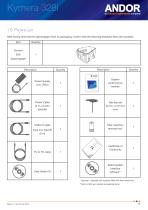
Kymera 328i 1.5 Packing List After having removed the spectrograph from its packaging, confirm that the following standard items are included: Item Power Supply Unit (PSU) System performance booklet Power Cable (3 m, country specific) Filter insertion/ removal tool* Spectrograph Interface software** USB 2.0 cable Type A to Type B (3 m) * Optional - supplied with systems fitted with filter wheel only. **Solis or SDK are ordered as separate items.
Open the catalog to page 13
Kymera 328i 1.5.1 Optional Supplied Accessories Depending on the options purchased, the following optional accessories may also be included: • Additional grating turrets Light-coupling interfaces: Accessories such as shutter, filter wheel & motorized slits may already have been installed on the spectrograph, prior to shipping Detector(s) (normally pre-installed if ordered with the spectrograph) Purpose-built accessories as ordered through Andor’s Customer Special Request (CSR) programme If any of the items you ordered are missing or for further information on any of the accessories, please contact...
Open the catalog to page 14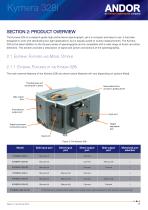
Kymera 328i SECTION 2: PRODUCT OVERVIEW The Kymera 328i is a research-grade high performance spectrograph, yet it is compact and easy to use. It has been designed to work with demanding low-light applications, but is equally suited to routine measurements. The Kymera 328i is the latest addition to the Kymera series of spectrographs and is compatible with a wide range of Andor and other detectors. This section provides a description of signal and power connections of the spectrograph(s). 2.1 External Features and Model Options 2.1.1 External Features of the Kymera 328i The main external features...
Open the catalog to page 15All Andor Technology PLC catalogs and technical brochures
 Zyla sCMOS
78 Pages
 iXon Ultra
121 Pages
 Andor_Newton
44 Pages
 Solis 64
6 Pages
 ikon xl 231
8 Pages
 zyla 5.5 scmos
12 Pages
 ixon ultra 888
12 Pages
 ikon xl 230
8 Pages
 2020 Neo 5.5 sCMOS
6 Pages
 Multi-Wavelength Imaging
11 Pages
 2017 iXon EMCCD
13 Pages
 iKon-L HF
7 Pages
 Shamrock 500 Spectrograph
13 Pages
 Shamrock 750 Spectrograph
14 Pages
 iXon Ultra 888 EMCCD
2 Pages
 iXon Ultra 897 EMCCD
2 Pages
 Zyla 5.5 HF
8 Pages
 Neo 5.5 sCMOS
6 Pages
 Microspectroscopy Gatefold
8 Pages
 Kymera 193 Spectrograph
14 Pages
 Spectroscopy
25 Pages
 High Energy Detection
28 Pages
 Spectroscopy Solutions
23 Pages
 Neo and Zyla sCMOS Cameras
17 Pages
 iXon EMCCD
13 Pages


Archived catalogs
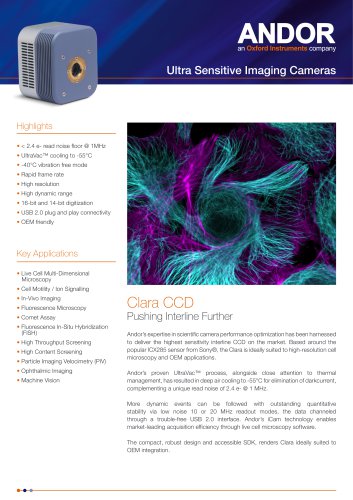 Clara CCD
2 Pages
 Andor iXon Life EMCCD
9 Pages
 Imaris Gatefold
8 Pages
 iKon-XL 231
8 Pages
 iKon-XL 230
8 Pages
 iKon-M CCD for Photovoltaics
6 Pages
- Analysis software
- Compound microscope
- Laboratory microscope
- Desktop microscope
- Control software
- Windows software
- Laboratory software
- CMOS camera
- Camera with USB port
- Spectroscope
- Hospital software
- LED light source
- Acquisition software
- Medical camera
- Capture software
- Biology microscope
- Benchtop spectrometer
- Microscope camera
- Research microscope