
- Catalogs
- Azure Biosystems
- AzureSpot Analysis Software

AzureSpot Analysis Software

AzureSpot Analysis Software
- 2D Densitometry: Allows for detailed analysis of gel and blot images.
- Automatic Lane and Band Detection: Automatically detects lanes and bands, even on distorted images.
- Molecular Weight Analysis: Provides tools for determining molecular weight using calibrated markers.
- Quantity Calibration: Includes a toolbox for calibrating quantities.
- Annotation: Tools for adding comments and highlighting images.
- Multiplex Analysis: Facilitates analysis of multiplex images with options for viewing in color or grayscale.
- 1D DNA Gels
- 1D Protein Gels
- Chemiluminescent Westerns
- Multiplex Fluorescent Westerns
- Operating Systems: Windows 8, 7, Vista, XP
- Processor: 1.4 GHz
- Memory: Minimum 256Mb, recommended 512Mb
- Free Hard Disk Space: Recommended 5Gb
- Offers both fully automated and semi-automated workflows.
- Allows for fine-tuning at each step of the analysis process.
- Includes visualization tools for data display and output customization.
- Automatic PDF report generation for easy documentation.
- Data export options include Excel and clipboard for further analysis.
- Integrated tutorial to guide users through the analysis process.
- Freehand drawing for fast analysis of gels with few bands.
Catalog excerpts
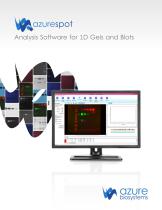
azurespot Analysis Software for 1D Gels and Blots
Open the catalog to page 1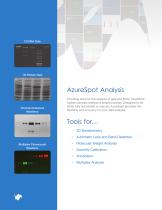
AzureSpot Analysis Chemiluminescent Westerns Providing tools for the analysis of gels and blots, AzureSpot makes complex analysis a simple process. Designed to be either fully automated or manual, AzureSpot provides the flexibility and accuracy for your data analysis. Tools for… Multiplex Fluorescent Westerns P 2D Densitometry P Automatic Lane and Band Detection P Molecular Weight Analysis
Open the catalog to page 2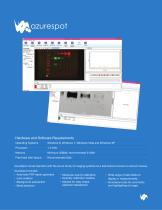
Hardware and Software Requirements Operating Systems Windows 8, Windows 7, Windows Vista and Windows XP Memory Minimum 256Mb, recommended 512Mb Free Hard Disk Space Recommended 5Gb AzureSpot comes standard with the Azure family of imaging systems as a stand alone license or network license. AzureSpot includes: • Automatic PDF report generator • Molecular size/pl calibration • Wide range of data fields to • Lane creation • Quantity calibration toolbox display in measurements • Background subtraction • Module for easy shape . Annotation tools for comments • Band detection selection/deselection...
Open the catalog to page 3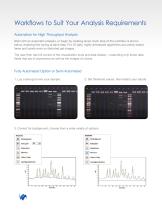
Workflows to Suit Your Analysis Requirements Automation for High Throughput Analysis Start with an automatic analysis, or begin by creating lanes. Each step of the workflow is shown below, enabling fine tuning at each step. For 1D gels, highly developed algorithms accurately detect lanes and bands even on distorted gel images. The user then has full control of the visualization tools and data display – outputting only those data fields that are of importance as well as the images of choice. Fully Automated Option or Semi Automated 1. Lay a lane grid over your sample. 2. et threshold values, then...
Open the catalog to page 4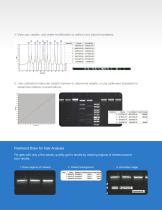
4. View your results, and make modification or edits to any band boundaries. 5. Use calibrated molecular weight markers to determine weight, or use calibrated standards to determine relative concentrations. Freehand Draw for Fast Analysis For gels with only a few bands, quickly get to results by drawing regions of interest around your results. Draw regions of interes
Open the catalog to page 5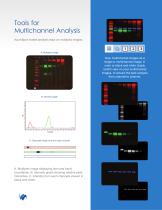
Tools for Multichannel Analysis AzureSpot makes analysis easy on multiplex images. View multichannel images as a single or multichannel image, in color or black and white. Easily switch view on your multichannel images, to ensure the best analysis from channel to channel. C. Grayscale image of lane in each channel A. Multiplex image displaying lane and band boundaries. B. Intensity graph showing relative peak intensities. C. Intensity from each channels viewed in black and white.
Open the catalog to page 6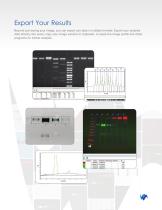
Export Your Results Beyond just saving your image, you can export you data in multiple formats. Export your analysis data directly into excel, copy your image window to clipboard, or paste the image profile into other programs for further analysis.
Open the catalog to page 7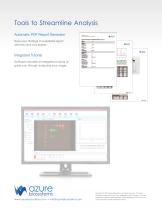
Tools to Streamline Analysis Automatic PDF Report Generator Save your findings in a detailed report with the click of a button. Integrated Tutorial Software includes an integrated tutorial to guide you through analyzing your image. www.azurebiosystems.com • [email protected] Copyright © 2014 Azure Biosystems. All rights reserved. The Azure Biosystems logo and Azure™ are trademarks of the Company. All other trademarks, service marks and trade names appearing in this brochure are the property of their respective owners.
Open the catalog to page 8All Azure Biosystems catalogs and technical brochures
 Azure Blotting Accessories
2 Pages
 Azure Ponceau
1 Page
 Azure ™ cSeries
12 Pages

- Solvent reagent
- Molecular biology reagent
- Histology reagent
- Sample tube
- Dye reagent kit
- Laboratory test tube
- Buffer solution reagent
- Immunoanalysis reagent kit
- Antibody
- Microtiter plate
- Reporting software
- Windows software
- Laboratory software
- Tissue reagent
- 96-well microplate
- PCR system
- Laboratory microplate
- V-bottom test tube
- Real-time PCR analyzer