- Catalogs
- Beta Bionics
- iLet Supply Change Guide

iLet Supply Change Guide
iLet Supply Change Guide
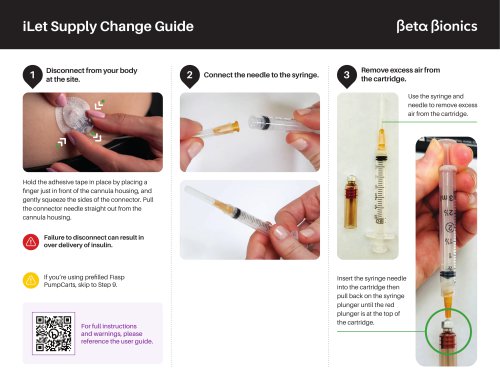
- Preparation: Disconnect the infusion set from the body to prevent over-delivery of insulin. Prepare the syringe and needle by removing excess air and filling it with insulin.
- Filling the Cartridge: Insert the syringe needle into the insulin vial and fill the syringe to 1.8ml. Remove air bubbles and fill the iLet cartridge with insulin, ensuring no overfilling occurs.
- Cartridge Installation: Rewind the iLet before inserting a new cartridge. Ensure the cartridge slides in easily without resistance. Do not connect tubing to the body at this stage.
- Connecting Tubing: Attach new tubing to a new connector, ensuring a straight and tight connection. Insert the connector into the iLet and secure it with a quarter turn.
- Filling Tubing and Cannula: Fill the tubing until insulin is visible at the end. Insert the new infusion set and fill the cannula with insulin, selecting the appropriate cannula type.
- Safety Information: The iLet Bionic Pancreas System is for individuals with type 1 diabetes aged 6 and older. It requires a prescription and proper training to avoid incorrect insulin delivery.
Catalog excerpts
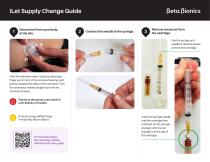
iLet Supply Change Guide Disconnect from your body at the site. Connect the needle to the syringe. Remove excess air from the cartridge. Use the syringe and needle to remove excess air from the cartridge. Hold the adhesive tape in place by placing a finger just in front of the cannula housing, and gently squeeze the sides of the connector. Pull the connector needle straight out from the cannula housing. Failure to disconnect can result in over delivery of insulin. If you’re using prefilled Fiasp PumpCarts, skip to Step 9. For full instructions and warnings, please reference the user guide. Insert the syringe needle into the cartridge then pull back on the syringe plunger until the red plunger is at the top of the cartridge.
Open the catalog to page 1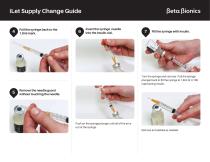
iLet Supply Change Guide Pull the syringe back to the 1.8ml mark. Insert the syringe needle into the insulin vial. Fill the syringe with insulin. Turn the syringe and vial over. Pull the syringe plunger back to fill the syringe to 1.8ml of U-100 rapid acting insulin. Remove the needle guard without touching the needle. Push on the syringe plunger until all of the air is out of the syringe. Remove air bubbles as needed.
Open the catalog to page 2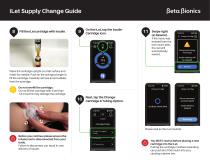
(3eta |3ionics Fill the iLet cartridge with insulin. Place the cartridge upright on a flat surface and insert the needle. Push on the syringe plunger to fill the cartridge. Carefully remove all air bubbles from the cartridge. Do not fill the cartridge with more than 1.8 ml as this may damage the cartridge. Before you continue please ensure the infusion set is disconnected from your body. Failure to disconnect can result in over delivery of insulin. On the iLet, tap the Insulin Cartridge Icon. Next, tap the Change Cartridge & Tubing Option. Swipe right on Rewind. If the menu was entered from the...
Open the catalog to page 3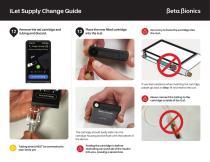
iLet Supply Change Guide Remove the old cartridge and tubing and discard. Place the new filled cartridge into the iLet. Do not try to force the cartridge into the iLet. If you feel resistance when inserting the cartridge, please go back to Step 11 and rewind the iLet. Never connect the tubing to the cartridge outside of the iLet. The cartridge should easily slide into the cartridge housing and be flush with the bottom of the device. Tubing should NOT be connected to your body yet. Putting the cartridge in before rewinding can push all of the insulin into you, causing a severe low.
Open the catalog to page 4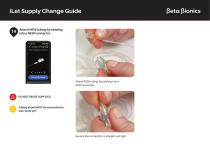
iLet Supply Change Guide Attach NEW tubing by twisting into a NEW connector. Attach NEW tubing by twisting into a NEW connector. Tubing should NOT be connected to your body yet. Be sure the connection is straight and tight.
Open the catalog to page 5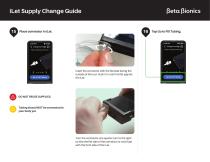
iLet Supply Change Guide Place connector in iLet. Insert the connector with the flat side facing the outside of the iLet. Push it in until it is flat against the iLet. Tubing should NOT be connected to your body yet. Turn the connector one quarter turn to the right so that the flat side of the connector is now flush with the front side of the iLet.
Open the catalog to page 6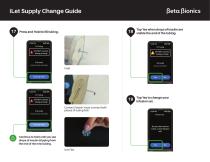
(3eta |3ionics Press and Hold to fill tubing. r ^ Fill Tubing I DO NOT connect * tubing to body Hold until you see drops Tap Yes when drops of insulin are visible the end of the tubing. Press & Hold Contact Detach (must connect both pieces of tubing first) Tap Yes to change your infusion set. Continue to hold until you see drops of insulin dripping from the end of the new tubing.
Open the catalog to page 7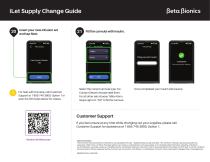
iLet Supply Change Guide Insert your new infusion set and tap Next. For help with this step, call Customer Support at 1-855-745-3800, Option 1 or scan the QR codes below for videos. Fill the cannula with insulin. Select the correct cannula type. For Contact Detach choose steel 6mm. For all other sets choose Teflon 6mm. Swipe right on “Fill” to fill the cannula. Once completed your insulin will resume. Customer Support If you feel unsure at any time while changing out your supplies, please call Customer Support for assistance at 1-855-745-3800, Option 1. Safety Information The iLet Bionic Pancreas...
Open the catalog to page 8All Beta Bionics catalogs and technical brochures
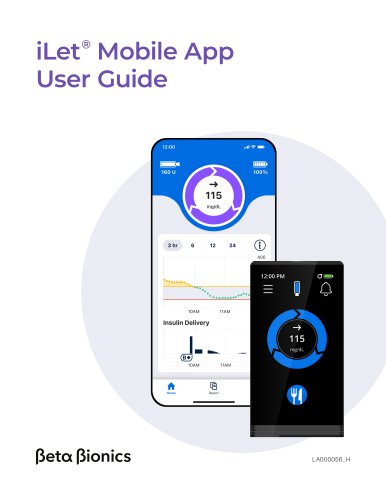 iLet Mobile App User Guide
10 Pages
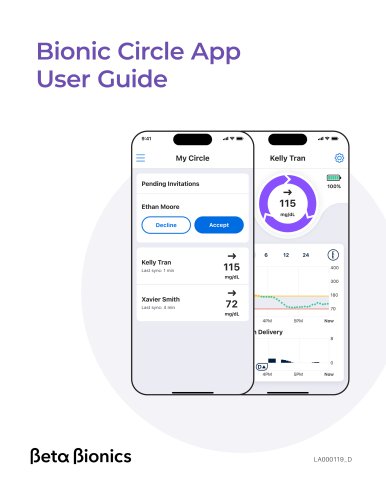 Bionic Circle App User Guide
8 Pages
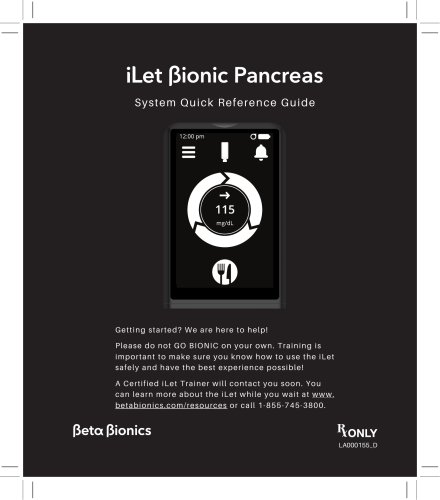 System Quick Reference Guide
108 Pages