
- Catalogs
- BioTelemetry
- ePatch PATIENT EDUCATION GUIDE

ePatch PATIENT EDUCATION GUIDE

ePatch PATIENT EDUCATION GUIDE
The ePatch is a device prescribed by physicians to continuously record heartbeats for analysis by certified cardiac technicians. Clinical reports are provided to healthcare professionals at the end of the service.
BioTel Heart may contact you for insurance confirmation, service initiation, or troubleshooting. Billing starts with monitoring, and you will receive an Explanation of Benefits (EOB) from your insurance, which is not a bill. Prompt return of equipment is necessary to avoid delays and additional charges.
Prepare the skin by shaving, washing, and drying the area for the ePatch Flex. Insert the sensor into the ePatch Flex and attach electrodes as instructed. Place the ePatch Flex on your chest below the collarbone.
Use the symptom/event diary to record heart-related symptoms by double-tapping the sensor. Note the symptom, activity, and time in the diary.
Continue wearing the ePatch as prescribed. Contact customer service if mild skin irritation persists.
The Flex accessory is not waterproof; remove it before showering. Replace electrodes every 48 hours and after each shower. Record all symptoms in the diary.
Change electrodes every other day or after showering. Ensure skin is clean and dry before applying new electrodes.
Return the sensor, unused patches, and diary in the provided kit via UPS using the pre-paid label for free return shipping.
The ePatch is for patients with transient symptoms like palpitations or dizziness. It is not for use with pacemakers or on irritated skin. Federal law restricts this device to sale by or on the order of a physician.
Avoid using broken sensors, touching terminals, and minimize connected devices to prevent leakage current. Do not expose the sensor to liquids or use it in environments with X-ray, CT, or MRI equipment.
The sensor is internally powered, with options for 1, 2, or 3 channel ECG data acquisition. It has a default recording time of 5 days and a sampling rate ranging from 128 to 1024 Hz. The device includes a 2 GB internal storage and is expected to last for a minimum of 500 lifecycles or two years.
The sensor is powered by a non-replaceable rechargeable lithium-ion polymer battery with a capacity of 350 mAh. It should be charged using the provided USB power adapter or a computer via the provided Micro USB cable.
The sensor and its accessories have specific operating, storage, and transportation conditions, including temperature, pressure, and humidity ranges.
A computer with at least Windows 7 or Mac OS X 10.7, a 1.5 GHz processor, 512 MB RAM, and a USB 2.0 port is required to read recorded data.
The sensor complies with various medical device standards, including IEC 60601-1 and EN 60601-1-2.
Includes terms for financial responsibility, privacy, and operational notices related to the BioTelemetry service. Users are responsible for co-payments and returning the monitoring system after use.
BioTelemetry's privacy practices ensure compliance with HIPAA, detailing how medical information may be used and disclosed.
BioTelemetry is committed to maintaining the privacy of your health information and provides a notice of their privacy practices, legal duties, and your rights.
Your health information may be used or disclosed without your authorization for various purposes, including treatment, payment, and healthcare operations.
With your agreement, your health information may be disclosed to family members or others involved in your care.
Your written authorization is required for marketing, sale of health information, and other uses not described in the notice.
You have rights to access, amend, and receive an accounting of disclosures of your health information.
Contact BioTelemetry's Privacy Officer for more information or to file a complaint.
BioTelemetry grants a nonexclusive, nontransferable license to use their cardiac monitoring system and service, subject to compliance with terms.
The agreement can be terminated by either party with thirty days' written notice.
The system and service are provided "as-is" without any warranties.
BioTelemetry is not liable for indirect, incidental, or consequential damages.
The patient agrees to indemnify BioTelemetry against third-party claims related to the misuse of the system or service.
The agreement can only be modified in writing and is governed by Pennsylvania law.
The device is for diagnostic purposes and not an emergency response service. In emergencies, dial 911.
Catalog excerpts

Extended Holter FLEX PATIENT EDUCATION GUIDE Need help or have questions? Contact Customer Service Toll Free at 1.877.593.6421 or visit myheartmonitor.com for online support. CardioNet, LifeWatch and BioTel Heart are trademarks of BioTelemetry, Inc. BioTelemetry reserves the right to change specifications at any time without notice.
Open the catalog to page 1
About Our Service What to Expect during Service Getting Started Record Symptoms Important Information Wear & Care Tips Showering/Replacing Electrodes Returning the Equipment Appendix • Addendum to the Patient Education Guide • Terms and Conditions • Notice of Confidentiality and Privacy Practices Your physician has prescribed for you. ePatch continuously records and stores heartbeats that are analyzed by certified cardiac technicians at BioTel Heart. Clinical reports are made available to your healthcare professional at the end of service. TM To get started, review the important information in...
Open the catalog to page 2
Before You Begin Before you Begin What to Expect During Service Contacting You We may contact you via automated and live messages for the following reasons: • Confirm insurance information • On behalf of your physician • Assist with starting service • Troubleshooting (Please note, we will not contact you regarding heart-related findings, unless specifically instructed by your physician.) Billing for Service Charges are incurred when you begin monitoring. After your service, your insurance company will send you an Explanation of Benefits (EOB). An EOB from your insurance carrier is NOT a bill....
Open the catalog to page 3
Getting Started LEFT Side If needed, SHAVE the area where the ePatch Flex will be placed. Getting Started Slide the sensor into the ePatch Flex. A green light on the sensor will flash when it is completely inserted. LEFT Side WASH the area with soap and water and DRY thoroughly with a towel. DO NOT apply lotions or oils. Remove two electrodes from the electrode pouch. Leave the plastic backing on the electrodes.
Open the catalog to page 4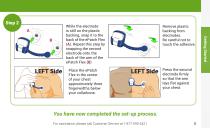
LEFT Side LEFT Side TM Place the ePatch Flex in the center of your chest approximately three fingerwidths below your collarbone. Remove plastic backing from electrodes. Be careful not to touch the adhesive. LEFT Side LEFT Side TM Press the second electrode firmly so that the arm lays flat against your chest. You have now completed the set-up process. For assistance, please call Customer Service at 1-877-593-6421 Getting Started While the electrode is still on the plastic backing, snap it to the back of the ePatch Flex (A). Repeat this step by snapping the second electrode onto the back of the...
Open the catalog to page 5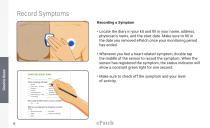
Record Symptoms Recording a Symptom • ocate the diary in your kit and fill in your name, address, L physician's name, and the start date. Make sure to fill in the date you removed ePatch once your monitoring period has ended. • henever you feel a heart-related symptom, double tap W the middle of the sensor to record the symptom. When the sensor has registered the symptom, the status indicator will show a constant green light for one second. EVENT DIARY SYMPTOM/EVENT DIARY Check any feelings that apply: button/sensor to record a symptom Anxiety Chest pain or pressure Dizziness Fainting Light-headedness...
Open the catalog to page 6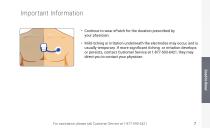
Important Information • Continue to wear ePatch for the duration prescribed by your physician. TM • Mild itching or irritation underneath the electrodes may occur, and is usually temporary. If more significant itching or irritation develops or persists, contact Customer Service at 1-877-593-6421, they may direct you to contact your physician. For assistance, please call Customer Service at 1-877-593-6421
Open the catalog to page 7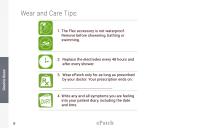
Wear and Care Tips: 1. he Flex accessory is not waterproof. T Remove before showering, bathing or swimming. 2. eplace the electrodes every 48 hours and R after every shower. 3. ear ePatch only for as long as prescribed W by your doctor. Your prescription ends on: _______________________________ Electrodes should be Wear ePatch only for as long as prescribed by your doctor. Your prescription ends on: The lead wire adapter is not waterproof. Remove before showering, bathing or swimming. changed every 48 hours. Write any and all symptoms you are feeling into your patient diary, including the date...
Open the catalog to page 8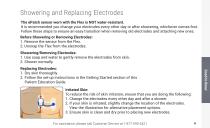
Showering and Replacing Electrodes The ePatch sensor worn with the Flex is NOT water-resistant. It is recommended you change your electrodes every other day or after showering, whichever comes first. Follow these steps to ensure an easy transition when removing old electrodes and attaching new ones. Before Showering or Removing Electrodes: 1. Remove the sensor from the Flex. 2. Unsnap the Flex from the electrodes. Showering/Removing Electrodes: 1. Use soap and water to gently remove the electrodes from skin. 2. Shower normally. Replacing Electrodes: 1. Dry skin thoroughly 2. ollow the set-up...
Open the catalog to page 9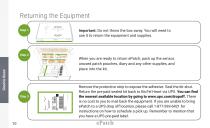
Returning the Equipment Important: Do not throw the box away. You will need to use it to return the equipment and supplies. Step 1 ePatch ™ LEFT Side LEFT Side LEFT Side TO EXPOSE ADHESIVE REMOVE LINER TO EXPOSE ADHESIVE REMOVE LINER TO EXPOSE ADHESIVE REMOVE LINER TO EXPOSE ADHESIVE REMOVE LINER TO EXPOSE ADHESIVE REMOVE LINER TO EXPOSE ADHESIVE REMOVE LINER TO EXPOSE ADHESIVE REMOVE LINER TO EXPOSE ADHESIVE REMOVE LINER TO EXPOSE ADHESIVE REMOVE LINER TO EXPOSE ADHESIVE REMOVE LINER TO EXPOSE ADHESIVE REMOVE LINER TO EXPOSE ADHESIVE REMOVE LINER TO EXPOSE ADHESIVE REMOVE LINER TO EXPOSE ADHESIVE...
Open the catalog to page 10
ePatch® ADDENDUM TO THE PATIENT EDUCATION GUIDE Indications for use ePatch is indicated for use on patients who may be asymptomatic or who may suffer from transient symptoms such as palpitations, shortness of breath, dizziness, light headedness, presyncope, syncope, fatigue, chest pain and/or anxiety. ePatch is intended for use by adolescents 18-21 and adults. Contraindications The sensor is not intended for use on: •Patients with implanted pacemakers. The compatible ECG patch is not intended for use in the following cases: •The compatible ECG patch is not intended for use on patients with known...
Open the catalog to page 11All BioTelemetry catalogs and technical brochures


- Blood pressure monitor
- Automatic blood pressure monitor
- Tablet computer software
- Tablet PC software
- Blood glucose meter
- Patient scale
- Cloud-based software
- Electronic patient scale
- Data management software
- Patient weighing scale with digital display
- Blood pressure monitor with built-in cuff
- Sharing software
- Battery-powered patient scale
- Holter ECG
- Hospital blood glucose meter
- Blood glucose meter with lancing device
- 3-channel Holter monitor
- Telemonitoring station
- Desk blood pressure monitor
- Vital sign telemonitoring station