
- Catalogs
- Brookfield
- JEROME® J505

JEROME® J505

JEROME® J505
The Jerome® J505 Mercury Vapor Analyzer is a compact device designed for detecting mercury vapor in ambient air, with a detection range of 0.05 to 500 micrograms per cubic meter. It employs atomic fluorescence spectroscopy for precise low-level mercury detection.
The analyzer offers three test modes: Standard, Quick, and Search, each with different ranges and resolutions. It features a 3.5-inch color LCD, data logging, and USB connectivity. Powered by an internal NiMH battery, it provides over 10 hours of operation and can be recharged with a 12VDC adapter.
The J505 uses atomic fluorescence spectroscopy, where a mercury light source emits light at 254nm. Mercury atoms absorb and re-emit this light, which is measured to determine concentration.
Operated via a keypad, the device includes a power key, test key, and navigation keys. It features a user-friendly interface with softkeys for menu navigation. To conserve battery, it should be turned off when not in use for long periods.
Regular maintenance involves checking the zero air filter and following a preventive maintenance schedule. The flow system should be inspected regularly.
Factory calibration services are recommended to maintain accuracy.
The J505 is for non-condensing gaseous vapor use only and should not be exposed to liquids or dust. It is not explosion-proof and must be used as specified for safety and accuracy.
Suitable for regulatory compliance detection, ambient air analysis, quality control, and mercury vapor source detection.
Keys are used for navigation and editing within the interface. The ENTER key saves changes, while the ESC key exits without saving. The ◄ and ► keys navigate lists.
Press the power key to turn on the instrument. A 6-minute warmup period is required before testing.
Includes a power connector and a USB port for a keyboard or flash drive, facilitating menu navigation and data export.
Displays date, USB status, power connection, battery charge, and time. Operates in STANDARD, QUICK, and SEARCH modes with different sampling characteristics.
Standard mode offers the highest resolution, Search mode provides continuous readings, and Quick mode allows faster sampling.
Users can manage up to 100 sites, each up to 20 characters long, with test results saved for the active site.
Configuration options include autosampling intervals, time/date settings, and result alarms.
Stores up to 10,000 results, which can be exported to a USB flash drive for analysis.
Results are saved in a text file format for further analysis with spreadsheet software.
Provides access to battery information, distributor contact details, and usage statistics.
Includes detailed battery status and maintenance recommendations.
Displays contact information for Arizona Instrument or authorized distributors.
Shows instrument samples and hours powered up since the last service.
- Zero Air Filter: Used to verify operation by removing mercury vapor. If readings exceed 0.05 μg/m3, change the intake fritware filter.
- Preventive Maintenance Schedule: Includes battery management, weekly fritware changes, and annual calibration and filter replacement.
- Flow System: Replace the intake fritware filter weekly or as needed.
Recommended every 12 months, performed by Arizona Instrument.
Minimal interferences, with slight response to acetone vapor.
Solutions for common issues like power problems and error messages.
Lists part numbers and descriptions for accessories and maintenance parts.
One-year warranty for defects in material or workmanship. Unauthorized opening voids the warranty.
Lists registered trademarks and copyright information for Arizona Instrument LLC.
Catalog excerpts
OPERATION MANUAL MERCURY VAPOR ANALYZER ARIZONA INSTRUMENT LLC 3375 N Delaware Street | Chandler, AZ 85225 USA 800.528.7411 | 602.470.1414 | f 602.281.1745 www.azic.com Email: General – [email protected] International – [email protected] Customer Service – [email protected] ARIZONA INSTRUMENT LLC 3375 N Delaware St | Chandler, AZ 85225 800.528.7411 | [email protected] | www.azic.com MADE IN THE USA AZI P/N 700-0130-F Last update December
Open the catalog to page 1
JEROME® J505 Mercury Vapor Analyzer Operation Manual PROPRIETARY RIGHTS NOTICE This manual contains valuable information and material developed by Arizona Instrument LLC for use with the Jerome® J505 Mercury Vapor Analyzer. No part of this manual can be reproduced or transmitted in any form or by any means, electronic, mechanical or otherwise. This includes photocopying and recording or in connection with any information storage or retrieval system without the express written permission of Arizona Instrument LLC. ALL RIGHTS RESERVED Resisorb® is a registered trademark of Avantor Performance Materials....
Open the catalog to page 2
An up-to-date electronic copy of this manual can be found at www.azic.com Call AZI Customer Service at (800) 528-7411 or (602) 470-1414 if you have any questions. If you prefer, you may send e-mail to [email protected]
Open the catalog to page 3
This manual contains details that will optimize the results and the life of your instrument. Read and refer to the manual for complete details on operation, maintenance and troubleshooting, and data output. The Jerome® J505 is easy to operate and ready for use upon receipt from the factory. • Remove the instrument from the packing material. Retain all packaging materials for any future shipment of the instrument. If the instrument is returned to AZI for any reason, it must be placed in the original packaging materials that have been tested and proven to be effective protection during shipment....
Open the catalog to page 4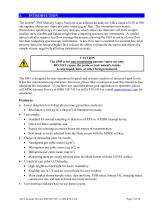
The Jerome® J505 Mercury Vapor Analyzer is an ambient air analyzer with a range of 0.05 to 500 micrograms of mercury vapor per cubic meter (µg/m3 Hg). The instrument uses atomic fluorescence spectroscopy for mercury analysis, which allows the detection cell to be simpler, smaller, more durable and lighter weight than competing spectroscopy instruments. A smaller optical cell also requires less flow to purge the system, allowing the J505 to run at a lower flow rate than competing spectroscopy instruments. A low flow rate is essential for accurate low-level mercury detection because higher flow...
Open the catalog to page 5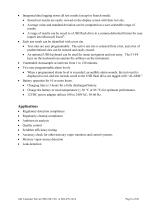
Integrated data logging stores all test results (except in Search mode). • Stored test results are easily viewed on the display screen with their test site. • Average value and standard deviation can be computed on a user-selectable range of results. • A range of results can be saved to a USB flash drive in a comma-delimited format for easy import into Microsoft Excel®. Each test result can be identified with a test site. • Test sites are user programmable. The active test site is selected from a list, and a list of predetermined sites can be entered and easily reused. • An optional USB keyboard...
Open the catalog to page 6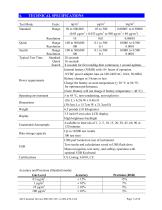
TECHNICAL SPECIFICATIONS Test Mode Standard Units: Range Quick Search Typical Test Time Resolution Range Resolution Range Resolution Standard Quick Search Power requirements Operating environment Dimensions Weight Display Unattended Autosample Data storage capacity (0.05 µg/m ± 0.033 µg/m to 500 µg/m3 ± 40 µg/m3) 10 0.01 0.00001 100 to 500,000 0.1 to 500 0.0001 to 0.500 100 0.1 0.0001 100 to 500,000 0.1 to 500 0.0001 to 0.500 100 0.1 0.0001 28 seconds 16 seconds 8 seconds for first reading then continuous 1 second updates Internal battery (NiMH) with 10+ hours of operation 12VDC power adapter...
Open the catalog to page 7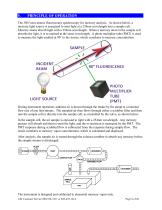
The J505 uses atomic fluorescence spectroscopy for mercury analysis. As shown below, a mercury light source is energized to emit light at a 254nm wavelength into a sample cell. Mercury atoms absorb light with a 254nm wavelength. When a mercury atom in the sample cell absorbs the light, it is re-emitted at the same wavelength. A photo multiplier tube (PMT) is used to measure the light emitted at 90° to the source, which correlates to mercury concentration. During instrument operation, ambient air is drawn through the intake by the pump at a nominal flow rate of one liter/minute. The sampled air...
Open the catalog to page 8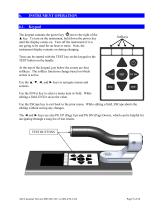
INSTRUMENT OPERATION The keypad contains the power key just to the right of the ▲ key. To turn on the instrument, hold down the power key until the display comes on. Turn off the instrument if it is not going to be used for an hour or more. Note, the instrument display remains on during charging. Tests can be started with the TEST key on the keypad or the TEST button on the handle. At the top of the keypad, just below the screen are four softkeys. The softkey functions change based on which screen is active. Use the ▲, ▼, ◄, and ► keys to navigate menus and screens. Use the ENTer key to select...
Open the catalog to page 9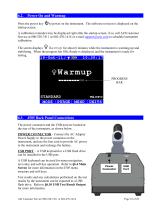
Press the power key startup screen. to power on the instrument. The software revision is displayed on the A calibration reminder may be displayed right after the startup screen; if so, call AZI Customer Service at 800-528-7411 or 602-470-1414 or e-mail [email protected] to schedule instrument calibration. The screen displays Warmup for about 6 minutes while the instrument is warming up and stabilizing. When the progress bar fills, Ready is displayed, and the instrument is ready for testing. J505 Back Panel Connections The power connector and the USB port are located at the rear of the instrument,...
Open the catalog to page 10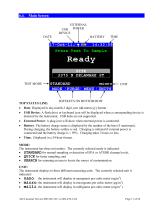
Main Screen EXTERNAL POWER USB DEVICE DATE TEST MODE SOFTKEYS ON BOTTOM ROW TOP STATUS LINE: • Date: Displayed in day-month-2 digit year (dd-mmm-yy) format. • USB Device: A flash drive or keyboard icon will be displayed when a corresponding device is detected by the instrument. USB hubs are not supported. • External Power: A plug icon will show when external power is connected. • Battery: The battery charge status is displayed by the number of the bars (5 maximum). During charging, the battery outline is red. Charging is initiated if external power is connected and the battery charge is < 95%....
Open the catalog to page 11All Brookfield catalogs and technical brochures
 Computrac® Vapor Pro® XL
76 Pages
 Computrac® MAX® 5000XL
95 Pages
 Computrac® MAX® 4000XL
105 Pages
 Jerome® 631-X
50 Pages
 Jerome® 651
68 Pages
 JEROME® J605
56 Pages
 JEROME® 451
80 Pages
 JEROME® J405
61 Pages
 PFT™ Powder Flow Tester
2 Pages
 CAP 1000+™ & CAP 2000+
2 Pages
 Temperature Control Baths
3 Pages

Archived catalogs
 Dial Reading Viscometer
1 Page
 DV1™ Viscometer
2 Pages
- Analysis software
- Visualization software
- Control software
- Automatic balance
- Laboratory testing system
- Reporting software
- Windows software
- Laboratory software
- Laboratory bath
- Monitoring software
- Automated software
- Benchtop laboratory bath
- Design software
- Traceability software
- Control analyser
- Capture software
- Benchtop water bath
- Data management software
- Measurement software
- Analyser for the pharmaceutical industry