
- Catalogs
- Changzhou Xingyun Eletronic Equipment Co., Ltd
- Automatic intelligent Moisture Analyzer

Automatic intelligent Moisture Analyzer

Automatic intelligent Moisture Analyzer
- Security: Guidelines emphasize safe use, including proper power connection, avoiding hazardous environments, and careful handling of flammable or toxic samples.
- Product Composition: Key components include a cooling window, mechanical arm, and sample tray bracket.
- Standard Packing List: Contains mainframe, wind cover, sample pan holder, and additional accessories.
- Operating Requirements: Requires a stable, dry environment with good ventilation.
- Installation of Accessories: Provides instructions for placing the wind cover and sample pan.
- Start Page: Features include printing history, taring, and initiating tests.
- Test Page: Offers options for printing, result conversion, stopping tests, and viewing moisture content over time.
- Parameters Setting: Includes options for stop mode, testing mode, and temperature settings.
- History: Allows viewing and printing of past test results.
- Printer Setting: Configures baud rate and communication mode.
- Calibration: Provides instructions for one-point and multi-point calibration.
- Language: Allows selection of preferred language.
- System Setting: Covers database, date/time, humidity calibration, touch calibration, and factory settings.
Illustrates the installation order for components like the aluminum scale pan and wind cover.
Automatic Open- Functions: Describes the dual motor system for chamber operation.
- Intelligent Sensing: Prevents the chamber from closing on obstructions.
- Notes: Advises on proper use and maintenance.
- Offers recommendations for warm-up, calibration, and power management.
- Includes temperature calibration instrument and optional POS printer for test reports.
- Addresses common issues like chamber errors, weighing inaccuracies, and heating problems, providing solutions.
- Initial Troubleshooting: If the machine malfunctions, power off and then on the indicator. If unresolved, factory repair is needed.
- Note: Do not attempt self-repair when encountering problems.
- Warranty Period: The product is guaranteed for one year.
- Free Repair Conditions: Repairs are free during the warranty period if failures occur under normal use as judged by company staff.
- Chargeable Repair Conditions: Repairs are charged if:
- No guarantee or proof of purchase is provided.
- Damage results from uncommon use.
- Damage occurs during shipping or delivery.
- External factors cause failure and damage.
- Improper use of water or other solutions causes damage.
- Damage is caused by using an incorrect power supply.
- Non-Warranty Parts: Parts such as the halogen lamp, weighing sensor, and sample pan are not covered under warranty.
- Liability: The company is not responsible for accidents caused by the machine.
Catalog excerpts

Automatic intelligent Moisture Analyzer USER MANUAL www.xingyundianzi.com
Open the catalog to page 1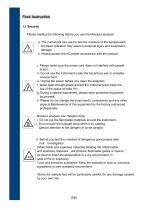
First: Instruction 1.1 Security Please reading the following before you use the Moisture analyzer: a. The instrument can use for test the moisture of the sample,each improper operation may result in personal injury and equipment damage b. Please access the AC power accordance with the manual; c. Please make sure the power cord does not interfere with people action; d. Do not use the instrument under the hazardous,wet or unstable environment ; e. Unplug the power before you clean the analyzer; f. lease keep enough space around the instrument,and keep the top of the space at least 1m; g. During...
Open the catalog to page 3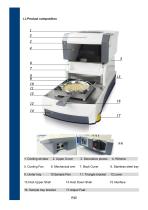
5. Cooling Fan 6. Mechanical arm 7. Back Cover 8. Stainless steel tray 9. Under tray 10.Sample Pan 11. Triangle bracket 12.Lever 13.Host Upper Shell 14.Host Down Shell 15.Interface 16. Sample tray bracket 17.Adjust Feet
Open the catalog to page 4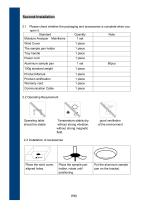
Please check whether the packaging and accessories is complete when you open it. Standard Quantity Note Moisture Analyzer Mainframe 1 set Wind Cover Tray handle Power cord Product Manual Product certification Warranty card Communication Cable Operating table should be stable Temperature stable,dry, without strong vibration, without strong magnetic field. good ventilation of the environment Place the wind cover, aligned holes. Place the sample pan holder, rotate until positioning. Put the aluminum sample pan on the bracket.
Open the catalog to page 5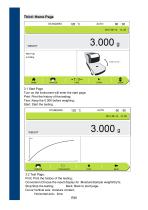
Third: Home Page 3.1 Start Page Turn on the instrument will enter the start page. Print: Print the history of the testing; Tare: Keep the 0.000 before weighing; Start: Start the testing. 3.2 Test Page: Print: Print the history of the testing; Conversion:Choose the result display for :Moisture/Sample weight/dry%; Stop:Stop the testing; Back: Back to start page. Curve:Vertical axis: moisture content, Horizontal axis:time: P 04
Open the catalog to page 6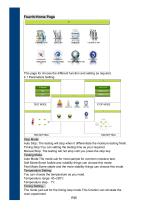
Fourth:Home Page This page for choose the different function and setting as required. 4.1 Parameters Setting Stop Mode: Auto Stop: The testing will stop when it differentiate the moisture testing finish. Timing Stop:You can setting the testing time as your required. Manual Stop: The testing will not stop until you press the stop key. Testing Mode: Auto Mode:The mode suit for most sample for common moisture test; Soft Mode:Some fusible and volatility things can choose this mode; Fast Mode:Some stable and the more stability things can choose this mode. Temperature Setting: You can choose the temperature...
Open the catalog to page 7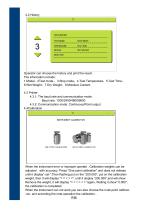
Operator can choose the history and print the result. The information include: 1.Model;2Test mode.;3.Stop mode;4.Test Temperature;5.Test Time; 6.Wet Weight;7.Dry Weight;8.Moisture Content. 4.3 Printer 4.3.1: The baud rate and communication mode. Baud rate: 1200/2400/4800/9600 4.3.2: Communication mode: Continuous/Point output 4.4Calibration When the instrument error or improper operate . Calibration weights can be adjusted with accuracy. Press "One point calibration" and does not release until it display“-cal-”,Then flashing put on the “200.000”, put on the calibration weight, then it will display...
Open the catalog to page 8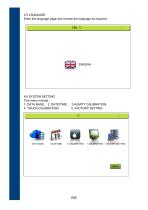
4.5 LANGUAGE Enter the language page and choose the language as required. 4.6 SYSTEM SETTING This menu include: 1. DATA BASE; 2. DATE/TIME ; 3.HUMITY CALIBRATION 4. TOUCH CALIBRATION; 5. FACTORY SETTING
Open the catalog to page 9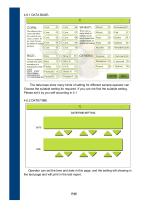
The data base store many kinds of setting for different sample,operator can Choose the suitable setting for required. If you can not find the suitable setting, Please set it by you self according in 4.1 4.6.2 DATE/TIME Operator can set the time and date in this page, and the setting will showing in the test page and will print in the test report.
Open the catalog to page 10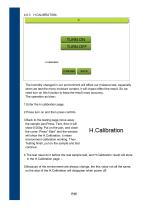
The humidity changed in our environment will effect our moisture test, especially when we test the micro moisture content, it will impact effect the result. So we need turn on this function to keep the result more accuracy. The operation as blow: 1.Enter the H.calibration page; 2.Press turn on and then press confirm; 3.Back to the testing page,move away the sample pan;Press: Tare, then it will show:0.000g; Put on the pan, and close the cover; Press” Start” and the window will show the H.Calibration, it mean environment calibration working. Then Testing finish, put on the sample and test continue....
Open the catalog to page 11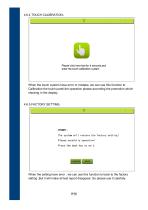
When the touch system have error or mistake, we can use this function to Calibration the touch panel.the operation please according the promotion which showing in the display. When the setting have error , we can use this function to back to the factory setting ,But it will make all test report disappear. So please use it carefully
Open the catalog to page 12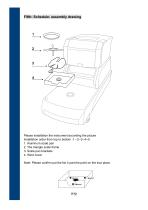
Fifth: Schedule: assembly drawing Please installation the instrument according the picture Installation order from top to bottom :1 --2--3--4--5 1. Aluminum scale pan 2. The triangle scale frame 3. Scale pan brackets 4. Wind cover Note: Please confirm put the No 4 part the point on the true place.
Open the catalog to page 14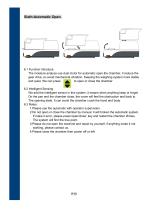
Sixth:Automatic Open. 6.1 Function Introduce The moisture analyze use dual motor for automatic open the chamber, it reduce the gear drive, so avoid mechanical vibration. Keeping the weighing system more stable and quiet. We can press to open or close the chamber 6.2 Intelligent Sensing We add the intelligent sensor in this system, it means when anything keep or forget On the pan and the chamber close, the cover will feel the obstruction and back to The opening state. It can avoid the chamber crush the hand and body. 6.3 Notes: 1.Please use the automatic with operator supervision. 2.Do not open...
Open the catalog to page 15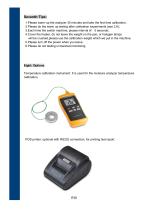
Seventh:Tips: 1.Please warm-up the analyzer 30 minutes and take the first time calibration; 2.Please do the warm up testing after calibration experiments (see 3.6); 3.Each time the switch machine, please interval of 5 seconds; 4.Cover the heater, do not leave the weight on the pan, or halogen lamps will be crushed,please use the calibration weight which we put in the machine. 5.Please turn off the power when you leave. 6.Please do not testing unmanned monitoring Eight: Options Temperature calibration instrument: It is used for the moisture analyzer temperature calibration. POS printer: optional...
Open the catalog to page 16All Changzhou Xingyun Eletronic Equipment Co., Ltd catalogs and technical brochures
 FA-T
FA-T6 Pages
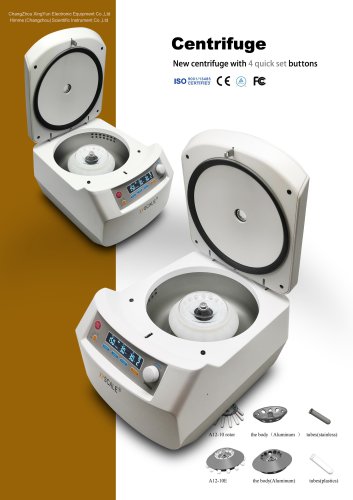 centrifuge
2 Pages


- Agitator
- Automatic balance
- Laboratory balance
- Electronic laboratory balance
- Benchtop laboratory balance
- Benchtop agitator
- Electronic stirrer
- USB laboratory balance
- Precision laboratory balance
- Automatic laboratory balance
- Laboratory balance with digital display
- Scientific research laboratory balance
- Laboratory balance with LCD display
- Laboratory laboratory balance
- Laboratory balance with touch screen
- Weighing system with printer
- Medical laboratory balance
- Analytical laboratory balance
- Laboratory balance with printer
- Moisture balance