

FA-T

FA-T
The FA-T series electronic analytical balances are designed for laboratory and general-purpose weighing. They feature a stainless steel pan, a 5-inch touch panel display, RS232 interface, and internal auto-calibration. The balances support multiple measurement units (mg, g, oz, ct) and have applications in weighing, net weight/tare, below balance weighing, piece counting, density, and percentage tests.
Specifications
Models include FA1004T, FA1204T, FA2004T, FA2104T, and FA2204T, with capacities ranging from 110g to 220g and a division of 0.1mg. The repeatability is 0.2mg, and linearity is 0.5mg. The pan size is 80mm in diameter, and the balance operates within a temperature range of +10°C to 40°C.
Unpacking and Setup
Upon unpacking, ensure all components are present. The balance should be placed on a stable, vibration-free surface, away from temperature extremes and air currents. Level the balance using the adjustable feet and bubble level. Allow the balance to warm up for 30-60 minutes before calibration.
Calibration
Calibration can be performed automatically or manually using standard weights. Follow the on-screen instructions for manual calibration.
Operation Settings
The balance offers settings for sensitivity, speed, and weighing units. It includes functions for piece counting, percentage, and density measurements. The counting function requires a minimum sample weight of 0.5mg.
Data Output
The balance supports data output via RS232 interface, with customizable baud rates and communication styles for printing or computer connection.
Fault Judgment
Common issues include no display, unstable weighing, and incorrect digits. Solutions involve checking power connections, ensuring stable environmental conditions, and performing calibration and leveling.
Maintenance and Troubleshooting
Regular maintenance involves keeping the balance clean and free from obstructions. Troubleshooting guidance is provided for common faults, with steps to resolve issues such as power supply problems and unstable readings.
Catalog excerpts

FA-T Electronic Analytical Balance USER MANUAL
Open the catalog to page 1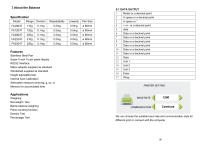
Specification Model PRINTER SETTING Features Stainless Steel Pan Super 5 inch Touch panel display RS232 Interface Mains adapter supplied as standard Windshield supplied as standard Height adjustable feet Internal Auto Calibration Selectable measure units:mg, g, oz, ct Memory for accumulated time Applications Weighing Net weight / tare Below balance weighing Piece counting function Density Test Percentage Test communication j Continue y We can choose the suitable baud rate and communication style for different print or connect with the computer
Open the catalog to page 2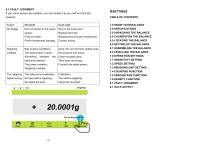
8.1 FAULT JUDGMENT If you come across any problem, you can check it by you self and find the reasons. HSETTINGS TABLE OF CONTENTS 1.0 KNOW YOUR BALANCE 7.3 WEIGHING UNIT SETTING
Open the catalog to page 3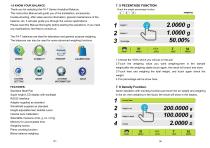
1.0 KNOW YOUR BALANCE Thank you for selecting the FA-T Series Analytical Balance. This Instruction Manual will guide you of the installation, accessories, trouble-shooting, after sales service information, general maintenance of the balance, etc. it will also guide you through the various applications. Please read this Manual thoroughly before starting the operations. If you need any clarifications, feel free to contact us. 7. 5 PECENTAGE FUNCTION Check the weight percentage function: The FA-T balances are ideal for laboratory and general purpose weighing. The balances can also be used for some...
Open the catalog to page 4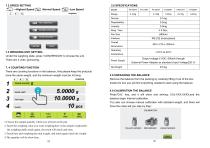
7. 4 COUNTING FUNCTION There are counting functions in the balance, And please keep the products have the same weight, and the minimum weight must be >0.5mg. Sample weight Total weight 3.0 UNPACKING THE BALANCE Remove the balance from the packing by carefully lifting it out of the box. Inside the box you will find everything needed to start using the balance 4.0 CALIBRATION THE BALANCE Press”CAL” key, and it will show and shining: CAL-XXX.XXXX,and the balance begin internal calibration. You also can choose manual calibration with standard weight, and there will have the notes tell you step by...
Open the catalog to page 5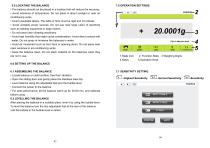
5.0 LOCATING THE BALANCE • The balance should not be placed in a location that will reduce the accuracy. • Avoid extremes of temperature. Do not place in direct sunlight or near air conditioning vents. • Avoid unsuitable tables. The table or floor must be rigid and not vibrate. • Avoid unstable power sources. Do not use near large users of electricity such as welding equipment or large motors. • Do not place near vibrating machinery. • Avoid high humidity that might cause condensation. Avoid direct contact with water. Do not spray or immerse the balances in water. • Avoid air movement such as...
Open the catalog to page 6All Changzhou Xingyun Eletronic Equipment Co., Ltd catalogs and technical brochures
 centrifuge
2 Pages


- Agitator
- Automatic balance
- Laboratory balance
- Electronic laboratory balance
- Benchtop laboratory balance
- Benchtop agitator
- Electronic stirrer
- USB laboratory balance
- Precision laboratory balance
- Automatic laboratory balance
- Laboratory balance with digital display
- Scientific research laboratory balance
- Laboratory balance with LCD display
- Laboratory laboratory balance
- Laboratory balance with touch screen
- Weighing system with printer
- Medical laboratory balance
- Analytical laboratory balance
- Laboratory balance with printer
- Moisture balance