
- Catalogs
- Cisco Systems
- Cisco Board Pro

Cisco Board Pro
Cisco Board Pro
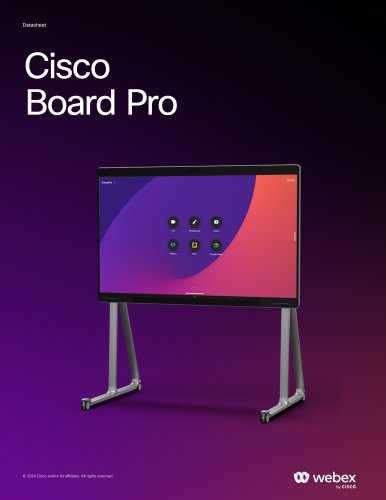
The Cisco Board Pro is an all-in-one device designed for hybrid teamwork, integrating video conferencing, digital whiteboarding, and content sharing. It is available in 55-inch and 75-inch models and supports both Cisco RoomOS for Webex and Microsoft Teams Rooms, ensuring flexibility and interoperability with third-party meeting apps.
- Design: Features a human-centric design with flexible mounting options and magnetic pens.
- Presentations: Supports wireless sharing via Webex App, HDMI, and USB-C inputs for 4k presentations.
- Whiteboarding: Includes native Webex and Microsoft Whiteboard apps with cloud storage and annotation capabilities.
- Web Apps: Can run web-based applications like Microsoft Office 365 and Trello directly on the device.
- Smart Meetings: Equipped with AI-powered video and audio, dual 4k cameras, and noise removal for enhanced meetings.
- Digital Signage: Displays static or interactive content when not in use.
- Smart Integrations: Offers room analytics and control via Cisco Room Navigator.
- Performance: Supports up to 4kp60 resolution and 20 Mbps bandwidth.
- Cloud and Premises: Provides flexible registration options with cloud optimization.
- BYOD USB-C Passthrough: Allows access to Board Pro's features through a USB-C connection.
The Cisco Board Pro is distinguished by its cloud-first deployment, app-enabled features, and activity-based capabilities, allowing seamless work transitions across devices and time zones, managed securely through the Control Hub.
The Board Pro is compatible with RoomOS 10.11 or later and Microsoft Teams Rooms on Android. It includes a 55- or 75-inch 4k LCD display, dual 4k cameras, a 14-element microphone array, integrated speakers, and stylus pens. Optional hardware includes various microphones, network cables, and stands.
Supports activation and connection to Webex, native registration with Cisco UCM or Expressway, and interoperability with third-party video meeting platforms like Microsoft Teams, Google Meet, and Zoom.
Offers 4k UHD resolution with a wide viewing angle and supports various video standards and resolutions. Includes dual 4k cameras with automatic tracking and zoom features.
Includes advanced audio features like Acoustic Echo Cancellation, AI-Powered Noise Removal, and beamforming microphones. Supports multiple audio inputs and outputs, including Bluetooth connectivity.
Supports Ethernet and Wi-Fi connections, with various network protocols and security features. Also supports IPv6 and offers secure management options.
Has specific power ratings and supports energy-saving features like setting office hours. Operates within a defined temperature and humidity range.
Supports 5-way embedded SIP/H.323 conferencing with adaptive MultiSite features, allowing for high-resolution video and content sharing.
Complies with various directives including EMC, Radio Equipment, Low Voltage, RoHS, and WEEE. It is NRTL approved and FCC listed, designed with sustainability in mind using circular design principles and recyclable materials.
Supports RoomOS and Microsoft Teams Rooms, offering native experiences for Webex and Microsoft Teams meetings. Supports video standards like H.264 AVC and H.265 HEVC, and allows content sharing at resolutions up to 3840 x 2160. Features include wireless sharing, HDCP support, USB passthrough, and AI noise removal.
Available in two sizes, 55 and 75 inches, with various mounting and stand options. Product dimensions and weights are specified for different configurations.
Provides detailed part numbers and compliance model numbers for different configurations, including options for stands, mounts, and accessories.
Comes with a 90-day limited liability warranty. Cisco offers a range of services and support to maximize the value of the collaboration investment.
Cisco emphasizes environmental sustainability in its product design and offers a takeback and reuse program. Provides flexible payment solutions through Cisco Capital to facilitate technology acquisition.
Catalog excerpts

© 2024 Cisco and/or its affiliates. All rights reserved.
Open the catalog to page 1
06 Cisco Board Pro features and benefits 10 Cisco Board Pro prominent features/ differentiators 11 Cisco Board Pro support 31 Cisco services and support © 2024 Cisco and/or its affiliates. All rights reserved. webex by cisco
Open the catalog to page 2
Cisco Board Pro is an all-in-one room device that provides everything you need for hybrid teamwork: it brings your local and remote teams together to collaborate in a connected digital workspace. Recognized with a Red Dot Design Award and a UC Award as “Best Meeting Room Product”, Board Pro is a purpose-built solution combining premium visual collaboration, video conferencing, ideation, and co-creation, allowing your teams to join video-first meetings, digitally whiteboard, wirelessly present, and share content. Whether you run the native Cisco RoomOS experience for Webex-first video conferencing...
Open the catalog to page 3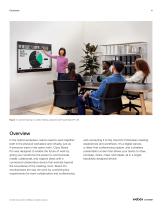
Figure 1. Content sharing in a video meeting using the wall-mount Board Pro 55 Overview In the hybrid workplace, teams need to work together both in the physical workplace and virtually, just as if everyone were in the same room. Cisco Board Pro was designed to enable the future of work by giving your workforce the power to communicate, create, collaborate, and capture ideas with a connected collaboration device that extends beyond the boundaries of the meeting room. Board Pro revolutionizes the way we work by combining key requirements for team collaboration and conferencing © 2024 Cisco and/or...
Open the catalog to page 4
Figure 2. Digital whiteboarding session in an open studio using the Board Pro 75 Available in 55-inch and 75-inch models, the Cisco Board Pro helps your teams collaborate in a variety of meeting spaces and connect with remote members to become more productive. Board Pro draws its power from the RoomOS platform for the native Webex experience and video interoperability, while also provides the flexibility to run the device on Microsoft Teams Rooms. At the same time, Board Pro brings you optionality by seamlessly working together with your most common third-party meeting apps and productivity tools...
Open the catalog to page 5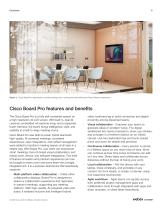
Figure 3. Cisco Board Pro deployed in a small meeting room, running the native Microsoft Teams Rooms experience Cisco Board Pro features and benefits The Cisco Board Pro is a fully self-contained system on a high-resolution 4k LCD screen. With built-in, dual 4k cameras, embedded microphone array, and a capacitive touch interface, the board brings intelligence, style, and usability to small-to-large meeting rooms. Cisco Board Pro was built to power hybrid teamwork: high-quality, AI-powered meetings, consistent experiences, open integrations, and unified management were added to transform meeting...
Open the catalog to page 6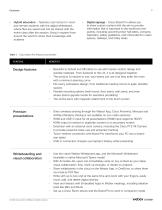
• Hybrid education - Teachers can instruct in-room and remote students with the digital whiteboard, where files are saved and can be shared with the entire class after the session. Bring in experts from around the world to share their knowledge with students • Digital signage - Cisco Board Pro allows you to show custom content with the aim to provide information that is important to the workforce and guests, including upcoming town hall dates, company calendars, safety guidelines, and critical alerts in open spaces, hallways, and lobby areas Table 1. Cisco Board Pro features and benefits Design...
Open the catalog to page 7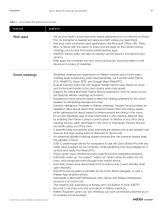
Datasheet Cisco Board Pro features and benefits 8 Table 1. Cisco Board Pro features and benefits Web apps • Set up your team’s most used web-based applications to run directly on Board Pro; no computer is needed and apps are right where you need them. • Add your most commonly used applications like Microsoft Office 365, Trello, Miro, or Mural with the option to share and annotate on the content during meetings and access third-party whiteboarding apps. • WebRTC allows video call apps to natively use the board’s microphone and camera. • Web apps are contained and only active during use, ensuring...
Open the catalog to page 8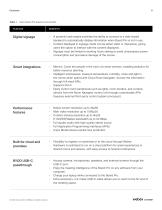
Table 1. Cisco Board Pro features and benefits Digital signage • a powerful web engine provides the ability to connect to a web-based backend to automatically display information when Board Pro is not in use. • Content displayed in signage mode can be either static or interactive, giving users the option to interact with the content displayed. • Signage must be limited to working hours setting to avoid unnecessary power consumption and premature damage of the screen. Smart integrations • Metrics: Count the people in the room via smart sensors, enabling analytics for better resource planning....
Open the catalog to page 9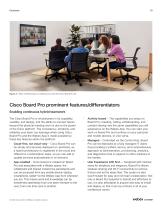
Figure 4. Video conferencing in a meeting room with the Cisco Board Pro 55 Cisco Board Pro prominent features/differentiators Enabling continuous hybrid teamwork The Cisco Board Pro is revolutionary in its capability, usability, and design, and the ability to connect teams beyond the physical meeting room is due to the power of the Cisco platform. The consistency, simplicity, and reliability your team can leverage when using Cisco Board Pro and the Webex App is made possible by these key features within the platform: • Cloud-first, not cloud-only – Cisco Board Pro can be simply and securely deployed...
Open the catalog to page 10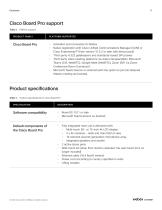
Table 2. Platform support PRODUCT FAMILY PLATFORM SUPPORTED Cisco Board Pro • Activation and connection to Webex • Native registration with Cisco Unified Communications Manager (UCM) or Cisco Expressway™ (from version 10.5.2 or later with device pack) • Third-party H.323 gatekeepers and standards-based SIP proxies • Third-party video meeting platforms via video interoperability: Microsoft Teams (CVI, WebRTC), Google Meet (WebRTC), Zoom (SIP, via Zoom Conference Room Connector). • Microsoft Teams Rooms on Android (with the option to join full-featured Webex meeting and events). Table 3. Product...
Open the catalog to page 11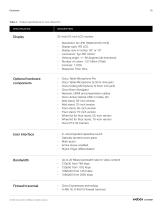
Table 3. Product specifications for Cisco Board Pro • Display size in inches: 55” or 75” • Viewing angle: +/- 89 degrees (all directions) • Number of colors: 1.07 billion (10bit) Optional hardware components Cisco Table Microphone Pro Cisco Table Microphone (3.5mm mini jack) Cisco Ceiling Microphone (3.5mm mini jack) Cisco Room Navigator Network, HDMI and presentation cables Cisco Active Optical USB-C Cable, 9m Wall stand, 55-inch version Wall stand, 75-inch version Floor stand, 55-inch version Floor stand, 75-inch version Wheel kit for floor stand, 55-inch version Wheel kit for floor stand,...
Open the catalog to page 12All Cisco Systems catalogs and technical brochures
 Cisco Desk Mini
13 Pages
 Cisco Desk Camera 1080p
11 Pages
 Cisco Desk Camera 4K
10 Pages
Archived catalogs
 Webex® Board 55S
14 Pages
 Webex® Board
14 Pages
 Webex® Desk Pro
14 Pages
 Webex Desk Camera
9 Pages
 Webex® Desk
14 Pages
 Cisco Spark Board 70
7 Pages
 Cisco Spark Board 55
7 Pages
 Cisco HyperFlex HX220c M4
5 Pages
 Virtual Patient Observation
2 Pages
 Healthcare Contact Center
2 Pages
 Cisco HyperFlex HX240c M4
5 Pages


- Analysis software
- Visualization software
- Control software
- Reporting software
- Windows software
- HDMI display
- DisplayPort display
- Monitoring software
- Planning software
- Cloud-based software
- Data management software
- AI-assisted software
- Artificial intelligence software
- 4K UHD display
- Web-based software
- Sharing software
- Server-based software
- Real-time software
- Data analysis software
- Security software