
- Catalogs
- Clarius Mobile Health
- Quick Start Guide


Quick Start Guide
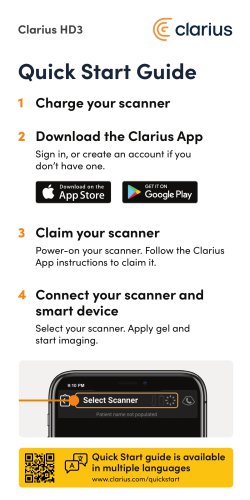
Quick Start Guide
- Download the Clarius App: Sign in or create an account if you don't have one.
- Charge Your Scanner: Ensure the Clarius HD3 scanner is fully charged.
- Connect Your Scanner and Smart Device: Select your scanner, apply gel, and start imaging.
- Claim Your Scanner: Power on your scanner and follow the app instructions to claim it.
- Adjust Gain: Slide left-right to adjust.
- Adjust Depth: Slide up-down to adjust.
- Capture and Measure: Use the app to capture images and take measurements.
- Exam Management: Manage your exams through the app.
- Switch Scanner & Clinical Application: Easily switch between different scanners and applications.
- Freeze: Use the freeze function to pause imaging.
- Clarius Classroom: Access on-demand videos to improve ultrasound skills at clarius.com/classroom.
- Video Tutorials: Learn basic scanning functions with short video tutorials at clarius.com/tutorials.
- User Manual: For full instructions, symbol glossary, and safety information, read the Clarius Ultrasound Scanner User Manual at clarius.com/manuals.
- Contact Information: For support or to request a printed manual, visit clarius.com/support/contact.
Catalog excerpts
Sign in, or create an account if you don't have one. V AppStore m F* Google Play Power-on your scanner. Follow the Clarius App instructions to claim it. Select your scanner. Apply gel and start imaging.
Open the catalog to page 1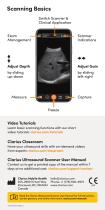
Scanning Basics Switch Scanner & Clinical Application Exam Management Scanner Indications Adjust Depth Adjust Gain Capture Freeze Video Tutorials Learn basic scanning functions with our short video tutorials: clarius.com/tutorials Clarius Classroom Hone your ultrasound skills with on-demand videos from experts: clarius.com/classroom Clarius Ultrasound Scanner User Manual Contact us to get a printed copy of the manual within 7 days at no additional cost: clarius.com/support/contact Clarius Mobile Health 205-2980 Virtual Way Vancouver, BC, V5M4X3 Canada [email protected] Phone: +1 (778) 800-9975...
Open the catalog to page 2All Clarius Mobile Health catalogs and technical brochures
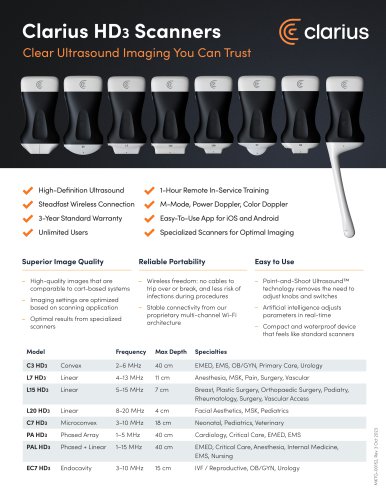 Clarius Sell Sheet
4 Pages


- CLARIUS ultrasound system
- CLARIUS B/W ultrasound system
- CLARIUS color doppler ultrasound system
- CLARIUS portable ultrasound system
- Multipurpose ultrasound imaging system
- Radiology software
- Visualization software
- Convex-array ultrasound system
- Linear-array ultrasound system
- Veterinary ultrasound system
- Multipurpose veterinary ultrasound system
- Portable veterinary ultrasound system
- CLARIUS hand-held ultrasound system
- CLARIUS wireless probe ultrasound system
- CLARIUS spectral doppler ultrasound system
- Color doppler veterinary ultrasound system
- Phased-array ultrasound system
- B/W veterinary ultrasound system
- Endocavitary ultrasound system
- Small animal veterinary ultrasound system