
- Catalogs
- Cortex-Dental Implants Industries
- NON-TOUCH PACKAGE


- Products
- Catalogs
- News & Trends
- Exhibitions
NON-TOUCH PACKAGE

NON-TOUCH PACKAGE
Overview
This document provides the latest update from Cortex, detailing recent developments, technical specifications, and procedural changes.
Main Sections
1. Specifications
The update outlines key technical parameters including system performance metrics, hardware requirements, and software compatibility. Critical specifications emphasize enhanced processing speeds, increased memory capacity, and improved integration capabilities.
2. Procedures
New operational procedures are introduced to optimize system deployment and maintenance. These include step-by-step guidelines for installation, configuration, and troubleshooting to ensure consistent performance and reliability.
3. Standards and Compliance
The document highlights adherence to industry standards and regulatory requirements. It specifies compliance with relevant safety protocols, data security measures, and quality assurance benchmarks.
4. Recommendations and Best Practices
Recommendations focus on maximizing system efficiency and longevity. Best practices cover routine maintenance schedules, software update protocols, and user training initiatives.
Key Data and Insights
Tables and charts included in the update summarize performance improvements, error rate reductions, and user feedback statistics. These visual aids underscore the effectiveness of recent enhancements and guide future development priorities.
Critical Information
- System upgrades require adherence to new installation procedures to avoid compatibility issues.
- Compliance with updated security standards is mandatory to protect data integrity.
- Regular maintenance and timely software updates are essential for optimal system operation.
Catalog excerpts
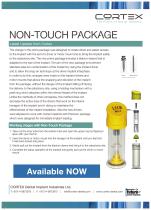
The Future of Dental Implants NON-TOUCH PACKAGE Latest Update from Cortex The change in the prime package was designed to create direct and easier access to the implant with the aid of a driver or motor mount and to bring the implant safely to the osteotomy site. The new prime package includes a titanium sleeve that is adapted to the size of the implant. The aim of the new package is to prevent stainless steel ion contamination of the implant by using the implant driver and to allow the snap on technique at the driver implant interphase. In order to do this, changes were made on the implant drivers and motor mounts that allows the snapping and elevation of the implant from the package, without the danger of the implant falling off during the delivery to the osteotomy site, using a holding mechanism with a peek ring which attaches within the internal thread of the implant. Unlike the methods of other companies, this method does not decrease the active area of the drivers that work on the interior hexagon of the implant and in doing so maintains the effectiveness of the implant installation. Also the new drivers were adjusted to work with Cortex Implants with Premium package which were designed for immediate implant loading. Working stages with Non-Touch Package 1. Take out the inner tube from the exterior tube and open the upper cap by flipping it open with your thumb. 2. Insert the driver or motor mount into the hexagon of the implant until you feel that it has been locked into place. 3. Gently pull out the implant from the titanium sleeve and bring it to the osteotomy site. 4. Complete the setup operation of the implant and gently pull out the driver or motor Motor Mount ! Gfdeted seperatety CORTEX Dental Implant Industries Ltd.
Open the catalog to page 1All Cortex-Dental Implants Industries catalogs and technical brochures
 Product Catalogue 2015
25 Pages
 Magix
Magix2 Pages
 Product Classification
1 Page
 Surgical Manual
37 Pages
 Synthe-Bone
6 Pages
 DRILL STOPPER KIT
1 Page


- Implant abutment
- Titanium implant abutment
- Straight implant abutment
- Dental surgery instrument kit
- Titanium dental implant
- Internal implant abutment
- Conical dental implant
- Angled implant abutment
- Drill bit
- Straight dental implant
- Dental implant surgery instrument kit
- Hexagonal implant abutment
- Screw implant abutment
- Dental implant analog
- Internal hexagon implant abutment
- Dental drill bit
- Hexagonal dental implant
- Narrow dental implant
- Multi-unit implant abutment