

- Company
- Products
- Catalogs
- News & Trends
- Exhibitions
cyclotest mySense
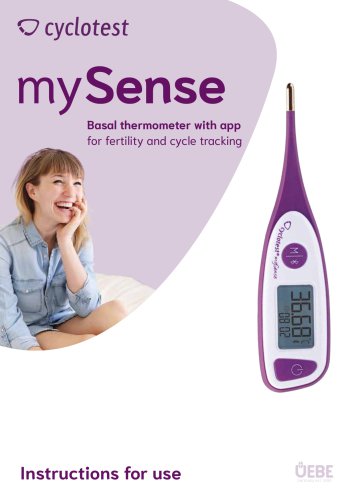
cyclotest mySense
The cyclotest mySense is a digital basal thermometer for self-measuring basal body temperature, primarily for fertility and cycle tracking. It connects to the cyclotest mySense app via Bluetooth 4.0 and is intended for use exclusively with this app.
Use the device as instructed, keeping it away from dirt, dust, extreme temperatures, and strong electromagnetic fields. Keep out of reach of children due to small parts. Allow the device to acclimate if stored in extreme temperatures and remove the battery if not used for long periods.
The thermometer features a gold-plated measuring tip, illuminated display, and buttons for power and data transfer. Initial setup requires downloading the mySense app and registering the device with an activation code. Synchronization of date and time with the app is done via Bluetooth.
Place the probe under the tongue and wait for a beep or flash to indicate completion. Measurements should be taken immediately after waking up, following at least 5 hours of sleep. The device can store up to 30 measurements if not immediately transferred to the app.
Data can be transferred manually if not done automatically. The device stores up to 30 readings, which can be recalled directly from the thermometer.
The device uses a CR2032 lithium battery. A flashing battery icon indicates low battery, and the device will not function if the battery is drained. After changing the battery, resynchronize the device with the app.
Common errors include temperature readings outside the range, ambient temperature issues, and full memory. Solutions involve checking battery placement, ensuring proper operating conditions, and transferring data to the app.
The thermometer measures temperatures between 32.00°C and 43.99°C with high accuracy. It operates best in ambient temperatures between 10°C and 40°C.
Repairs should only be performed by the manufacturer or authorized personnel. Contact UEBE Medical GmbH for assistance.
Follow local regulations for disposing of electronic devices and batteries.
- Operating temperature adjustment time: 30 minutes
- Battery: 1 x CR2032, 3.0 V, mercury-free
- Battery life: Approximately 400 measurements
- Data transfer: Bluetooth 4.0 LE (low energy)
- IP classification: IP67 (dust tight, protection against temporary submersion)
- Expected service life: 5 years
- Dimensions: 137 mm (L) x 32 mm (W) x 15 mm (H)
- Weight: 27 g with battery
Recommended technical inspection every 5 years by UEBE Medical GmbH or authorized services.
Complies with Council Directive 93/42/EEC concerning medical devices. CE mark 0123 (TÜV SÜD Product Service GmbH).
Instructions provided for Bluetooth connection error and sensor error.
Clean with a soft cloth and isopropyl alcohol diluted with water or cold, soapy water. Do not use aggressive cleaning agents or solvents. The thermometer can be immersed in water or disinfectant but not sterilized by boiling or autoclave. Avoid scratching the measuring sensor and display. Wait 5 minutes after cleaning with alcohol before next use.
2-year warranty from the date of purchase for defects. Warranty excludes normal wear and tear, improper handling, and disassembly. Warranty claims require proof of purchase and description of the complaint. Return costs are borne by the sender.
UEBE Medical GmbH, Service-Center, Zum Läger 1, 97900 Külsheim, Germany. Website: www.cyclotest.de Email: [email protected]
Catalog excerpts
Basal thermometer with app for fertility and cycle tracking
Open the catalog to page 1
Initial setup of the device 6 Manually transferring data to the mySense app 11 Recalling saved measurement values 11 Battery display/changing the battery 12 The device transmits the measured values to the cyclotest mySense app via a Bluetooth 4.0 interface. The device is intended exclusively for use with the cyclotest mySense app. The device cannot be operated without the cyclotest mySense app or with other apps.
Open the catalog to page 2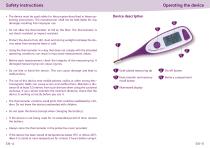
Operating the device • The device must be used solely for the purpose described in these operating instructions. The manufacturer shall not be held liable for any damages resulting from improper use. • Do not allow the thermometer to fall on the floor. The thermometer is not shock-resistant or impact-resistant. • Protect the device from dirt, dust and strong sunlight and keep the device away from excessive heat or cold. • Using the thermometer in a way that does not comply with the intended operating conditions can result in inaccurate measurement values. • Before each measurement, check the...
Open the catalog to page 3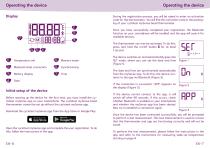
Operating the device Of Memory mode Synchronising Time Display Temperature unit Bluetooth data connection Battery display Date Before starting up the device for the first time, you must install the cyclotest mySense app on your smartphone. The cyclotest mySense basal thermometer cannot be set up without the cyclotest mySense app. Download the cyclotest mySense app from the App Store or Google Play. m App Store r* Google Play Open the cyclotest mySense app and complete the user registration. To do this, follow the instructions in the app. During the registration process, you will be asked to enter...
Open the catalog to page 4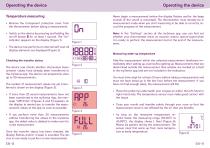
Temperature measuring Never begin a measurement before the display flashes and/or the beep sounds (if the sound is activated). The thermometer must already be in measurement mode when you start measuring to be able to correctly record the progress of the measurement. • Remove the transparent protective cover from the thermometer before taking a measurement. • Switch on the device by pressing and holding the on/off button for at least 1 second. The “On” indicator appears on the display (Figure 1). • The device now performs an internal self-test; all display elements are displayed (Figure 2). Checking...
Open the catalog to page 5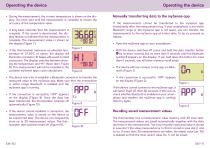
• During the measurement, the current temperature is shown on the display. You must wait until the measurement is complete to ensure the accuracy of the temperature value. • A long beep indicates that the measurement is complete. If the sound is deactivated, the display flashes to indicate that the measurement is complete. The measurement value is shown on the display (Figure 7). • If the thermometer measures an elevated temperature of 37.50°C or above, the display will illuminate red and/or 10 beeps will sound in rapid succession. The display switches between showing the temperature and “HI”...
Open the catalog to page 6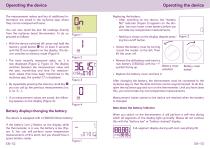
Operating the device Operating the device The measurement values and lots of additional information are saved in the mySense app, where they can be analysed with ease. You can also recall the last 30 readings directly from the mySense basal thermometer. To do so, proceed as follows: • With the device switched off, press and hold the memory recall button © for at least 5 seconds until the (El icon appears on the display. The device switches to memory mode (Figure 1) • The most recently measured value, no. 1, is now displayed (Figure 2, Figure 3). The display switches between the measurement value...
Open the catalog to page 7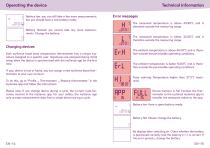
Technical information •[ Battery low: you can still take a few more measurements, but you should have a new battery ready. Error messages Battery drained: you cannot take any more measurements. Change the battery. Changing devices Each mySense basal body temperature thermometer has a unique signature assigned to a specific user. Signatures are assigned during initial setup when the device is synchronised with the mySense app for the first time. If your device is lost or faulty, you can assign a new mySense basal thermometer to your user account. To do this, go to “Profile ^ Thermometer ^ Replace...
Open the catalog to page 8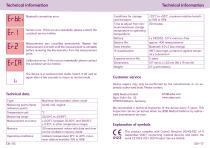
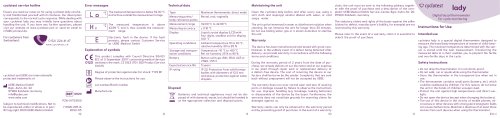
Technical information Conditions for storage and transport: Technical information Erbt* Bluetooth connection error Sensor error. If this occurs repeatedly, please contact the cyclotest service hotline. Measurement was cancelled prematurely. Repeat the measurement and wait until the measurement is complete before removing the thermometer from the measurement point. Calibration error. If this occurs repeatedly, please contact the cyclotest service hotline. The device is in technical test mode. Switch it off and on again after a few seconds to return to normal mode. Device repairs may only be performed...
Open the catalog to page 9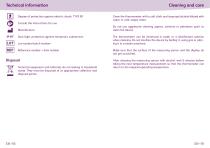
Technical information Degree of protection against electric shock: TYPE BF Consult the instructions for use Manufacturer IP 67 Dust tight, protection against temporary submersion Lot number/batch number Reference number = item number Disposal Technical equipment and batteries do not belong in household waste. They must be disposed of at appropriate collection and disposal points. Cleaning and care Clean the thermometer with a soft cloth and isopropyl alcohol diluted with water or cold, soapy water. Do not use aggressive cleaning agents, solvents or petroleum spirit to clean the device. The thermometer...
Open the catalog to page 10
The cyclotest service hotline The device has been manufactured and tested with all due care. Nevertheless, in the event of defects upon delivery, we provide a warranty under the following conditions: During the warranty period of 2 years from the date of purchase, we remedy such defects at our discretion and at our expense in our plant through repair work or replacement delivery of a defect-free device. The warranty does not cover normal wear and tear of wearing parts or damage caused by failure to observe the instructions for use, improper handling (e.g. unsuitable power sources, breakage, leaking...
Open the catalog to page 11All Cyclotest catalogs and technical brochures
 cyclotest lady
2 Pages
 portfolio UEBE medical
52 Pages
- Cassette rapid test
- Immunoassay rapid diagnostic test
- Blood pressure monitor
- Automatic blood pressure monitor
- Medical thermometer
- Digital thermometer
- Urine rapid diagnostic test
- Rapid bacteria test
- Test strip
- Blood pressure monitor with adult cuff
- Thermometer with audible signal
- Self-test rapid test
- Probe thermometer
- Gynecology rapid test
- Urine test strip
- Waterproof thermometer
- Oral thermometer
- Blood pressure monitor with rechargeable battery
- Pregnancy test