
- Catalogs
- D TECH DENTAL TECHNOLOGIES
- Printer Settings 2024

Printer Settings 2024

Printer Settings 2024
Overview
This document provides comprehensive printer settings and configurations for multiple 3D printers used in dental applications with D Tech Dental Technologies resins. It covers validated parameters for various printer models, resin types, and dental applications such as dental models, casts, surgical guides, and crown & bridge components.
1. Printer Models and Compatibility
Eight 3D printer models are detailed with their compatibility across different resin types and dental applications:
- Asiga Max UV 385
- Ackuretta SOL
- Shining 3D L4K
- Phrozen Sonic Mini 4K
- Phrozen Sonic Mini 8K
- Phrozen Sonic Mighty 4K
- Anycubic Photon Mono 4K
- Elegoo Saturn 2 8K
Each printer is matched with resin types such as Model Pro, Model Std, Model Basic, Model Hard, Dental Cast, Cast-L, Crown & Bridge, and Surgical Guide. Exposure times for layer curing range typically from 50 to 150 seconds depending on printer and resin.
2. General Recommendations and Notes
- D Tech resins are pre-validated for use with these printers.
- Users should download and import specific configuration files (.ini or equivalent) from official sources.
- Recommended slicing software versions include Asiga Composer V2.0, Ackuretta Alpha AI V5.1.1, Shining Accuware V3.1.8.35, and Phrozen Chitubox V1.9.6.
- For older printers with diminished light intensity, increase layer curing time by 10-15% to prevent print failures.
3. Printer-Specific Settings
- Asiga Max UV 385: Use Composer V2.0; exposure times 50-150 seconds; import validated .ini files.
- Ackuretta SOL: Use Alpha AI V5.1.1; select printer, brand, and resin from dropdowns; exposure times 50-150 seconds; increase curing time by 10-15% if needed.
- Shining 3D L4K: Use Accuware V3.1.8.35; adjust fill and boundary exposure times (e.g., 3.6 to 4 seconds for 50µm layers); slow Z-axis return speed from 90 to 72; profiles for 50µm and 100µm layers.
- Phrozen Sonic Mini 4K & 8K: Use Chitubox V1.9.6; exposure times typically 50 seconds per layer; supports multiple resin types and 50µm layer height.
- Phrozen Sonic Mighty 4K: Use Chitubox V1.9.6; supports Model Basic and Surgical Guide resins; layer heights 50µm and 100µm; exposure times 50-100 seconds.
- Anycubic Photon Mono 4K & Elegoo Saturn 2 8K: Compatibility and exposure times listed; detailed settings provided separately.
4. Key Parameters and Adjustments
- Layer height: Commonly 50µm (0.05mm) or 100µm (0.1mm) depending on resin and printer.
- Exposure times: Vary by printer and resin, generally 50-150 seconds per layer.
- Software profiles: Must be selected or modified to match resin and printer specifications.
- Light intensity degradation: Increase curing time by 10-15% for older printers.
5. Best Practices
- Keep slicing software updated to the latest versions.
- Download and import official or validated configuration files for optimal print quality.
- Adjust exposure times based on printer age and resin type to avoid print failures.
- Follow manufacturer recommendations for layer height and exposure settings.
6. Specific Settings for Anycubic Photon Mono 4K and Elegoo Saturn 2 8K
- Anycubic Photon Mono 4K: Uses Anycubic Photon Workshop V2.2.16; layer height fixed at 50µm.
- Elegoo Saturn 2 8K: Uses Chitubox V1.9.6; layer height fixed at 50µm.
- Compatible with multiple dental materials including Dental Cast-L, Dental Cast-Purple, Model Pro, Model Std, Model Basic, Model Hard, Surgical Guide, and Crown & Bridge.
- Document control details: Origin date 22 January 2024; revision dates 6 February 2024 (Anycubic) and 7 February 2024 (Elegoo); revision numbers Anycubic - 01, Elegoo - 00.
Summary
This document is a detailed technical guide for dental professionals and technicians to configure various 3D printers with D Tech Dental resins. It highlights validated printer-resin combinations, software compatibility, critical parameters such as layer height and exposure times, and practical adjustments to ensure high-quality dental prints. Following the specified settings and best practices will optimize print accuracy and reliability across multiple dental applications.
Catalog excerpts

Asiga Max UV 385 Phrozen Sonic Mini 8K Ackuretta Sol Phrozen Sonic Mighty 4K Shining 3D L4K Anycubic Photon Mono 4K Phrozen Sonic Mini 4K Elegoo Saturn 2 8K
Open the catalog to page 1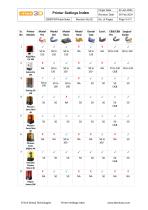
Printer Settings Index QMS/PS/Printer/Index Printer Models Revision Date Model Basic Model Hard Dental Cast Origin Date C&B/C&B Surgical Pro Guide Phrozen Sonic Mini 4K Phrozen Sonic Mini 8K 6 Phrozen Sonic Mighty 4K Anycubic Photon Mono 4K
Open the catalog to page 2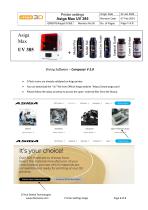
Slicing Software - Composer V 2.0 • D Tech resins are already validated on Asiga printer • You can download the "ini" file from Official Asiga website "https://www.asiga.com/ • Please follow the steps as below to access the open- material files from the library. 3D Printers vMaterials vSoftware vIndustries vLearn v Open Material Library It’s your choice! Over 500 materials to choose from. Select the material manufacturer of your choice below and see which materials are compatible and ready for printing on our 3D printers. Explore Open Material Library Contact a 3D Printing Expert D Tech Dental...
Open the catalog to page 3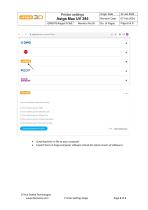
List of available material profiles: D-Tech 3DAccuprint C&B D-Tech 3DAccuprint Dental Cast D-Tech 3DAccuprint Model Pro D-Tech 3DAccuprint Model Standard D-Tech 3DAccuprint Surgical Guide visit - dtechasia.com Download Material Profiles • Download the ini file to your computer • Import them in Asiga composer software (check for latest version of software) D Tech Dental Technologies www.dtechasia.com Printer Settings Asiga
Open the catalog to page 4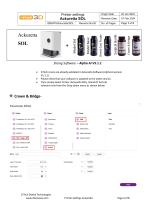
Slicing Software - Alpha AI V5.1.1 • D Tech resins are already validated in Ackuretta Software (Alpha AI version V5.1.1) • Please check that your software is updated to the latest version. • Then simply Select Printer (Ackuretta SOL), Brand (D Tech) & relevant resin from the Drop-down menu as shown below. SOL D Tech Dental Technologies www.dtechasia.com Printer Settings Ackuretta
Open the catalog to page 5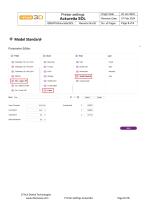
V Model Standard- D Tech Dental Technologies www.dtechasia.com Printer Settings Ackuretta
Open the catalog to page 6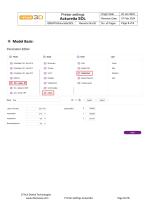
♦♦♦ Model Basic- D Tech Dental Technologies www.dtechasia.com Printer Settings Ackuretta
Open the catalog to page 7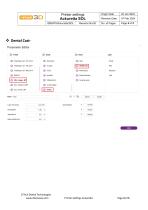
♦ Dental Cast- D Tech Dental Technologies www.dtechasia.com Printer Settings Ackuretta
Open the catalog to page 8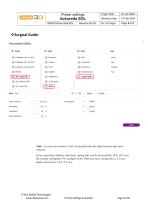
Note - In case your printer is old, it is possible that the light intensity may have reduced. If you experience failures, then layer curing time can be increased by 10 to 15% over the normal curingtime. For example, if the 50micron layer curing time is 2.2 secs, please increase to 2.4 or 2.5 secs. D Tech Dental Technologies www.dtechasia.com Printer Settings Ackuretta
Open the catalog to page 9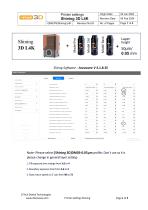
Layerheight50pm/0.05 mm Slicing Software - Accuware V 3.1.8.35 Note- Please select [Shining 3D]DM03-0.05^m profile. Don't use as it is please change in general layer setting- 1. Fill exposure time change from 3.6 to 4 2. Boundary exposure time from 3.6 to 4 3. Slow return speed on Z- axis from 90 to 72 D Tech Dental Technologies www.dtechasia.com Printer Settings Shining
Open the catalog to page 10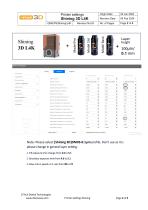
Layerheight100pm/0.1 mm Note- Please select [Shining 3D]DM03-0.1^m profile. Don't use as it is please change in general layer setting- 1. Fill exposure time change from 4.6 to 5.1 2. Boundary exposure time from 4.6 to 5.1 3. Slow return speed on Z- axis from 90 to 72 D Tech Dental Technologies www.dtechasia.com Printer Settings Shining
Open the catalog to page 11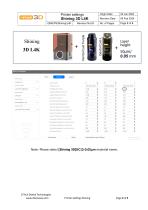
Note- Please select [Shining 3D]DC12-0.05^m material name. D Tech Dental Technologies www.dtechasia.com Printer Settings Shining
Open the catalog to page 12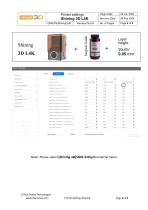
Note- Please select [Shining 3D]SG01-0.05^m material name. D Tech Dental Technologies www.dtechasia.com Printer Settings Shining
Open the catalog to page 13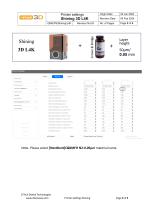
Note- Please select [NextDent]C&BMFH N2-0.05^m material name. D Tech Dental Technologies www.dtechasia.com Printer Settings Shining
Open the catalog to page 14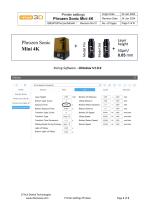
Phrozen Sonic D Tech Dental Technologies www.dtechasia.com Printer Settings Phrozen
Open the catalog to page 15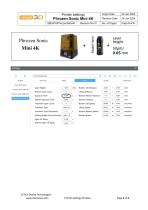
Phrozen Sonic AnyCubic Photon Phrozen Sonic Mini 8K Phrozen Sonic Mighty 4K D-Tech Model Hard Phrozen Sonic Mini 4K Layer Height: Bottom Layer Count: Exposure Time: Bottom Exposure Time: Transition Layer Count: Transition Type: Transition Time Decrement: Waiting Mode During Printing: Light... ▼ Light-off Delay: 9.000 Bottom Light-off Delay: Bottom Lift Distance: Bottom Retract Distance: ' 5.000 ] + ( 0.000 Bottom Lift Speed: 60.000 | & Lifting Speed: so.ooo & Bottom Retract Speed: 120.000 J & | 0.000 mm/min Retract Speed: D Tech Dental Technologies www.dtechasia.com Printer Settings Phrozen
Open the catalog to page 16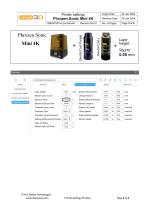
Phrozen Sonic AnyCubk Photon Phrozen Sonic Mini 8K Phrozen Sonic Mighty 4K D-Tech Dental Cast Purple, Cast *1 Phrozen Sonic Mini 4K Layer Height: Bottom Layer Count: Exposure Time: Bottom Exposure Time: 40.000 Transition Layer Count: 6 Transition Type: Linear ▼ Transition Time Decrement: Waiting Mode During Printing: Light... ▼ Light-off Delay: Bottom Light-off Delay: Bottom Lift Distance: Lifting Distance: Bottom Retract Distance: Retract Distance: Bottom Lift Speed: Lifting Speed: Bottom Retract Speed: Retract Speed: 120.000 | & o.ooo | mm/min 120.000 & o.ooo mm/min D Tech Dental Technologies...
Open the catalog to page 17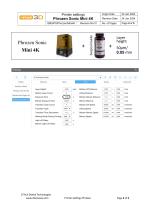
Phrozen Sonic AnyCubic Photon Phrozen Sonic Mini 8K Phrozen Sonic Mighty 4K Phrozen Sonic Mini 4K D-Tech Surgical Guide Machine Resin Layer Height: Bottom Layer Count: Exposure Time: Bottom Exposure Time: Transition Layer Count: Transition Type: Transition Time Decrement Waiting Mode During Printing: Light-off Delay: Bottom Light-off Delay: Bottom Lift Distance: Lifting Distance: Bottom Retract Distance: 5.ooo ) + Retract Distance: Bottom Lift Speed: Lifting Speed: Bottom Retract Speed: Retract Speed: D Tech Dental Technologies www.dtechasia.com Printer Settings Phrozen Page 4 of 5
Open the catalog to page 18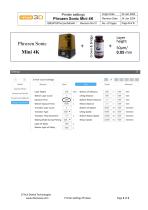
Phrozen Sonic AnyCubic Photon Phrozen Sonic Mini 8K Phrozen Sonic Mighty 4K Phrozen Sonic Mini 4K D-Tech Crown & Bridge Layer Height: Bottom Layer Count: Exposure Time: Bottom Exposure Time: Transition Layer Count: Transition Type: Transition Time Decrement: Waiting Mode During Printing: Light-off Delay: Bottom Light-off Delay: ^6.000^ Bottom Lift Distance: Lifting Distance: Bottom Retract Distance: Retract Distance: Ught...1 Bottom Retract Speed: Retract Speed: D Tech Dental Technologies www.dtechasia.com Printer Settings Phrozen
Open the catalog to page 19All D TECH DENTAL TECHNOLOGIES catalogs and technical brochures
 Composite Flyer
1 Page
 Model Basic Flyer
1 Page
 3D resins Flyer
1 Page
 3D Resins Catalogue 2023
12 Pages