
- Catalogs
- Datrend Systems
- vPad-O2

vPad-O2
vPad-O2
The vPad-A1 is a comprehensive patient simulator and performance tester by Datrend Systems Inc. This manual provides detailed guidance on its operation, specifications, and maintenance.
Inspect the shipping carton for damage upon receipt. If damage is found, stop unpacking and contact the freight carrier. Ensure the device is free from physical damage.
Contact Datrend Systems or a local representative for products not operating within specifications. Returns require a Return Material Authorization (RMA) number and must be in resalable condition within 90 days.
The vPad-A1 includes a one-year warranty, extendable to two years with annual calibration. The warranty covers material and workmanship defects but excludes misuse or unauthorized modifications.
The vPad-A1 supports multi-parameter patient simulation, pulse oximetry testing, and non-invasive blood pressure simulation. It features a modular design with a tablet interface.
Instructions for assembling and setting up the vPad-A1 are provided. The system is initiated by powering on the Base unit and Tablet, which runs the vPad-A1 App for wireless control.
The manual operation section covers the use of the Patient Simulator App, parameter selection, and controls for ECG, respiration, temperature, and cardiac output testing.
Unauthorized modifications may result in electrical hazards. The device contains no user-serviceable components, and breaking the tamper-resistant seal voids the warranty.
The vPad-A1 supports tests like R-Wave Detector, QRS Detection, and simulates various physiological parameters. Each function has detailed specifications for rates, amplitudes, and other parameters.
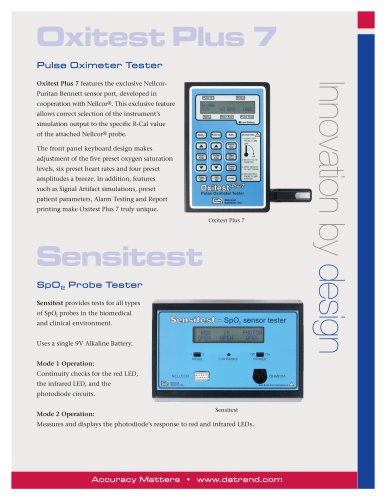
The vPad-O2 module provides SpO2 testing with a range of 30 to 100% and heart rate testing from 20 to 300 BPM, including features for simulating signal artifacts.
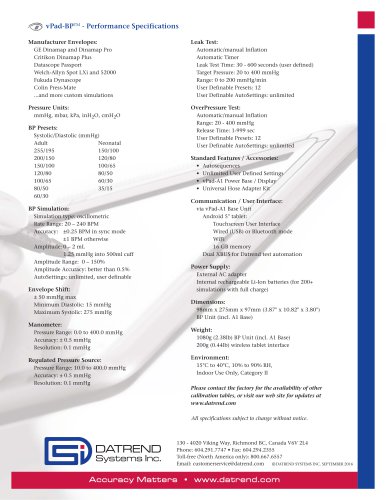
The vPad-BP module simulates NIBP using the oscillometric method, with a pulse rate range of 20 to 240 BPM and pressure range of 0.0 to 400.0 mmHg.
AutoSettings allow users to configure and save simulation settings, while AutoSequences automate these settings, improving efficiency and reducing errors.
Includes simulations for atrial and ventricular fibrillation, tachycardia, and other arrhythmias. Amplitude and artifact adjustments are possible.
Simulations test a monitor's ability to display rhythms with artificial pacing pulses, with adjustable QRS amplitude and baseline artifact.
Simulates heartbeats from a fetal probe with limited rate settings.
Standard signals for testing ECG monitor performance, focusing on amplitude.
Generates standalone complexes for pulse detection, with adjustable amplitude and rate.
Simulates NSR waves with adjustable ST-segment offset and large T-waves with fixed rate.
Simulated by impedance variations across ECG leads, with adjustable parameters.
Simulations use thermistor-based measurements and thermodilution techniques.
Provides static or dynamic pressure settings for testing blood pressure channels.
Simulates light levels for pulse oximeters, with parameters for Blood Oxygen Saturation and Heart Rate.
Uses oscillometric signals to assess blood pressure, with a focus on cuff pressure and oscillometric pulses.
Allows users to set the frequency of pulses during an NIBP Simulation.
Adjusts the size of simulated pulses to test monitor capabilities.
Simulation Mode should match the NIBP monitor type.
Select the appropriate NIBP monitor make and model for compatibility.
Choose targeted SYS-DIA-MAP readings for simulations.
Simulator prepares for testing, with the device under test controlling cuff inflation and deflation.
Verifies pressure transducers in NIBP monitors.
Tests pressure relief valve limits.
Assesses air leakage rates.
Includes a Timer/Stopwatch and App Settings for optimizing performance.
Offers four communication modes: Demo Mode, USB to A1 Base, USB to ES, and Bluetooth.
Translates light transmission measurements into oxygen saturation percentages.
Customized through a setup interface for generating pressure pulses.
Checks the height of standardized test pulses.
Automated performance testing involves setting up simulations and documenting conditions and outcomes.
Users can record values observed on the Device Under Test (DUT) through manual input or automated settings.
Saved Test Results can be viewed and include parameter settings, DUT values, and comments.
To create a Test Record, users must enter a Control Number and Technician ID.
Users can create Test Records by entering equipment information and saving it.
The vPad Record Manager app allows users to manage Test Records.
vPad-A1 supports manual and automated modes, with AutoSettings and AutoSequences for efficient testing.
AutoSequences can be selected and run from the main screen.
AutoSequences can be created from scratch or by editing existing sequences.
Annual calibration by a Datrend Authorized Service facility is recommended. Unauthorized service may void the warranty.
Provides an example of a test record, including setup, numerical data, and comments.
Catalog excerpts

All-in-One Patient Simulator and Performance Tester Operating Manual
Open the catalog to page 1
vPad-A1 All-in-One Patient Simulator and Performance Tester Operating Manual © 2016 - 2017 Datrend Systems Inc. Unit 130 - 4020 Viking Way Richmond, BC • CANADA • V6V 2L4 Tel: 800.667.6557 (North America Only) or 604.291.7747 • Fax 604.294.2355 e-mail: [email protected]
Open the catalog to page 3
To order this manual, use Part Number 6100-086 Revision Revision History Description Initial release Spec Update Copyright Datrend Systems Inc. (“DSI”) agrees to a limited copyright release that allows you to reproduce manuals and other printed materials for use in service training programs and other technical publications. If you would like other reproductions or distributions, submit a written request to Datrend Systems Inc. Unpacking and Inspection Follow standard receiving practices upon receipt of the instrument. Check the shipping carton for damage. If damage is found, stop unpacking the...
Open the catalog to page 5
Warranty Warranty and Product Support Datrend Systems Inc. ("DSI") warrants the Base and Simulation Modules of vPad-A1 (the "Datrend product") to be free from defects in materials and workmanship under normal use and service for one (1) year from the date of original purchase. This warranty will be automatically extended to two (2) years from the date of original purchase, provided that calibration is performed on an annual basis by a Datrend Authorized Service Center*. During the warranty period DSI will, at our option, either repair or replace defects in materials and workmanship at no charge;...
Open the catalog to page 6
Warranty Disclaimer Should you elect to have your instrument serviced and/or calibrated by someone other than Datrend Systems or an Authorized Service Centre, please be advised that the original warranty covering your product becomes void when the tamper-resistant Quality Seal is removed or broken without proper factory authorization. We strongly recommend, therefore, that you send your instrument to Datrend Systems or an Authorized Service Centre for service and calibration, especially during the original warranty period. In all cases, breaking the tamper-resistant Quality Seal should be avoided...
Open the catalog to page 7
Table of Contents ABBREVIATIONS AND DEFINITIONS . . . . . . . . . . . . . . . . . . . . . . . . . . . . . . . . . . . . . . . SYMBOL DEFINITIONS . . . . . . . . . . . . . . . . . . . . . . . . . . . . . . . . . . . . . . . . . . . . . . . . . General Specifications . . . . . . . . . . . . . . . . . . . . . . . . . . . . . . . . . . . . . . . . . . . . . . . . 1 Multi-Parameter Patient Simulation . . . . . . . . . . . . . . . . . . . . . . . . . . . . . . . . . . . . . . 3 Pulse Oximetry (SpO2) Testing . . . . . . . . . . . . . . . . . . . . . . . . . . . . . . . . . . . . . . . . . 9 Non-Invasive...
Open the catalog to page 9
4.3.1 General . . . . . . . . . . . . . . . . . . . . . . . . . . . . . . . . . . . . . . . . . . . . . . . . . . . . . . 4.3.2 Parameters . . . . . . . . . . . . . . . . . . . . . . . . . . . . . . . . . . . . . . . . . . . . . . . . . . . 4.3.2.1 Breath Rate . . . . . . . . . . . . . . . . . . . . . . . . . . . . . . . . . . . . . . . . . . . . . . 4.3.2.2 Baseline Impedance . . . . . . . . . . . . . . . . . . . . . . . . . . . . . . . . . . . . . . . . 4.3.2.3 Impedance Variation . . . . . . . . . . . . . . . . . . . . . . . . . . . . . . . . . . . . . . . 4.3.2.4 Lead Selection . . . . ....
Open the catalog to page 10
4.7.3.2 Maximum Pressure . . . . . . . . . . . . . . . . . . . . . . . . . . . . . . . . . . . . . . . . 4.7.3.3 Delay Time . . . . . . . . . . . . . . . . . . . . . . . . . . . . . . . . . . . . . . . . . . . . . . . 4.7.3.4 Pressure Step . . . . . . . . . . . . . . . . . . . . . . . . . . . . . . . . . . . . . . . . . . . . 4.7.3.5 Running Pressure Tests . . . . . . . . . . . . . . . . . . . . . . . . . . . . . . . . . . . . . 4.7.4 Over Pressure and Pop-Off . . . . . . . . . . . . . . . . . . . . . . . . . . . . . . . . . . . . . . . 4.7.4.1 Target Pressure . . . . . . . . . . . . . . . ....
Open the catalog to page 11
The following abbreviations, terms and acronyms may be used throughout this manual: Micro-ampere Ampere American Association of Medical Instrumentation Software application for a mobile device Equipment Under Test. The electrical device being tested. Hertz International Electrotechnical Commission kilohertz left arm ECG lead left leg ECG lead right arm ECG lead right leg ECG lead Volt Precordial (chest) ECG leads Volts rms Definitions ■ Page viii
Open the catalog to page 12
Symbol Definitions The following symbols may be found on vPad-A1: CONSULT MANUAL FOR PROPER OPERATION The operating manual provides valuable information on the proper use of vPad-A1. It is highly recommended the operator read the instructions thoroughly before operating the device. It may be possible to damage the Equipment Under Test (EUT) and/or cause harm to the operator if vPad-A1 is used incorrectly. WARNING: OPENING THE vPad-A1 MAY COMPROMISE USER SAFETY. REFER SERVICING TO DATREND AUTHORIZED AGENT. vPad-A1 is a complex instrument which contains Lithium Ion batteries and associated charging...
Open the catalog to page 13
The vPad-A1 All-In-One patient simulator and performance tester is a modular, stackable system comprised of a user interface or "base" module providing a tablet computer, system power and communications, and one or more of the following modules: a patient simulator (ECG, IBP, RESP, etc.); a pulse oximeter (SpO2) tester; and an NIBP simulator. Each simulation/test module can be used individually with the base, or in combination with either or both of the other modules. The base module includes hardware for charging an internal battery which provides power to the base, the pulse oximeter tester,...
Open the catalog to page 15
Micro USB 2.0 Type B XBUS Interface (RJ12-6) USB wired connection Bluetooth wireless Environment: • 15/C to 40/C (59/F to 104/F) • 10% to 90% Relative Humidity • Indoor Use Only Power Supply: • Internal Lithium Ion batteries (rechargeable, 3.8V 2600 mAh each), or • AC adapter, Input: 90-240VAC 50/60Hz Output: 15 VDC, 2.67A, 40W Dimensions and Weight (maximum, all modules included): • 9.8 cm W x 27.5 cm L x 9.7 cm D (3.86" W x 10.83" L x 3.82" D) • 1.76 kg (3.88 lb) Electrical Interfaces: • 10 standard ECG snap leads • Optional, externally-connected ECG jacks x 10 (accepts 3 mm or 4 mm plugs)...
Open the catalog to page 16All Datrend Systems catalogs and technical brochures
 Breath Simulator vPad-CO2 TM
2 Pages
 venTest
2 Pages
 vPad-BP
1 Page
 vPad-Mini
2 Pages
 vPad-ES2
2 Pages
 vPad-Rugged2
2 Pages
 Infutest Solo
2 Pages
 vPad-RF
2 Pages
 vPad-A1
2 Pages
 vPad-IN
2 Pages
 Model 20A
1 Page
 FMS-3
FMS-32 Pages
 AMPS-1
2 Pages
 Oxitest Plus7
2 Pages
 Phase 3 VLM
2 Pages
 Phase 3
2 Pages
- Datrend medical device tester
- Control analyser
- Portable simulation unit
- Monitoring simulator
- Flow testing system
- Emergency care simulator
- Testing system with touchscreen
- Pressure testing system
- Continuous testing system
- USB testing system
- Gynecological simulator
- Electric tester
- Heart rate simulator
- Monitoring patient simulator
- ECG simulator
- Intensive care simulator
- Breathing simulator
- SpO2 simulator
- Fetus simulator