


- Products
- Catalogs
- News & Trends
- Exhibitions
Introducing DEXCOM STUDIO? Continuous Glucose Monitoring Software

Introducing DEXCOM STUDIO? Continuous Glucose Monitoring Software
Dexcom Studio™ is a continuous glucose monitoring (CGM) software designed to assist in glucose pattern management. It provides tools for interpreting CGM data reports to help manage glucose levels effectively.
Glucose Pattern Management
- Assess Patterns of Overnight Glucose Control: Consider adjustments to overnight basal or bolus insulin based on glucose patterns. Consultation with a healthcare provider is recommended before making any changes.
- Assess Patterns of Hypoglycemia: Identify when hypoglycemia occurs, prioritizing overnight occurrences. Adjustments to insulin doses may be necessary based on meal timing and composition.
- Assess Pre-Prandial Glucose Control: Evaluate pre-meal glucose levels and consider insulin adjustments if necessary. Meal composition and timing between meals are critical factors.
- Assess Post-Prandial Glucose Control: Determine post-meal glucose levels and assess the sufficiency of bolus insulin. Timing of insulin administration is crucial for effective control.
Clinical Features and Tools
- Clinical Blinding Tool: Allows the use of Dexcom CGM in blinded or real-time displays for clinical assessments.
- Downloading Data and Printing: Users can configure and print preferred reports such as weekly, monthly, or quarterly summaries.
- Dexcom Portrait™ Summary Report: Provides a comprehensive overview of glucose control, highlighting significant clinical patterns and potential considerations for glycemic issues.
CGM Reports
- Hourly Stats: Assesses glycemic patterns and variability.
- Daily Trends: Overlapping days to evaluate glycemic patterns.
- Daily Stats: Reviews time spent in high, low, and target glucose ranges.
- Glucose Distribution: Shows overall glucose distribution and time spent in various glucose ranges.
- Glucose Trends: Reviews daily glucose trends and correlations between SMBG and CGM.
- Success Report: Compares glycemic control over different periods.
Customizable Features
- Professional Use: Options to reset Dexcom receiver memory and set system-wide target glucose ranges.
- Set Default Chart Display: Automatically launch preferred Dexcom Studio reports.
- Set Time of Day: Customize time ranges for various daily periods.
Product Troubleshooting
For troubleshooting, contact Dexcom Technical Support. In some cases, sending receiver data to Dexcom may be necessary for product assessment.
Additional Information
Dexcom Studio is optional software compatible with the Dexcom Seven® Plus CGM System. It is intended for single-patient use and requires a prescription.
Catalog excerpts

DEXCOM STUDIO™ Continuous Glucose Monitoring Software INTUITIVE. FOCUSED. SIMPLIFIED. HELP TAKE GLUCOSE PATTERN MANAGEMENT
Open the catalog to page 1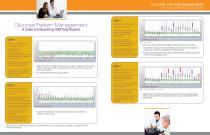
GLUCOSE PATTERN MANAGEMENT Pre and Post Prandial Glucose Control Glucose Pattern Management A Guide to Interpreting CGM Data Reports Determine if there is pre-meal hyperglycemia based on patient’s individual target glucose range. Basal insulin adjustment may be considered if time difference between meals is 4+ hours and a normal mixed meal is consumed.(1) Determine when hypoglycemia occurs and prioritize: • Hypoglycemia overnight (1st) • Hypoglcyemia throughout day/night (2nd) If hypoglycemia occurs after bolus insulin, may consider adjustment to meal bolus or correction dose. Assess Pre-Prandial...
Open the catalog to page 2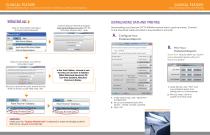
CLINICAL FEATURE Clinical Blinding Tool - Use Dexcom CGM* in Blinded or Real-Time Displays: Click on Tools Option and select "Activate Clinical Features" Contact Dexcom Technical Support "Activation Request Key" code. llmpil t>«4lvix>n RfqMK trf SMJIFH-J W>K Dm "^vd Dexcom will contact you with the "Activation Code". 3rw I4M evil *t 4CI»IWI l*fl»*n U^, Owen iHI rtx* *. 4ir->n CMe 1e t*jipr**$* end! V ,3u In the Tools Option, choose to use the Dexcom receiver in blinded (Blind Attached Receiver) OR real-time (Unblind Attached Receiver) display. Once you receive the code, enter it into the "Enter...
Open the catalog to page 3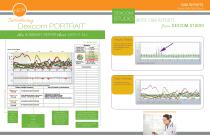
Dexcom PORTRAIT tie SUMMARY REPORT^C^ SAYS IT ALL Pattern insight Summary Nighttime Lows Nighttime Highs Daytime Highs No significant patterns detected No significant pattern; detected Ho signilitant patterns detected Soma Possible Considerations - Adjustment to basal insulin '' Adjustment to meaklme Insulin a Review carbohydrate counting ■=■ Effects of e*erclse. e Icohoi, snoYor food choices Dexcom, Data on File Clinical Significance Some possible clinical considerations to help resolve glycemic treatment plan Clinical assesment notes to supplement chart notes and can Summary statistics of overall...
Open the catalog to page 4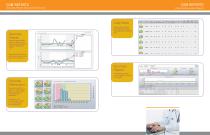
Glucose Trends-Glucose Distribution Daily Stats-Success Report Daily Stats Glucose Trends Review percent time spent high, low and in target glucose ranges by day. 10:48 PM Insulin 2.5 units 9:15 PM Carbs 25 grams Report to review daily glucose trends, event markers and correlation between SMBG and CGM. Daily Strip Print™ feature prints glucose trends with a touch of a button. Carbs 26 grams Insulin 2.6 units Carbs 13 grams Carbs 52 grams Insulin 4 units Insulin 1 units Success Report Compares glycemic control weekly, monthly or quarterly. Glucose Distribution Shows percent time high, low and...
Open the catalog to page 5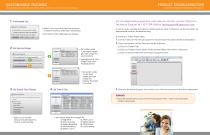
^ HwJtti Care Professionals </ AutomaXaSy load previous eaten: a; startuc Prompt to reset receiver after every download. U Default Target Glucose Raise for new patents. Select if you want the Dexcom receiver to reset its memory after each download Set system-wide target glucose ranges I Glucose Range Lrtb Click to configure the list of glucose range Men. Ox.ii to configure the predeWd Urget glucose ringes. Predefined Target Range* customized target your practice target glucose Fasting, Pre-Meal 3. Set Default Chart Display . Drlmlt Chirt/R^OCrt Choose the than to automatically display afttr download-...
Open the catalog to page 6
Visit us online for more information at www.dexcom.com Dexcom, Inc. 6340 Sequence Drive, San Diego, CA 92121 USA 1.858.200.0200 / 1.877.339.2664 www.dexcom.com Outside US: Contact your local distributor Note: • Dexcom Studio is an optional software. • Dexcom Studio Data Manager software is backward compatible with the Dexcom Seven® Plus Continuous Glucose Monitoring System. • All CGM data presented in this brochure is on file at Dexcom, Inc. * The Dexcom G4™ PLATINUM system is intended for single patient use and requires a prescription. References: 1. Walsh, Roberts. Pumping Insulin, Fourth Edition....
Open the catalog to page 7

