- Catalogs
- DIAL Medicali
- iFIXation

- Products
- Catalogs
- News & Trends
- Exhibitions
iFIXation

iFIXation
This document provides guidelines for the updated software and mounting procedures for a new fixator system that allows for flexible or symmetrical mounting. Key features include the elimination of spheres, fixed positioning, and the use of trauma struts for easy reduction.
Specifications
- The system supports symmetrical mounting without the need for spheres.
- White circles assist in faster pre-mounting by aligning with specific holes.
- Struts should be of the same length for consistency.
- The system allows for flexible mounting by adjusting the strut position.
- Options for carbon fiber or aluminum rings are available.
Procedures
- Align the white "P" circle with the "D" hole in the distal ring for proper setup.
- Use an extension plate for rings that are very close to each other, which can be added during surgery or treatment.
- The software update provides daily correction recommendations.
Software Updates
- The software requires input of patient data and selection of ring color (Red or Black). Mixing colors during surgery is not allowed.
- The extension plate can be configured in the software during the "Mounting Parameters" stage or during treatment via the prescription page.
Recommendations
- Follow the software updates to ensure correct placement of extension plates.
- Utilize the trauma struts for easier reduction and flexibility in mounting.
Conclusion
This updated system and software aim to simplify the mounting process, offering flexibility and precision in treatment setups.
Catalog excerpts

No spheres are needed any more Trauma struts for an easy reduction Fixed position For a faster pre-mounting, the white circles will help you Align the white "P" circle with the "D" hole in the distal ring Put the same lenght to the same struts Remember: you can skip to flexible mounting whenever you like. Just move the strut to the desired hole. Xtension plate You can use an extension plate for rings very close to eachother You can choose to add extension plate either during the theatre or during the treatment. You can add this information in the software quite easily. P.S.: Look in the software...
Open the catalog to page 2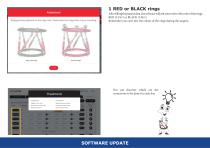
1 RED or BLACK rings After filling the patient data, the software will ask you to select the color of the rings: RED (I-Fix1) or BLACK (I-Fix2) Remember you can't mix the colour of the rings during the surgery. You can discover which are the corrections to be done for each day SOFTWARE UPDATE
Open the catalog to page 3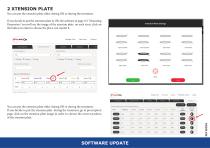
Distal Ring Size 2 XTENSION PLATE You can put the xtension plate either during OR or during the treatment. If you decide to put the xtension plate in OR, the software at page n°2 "Mounting Parameters" you will see the image of the xtension plate on each strut, click on the button in order to choose the place you mount it. Manage Case New Case Contact Proximal Ring Size You can put the xtension plate either during OR or during the treatment. If you decide to put the xtension plate during the treatment, go to prescription page, click on the xtension plate image in order to choose the correct position...
Open the catalog to page 4