
- Catalogs
- digipaX GmbH
- Image acquistion software

Image acquistion software

Image acquistion software
- Extended administration of organ tables with options for coloring and filtering entries.
- Linking capabilities for creating or editing procedure codes or macros.
- Extensive database for configuring individual image acquisitions and mapping external codes to internal digipaX codes.
- Macros can be easily configured to combine image acquisitions.
- Assignment of multiple organ tables for joint practices and multiple target archives with the "Radiography Plus" module.
- Easy activation and preparation for image acquisition at any workstation, with the ability to reconfigure PCs as needed.
- Integrated console for direct generator control and viewing advanced patient information (height, weight, pregnancy status).
- Fully automatic image acquisition, correction, optimization, and transformation with clear visualization of system status and progress.
- Manual image filter changes and comparison of different filters post-acquisition.
- Dose indicator compliant with DIN62494-1, with adjustable target exposure index in the ControlCenter for each acquisition.
- "X-Ray Admin" tool for administrators to configure post-processing steps and advanced image optimization, adjustable for each body type.
Catalog excerpts
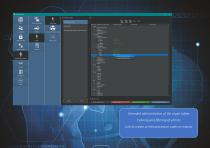
Orthopedic surgery Gynaecology Body part / Refinement / Beam path Otolaryngology-head and neck surgery Head creating mapping / macro. Hip left Hip right Pelvis Coccyx Sacrum Foot Toes Heel bone Ankle joint Z filter fist (X-ray) Z entries without Codes Z known Procedure Codes Z known mappings / macros Extended administration of the organ tables Coloring and filtering of entries Link to create or edit procedure codes or macros
Open the catalog to page 2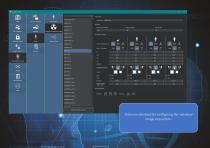
Control Center Image Laterality: View Position: Mode / Technique: Network / DICOM Ionisation chambers: Extensive database for configuring the individual image acquisitions
Open the catalog to page 3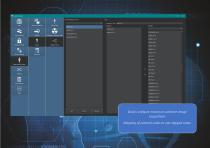
List of mappings / macros Mapping / Macros Network / DICOM Easily configure macros to combine image acquisitionsMapping of external codes to own digipaX codes
Open the catalog to page 4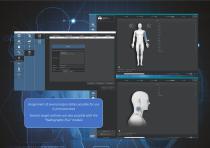
Assignment of several organ tables possible for use in joint practices Several target archives are also possible with the "Radiography Plus" module
Open the catalog to page 5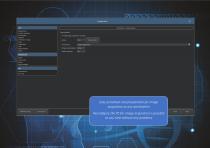
Image preview Overlay / Scout lines User Interlace Histogram Information on image Loupe Image splitter Login Image acquisition Others Image acquisition V Enable image acquisition for this station Work directory: Action control Administrator login. Control Center Easy activation and preparation for image acquisition at any workstationReconfigure the PC for image acquisition is possible at any time without any problems
Open the catalog to page 6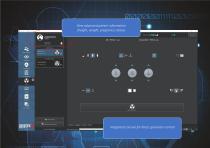
View advanced patient information (height, weight, pregnancy status) Integrated console for direct generator control
Open the catalog to page 7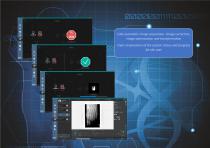
Fully automatic image acquisition, image correction, image optimization and transformation Clear visualization of the system status and progress
Open the catalog to page 8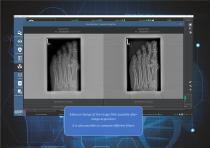
Image enhancement - comparison of image Filters Comparison fflter 1 Comparison filter 2 Stitching X-ray journt Image manage! always apply this selection User: Test (Orthopedics) Lnornt of used space of archive: 71 % Manual change of the image filter possible after image acquisitionIt is also possible to compare different filters
Open the catalog to page 9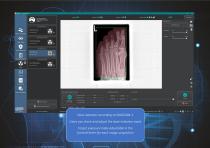
(□) digipaX 2 - digipaX GmbH Patient management Code: HAND-AP-l Job: Hand left / lateral Job: Foot left / lateral Foot left lateral Code: FOOT-lAT-l X-ray journal Image management Target value: Deviation Index: User: Test (Orthopedics) it of used space of archive: <£) 71 % Dose indicator according to DIN62494-1 Users can check and adjust the dose indicator mask Target exposure index adjustable in the ControlCenter for each image acquisition
Open the catalog to page 10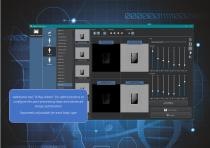
Collimator detection (changed settings from toolbar) Additional tool ''X-Ray Admin”for administrators to configure the post-processing steps and advanced image optimization Saving / Applying. Separately adjustable for each body type
Open the catalog to page 11All DigipaX GmbH catalogs and technical brochures

- Radiology software
- Visualization software
- Windows software
- Diagnostic software
- Planning software
- Treatment software
- Software module
- Analysis software module
- PACS
- Medical imaging PACS
- Medical imaging software module
- Radiography software
- Management software module
- Visualization software module
- PACS software
- Post-processing software
- DICOM software
- Image acquisition software
- Acquisition software module
- Radiography software module