
- Catalogs
- digipaX GmbH
- SOFTWARE FOR IMAGE ARCHIVING AND DIAGNOSTICS

SOFTWARE FOR IMAGE ARCHIVING AND DIAGNOSTICS
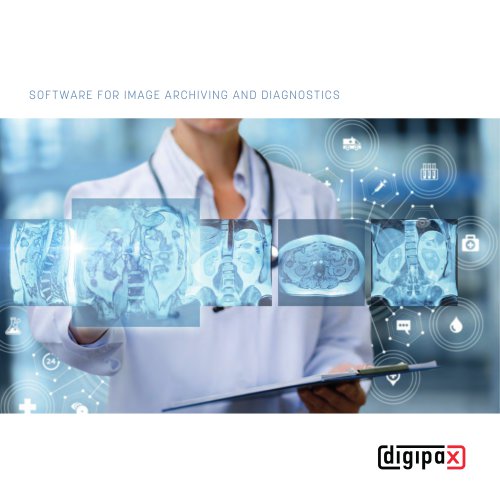
SOFTWARE FOR IMAGE ARCHIVING AND DIAGNOSTICS
Catalog excerpts
SOFTWAR E FO R I M A G E A R C H I V I NG AN D DIAGN OSTICS
Open the catalog to page 1
PROFESSIONAL PACS SOLUTIONS Your benefits with digipaX 21
Open the catalog to page 2
DIGIPAX GM BH digipaX – one of the pioneers in the field of image and document archiving allowing for seamless work within DICOM standard. The vision outlined a PACS that is 100% tailored to user needs. Workflows are supposed to be shaped as optimally as possible. We stay committed to providing a PACS that is easy and efficient to use for both human and veterinary healthcare professionals. Intuitive ease in use is a key distinctive feature of the software. This also includes convenient connectivity to external software systems such as management software in clinic and practice. A high quality standard...
Open the catalog to page 3
Our digipaX software can be used in a wide variety of applications, ranging from systems with X-ray equipment or ultrasound devices to CT/MRI devices and document archiving. Quality is top priority! The company digipaX GmbH maintains a quality management system in accordance with the requirements set out in ISO 13485. The digipaX software is a Class IIb medical device. Through consistent application of the relevant standards and practice-oriented technical tests, the company is capable of supplying a premium-quality, smoothly and reliably running software. The enterprise aims to develop products...
Open the catalog to page 4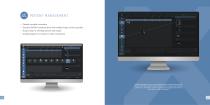
Flexible, versatile, innovative Standard DICOM communication with multiple image archives possible Drag & drop for selecting patients and images QuickNavigation for transfer to other components In patient management, you can conveniently search for patients or particular studies. Then simply drag the specific images with the mouse to the individual components – for example, to the ‘Create patient CD’ category if you want to burn them on a CD. Just lik
Open the catalog to page 5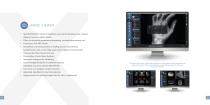
IMAGE VIEWER > Standard DICOM functions: brightness and contrast (window level), rotation, flipping, inversion, display shutter > Filters for improving appearance (sharpening, contrast enhancement, etc.) > Annotations and measurements, including special measurements (cardiothoracic ratio, centre-edge angle, pelvic obliquity measurement) > CineLoop function (cinema browser) > Presentation of scout lines (localiser) > Interactive histogram for windowing > Use of Hanging Protocols for predefined layouts > Displaying structured reports (DICOM-SR) > Full-screen and multiple-monitor functions > Adjustable...
Open the catalog to page 6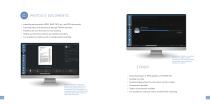
Importing pixel graphics (JPEG, BMP, TIFF, etc.) and PDF documents Scanning letters and documents through TWAIN interface Flexible auto scan functions for fast working Setting up document archives for paperless practices It is possible to continue work in parallel while importing Increase your efficiency, since while the selected images are being exported, you can continue working in other parts of the programme without any problems. Your PACS becomes a universal archive. Whether acquisitions from other devices, photos for wound documentation or scanned letters for a paperless practice, everything...
Open the catalog to page 7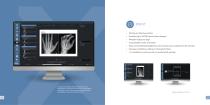
PRINT > Printing on Windows printer > Transferring to DICOM printer (laser imager) > Multiple images per page > Customisable header and footer > Zoom and windowing (brightness and contrast) can be adjusted in the preview > Numerous additional settings in the Expert Mode > It is possible to continue work in parallel while printing Arrange printed pages entirely customized to your requirements. You have full control over image splitting and layout, as well as the image section to be printed and brightness and contrast enhancement. Flexible printing, just as I like.
Open the catalog to page 8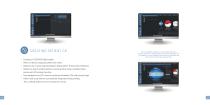
Use the LabelPrint module to turn your patient CDs into a business card of your medical facility. Your custom made labels can be designed in an own integrated cover editor and complemented with patient and study data during printing. Creating on CD/DVD/USB possible With or without integrated patient CD viewer Optional use of a burning robot (Epson Discproducer, Primera Disc Publisher) Media can also be printed without a burning robot using a standard inkjet printer with CD printing function › User-designed own CD covers for professional patient CDs with practice logo › Patient and study data...
Open the catalog to page 9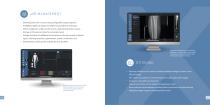
Selecting jobs with a mouse using configurable organ programs Predefined tables of organs for different specialities and devices Direct assignment of jobs to the device using defined station names Storage of Procedure Codes for automated work Storage of plenty of additional information on the job possible (contrast agent, referring physician, appointment, priority, indication, etc.) › Simultaneous working with multiple job lists possible During the stitching process, positioning algorithms assist you. Tools such as zoom, transparency, and blending modes help with inspection and fine-tuning. ST ITC...
Open the catalog to page 10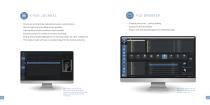
Entries are automatically captured pursuant to specifications Manual capturing and editing entries possible Filtering list pursuant to various criteria possible Exporting entries for further processing or printing› Drag & drop and QuickNavigation for selecting images for other components This makes it quick and easy to compile images for the medical authority. Filter options and thumbnails assist you in searching for images. These can be afterwards selected again directly by drag & drop for further processing. › Scanning directories – prompt loading › Study tree with thumbnails › Drag & drop and...
Open the catalog to page 11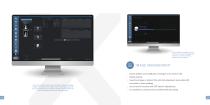
You receive optimal support when importing, changing or deleting images in your system. For example, when importing a patient CD, you can conveniently access the data transferred via GDT from your practice management system for data adjustment. 1 1 Faster working is possible since the processes are run in the background and you can continue working elsewhere in the program. > Secure deletion and modification of images in the archive with backup and log > Importing images or patient CDs with data adjustment (own patient ID, correction of name spelling) > Use of search functions and GDT data for...
Open the catalog to page 12All DigipaX GmbH catalogs and technical brochures
 Image acquistion software
12 Pages
- Radiology software
- Visualization software
- Windows software
- Diagnostic software
- Planning software
- Treatment software
- Software module
- Analysis software module
- Medical imaging PACS
- Medical imaging software module
- Radiography software
- Management software module
- Visualization software module
- PACS software
- Post-processing software
- DICOM software
- Image acquisition software
- Acquisition software module
- Radiography software module