
- Catalogs
- EHD imaging
- EHD SC-CTR Series Cooled Cameras

EHD SC-CTR Series Cooled Cameras
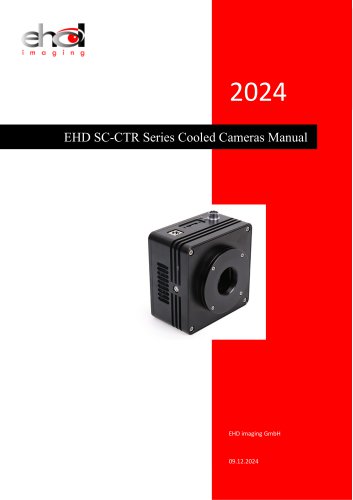
EHD SC-CTR Series Cooled Cameras
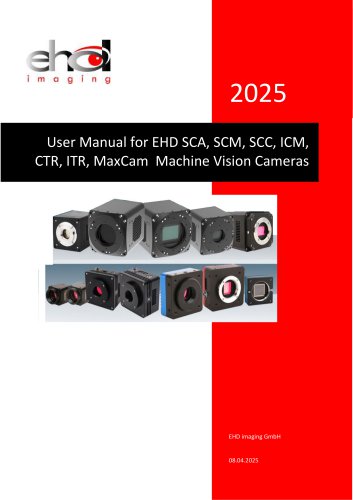
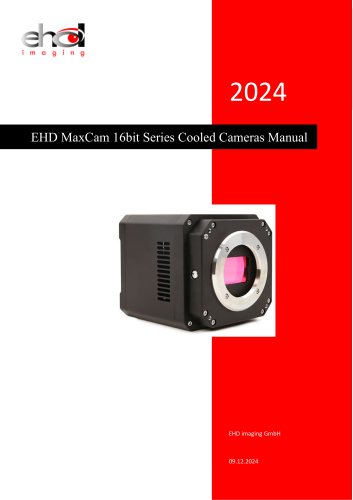
The EHD SC-CTR Series Cooled Cameras Manual provides comprehensive information on the SC-CTR Series TE-Cooling USB3.0 and GigE CMOS Cameras. These cameras feature SONY Exmor CMOS sensors and are designed for high-speed data transfer via USB3.0 and GigE interfaces. Equipped with Peltier cooling, they enhance the signal-to-noise ratio and reduce image noise, making them ideal for low-light environments such as microscopy and astronomy.
- Standard camera with SONY Exmor CMOS sensors.
- Switchable 8 Bit / 12 Bit modes.
- TE-cooling with controllable electric fan, cooling sensor chip 5-10°C below ambient temperature.
- Efficient heat radiation and moisture prevention structure.
- Optional IR-CUT/AR coated windows.
- USB3.0 interface for high-speed data transmission.
- Long exposure capability up to 300 seconds.
- Advanced video and image processing applications (EHDView/EHDLite).
- Support for multiple platforms (Windows/Linux/Mac OS) and programming interfaces (C/C++, C#/VB.NET, DirectShow, Twain Control API).
The manual details specifications for various models within the SC-CTR series, including:
- SC287M-CTR: 0.39M pixels, 20fps@720x540, USB3.0 interface.
- SC426M-CTR: 0.5M pixels, 20fps@800x620, USB3.0 interface.
- SC432C-ITR: 1.7M pixels, 98.6fps@1600x1100, USB3.0 interface.
- SC428C-ITR: 7.0M pixels, 51.3fps@3200x2200, USB3.0 interface.
- SC183C-ITR: 20M pixels, 19.0fps@5440x3648, USB3.0 interface.
- SC492M-CTR: 45M pixels, 8.1fps@8176x5616, USB3.0 interface.
The SC-CTR series cameras are versatile, suitable for low-light environments, microscope fluorescence image capture, and astronomy deep sky applications.
The EHD SC-CTR Series cameras offer advanced imaging capabilities with high-speed data transfer, efficient cooling, and versatile application support, making them suitable for a wide range of scientific and industrial imaging needs.
The SC492M-CTR camera features a 45M pixel industrial camera with a Sony IMX492LLJ-C sensor. Key parameters include a pixel size of 2.315 µm, frame rate range from 8.1 to 86.5 fps depending on resolution, readout noise levels, dynamic range, and sensitivity. It supports USB3.0 data interface and offers various binning options, operating within a temperature range of -10 to 50°C, and is certified by CE and FCC.
The SC-CTR series cameras have specific mechanical housing dimensions and interface descriptions, including a DC 12V power port, USB 3.0 or GigE port, and a 7-pin trigger. Power supply and I/O connector details are provided, including pin signal definitions for various functionalities.
The camera supports multiple capture modes, including video and trigger modes. Trigger sources can be software or hardware-based, with options for single, loop, multiple, or sequence capture styles. The document details ROI control, bandwidth, and precise frame rate control, as well as the use of a DDR3 buffer for data transmission stability.
The camera uses a DC12V power supply, with a TEC cooling system that can lower the operating temperature below ambient levels. The cooling system is controlled via a PID algorithm for precise temperature management.
The document explains the configuration of trigger modes, including video and trigger modes, and the various trigger sources and capture styles. It provides detailed descriptions of the trigger sources, including isolated input, GPIO, counter, PWM, and software triggers, along with their respective configurations and capture styles.
The Options property sheet allows configuration of the camera's output and input settings, including isolated outputs and GPIO configurations. Key configurations include output destination, sequence setup, and IO control styles. The property sheet is divided into several pages, each focusing on different aspects of camera operation.
This section allows users to set the destination for captured frames, which can be displayed in a video window, a new window, or saved to disk. Users can define file name formats and directories for saved files. Note that certain settings are only valid for sequence or multiple capture setups.
The sequence page allows users to configure capture sequences, including disabling sequences, planning sequences, and hardware-triggered sequences. Users can specify the number of frames, exposure time, gain, and delay for each capture index. The sequence button's availability depends on the chosen trigger source and sequence type.
This page is used to configure input and output lines, including isolated inputs/outputs and GPIO lines. Users can set the mode (input or output), format, debouncer time, input activation, and trigger delay. Output modes include frame trigger wait, exposure active, strobe, user output, counter output, and timer output.
The advanced page includes settings for always enabling software triggers, UART communication, shutter mode, and exposure active mode. Users can configure UART settings, including baud rate and cable select options, and choose between rolling shutter or global reset modes.
Users can download the latest EHDView software from the company's website. EHDView integrates camera control, image acquisition, processing, and analysis functions. It supports various operating systems, video modes, and image processing functions. The user interface is designed for quick operation with integrated sidebars and a detailed help manual.
Users can manually adjust the white balance by setting the color temperature and color. This is part of the color adjustment features which include saturation, brightness, contrast, and gamma adjustments.
The camera's frame rate can be adjusted to ensure compatibility with different computer and USB performances.
Users can flip the image horizontally or vertically to match the visual system's orientation. Sampling options include neighborhood averaging for improved signal-to-noise ratio and sampling extraction for video sharpness. Additional features include histogram expansion, grayscale calibration, and sharpness factor calculation.
The camera supports 8-bit and 12-bit image formats, with 12-bit offering higher quality at a reduced frame rate. The Region of Interest (ROI) function allows users to set and adjust the video window size.
Dark field correction can be enabled after capturing a field image. Cooling settings include TEC target temperature and fan control.
Users can load, save, and export custom camera panel controls, including calibration and exposure parameters.
The camera offers various video processing functions such as broadcasting, timing capture, watermarking, and video measurement. Image processing includes contrast control, denoising, filtering algorithms, and image overlay using advanced matching technology.
The camera is compatible with multiple platforms including Windows, macOS, and Linux, and supports various languages. It provides interfaces for Twain, DirectShow, Labview, and SDKs for different programming languages.
Minimum requirements include an Intel Core 2 CPU, 2GB RAM, USB 3.0/2.0 ports, and a 17" monitor.
The SDK supports multiple platforms and architectures, offering APIs for C/C++, .NET, Python, Java, and more. It includes examples and documentation for various development environments.
Catalog excerpts
EHD SC-CTR Series Cooled Cameras Manual
Open the catalog to page 1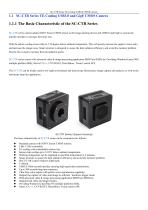
SC-CTR Series TE-Cooling USB3.0 CMOS Camera 1.1 SC-CTR Series TE-Cooling USB3.0 and GigE CMOS Camera SC-CTR series camera adopts SONY Exmor CMOS sensor as the image-picking device and USB3.0 and GigE is used as the transfer interface to increase the frame rate. With the pettier cooling sensor chip to 5-10 degree below ambient temperature. This will greatly increase the signal to noise ratio and decrease the image noise. Smart structure is designed to assure the heat radiation efficiency and avoid the moisture problem. Electric fan is used to increase the heat radiation speed. SC-CTR series comes...
Open the catalog to page 2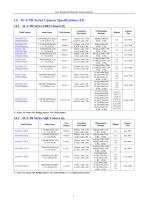
User Manual for Machine Vision Cameras Model Number *C: Color; M: Mono; RS: Rolling shutter; GS: Global shutter. 1.4.2 SC-CTR Series GigE Camera (6) Model Number *C: Color; M: Mono; RS: Rolling shutter; GS: Global shutter; G: 1 Gigabit Ethernet port.
Open the catalog to page 3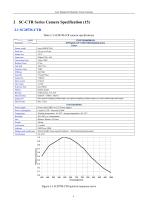
User Manual for Machine Vision Cameras Table 2-1 SC287M-CTR camera specifications
Open the catalog to page 4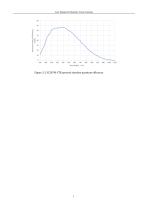
User Manual for Machine Vision Cameras Figure 2-2 SC287M-CTR spectral absolute quantum efficiency
Open the catalog to page 5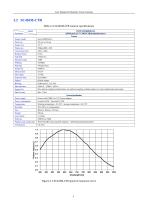
User Manual for Machine Vision Cameras Table 2-2 SC426M-CTR camera specifications
Open the catalog to page 6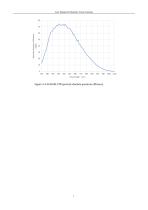
User Manual for Machine Vision Cameras Figure 2-4 SC426M-CTR spectral absolute quantum efficiency
Open the catalog to page 7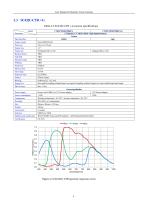
User Manual for Machine Vision Cameras Table 2-3 SC432C-CTR /-G camera specifications
Open the catalog to page 8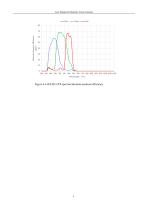
Figure 2-6 SC432C-CTR spectral absolute quantum efficiency 9
Open the catalog to page 9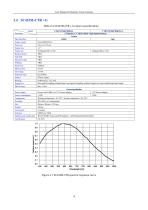
User Manual for Machine Vision Cameras Table 2-4 SC432M-CTR /-G camera specifications
Open the catalog to page 10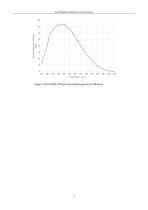
User Manual for Machine Vision Cameras Figure 2-8 SC432M-CTR spectral absolute quantum efficiency
Open the catalog to page 11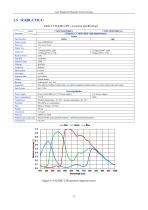
User Manual for Machine Vision Cameras Table 2-5 SC428C-CTR /-G camera specifications
Open the catalog to page 12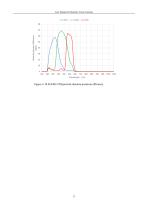
User Manual for Machine Vision Cameras Figure 2-10 SC428C-CTRspectral absolute quantum efficiency
Open the catalog to page 13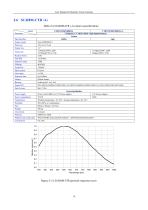
User Manual for Machine Vision Cameras Table 2-6 SC428M-CTR /-G camera specifications
Open the catalog to page 14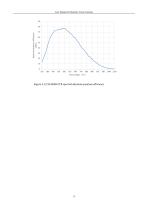
User Manual for Machine Vision Cameras Figure 2-12 SC428M-CTR spectral absolute quantum efficiency
Open the catalog to page 15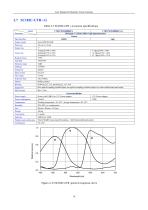
User Manual for Machine Vision Cameras Table 2-7 SC183C-CTR /-G camera specifications
Open the catalog to page 16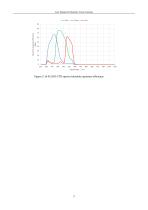
User Manual for Machine Vision Cameras Figure 2-14 SC183C-CTR spectral absolute quantum efficiency
Open the catalog to page 17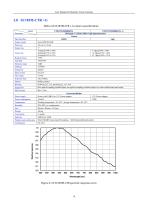
User Manual for Machine Vision Cameras Table 2-8 SC183M-CTR /-G camera specifications
Open the catalog to page 18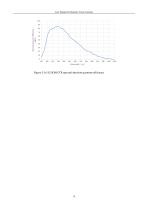
User Manual for Machine Vision Cameras Figure 2-16 SC183M-CTR spectral absolute quantum efficiency
Open the catalog to page 19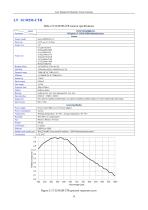
User Manual for Machine Vision Cameras Table 2-9 SC492M-CTR camera specifications
Open the catalog to page 20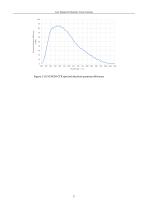
User Manual for Machine Vision Cameras Figure 2-18 SC492M-CTR spectral absolute quantum efficiency
Open the catalog to page 21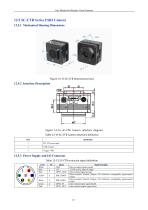
User Manual for Machine Vision Cameras 12.5 SC-CTR Series USB3 Camera 12.5.1 Mechanical Housing Dimensions Figure 12-15 SC-CTR dimensions (mm) Figure 12-16 SC-CTR Camera interface diagram Table 12-14 SC-CTR Camera interface definition 12.5.3 Power Supply and I/O Connector Color White Red Blue Table 12-15 SC-CTR series pin signal definition Pin 1 2 3 Green Pink OPTO_IN OPTO_OUT Signal description Direct-coupled signal ground 12VDC power input or output Opto-isolated signal ground Direct-coupled General Purpose I/O (Software configurable input/output) (line2) Direct-coupled General Purpose I/O...
Open the catalog to page 22
User Manual for Machine Vision Cameras Table 12-16 Recommended accessories
Open the catalog to page 23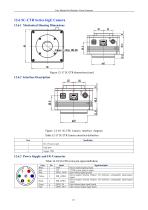
User Manual for Machine Vision Cameras Figure 12-18 SC-CTR Camera interface diagram Table 12-17 SC-CTR Camera interface definition
Open the catalog to page 24
User Manual for Machine Vision Cameras Table 12-19 Recommended accessories
Open the catalog to page 25
User Manual for Machine Vision Cameras Camera operation mode support: Video Mode or Trigger Mode. Camera trigger mode supports: Soft Trigger Mode(Software) or External Trigger Mode(Isolated input, GPIO0, GPIO1, Counter or PWM). Partial cameras supports hardware ROI. The smaller the ROI size, the faster the frame rate. Partial cameras supports bandwidth adjustment from 1% to 100%. As shown in Figure 14-1, the camera is with 100% bandwidth by default, and you can drag the slider to set the desired bandwidth. Move the slider to the right to ensure that the camera plays live video at the fastest...
Open the catalog to page 26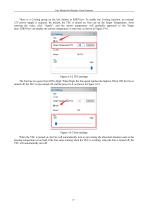
User Manual for Machine Vision Cameras There is a Cooling group on the left sidebar in EHDView. To enable the Cooling function, an external 12V power supply is required. By default, the TEC is turned on. One can set the Target Temperature. After entering the value, click "Apply", and the sensor temperature will gradually approach to the Target Temperature. At can the display same the current temperature in real time, as shown in Figure 14-2. time, EHDView Figure 14-2 TEC settings The Fan has two gears from Off to High. When High, the Fan speed reaches the highest. When Off, the Fan is turned...
Open the catalog to page 27
User Manual for Machine Vision Cameras The trigger function can be found on the Capture & Resolution group on the Camera Sidebar in EHDView. When the camera is opened, it is in Video Mode as shown in Figure 15-1 on the left. In Video Mode, Auto Exposure, Exposure Target, Exposure Time and Gain can be set. One can switch to Trigger Mode by checking the Trigger Mode check box. Figure 15-1 Video Mode and Trigger Mode on the Capture & Resolution group in EHDView After the Trigger Mode is checked, the Capture & Resolution group will switch to Trigger Mode as shown in Figure 15-1 on the right. Where,...
Open the catalog to page 28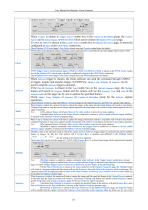
User Manual for Machine Vision Cameras camera needs to receive 3 trigger signals to trigger once; Counter is chosen in Trigger Source combo box in the Capture & Resolution group, the Counter can be Isolated input, GPIO0 or GPIO1 which can be chosen on Options>IO Control page; If GPIO0 or GPIO1 is chosen in the Counter Source combo box on Options>IO Control page. It should be configured as Input in the GPIO Mode combo box; Source Check Options>IO Control page’s Line Select related items and Counter related items for details; PWM refers to the operation mode in which the camera exposure time is...
Open the catalog to page 29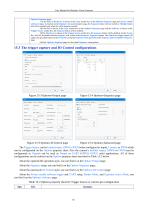
User Manual for Machine Vision Cameras Options>Sequence page; 3) If the Plan or Hardware is chosen in the Type combo box on the Options>Sequence page and Always enable software trigger is checked on the Options>Advanced property page, the Sequence button will not switch to Multiple button and will be enabled only when the still in Sequence enable 4)If the Plan is chosen in the Type combo box on the Options>Sequence page and the Software is chosen in the Trigger Source combo box, the Sequence button will be enabled. 5)If the Hardware is chosen in the Trigger Source combo box, the Sequence button...
Open the catalog to page 30All EHD imaging catalogs and technical brochures
 MaxCam‐990TE‐TR
2 Pages
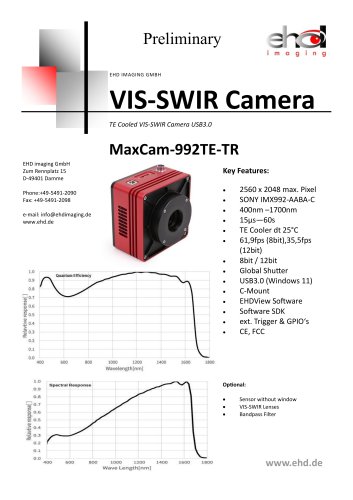 MaxCam-992TE-TR
2 Pages
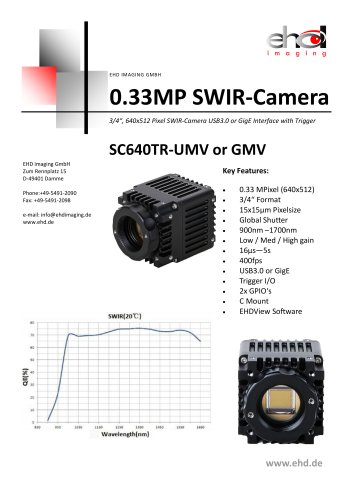 SC640TR-UMV or -GMV
2 Pages
 SC‐2020UV‐ITR
46 Pages
 EHD ICM-Series
51 Pages
 MaxCam‐400UV‐TE
38 Pages
 EHD Vis-SWIR Series
172 Pages
 EHDView Software
137 Pages
 EHD SCM-SCA-SCC-TR series
308 Pages
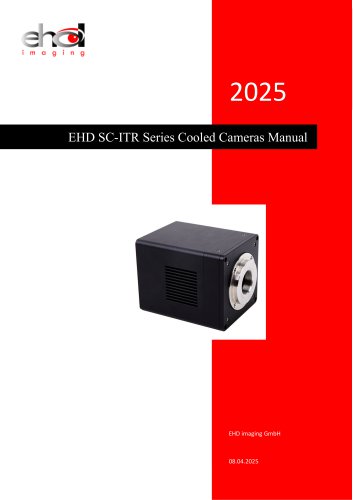 EHD SC-ITR Series
48 Pages
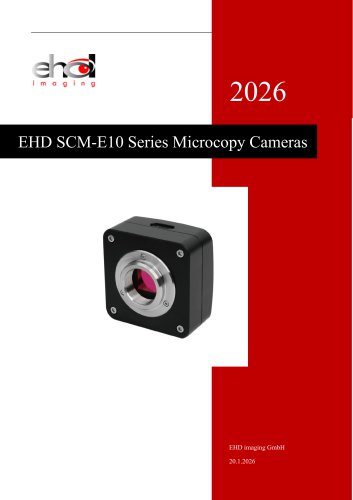 SCM-E10 Series Microcopy Cameras
4 Pages
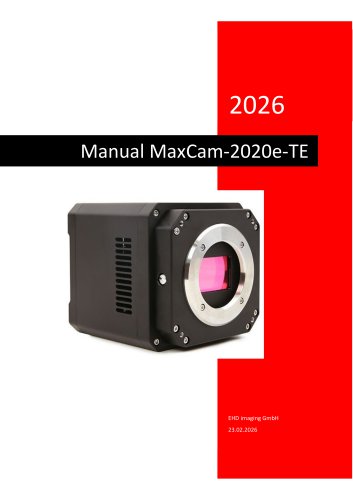 MaxCam‐2020e‐TE
39 Pages
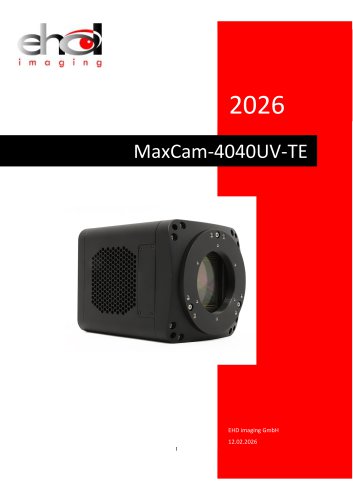 MaxCam‐4040UV‐TE
44 Pages
- Compound microscope
- Laboratory microscope
- Desktop microscope
- Laboratory software
- Camera with USB port
- LED microscope
- Acquisition software
- Medical camera
- Measurement software
- Full HD camera
- HD camera
- Recording software
- Microscope camera
- Fluorescence microscope
- Real-time software
- Digital microscope
- Ultra-high resolution camera
- Monocular microscope