
- Catalogs
- EHD imaging
- EHD SC-ITR Series

EHD SC-ITR Series
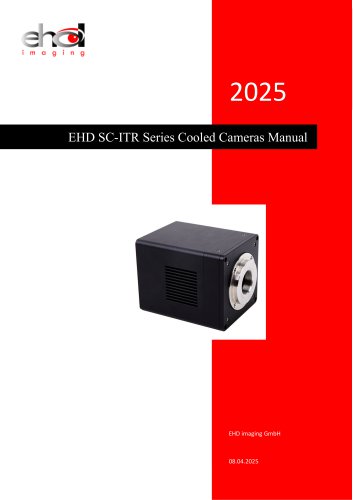
EHD SC-ITR Series
The SC-ITR series cameras are equipped with SONY Exmor CMOS and GPIXEL GSENSE sensors, featuring USB3.0 and GigE interfaces for enhanced frame rates. They include a two-stage Peltier cooling system that reduces sensor temperature by up to 40°C below ambient, improving signal-to-noise ratio and reducing image noise. The design incorporates a smart structure for efficient heat dissipation and moisture prevention, supported by an electric fan.
- Switchable 8/12/16 Bit depth (sensor-dependent).
- TE-cooling with controllable electric fan.
- Exposure times up to 3600 seconds.
- Advanced video and image processing applications (EHDView/EHDLite).
- Support for Windows, Linux, and macOS platforms with SDKs available.
- Native support for C/C++, C#/VB.NET, DirectShow, and Twain Control API.
The SC-ITR series is suitable for low-light environments, microscope fluorescence imaging, and astronomy deep sky applications.
- SC492M-ITR: 45M pixels, 1.4” CMOS sensor, frame rates up to 86.5 fps at 1360x720 resolution, dynamic range of 72dB, sensitivity of 175mV, USB3.0 interface, power consumption of 24.12W.
- SC571C-ITR: 26M pixels, 1.8” CMOS sensor, frame rates up to 110 fps at 2064x1388 resolution, dynamic range up to 84dB, sensitivity of 485mV, USB3.0 interface, power consumption of 28.32W.
- SC183C-ITR: 20M pixels, 1” CMOS sensor, frame rates up to 59.4 fps at 1824x1216 resolution, dynamic range of 72dB, sensitivity of 462mV, available in USB3.0 and GigE interfaces.
- Operating temperature range: -10°C to 50°C.
- Storage temperature range: -30°C to 70°C.
- Humidity: 20%-80%, non-condensing.
- Certification: CE, FCC.
The cameras support USB3.0 (USB3.1 GEN1) and some models also support GigE. They feature digital I/O with optical-coupling isolated inputs and outputs, and non-isolated inputs and outputs. The data format varies between 8bit, 12bit, 14bit, and HDR16bit depending on the model.
The document includes mechanical housing dimensions and interface descriptions for both USB3 and GigE cameras. It provides a detailed interface definition, including protective window types, power and system LED indicators, power ports, USB ports, and trigger pins.
The SC-ITR series pin signal definition includes:
- Pin 1 (White): GND - Direct-coupled signal ground
- Pin 2 (Red): 12V - 12VDC power input or output
- Pin 3 (Blue): OPTO_GND - Opto-isolated signal ground
- Pin 4 (Yellow): DIR_GPIO0 - Direct-coupled General Purpose I/O
- Pin 5 (Black): DIR_GPIO1 - Direct-coupled General Purpose I/O
- Pin 6 (Green): OPTO_IN - Opto-isolated input signal
- Pin 7 (Pink): OPTO_OUT - Opto-isolated output signal
Recommended accessories include a camera, power adapter, I/O cable, GigE cable, and an optional C-mount lens.
Camera Capture Mode: Supports Video Mode or Trigger Mode, with Soft Trigger Mode and External Trigger Mode options.
ROI Control: Hardware ROI is supported, allowing faster frame rates with smaller ROI sizes.
Bandwidth and Precise Frame Rate Control: Bandwidth can be adjusted from 1% to 100%, affecting frame rate.
DDR3 Buffer: A 512MB DDR3 buffer improves USB3.0 data transmission stability.
Binning: Supports 1x1 to 8x8 digital binning and 1x1 to 2x2 hardware binning for higher frame rates.
Power Supply and Cooling System: Uses DC19V or DC12V power supply. TEC cooling system with PID algorithm ensures precise temperature control.
Video Mode and Trigger Mode: Trigger function is accessible in EHDView. Trigger Mode allows setting of Trigger Source, Exposure Time, Gain, etc.
Trigger Sources and Capture Style: Trigger sources include Isolated input, GPIO0, GPIO1, Counter, PWM, and Software. Each source has specific logic levels and configurations.
Trigger Capture and IO Control Configurations: Configurations for trigger sources and camera pin IO control are available on the Options property sheet.
- Hardware Trigger and Sequence Capture: The camera captures frames upon receiving a hardware trigger signal, using specified exposure time and gain settings. The sequence button is disabled if hardware trigger is selected, but enabled with software trigger or if the software trigger is always enabled.
- Sequence Settings: Users can save, rename, or remove sequence settings. The sequence capture frames are executed one by one, and if the number exceeds the sequence number, it recycles in the next operation.
- Line Select and GPIO Mode: Users can configure lines as isolated input/output or GPIO, with specific modes for input or output.
- Debouncer Time and Input Activation: Debouncing prevents false triggers, and input activation can be set to rising/falling edge or high/low level.
- Output Mode and Strobe Control: Various output modes are available, including frame trigger wait, exposure active, and strobe, with configurable delay and duration.
- Software Trigger and UART: Software triggers can be always enabled, and UART allows communication with external devices via serial port.
- Shutter and Exposure Modes: Options for rolling shutter or global reset, and specified lines or common exposure time.
- EHDView Software: A professional tool for camera control, image acquisition, and processing, supporting multiple languages and advanced image processing functions.
- User Interface and Camera Control: Features include auto/manual exposure, white balance, color adjustment, frame rate control, and ROI settings.
- Image Processing: Offers video processing, image enhancement, overlay, and super compatibility with various platforms and architectures.
Catalog excerpts
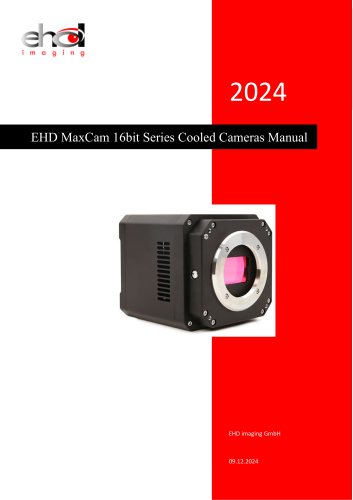
EHD SC-ITR Series Cooled Cameras Manual
Open the catalog to page 1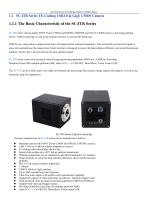
SC-ITR Series TE-Cooling USB3.0 CMOS Camera 1.1 SC-ITR Series TE-Cooling USB3.0 & GigE CMOS Camera SC-ITR series camera adopts SONY Exmor CMOS and GPIXEL GSENSE and GLUX sCMOS sensor as the image-picking device. USB3.0 and GigE is used as the transfer interface to increase the frame rate. With the two-stage pettier cooling sensor chip to 40 degree below ambient temperature. This will greatly increase the signal to noise ratio and decrease the image noise. Smart structure is designed to assure the heat radiation efficiency and avoid the moisture problem. Electric fan is used to increase the heat...
Open the catalog to page 2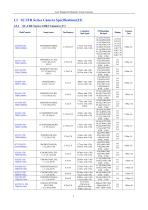
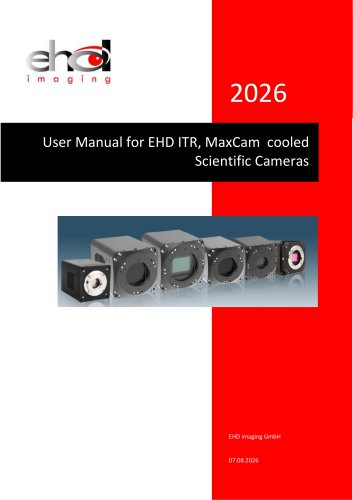
User Manual for Machine Vision Cameras
Open the catalog to page 3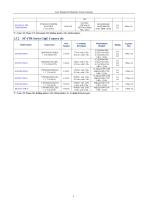
User Manual for Machine Vision Cameras *C: Color; M: Mono; RS: Rolling shutter; GS: Global shutter; G: 1 Gigabit Ethernet port.
Open the catalog to page 4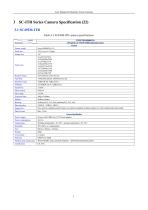
User Manual for Machine Vision Cameras Table 3-1 SC492M-ITR camera specifications
Open the catalog to page 5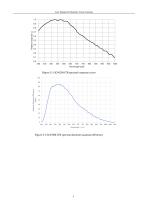
User Manual for Machine Vision Cameras Figure 3-1 SC492M-ITR spectral response curve Figure 3-2 SC492M-ITR spectral absolute quantum efficiency
Open the catalog to page 6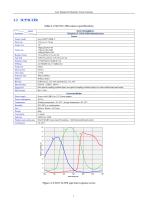
User Manual for Machine Vision Cameras Table 3-2 SC571C-ITR camera specifications
Open the catalog to page 7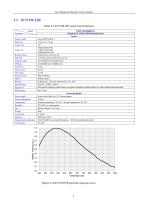
User Manual for Machine Vision Cameras Table 3-3 SC571M-ITR camera specifications
Open the catalog to page 8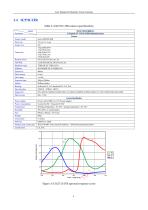
User Manual for Machine Vision Cameras Table 3-4 SC571C-ITR camera specifications
Open the catalog to page 9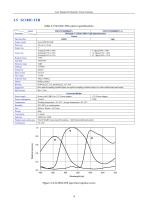
User Manual for Machine Vision Cameras Table 3-5 SC183C-ITR camera specifications
Open the catalog to page 10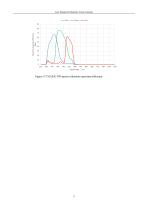
User Manual for Machine Vision Cameras Figure 3-7 SC183C-ITR spectral absolute quantum efficiency
Open the catalog to page 11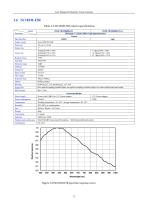
User Manual for Machine Vision Cameras Table 3-6 ISC183M-ITR camera specifications
Open the catalog to page 12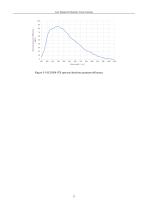
User Manual for Machine Vision Cameras Figure 3-9 SC183M-ITR spectral absolute quantum efficiency
Open the catalog to page 13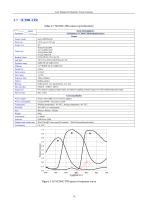
User Manual for Machine Vision Cameras Table 3-7 SC294C-ITR camera specifications
Open the catalog to page 14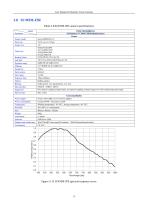
User Manual for Machine Vision Cameras Table 3-8 SC492M-ITR camera specifications
Open the catalog to page 15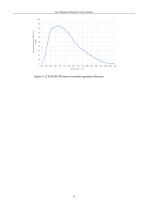
User Manual for Machine Vision Cameras Figure 3-12 SC492M-ITR spectral absolute quantum efficiency
Open the catalog to page 16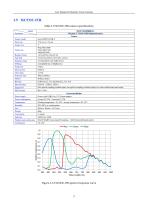
User Manual for Machine Vision Cameras Table 3-9 SC533C-ITR camera specifications
Open the catalog to page 17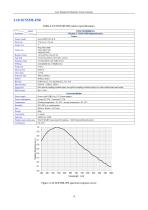
User Manual for Machine Vision Cameras Table 3-10 SC533M-ITR camera specifications
Open the catalog to page 18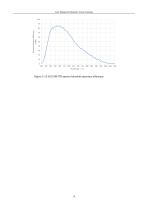
User Manual for Machine Vision Cameras Figure 3-15 SC533M-ITR spectral absolute quantum efficiency
Open the catalog to page 19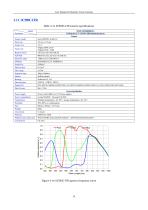
User Manual for Machine Vision Cameras Table 3-11 SC585C-ITR camera specifications
Open the catalog to page 20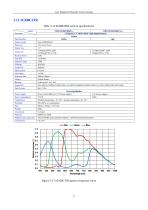
User Manual for Machine Vision Cameras Table 3-12 SC428C-ITRA camera specifications
Open the catalog to page 21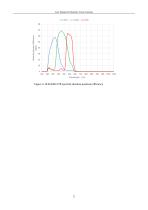
User Manual for Machine Vision Cameras Figure 3-18 SC428C-ITR spectral absolute quantum efficiency
Open the catalog to page 22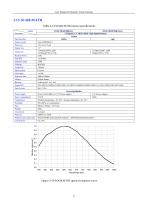
User Manual for Machine Vision Cameras Table 3-13 SC428-M-ITR camera specifications
Open the catalog to page 23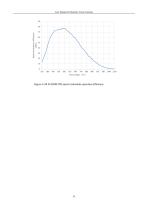
User Manual for Machine Vision Cameras Figure 3-20 SC428M-ITR spectral absolute quantum efficiency
Open the catalog to page 24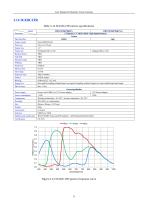
User Manual for Machine Vision Cameras Table 3-14 SC432C-ITR camera specifications
Open the catalog to page 25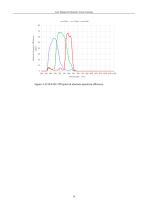
Figure 3-22 SC432C-ITR spectral absolute quantum efficiency 26
Open the catalog to page 26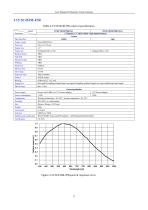
User Manual for Machine Vision Cameras Table 3-15 SC432M-ITR camera specifications
Open the catalog to page 27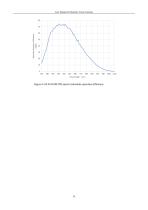
User Manual for Machine Vision Cameras Figure 3-24 SC432M-ITR spectral absolute quantum efficiency
Open the catalog to page 28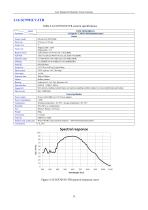
User Manual for Machine Vision Cameras Table 3-16 SC9701UV-ITR camera specifications
Open the catalog to page 29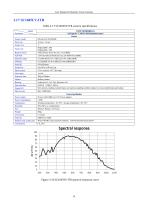
User Manual for Machine Vision Cameras Table 3-17 SC1605UV-ITR camera specifications
Open the catalog to page 30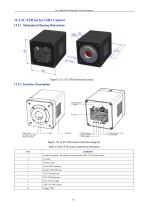
User Manual for Machine Vision Cameras 12.3.2 Interface Description Item
Open the catalog to page 31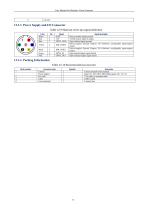
User Manual for Machine Vision Cameras Table 12-9 MaxCam series pin signal definition
Open the catalog to page 32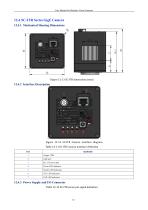
User Manual for Machine Vision Cameras 12.4 SC-ITR Series GigE Camera 12.4.1 Mechanical Housing Dimensions Figure 12-13 SC-ITR dimensions (mm) Figure 12-14 SC-ITR Camera interface diagram Table 12-11 SC-ITR Camera interface definition Specification GigE port 12.4.3 Power Supply and I/O Connector Table 12-12 SC-ITR series pin signal definition 32
Open the catalog to page 33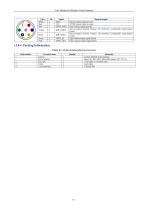
User Manual for Machine Vision Cameras
Open the catalog to page 34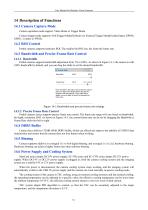
User Manual for Machine Vision Cameras Camera operation mode support: Video Mode or Trigger Mode. Camera trigger mode supports: Soft Trigger Mode(Software) or External Trigger Mode(Isolated input, GPIO0, GPIO1, Counter or PWM). Partial cameras supports hardware ROI. The smaller the ROI size, the faster the frame rate. Partial cameras supports bandwidth adjustment from 1% to 100%. As shown in Figure 14-1, the camera is with 100% bandwidth by default, and you can drag the slider to set the desired bandwidth. Move the slider to the right to ensure that the camera plays live video at the fastest...
Open the catalog to page 35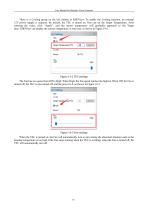
User Manual for Machine Vision Cameras There is a Cooling group on the left sidebar in EHDView. To enable the Cooling function, an external 12V power supply is required. By default, the TEC is turned on. One can set the Target Temperature. After entering the value, click "Apply", and the sensor temperature will gradually approach to the Target Temperature. At can the display same the current temperature in real time, as shown in Figure 14-2. time, EHDView Figure 14-2 TEC settings The Fan has two gears from Off to High. When High, the Fan speed reaches the highest. When Off, the Fan is turned...
Open the catalog to page 36
User Manual for Machine Vision Cameras The trigger function can be found on the Capture & Resolution group on the Camera Sidebar in EHDView. When the camera is opened, it is in Video Mode as shown in Figure 15-1 on the left. In Video Mode, Auto Exposure, Exposure Target, Exposure Time and Gain can be set. One can switch to Trigger Mode by checking the Trigger Mode check box. Figure 15-1 Video Mode and Trigger Mode on the Capture & Resolution group in EHDView After the Trigger Mode is checked, the Capture & Resolution group will switch to Trigger Mode as shown in Figure 15-1 on the right. Where,...
Open the catalog to page 37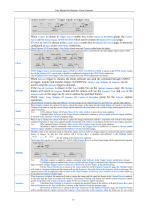
User Manual for Machine Vision Cameras camera needs to receive 3 trigger signals to trigger once; Counter is chosen in Trigger Source combo box in the Capture & Resolution group, the Counter can be Isolated input, GPIO0 or GPIO1 which can be chosen on Options>IO Control page; If GPIO0 or GPIO1 is chosen in the Counter Source combo box on Options>IO Control page. It should be configured as Input in the GPIO Mode combo box; Source Check Options>IO Control page’s Line Select related items and Counter related items for details; PWM refers to the operation mode in which the camera exposure time is...
Open the catalog to page 38All EHD imaging catalogs and technical brochures
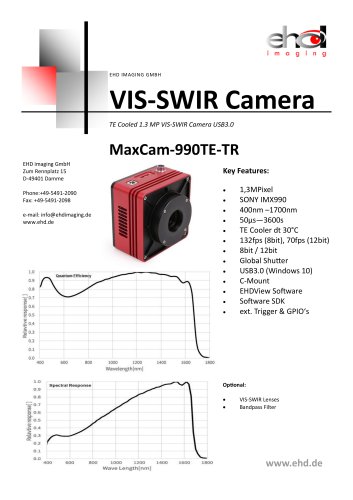 MaxCam‐990TE‐TR
2 Pages
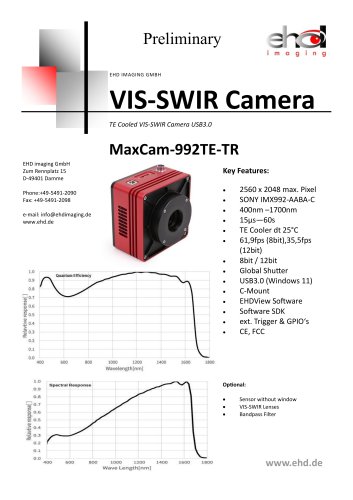 MaxCam-992TE-TR
2 Pages
 SC640TR-UMV or -GMV
2 Pages
 SC‐2020UV‐ITR
46 Pages
 EHD ICM-Series
51 Pages
 MaxCam‐400UV‐TE
38 Pages
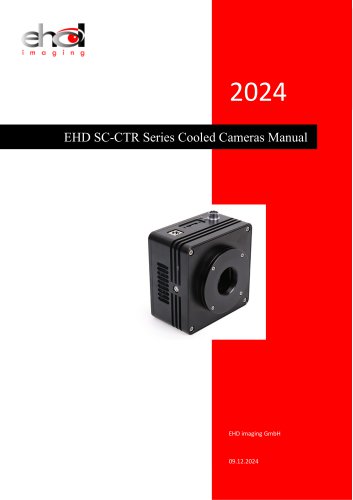 EHD SC-CTR Series Cooled Cameras
39 Pages
 EHD Vis-SWIR Series
172 Pages
 EHDView Software
137 Pages
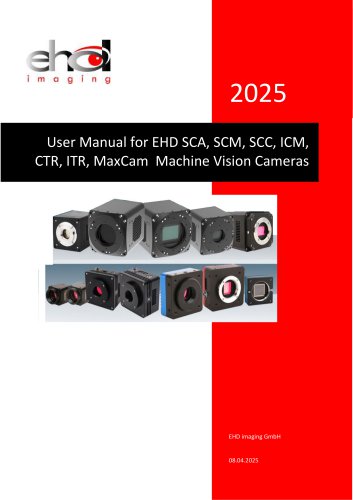
 EHD SCM-SCA-SCC-TR series
308 Pages
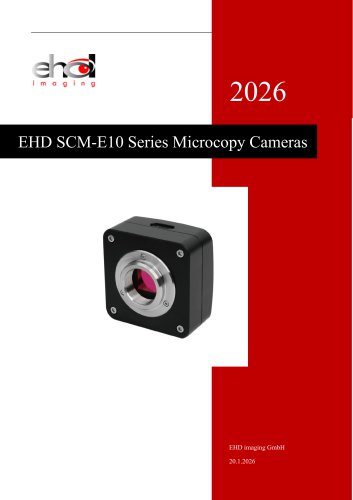 SCM-E10 Series Microcopy Cameras
4 Pages
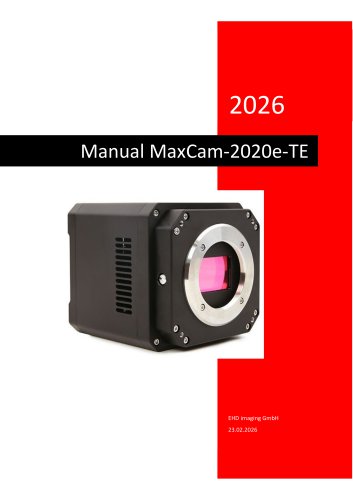 MaxCam‐2020e‐TE
39 Pages
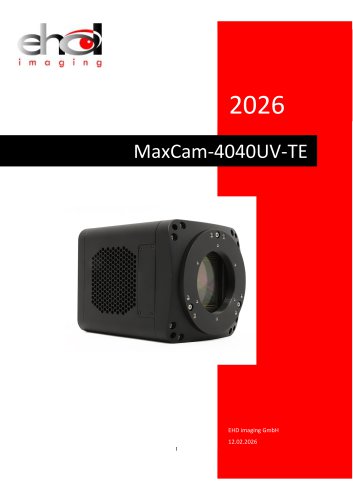 MaxCam‐4040UV‐TE
44 Pages
- Compound microscope
- Laboratory microscope
- Desktop microscope
- Laboratory software
- Camera with USB port
- LED microscope
- Acquisition software
- Medical camera
- Measurement software
- Full HD camera
- HD camera
- Recording software
- Microscope camera
- Fluorescence microscope
- Real-time software
- Digital microscope
- Ultra-high resolution camera
- Monocular microscope