
- Catalogs
- EHD imaging
- SC‐2020UV‐ITR

SC‐2020UV‐ITR
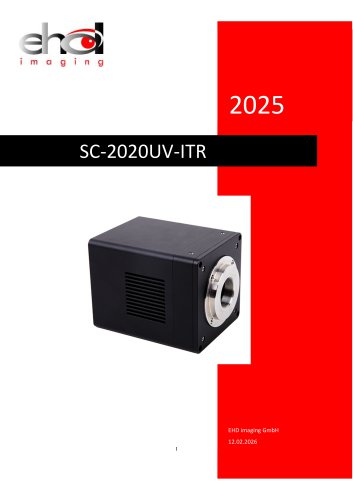
SC‐2020UV‐ITR
The SC2020-UV-ITR sCMOS Camera Manual provides comprehensive details on the SC2020-UV-ITR camera models, featuring the GSENSE2020BSI CMOS sensor. It covers specifications, performance, and applications across a spectral range of 200nm to 1100nm, suitable for ultraviolet, visible, and near-infrared uses.
1. Basic Characteristics:
The camera includes a 1.2-inch image sensor with a resolution of 2048x2048 pixels and a pixel size of 6.5um. It supports USB3 and CameraLink interfaces for high-speed data transfer and features a cooling module to reduce sensor temperature by 35-40 degrees below ambient temperature.
2. Camera Parameters and Performance:
- Specifications: Supports various frame rates and resolutions, with a maximum of 108fps at full resolution. Offers multiple ADC modes and supports HCG, LCG, and HDR modes.
- Quantum Efficiency: Achieves 95% at 560nm.
- Capture Modes: Supports RAW8, RAW11, RAW12, and RAW16 HDR modes.
- DDR3 Buffer: Includes a 512MB DDR3 buffer to prevent frame loss.
- Binning: Supports digital binning from 1x1 to 8x8 and hardware binning up to 2x2.
3. Dimensions and Layout:
Compact design with dimensions of 80x80x101.5mm and a weight of 860g. Compatible with C-mount lenses.
4. External IO Connector and Electrical Characteristics:
Features optical-coupling isolated inputs and outputs, and non-isolated I/O circuits for external trigger control.
5. Cooling:
Designed to maintain optimal sensor temperatures, enhancing performance and reducing noise.
6. Camera Applications:
- Trigger Modes: Supports video and trigger modes with configurable sources and capture styles.
- Software Integration: Instructions for EHDView software and SDK for camera control and image processing.
7. SC2020-UV-ITR-CL100 Camera Application:
Details on CameraLink interface connection and configuration, including software installation and GenIcam usage.
Power Supply and Cooling System:
Operates on a DC12V power supply, with TEC cooling and a PID algorithm for precise temperature control.
Filter Specifications:
Uses a UV Quartz glass JGS2 filter with specific transmittance characteristics.
Camera Dimensions and Ports:
Includes USB 3.0/2.0 ports, a DC 12V power port, and a trigger 7PIN port.
Packing Information:
Standard package includes the camera, power adapter, USB cable, IO cable, and a CD with drivers and utilities.
External IO Connector and Electrical Characteristics:
Includes opto-isolated input and output circuits with specific logic levels and current specifications.
Cooling Functionality:
Cooling effect significantly lowers sensor temperature compared to ambient conditions.
Camera Application and Trigger Modes:
Supports various trigger modes with configurable settings for exposure and gain.
Frame Capture Settings:
Allows setting the number of frames to capture, with options for display or saving.
Sequence Capture:
Initiates image capture until the specified number of frames is reached.
Trigger Capture and IO Control:
Includes configurations for output destination, sequence setup, and IO control.
Options Property Sheet:
Provides settings for captured frames, sequence capture, and IO control.
IO Control Details:
Configurable line selection for input or output, with debouncer time and trigger delay settings.
Advanced Settings:
Includes software triggers and UART communication options.
Camera Configuration and Operation:
- Shutter Mode: Options for Rolling Shutter or Global Reset.
- Exposure Active Mode: Configurable exposure settings.
Software Installation and Usage:
- Application Installation: EHDView software supports ASCOM and DirectShow interfaces.
- EHDView Features: Includes camera control, image acquisition, and processing.
- User Interface Design: Features menus, toolbars, and a help manual.
Camera Control and Image Processing:
- Camera Control Sidebar: Settings for capture, exposure, gain, and more.
- Image Processing Functions: Includes video broadcasting and HDR processing.
Software Development Instructions:
- SDK Description: APIs for various platforms with example codes.
- Third-party Interface Software: Supports integration with DirectShow, TWAIN, LabView, and MatLab.
Camera Application and Configuration:
- Connection to CameraLink: Proper connection is crucial for operation.
- Software Installation: Instructions for SDK and driver installation on Windows.
- CameraLink Configuration: Steps for configuring CameraLink mode and settings.
- GenIcam Usage: Includes communication and trigger settings.
Camera Commands:
- Basic Formats: Uses CameraLink serial port with a baud rate of 115200.
- Dedicated Part Format: Varies for reading and writing register data.
- Register Definitions: Includes key registers for various settings.
SDK & CLView Application:
- SDK: Control via private SDK or GenICam interface.
- CLView Application: Comprehensive camera control and real-time monitoring.
- CLCtrl Software: Used with a CameraLink capture card for image capture and display.
Catalog excerpts
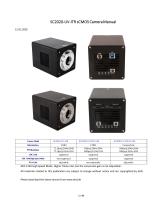
ADC 11bit High Speed Mode: Higher frame rate, but the conversion gain is not adjustable. All materials related to this publication are subject to change without notice and are copyrighted by EHD. Please download the latest version from www.ehd.de
Open the catalog to page 2
The SC2020-UV-ITR sCMOS Camera Help Manual
Open the catalog to page 3
The SC2020-UV-ITR sCMOS Camera Help Manual
Open the catalog to page 4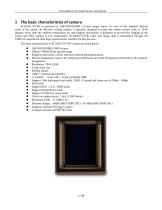
The SC2020-UV-ITR sCMOS Camera Help Manual SC2020-UV-ITR is powered by GSENSE2020BSI 1.2-inch image sensor. In view of the inherent thermal noise of the sensor, an efficient cooling module is specially designed to make the camera sensor work at 35-40 degrees lower than the ambient temperature.An anti-fogging mechanism is designed to prevent the fogging of the sensor and filter surface at low temperature. SC2020-UV-ITR video and image data is transmitted through the USB3 or CameraLink ultra high speed transfer interface for fast preview. The basic characteristics of SC2020-UV-ITR Camera are listed...
Open the catalog to page 5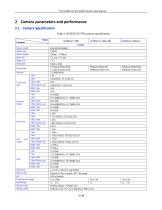
The SC2020-UV-ITR sCMOS Camera Help Manual Table 1 SC2020-UV-ITR camera specification
Open the catalog to page 6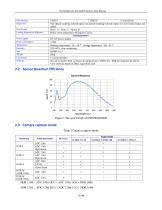
The SC2020-UV-ITR sCMOS Camera Help Manual Data interface Digital I/O Data Format Cooling temperature difference USB3.0 USB3.0 CameraLink One optical-coupling isolated input, one optical-coupling isolated output, tow non-isolated input and output Mono 11 / Mono 12 / Mono 16 Below room temperature 40 degrees Celsius General parameters DC12V power supply <25W Working temperature -30 ~ 60 ℃, storage temperature - 40 ~ 85 ℃ 20%-80% , non-condensing 80*80*101.5 860g C-mount interface Provide Complete SDK (software development kit) / EHDView / SDK development kit and CL View software based on Delsa...
Open the catalog to page 7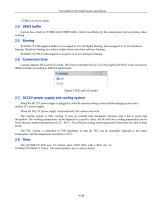
The SC2020-UV-ITR sCMOS Camera Help Manual 2.4 DDR3 buffer Camera has a built-in 512MB (4Gb) DDR3 buffer, which can effectively the camera does not lose frames when working. 2.5 Binning SC2020-UV-ITR supports additive or averaged 1x1 to 8x8 digital binning, and averaged 1x1 to 2x2 hardware binning. Hardware binning can achieve higher frame rates than software binning. SC2020-UV-ITR-CL100 supports averaged 1x1 to 2x2 hardware binning. 2.6 Conversion Gain Camera supports HCG and LCG mode. HCG has low Readout Noise, LCG has higher Full Well. Users can choose different modes according to different...
Open the catalog to page 8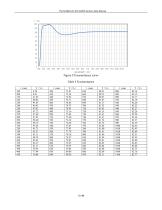
The SC2020-UV-ITR sCMOS Camera Help Manual
Open the catalog to page 9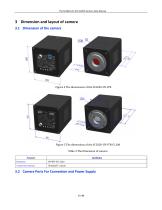
The SC2020-UV-ITR sCMOS Camera Help Manual 3 Dimension and layout of camera 3.1 Dimension of the camera Figure 5 The dimensions of the SC2020-UV-ITR-CL100 Table 4 The Dimension of camera Camera lens interface 3.2 Camera Ports For Connection and Power Supply
Open the catalog to page 10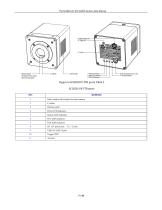
The SC2020-UV-ITR sCMOS Camera Help Manual Figure 6 SC2020-UV-ITR ports Table 5 SC2020-UV-ITR ports Filter window,AR window for mono camera Thermo outlet
Open the catalog to page 11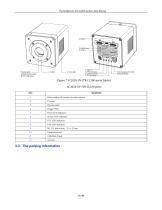
The SC2020-UV-ITR sCMOS Camera Help Manual Figure 7 SC2020-UV-ITR-CL100 ports Table 6 SC2020-UV-ITR-CL100 ports Filter window,AR window for mono camera Thermo outlet CameraLink port USB-Mini-B port
Open the catalog to page 12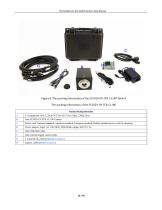
The SC2020-UV-ITR sCMOS Camera Help Manual Figure 9 The packing information of the SC2020-UV-ITR-CL100 Table 8 The packing information of the SC2020-UV-ITR-CL100 Standard Packing information Power cord. National standard, American standard, European standard, British standard power cord for choosing Power adapter: input: AC 100~240V 50Hz/60Hz, output: DC12 V 3A One external trigger control cable 2 CameraLink cables(Optional Accessory) capture card(Optional Accessory)
Open the catalog to page 14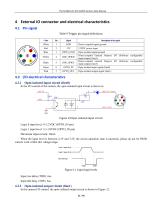
The SC2020-UV-ITR sCMOS Camera Help Manual Table 9 Trigger pin signal definitions In the I/O control of the camera, the opto-isolated input circuit is shown in Logic 0 input level: 0~2.2VDC (OPTO_IN pin) Logic 1 input level: 3.3~24VDC (OPTO_IN pin) Maximum input current: 30mA When the input level is between 2.2V and 3.2V, the circuit operation state is uncertain, please do not let SWIR camera work within this voltage range. Logic 1 input level Logic 0 input level Internal logic Figure 11 Input logic levels Input rise delay (TDR): 6us Input fall delay (TDF): 6us In the camera I/O control, the...
Open the catalog to page 15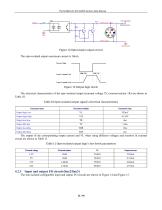
The SC2020-UV-ITR sCMOS Camera Help Manual The opto-isolated output maximum current is 30mA. The electrical characteristics of the opto-isolated output (external voltage 5V, external resistor 1K) are shown in Table 10. Table 10 Opto-isolated output signal's electrical characteristics The non-isolated configurable input and output I/O circuits are shown in Figure 14 and Figure 15.
Open the catalog to page 16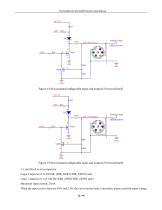
The SC2020-UV-ITR sCMOS Camera Help Manual Figure 14 Non-isolated configurable input and output I/O circuit (line2) Figure 15 Non-isolated configurable input and output I/O circuit (line3) 1. Line2/line3 is set as input pin Logic 0 input level: 0~0.6VDC (DIR_GPIO1/DIR_GPIO2 pins) Logic 1 input level: 2.0~24VDC (DIR_GPIO1/DIR_GPIO2 pins) Maximum input current: 25mA When the input level is between 0.6V and 2.0V, the circuit action state is uncertain, please avoid the input voltage 13 / 45
Open the catalog to page 17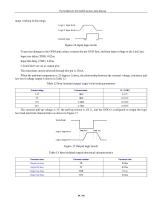
The SC2020-UV-ITR sCMOS Camera Help Manual range working in this range. To prevent damage to the GPIO pins, please connect the pin GND first, and then input voltage to the Line2 pin. Input rise delay (TDR): 0.02us Input fall delay (TDF): 0.02us The maximum current allowed through this pin is 25mA. When the ambient temperature is 25 degrees Celsius, the relationship between the external voltage, resistance and low-level valtage output is shown in Table 12. Table 12 Non-isolated output Logic's low level parameters
Open the catalog to page 18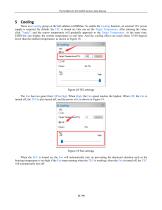
The SC2020-UV-ITR sCMOS Camera Help Manual There is a Cooling group on the left sidebar in EHDView. To enable the Cooling function, an external 12V power supply is required. By default, the TEC is turned on. One can set the Target Temperature. After entering the value, click "Apply", and the sensor temperature will gradually approach to the Target Temperature. At the same time, EHDView can display the current temperature in real time. And the cooling effect can reach about 35-40 degrees lower than the ambient temperature, as shown in Figure 18. Figure 18 TEC settings The Fan has two gears from...
Open the catalog to page 19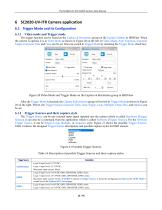
The SC2020-UV-ITR sCMOS Camera Help Manual The trigger function can be found on the Capture & Resolution group on the Camera Sidebar in EHDView. When the camera is opened, it is in Video Mode as shown in Figure 20 on the left. In Video Mode, Auto Exposure, Exposure Target, Exposure Time and Gain can be set. One can switch to Trigger Mode by checking the Trigger Mode check box. After the Trigger Mode is checked, the Capture & Resolution group will switch to Trigger Mode as shown in Figure 20 on the right. Where, the Trigger Source, Exposure Time, Gain, Single, Loop, Multiple, Frame Box, and Options...
Open the catalog to page 20All EHD imaging catalogs and technical brochures
 MaxCam‐990TE‐TR
2 Pages
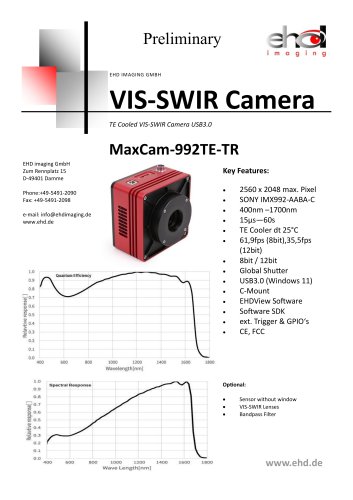 MaxCam-992TE-TR
2 Pages
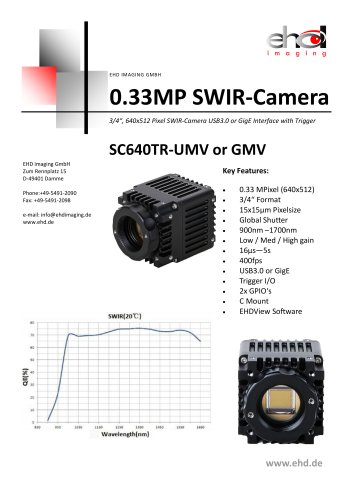 SC640TR-UMV or -GMV
2 Pages
 EHD ICM-Series
51 Pages
 MaxCam‐400UV‐TE
38 Pages
 EHD SC-CTR Series Cooled Cameras
39 Pages
 EHD Vis-SWIR Series
172 Pages
 EHDView Software
137 Pages
 EHD SCM-SCA-SCC-TR series
308 Pages
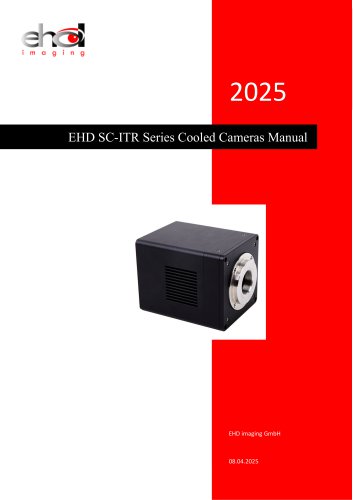 EHD SC-ITR Series
48 Pages
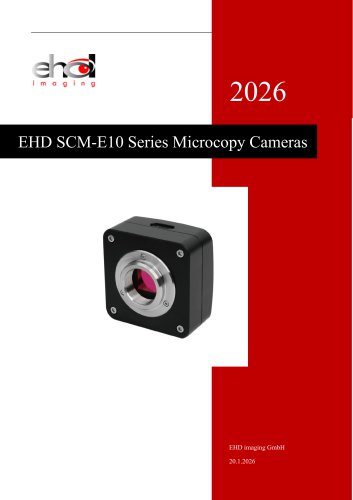 SCM-E10 Series Microcopy Cameras
4 Pages
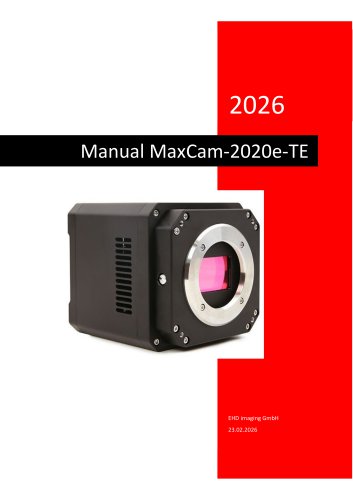 MaxCam‐2020e‐TE
39 Pages
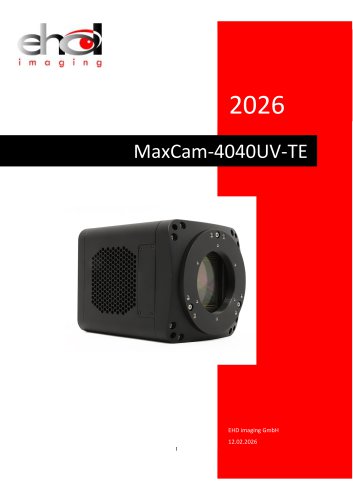 MaxCam‐4040UV‐TE
44 Pages
- Microscopy
- Compound microscope
- Laboratory microscope
- Desktop microscope
- Laboratory software
- CMOS camera
- Camera with USB port
- LED microscope
- Acquisition software
- Medical camera
- Measurement software
- Full HD camera
- HD camera
- Recording software
- Microscope camera
- Fluorescence microscope
- Real-time software
- Digital microscope
- Ultra-high resolution camera
- Monocular microscope