


- Products
- Catalogs
- News & Trends
- Exhibitions
MOSAIQ® Evaluate Brochure

MOSAIQ® Evaluate Brochure
MOSAIQ® Evaluate is an integrated oncology management system designed to streamline treatment planning and dose review processes. It allows clinicians to manage and review treatment plans directly within the MOSAIQ system, enhancing efficiency and reducing delays in patient care.
- Integrated plan management and dose review within MOSAIQ.
- Capability to evaluate, approve, and promote multiple plans from any MOSAIQ workstation.
- Support for various treatment modalities including photon, electron, brachytherapy, and proton plans.
- Interactive display of RT plans and DRRs, with the ability to send plans and images from any Treatment Planning System (TPS).
- Tools for comparing and quantifying dose coverage trade-offs to ensure optimal treatment.
- Improves treatment quality by allowing multiple RT plan and dose reviews.
- Streamlines workflow and enhances productivity by reducing the need for physical presence in the dosimetrist’s office.
- Facilitates informed treatment decisions through comprehensive data access and analysis.
- Enables adaptive therapy by integrating clinical treatment data into the planning system.
- Display treatment plans within the EMR and view dose and beams on registered images.
- Plan summation and subtraction, multi-user approvals, and DVH goal assessment.
- Streamlined QA checks and simplified treatment field creation.
MOSAIQ Evaluate enhances the efficiency of oncology practices by integrating treatment planning functions into the clinical workflow, reducing patient wait times, and improving overall productivity. It supports data mining and retrospective queries, providing comprehensive access to historical plan information.
Catalog excerpts

MOSAIQ® Evaluate Integrated plan management and dose review A new paradigm of treatment planning management
Open the catalog to page 1
MOSAIQ® Evaluate Integrated plan management and dose review MOSAIQ Evaluate delivers a truly integrated oncology management system, providing comprehensive treatment planning tools such as plan management and dose review directly within MOSAIQ. Multiple plan evaluation, approval and promotion can now be performed inside the patient chart, allowing clinicians to review the entire treatment plan on any MOSAIQ workstation. The combination of MOSAIQ with powerful treatment planning functions in a single software framework offers a multitude of efficiency gains and quality improvements for oncology...
Open the catalog to page 2
Why MOSAIQ® Evaluate? Provide the tools to help clinicians improve treatment quality with multiple RT plan, dose and DVH review within MOSAIQ View an interactive display of the actual RT Plan and DRRs in MOSAIQ Send the RT plan and reference images concurrently from virtually any Treatment Planning System (TPS) to MOSAIQ or in any sequence Manage plans for different treatment modalities on any MOSAIQ workstation Export, archive and restore plans, DICOM images and RT objects with MOSAIQ® Data Director
Open the catalog to page 3
Make more informed treatment decisions MOSAIQ® Evaluate supports the management of plans for different modalities and multi-modality images, photon, electron, brachytherapy and proton plans while powerful graphical displays and analytical tools help you to compare and quantify information. This helps clinicians compare plans from different systems, quantify and evaluate dose coverage trade-offs, to ensure the best possible course of treatment for each patient. MOSAIQ Evaluate enables closer integration of treatment planning functions into the MOSAIQ clinical workflow while enabling the planning...
Open the catalog to page 4
With MOSAIQ Evaluate, users can: • Display the treatment plan within the EMR View dose and beams on registered images Plan summation and subtraction Configure Multi-User approvals Review DVH Goal assessment Compare rival trial plans Approve plan and associated prescription MOSAIQ Plan Worklist identifies approved plans and triggers QA check
Open the catalog to page 5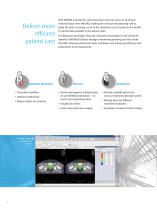
Deliver more efficient patient care Radiation Oncologist • Streamline workflow • Improve productivity With MOSAIQ Evaluate the planning system now has access to all clinical treatment data from MOSAIQ, enabling the clinician and planning staff to adapt the plan as changes occur in the treatment course, based on the wealth of clinical data available in the patient chart. The Radiation Oncologist, Physicist, Dosimetrist and patients will realize the benefits of MOSAIQ Evaluate through streamlining planning activities inside the EMR, reducing patient wait times and delays and improving efficiency...
Open the catalog to page 6
With MOSAIQ Evaluate, plan data is directly integrated into MOSAIQ, creating opportunities for data mining and retrospective queries on historical plan information. All plan information is accessible, either at a MOSAIQ workstation or accessed remotely with MOSAIQ Mobile*. MOSAIQ Evaluate single plan review showing DVH.
Open the catalog to page 7
for treating cancer and brain disorders. Elekta provides intelligent and resource-efficient technologies that improve, prolong and save patient lives. We go beyond collaboration seeking long-term relationships built on trust with a shared vision, offering confidence to healthcare providers and their patients. Human Care Makes the Future Possible Corporate Head Office: Regional Sales, Marketing and Service: Europe, Middle East, Africa, Eastern Europe, Latin America Tel +46 8 587 254 00 Fax +46 8 587 255 00 [email protected] Art. nr. LPCMSQ121130 v1.0 © 2013 Elekta AB (publ). All mentioned...
Open the catalog to page 8Archived catalogs
 Elekta Infinity
8 Pages
 MOSAIQ® 3
20 Pages
 Elekta Versa HD™
12 Pages
 Elekta Unity
16 Pages
 METRIQ®
8 Pages
 Elekta Compact™
8 Pages
 Leksell Gamma Knife® Icon™
16 Pages
 Precise Treatment System™
12 Pages
 Elekta Synergy®
8 Pages
 MOSAIQ® Survivorship™
2 Pages
 MOSAIQ® Medical Oncology EHR
12 Pages
 Elekta Neuromag® TRIUX
7 Pages
 MOSAIQ® Locate
2 Pages
 iViewGT™
8 Pages
 microSelectron ® Digital
12 Pages
 Leksell SurgiPlan
10 Pages
 Interstitial Brachytherapy
8 Pages
 Oncentra ® Brachy ACE
2 Pages
 Oncentra ® Brachy
10 Pages
 Flexitron brochure
8 Pages
 MOSAIQ® IQ Scripts? Brochure
6 Pages
 ANALYTIQ? Brochure
2 Pages
 Leksell Gamma Knife® 4C
1 Page
 Leksell Gamma Knife® 4
1 Page
 128-channel EEG system
1 Page
 64-channel EEG system
1 Page
 32-channel EEG system
1 Page
 Patient chair
1 Page
 Patient couch
1 Page
 Elekta Compact brochure
6 Pages


- Analysis software
- Radiology software
- Visualization software
- Elekta tablet computer software
- Elekta tablet PC software
- Control software
- Cloud-based software
- Planning software
- Automated software
- Treatment software
- Traceability software
- AI-assisted software
- Artificial intelligence software
- Training software
- Elekta surgery software
- Real-time software
- CT software
- Data analysis software
- Image analysis software
- EMR software