


Independently Tested Reliability of Form 4 and Other Resin 3D Printer
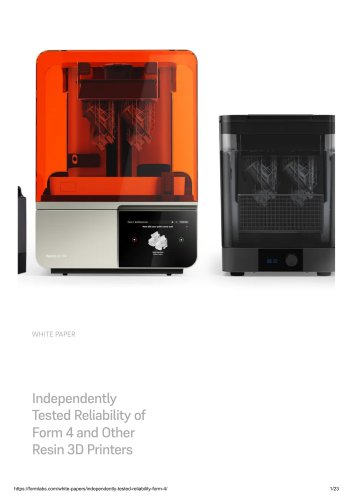
Independently Tested Reliability of Form 4 and Other Resin 3D Printer
Additive manufacturing (AM), commonly known as 3D printing, is essential for product development across various industries. Despite its potential, reliability issues hinder its widespread adoption. This white paper by Formlabs addresses the lack of quantitative reliability data for 3D printers, specifically focusing on the Form 4 and other resin 3D printers.
Customers often rely on brand reputation due to a lack of reliable data for informed purchasing decisions. Formlabs seeks to provide comprehensive performance data through independent testing of select stereolithography (SLA) 3D printers.
An independent global leader in product testing conducted the tests. The procedure involved printing 15 models three times each on five different printers from each manufacturer, totaling 225 prints per model. The success or failure of each print was recorded.
The Form 4 printer achieved a 98.7% print success rate, matching the Form 3+. Benchmark printers A and B had success rates of 86.2% and 74.7%, respectively. Notably, two printers from benchmark B were non-functional upon arrival, highlighting hardware reliability issues.
Formlabs attributes its high reliability to extensive validation of print settings, automated diagnostics, and rigorous quality control, including a 60-point inspection before shipping.
- Form 4: 98.7% success rate, 1.3% failure rate, launched in 2024.
- Form 3+: 98.7% success rate, 1.3% failure rate, launched in 2019.
- Benchmark A: 86.2% success rate, 13.8% failure rate, launched in 2023.
- Benchmark B: 74.7% success rate, 25.3% failure rate, launched in 2022.
Printers were tested using standard grey resin and models from various applications, including engineering, biomedical, and dental. The SOP involved consistent setup and post-processing procedures to ensure fair comparison.
Prints were evaluated for adherence, delamination, warping, and other defects. Minor blemishes were noted but did not count as failures.
Formlabs aims to set industry standards for printer reliability, providing customers with trustworthy data for informed decision-making. The testing promotes the development of ASTM/ISO standards for additive manufacturing.
- 1.0 Description of Models: Lists various models used in testing, including dental models, surgical guides, and automotive parts.
- 2.0 Print Settings: Details the settings used for Benchmark A and B printers.
- 3.0 Definitions: Provides definitions for terms such as 'Printer', 'Model', 'Print', 'Mechanical Reliability', and 'Print Reliability'.
Catalog excerpts
Independently Tested Reliability of Form 4 and Other Resin 3D Printers
Open the catalog to page 1
Introduction History: Additive manufacturing (AM), also known as 3D printing, is a powerful, popular tool to accelerate product development and manufacturing across many industries. Reliability is critical for any tool designed to create parts, and 3D printing is no exception. While 3D printing has made huge leaps over the past decade, many printers are still held back by poor reliability. In a 2024 survey by 3D Printing Industry, leaders in additive manufacturing listed “Machine and Process Reliability” as the number one barrier to achieving broader adoption of 3D printing. Problem: Unfortunately,...
Open the catalog to page 2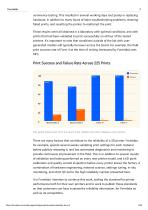
commence testing. This resulted in several working days lost purely in replacing hardware, in addition to many hours of labor troubleshooting problems, cleaning failed prints, and resetting the printer to reattempt the print. These results were all obtained in a laboratory with optimal conditions, and with prints that had been validated to print successfully on all four of the tested printers. It's important to note that conditions outside of the lab with usergenerated models will typically be lower across the board. For example, the field print success rate of Form 4 at the time of writing (measured...
Open the catalog to page 3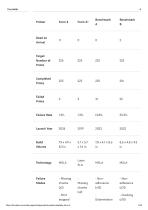
Technology MSLA Failure Modes chunks Missing - Print stopped
Open the catalog to page 4
Non-PrintIssues Outdated Lost Hours Printing Due to Failures Book a Consultation Get in touch with our 3D printing experts for a 1:1 consultation to find the right solution for your business, receive ROI analyses, test prints, and more.
Open the catalog to page 5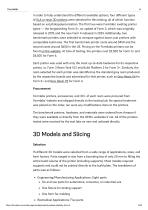
In order to fully understand the different available options, four different types of SLA or resin 3D printers were selected for this testing, all of which function based on vat photopolymerization. The first two were Formlabs' existing printer types — the longstanding Form 3+, an update of Form 3, which was originally released in 2019, and the new Form 4 released in 2024. Additionally, two benchmark printers were selected to compare against lower cost printers with comparable build area. The first benchmark printer costs around $450 and the second costs around $650 in the US. Pricing on the...
Open the catalog to page 6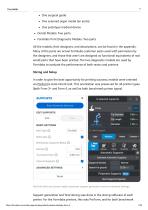
• One scanned organ model (an aorta) • One prototype medical device • Dental Models: Two parts • Formlabs Print Diagnostic Models: Two parts All the models, their designers, and descriptions, can be found in the appendix. Many of the parts are actual Formlabs customer parts used with permission by the designers, and those that aren't are designed as functional equivalents of real world parts that have been printed. The two diagnostic models are used by Formlabs to evaluate the performance of both resins and printers. In order to give the best opportunity for printing success, models were oriented...
Open the catalog to page 7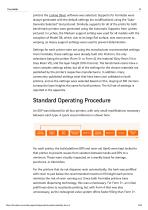
printers the Lychee Slicer software was selected. Supports for Formlabs were always generated with the default settings (no modifications) using the “AutoGenerate Selected” tool pictured. Similarly, supports for all of the prints for both benchmark printers were generated using the Automatic Supports from Lychee, pictured. In Lychee, the Medium support setting was used for all models with the exception of Model D8, which, due to its large flat surface, was more prone to warping, so Heavy support settings were used to prevent delamination. Settings for each printer were set using the manufacturer...
Open the catalog to page 8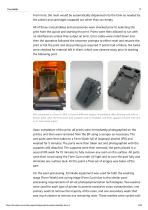
From here, the resin would be automatically dispensed into the tank as needed by the printer and cartridges swapped out when they ran empty. All of these consumables and accessories were checked prior to selecting the print from the queue and starting the print. Prints were then allowed to run with no interference unless they output an error. Error codes were noted down and then the operators followed the onscreen prompts to either reset and resume the print or fail the print and stop printing as required. If prints had a failure, the tanks were checked for material left in them, which was cleaned...
Open the catalog to page 9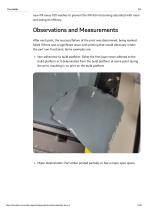
new IPA every 100 washes to prevent the IPA from becoming saturated with resin and losing its efficacy. Observations and Measurements After each print, the success/failure of the print was determined, being marked failed if there was a significant issue with printing that would obviously render the part non-functional. Some examples are: Non-adherence to build platform: Either the first layer never adhered to the build platform or it delaminated from the build platform at some point during the print, resulting in no print on the build platform Major delamination: Part either printed partially...
Open the catalog to page 10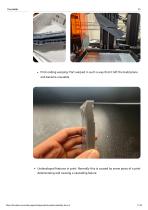
Print ending warping: Part warped in such a way that it left the build plane and became unusable Undeveloped features in print: Normally this is caused by some piece of a print delaminating and causing a cascading failure.
Open the catalog to page 11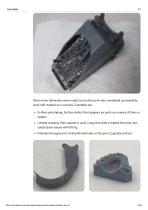
More minor blemishes were noted, but as the print was completed successfully, were still marked as a success. Examples are: Surface pinstriping: Surface defect that appears on parts as a series of lines or ripples Limited warping: Part warped in such a way that didn’t impede the print, but could cause issues with fitting Pinholes through print: Unintentional holes in the print, typically vertical
Open the catalog to page 12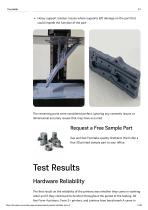
Heavy support residue: Issues where supports left damage on the part that could impede the function of the part The remaining parts were considered perfect, ignoring any cosmetic issues or dimensional accuracy issues that may have occurred. Request a Free Sample Part See and feel Formlabs quality firsthand. We’ll ship a free 3D printed sample part to your office. Test Results Hardware Reliability The first result on the reliability of the printers was whether they came in working order and if they continued to function throughout the period of the testing. All five Form 4 printers, Form 3+ printers,...
Open the catalog to page 13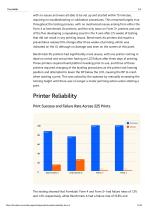
with no issues and were all able to be set up and started within 15 minutes, requiring no troubleshooting or calibration procedures. This remained largely true throughout the testing process, with no mechanical issues arising from either the Form 4 or benchmark A’s printers, and the only issue on Form 3+ printers was one of the five developing a squeaking sound in the X axis after 2.5 weeks of testing that did not result in any printing issues. Benchmark A’s printers did require a preventative release film change after three weeks of printing, which was indicated on the UI, although no damage...
Open the catalog to page 14All Formlabs catalogs and technical brochures
 THE FUSE X1 SLS ECOSYSTEM
4 Pages
 General Purpose Resins
2 Pages
 form-4
4 Pages
Archived catalogs
 Elastic
2 Pages
 Dental LT Clear
2 Pages
 Ceramic
2 Pages
 Draft Resin
2 Pages
 Form 3B for Dental Practice
2 Pages
 Tough 2000
2 Pages
 Flexible
2 Pages
 Dental Model
2 Pages
 Rigid
Rigid2 Pages
 Tough 1500
2 Pages
- Formlabs dental material
- Formlabs dental restoration material
- Formlabs resin dental material
- Visualization software
- Formlabs dental prosthesis dental material
- Reporting software
- Formlabs modeling dental material
- Dental crown material
- Windows software
- Dental bridge material
- Formlabs biocompatible dental material
- Dental laboratory dental material
- Ceramic dental material
- Monitoring software
- Planning software
- Cloud-based software
- Cleaner
- Formlabs liquid dental material
- Design software
- Formlabs photopolymerizable dental material