

Auto-freeze/decision/save for expert mode

1 / 1 PageView full catalog
Auto-freeze/decision/save for expert mode
Product catalog summary
Overview: The document outlines features available in the expert mode settings of a testing operation system, specifically focusing on auto-freeze, auto-decision, and auto-save functionalities.
Key Features:
- Auto Freeze: Automatically freezes the waveform when it becomes stable, simplifying the testing process.
- Auto Decision: Automatically loads waveform data into memory once it is frozen, streamlining data handling.
- Auto Save: Automatically saves the data file every time a test is completed, ensuring data is not lost.
Additional Information: Users can activate these features from the Option Screen to enhance the efficiency of testing operations. An update for Smart-V-Link V3 is available, and users can return to the product page for more information.
See more
Catalog excerpts
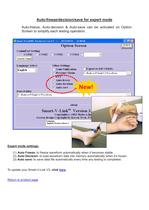
Auto-freeze/decision/save for expert mode Auto-freeze, Auto-decision & Auto-save can be activated on Option Screen to simplify each testing operation. Expert mode settings: (1) Auto Freeze: to freeze waveform automatically when it becomes stable. (2) Auto Decision: to load waveform data into memory automatically when it’s frozen. (3) Auto save: to save data file automatically every time any testing is completed. To update your Smart-V-Link V3, click here. Return to product page
Open the catalog to page 1All Hadeco catalogs and technical brochures
 Discontinued products
18 Pages


*Prices are pre-tax. They exclude delivery charges and customs duties and do not include additional charges for installation or activation options. Prices are indicative only and may vary by country, with changes to the cost of raw materials and exchange rates.