
- Catalogs
- HANNA Instruments
- edge® pH•EC•DO


edge® pH•EC•DO
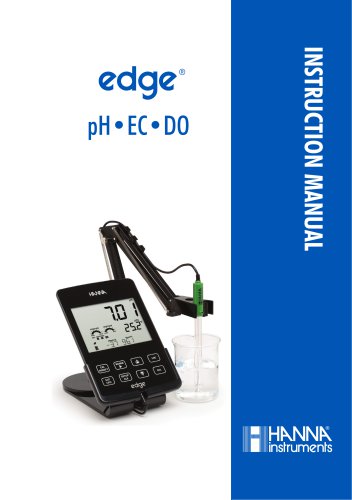
edge® pH•EC•DO
The document is an instruction manual for the Hanna Instruments edge® series, which includes pH, EC, and DO meters. It provides guidance on the use of the instrument, its versatility, and technical support contact information.
Each edge® instrument includes a bench cradle, wall cradle, electrode holder, USB cable, power adapter, instruction manual, and quality certificate. Model-specific components include digital electrodes for pH, EC, and DO measurements, calibration solution kits, and maintenance accessories.
Ensure the instrument is suitable for your application and environment. Avoid using it in hazardous environments or microwave ovens. Retain all packing materials until the instrument is confirmed to work correctly.
The edge® meter is designed for fast, accurate measurements of pH, conductivity, or dissolved oxygen. It features a sleek design, internal clock, adjustable resolution, auto parameter recognition, and a basic operation mode. It can be used as a portable or line-powered laboratory instrument.
Familiarize yourself with the features, decide on its use (portable or stationary), and connect the necessary probes. The device can be powered via a cradle or directly through a micro USB connection. The rechargeable battery provides up to 8 hours of use.
Connect the 3 mm probe jack to the edge® input. The device will display a "CONNECTING" message if the probe is recognized. If not, a "NO PROBE" message will appear.
Options include selecting the logging type, setting calibration expiration warnings, and configuring probe-specific parameters. These settings are retained even when switching probes or when no probe is attached.
Detailed instructions on calibration, measurement, data logging, and data export for pH, EC, and DO modes. It includes guidance on using the basic and standard modes, configuring meter settings, and understanding calibration messages.
Regular maintenance of pH, EC, and DO probes is essential for accurate measurements. The manual includes a troubleshooting guide and specifications for each probe type.
Detailed specifications of the edge® meters and a list of available accessories.
Outlines the setup and configuration options for the device. Key settings include date and time configuration, auto-off feature, sound settings, temperature unit selection, LCD contrast adjustment, and flash format for error conditions.
Offers a simplified configuration process for pH and EC measurements. Calibration is limited to five standard pH buffers, and measurements are displayed with 0.01 pH resolution.
Supports various logging functions, including interval logging, manual logging, and stability logging. Up to 1000 log records can be stored, shared across all measurement types.
Logged data can be transferred to a USB flash drive or a PC. The device supports USB 2.0 and can export data in CSV format.
- Standard Mode: Offers full functionality with seven standard buffers and two custom ones. A minimum of a three-point calibration is recommended for accuracy.
- Basic Mode: Allows up to three-point buffer calibration. A two-point calibration is recommended for accuracy.
- Sensor Check™: Monitors the health of the electrode's reference junction.
- Calibration Check™: Assesses electrode condition and response time during calibration.
- Use fresh buffers for each calibration and perform regular electrode maintenance.
- Daily calibration is advised for continuous monitoring of electrode condition and response.
Provides a table of pH buffer values at various temperatures, crucial for calibrating pH meters.
Outlines diagnostic messages that may appear during calibration and provides guidance on addressing these issues.
Explains how to access calibration information and the importance of maintaining calibration records for quality control.
Instructions for measuring pH using an edge® pH probe, emphasizing the importance of calibration before measurement.
Compares Basic and Standard modes for Electrolytic Conductivity (EC) measurement.
Details configuration options for the EC meter, including temperature compensation, cell factor, TDS conversion factor, and measurement ranges.
Calibrate frequently for high accuracy. Use fresh standard solutions and perform electrode maintenance.
Pour standard solutions into a plastic beaker to minimize EMC interference. Use separate beakers for rinsing and calibration.
Lists temperature dependence of EC calibration standards.
Use HI7037 solution for 100% NaCl calibration.
GLP functions store and retrieve electrode maintenance data.
Switch between conductivity, TDS, and salinity using RANGE/u key.
Switch to salinity scale using RANGE/u key.
Prepare DO probe, connect to meter, configure parameters, calibrate sensor, and take measurements.
DO meter operation is configured using the SETUP/CLR key. Key parameters include altitude and salinity.
The probe is shipped dry and requires careful handling. Preparation involves filling the membrane cap with electrolyte.
Calibration involves 100% saturated calibration in water-saturated air and zero calibration using a zero oxygen solution.
Ensure the probe is polarized and calibrated before use. Submerge the probe in the sample and stir to maintain accurate readings.
Regular maintenance includes checking for salt deposits and ensuring the electrode is moist.
Compensation for temperature, altitude, and salinity is crucial for accurate DO measurements.
Includes replacing the membrane or refilling with electrolyte and cleaning the platinum cathode.
Common issues include slow response and calibration errors. Solutions involve cleaning electrodes and refilling electrolyte.
Provides detailed specifications for pH, EC, TDS, Salinity, and DO measurements.
The edge® device is warranted for two years, while electrodes and probes have a six-month warranty.
Catalog excerpts
INSTRUCTION MANUAL
Open the catalog to page 1
Dear Customer, Thank you for choosing a Hanna Instruments product. Please read this instruction manual carefully before using the instrument. This manual will provide you with the necessary information for correct use of the instrument, as well as a precise idea of its versatility. If you need additional technical information, do not hesitate to e‑mail us at [email protected] or view our worldwide contact list at www.hannainst.com. All rights are reserved. Reproduction in whole or in part is prohibited without the written consent of the copyright owner, Hanna Instruments Inc., Woonsocket, Rhode...
Open the catalog to page 2
Remove the instrument from the packing material and examine it carefully to make sure that no damage has occurred during shipping. If there is any damage, please contact your local Hanna Instruments Office. Each instrument edge® (pH, EC, DO) is supplied with: Bench cradle Wall cradle Electrode holder USB cable 5 Vdc Power Adapter Instruction Manual Quality Certificate Model Specific Components include: Note: Save all packing material until you are sure that the instrument works correctly. Any defective item must be returned in its original packing. Before using this product, make sure that it...
Open the catalog to page 5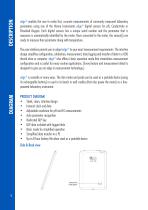
DIAGRAM DESCRIPTION edge® enables the user to make fast, accurate measurements of commonly measured laboratory parameters using one of the Hanna Instruments edge® digital sensors for pH, Conductivity or Dissolved Oxygen. Each digital sensors has a unique serial number and the parameter that is measures is automatically identified by the meter. Once connected to the meter, the sensor(s) are ready to measure their parameter along with temperature. The user interface permits you to adapt edge® to your exact measurement requirements. The intuitive design simplifies configuration, calibration, measurement,...
Open the catalog to page 6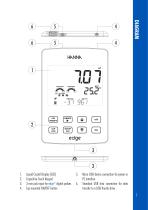
DIAGRAM HNSINk CONDITION RESPONSE POOR OOOD SLOW M ST gg (T) q © CD EDedge 1. Liquid Crystal Display (LCD) 2. Capacitive Touch Keypad 3. 3 mm jack input for edge® digital probes 4. Top mounted ON/OFF button 5. Micro USB device connection for power or PC interface 6. Standard USB host connection for data transfer to a USB thumb-drive
Open the catalog to page 7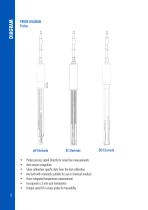
PROBE DIAGRAM Probes • Probes process signal directly for noise free measurements • Auto sensor recognition • Store calibration specific data from the last calibration • Are built with materials suitable for use in chemical analysis • Have integrated temperature measurement • Incorporate a 3 mm jack termination • Unique serial ID in every probe for traceability
Open the catalog to page 8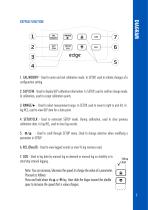
KEYPAD FUNCTION DIAGRAM 1. CAL/MODIFY - Used to enter and exit calibration mode. In SETUP, used to initiate changes of a configuration setting. 2. GLP/CFM - Used to display GLP calibration information. In SETUP, used to confirm change made. In calibration, used to accept calibration points. 3. RANGE/u - Used to select measurement range. In SETUP, used to move to right in pick list. In log RCL, used to view GLP data for a data point. 4. SETUP/CLR - Used to enter/exit SETUP mode. During calibration, used to clear previous calibration data. In log RCL, used to clear log records. 5. ^/^ - Used to...
Open the catalog to page 9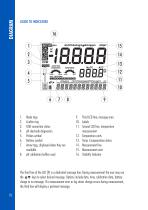
9. Third LCD line, message area 11. Second LCD line, temperature measurement 13. Temp. Compensation status 7. Arrow tags, displayed when they are available 8. pH calibration buffers used The third line of the LCD (9) is a dedicated message line. During measurement the user may use the ^ ^ keys to select desired message. Options include date, time, calibration data, battery charge or no message. If a measurement error or log status change occurs during measurement, the third line will display a pertinent message.
Open the catalog to page 10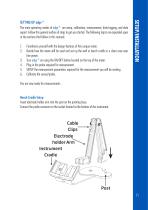
The main operating modes of edge ® are setup, calibration, measurement, data logging, and data export. Follow this general outline of steps to get you started. The following topics are expanded upon in the sections that follow in this manual. 1. Familiarize yourself with the design features of this unique meter. 2. Decide how the meter will be used and set up the wall or bench cradle in a clean area near line power. 3. Turn edge ® on using the ON/OFF button located on the top of the meter. 4. Plug in the probe required for measurement. 5. SETUP the measurement parameters required for the measurement...
Open the catalog to page 11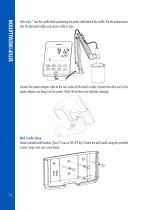
Slide edge ® into the cradle while positioning the probe cable behind the cradle. Put the probe/sensor into the electrode holder and secure cable in clips. Connect the power adapter cable to the rear socket of the bench cradle. Connect the other end to the power adapter and plug into line power. Verify the battery icon indicates charging. Wall Cradle Setup Choose suitable wall location. (Use 2.5 mm or US #3 bit). Fasten the wall cradle using the provided screws. Snap cover over screw heads.
Open the catalog to page 12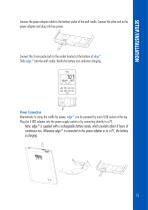
Connect the 3 mm probe jack to the socket located at the bottom of edge ®. Slide edge ® into the wall cradle. Verify the battery icon indicates charging. Connect the power adapter cable to the bottom socket of the wall cradle. Connect the other end to the power adapter and plug into line power. Power Connection Alternatively to using the cradle for power, edge ® can be powered by micro USB socket at the top. Plug the 5 VDC adapter into the power supply socket or by connecting directly to a PC. Note: edge ® is supplied with a rechargeable battery inside, which provides about 8 hours of continuous...
Open the catalog to page 13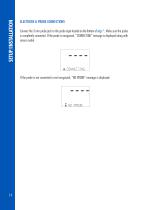
ELECTRODE & PROBE CONNECTIONS Connect the 3 mm probe jack to the probe input located on the bottom of edge ®. Make sure the probe is completely connected. If the probe is recognized, “CONNECTING” message is displayed along with sensor model. If the probe is not connected or not recognized, “NO PROBE” message is displaye
Open the catalog to page 14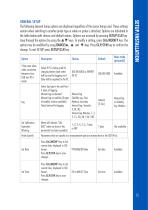
GENERAL SETUP The following General Setup options are displayed regardless of the sensor being used. These settings remain when switching to another probe type or when no probe is attached. Options are tabulated in the table below with choices and default values. Options are accessed by pressing SETUP/CLR key. Loop through the options by using the ^ ^ keys. To modify a setting, press CAL/MODIFY key. The option may be modified by using RANGE/u, ^ and ^ keys. Press GLP/CFM key to confirm the change. To exit SETUP press SETUP/CLR key.
Open the catalog to page 15All HANNA Instruments catalogs and technical brochures
Archived catalogs
 HI 9125N Portable pH Meter
4 Pages
 HI84500
6 Pages
 HI84502
6 Pages
 General Catalog
772 Pages
 HI99151
4 Pages
 HI99191
4 Pages
 edge® dedicated Brochure
8 Pages
 Professional Waterproof Meters
12 Pages
 HI2202 edge blu
8 Pages
 HI5000 Series Benchtop Meters
12 Pages
 Hanna Titration Catalog
40 Pages
 edge pH EC DO Brochure
8 Pages
 HI4114
9 Pages
 HI98129
2 Pages


- Detection kit
- Solvent reagent
- Laboratory reagent
- Thermometer
- Laboratory agitator
- Optical test kit
- Dye reagent kit
- Benchtop laboratory agitator
- Digital thermometer
- Buffer solution reagent
- Quality control reagent
- Laboratory testing system
- Digital laboratory agitator
- Temperature sensor
- Straight electrode
- Research detection kit
- Electrolyte reagent
- Magnetic laboratory shaker
- Gas sensor
- Spectrophotometer