
- Catalogs
- HANNA Instruments
- HI99181


HI99181
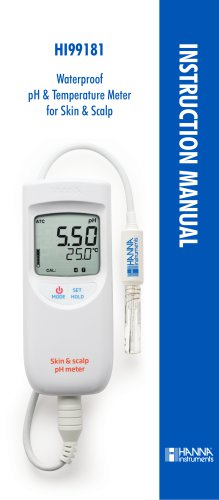
HI99181
Upon receiving the HI99181 pH and Temperature Meter, inspect for any shipping damage. The package includes essential accessories such as a pH/temperature probe, buffer solutions, and batteries. Retain packaging until the instrument is confirmed operational.
The HI99181 is a portable, waterproof pH meter designed for skin and scalp measurements. It features simple operation, automatic calibration, and a dual-line display. The HI14143/50 probe includes a temperature sensor and preamplifier for accuracy.
The meter offers simultaneous pH and temperature readings, automatic calibration, selectable temperature units, and an electrode condition indicator. It includes a quick connect system, battery life indication, and an auto-off function. The casing is IP67 rated for waterproof protection.
The meter measures pH from -2.00 to 16.00 and temperature from -5.0 to 105.0 °C, with a resolution of 0.01 pH and 0.1 °C. Accuracy is ±0.02 pH and ±0.5 °C. It supports automatic temperature compensation and operates on three AAA batteries with a life of approximately 1400 hours.
The display shows indicators for temperature compensation, stability, battery life, electrode condition, and measurement units. It also displays calibration buffers and meter modes.
Insert batteries and connect the probe before use. The meter turns on with a button press, displaying battery life and electrode status. Calibration is recommended before use, especially after cleaning or replacing the electrode.
Setup mode allows selection of temperature units, auto-off timing, beep confirmation, buffer set, resolution, and electrode condition display. Adjust settings using the SET button and confirm with the power button.
A warning appears when battery life is below 10%. Replace batteries by accessing the compartment on the back, ensuring correct polarity.
Available accessories include buffer solutions, storage solutions, and cleaning solutions. Additional accessories for HI991XX instruments include a rubber boot, electrode holder, carrying case, and calibration kit.
- Preparation: Remove the protective cap, rinse, shake to remove air bubbles, soak in storage solution if dry, and calibrate before use.
- Storage: Keep the glass tip moist, replace the cap with storage solution, and avoid distilled water.
- Periodic Maintenance: Inspect for damage, rinse off deposits, and follow storage procedures.
- Cleaning Procedure: Soak in cleaning solutions for 20 minutes, rinse, soak in storage solution, and calibrate before use.
- Troubleshooting: Follow operating and calibration procedures and evaluate electrode performance.
Products conform to CE European Directives and are RoHS compliant. Proper disposal of electrical equipment and batteries is emphasized.
The HI99181 is warranted for two years against defects, with electrodes and probes warranted for six months. The warranty covers repair or replacement but excludes misuse or lack of maintenance.
Ensure the product is suitable for the specific application and environment. Avoid using or storing the meter in hazardous environments.
Hanna Instruments reserves the right to modify product design and is headquartered in Woonsocket, RI, USA.
Catalog excerpts
Waterproof pH & Temperature Meter for Skin & Scalp INSTRUCTION MANUAL
Open the catalog to page 1
Thank you for choosing a Hanna Instruments product. Dear Customer, Please read this instruction manual carefully before using this meter. This manual will provide you with the necessary information for correct use of this meter, as well as a precise idea of its versatility. If you need additional technical information, do not hesitate to e‑mail us at [email protected] or view our worldwide contact list at www.hannainst.com. All rights are reserved. Reproduction in whole or in part is prohibited without the written consent of the copyright owner, Hanna Instruments Inc., Woonsocket, Rhode Island,...
Open the catalog to page 2
PRELIMINARY EXAMINATION PRELIMINARY EXAMINATION Remove the instrument and accessories from the packaging and examine it carefully to make sure that no damage has occurred during shipping. Notify your nearest Hanna Instruments Customer Service Center if damage is observed. Each HI99181 is delivered in a rugged carrying case and is supplied with: • HI14143/50 pH/temperature probe with flat tip, DIN connector and 1m (3.3') cable • HI700620 Cleaning and disinfection solution for skin residuals (1 sachet) • HI700621 Electrode cleaning solution for skin grease and sebum (1 sachet) • Instrument quality...
Open the catalog to page 4
The HI99181 portable pH meter together with a HI14143/50 combination pH electrode, is designed to measure pH on skin and scalp. The HI99181 features a two button operation system and is simple to use. It has a waterproof and compact casing, large dual-line display, and automatic pH calibration at one or two points. The HI14143/50 has a built-in temperature sensor for temperature compensated pH readings and an integrated preamplifier to provide measurements impervious to noise and electrical interferences. The flat tip of the HI14143/50 provides optimal contact between the sample and the sensor....
Open the catalog to page 5
MAIN FEATURES MAIN FEATURES • Simultaneous pH and temperature measurements on a large dual-line LCD display • Automatic pH calibration at one or two points within two memorized buffer sets (standard or NIST) • Selectable temperature unit (°C or °F) • Electrode condition indicator • mV of pH measurement for electrode check • HI14143/50 dedicated pH probe with integrated temperature sensor • Probe quick connect system • Battery life indication and low battery detection • Keystroke confirmation tone • Auto-off function
Open the catalog to page 6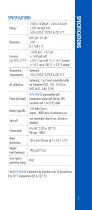
the HI14143/50 is limited to be used from 0 to 12 pH and from 0 to 50 °C temperature (32 to 122 °F)
Open the catalog to page 7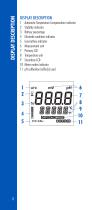
DISPLAY DESCRIPTION DISPLAY DESCRIPTION 1 Automatic Temperature Compensation indicator 4 Electrode condition indicator 10 Meter modes indicator 11 pH calibration buffer(s) used
Open the catalog to page 8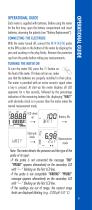
Each meter is supplied with batteries. Before using the meter for the first time, open the battery compartment and insert batteries, observing the polarity (see “Battery Replacement“). CONNECTING THE ELECTRODE With the meter turned off, connect the HI14143/50 probe to the DIN socket on the bottom of the meter by aligning the pins and pushing in the plug firmly. Remove the protective cap from the probe before taking any measurements. TURNING THE METER ON To turn the meter ON, press the button on the front of the meter. If it does not turn on, make sure that the batteries are properly installed...
Open the catalog to page 9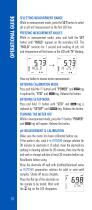
OPERATIONAL GUIDE SELECTING MEASUREMENT RANGE While in measurement mode, press the SET button to select pH or pH-mV measurement on the first LCD line. FREEZING MEASUREMENT VALUES While in measurement mode, press and hold the SET button until “HOLD“ appears on the secondary LCD. The “HOLD“ remains for 1 second and reading of pH, mV and temperature will be frozen on the LCD with “H” blinking. → Press any button to resume active measurements. ENTERING CALIBRATION MODE tag Press and hold the button until ”POWER” and is replaced by “STD“ and tag. Release the button. ENTERING SETUP MODE tag is Press...
Open the catalog to page 10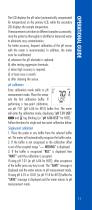
The LCD displays the pH value (automatically compensated for temperature) on the primary LCD, while the secondary LCD displays the sample temperature. If measurements are taken in different samples successively, rinse the probe tip thoroughly in distilled or deionized water to eliminate cross-contamination. For better accuracy, frequent calibration of the pH sensor with the meter is recommended. In addition, the meter must be recalibrated: a) whenever the pH electrode is replaced. b) after testing aggressive chemicals. c) when high accuracy is required. d) at least once a month. OPERATIONAL GUIDE...
Open the catalog to page 11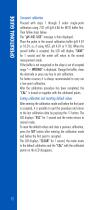
Two-point calibration Proceed with steps 1 through 3 under single-point calibration using 7.01 pH (pH 6.86 for NIST) buffer first. Then follow steps below: The ”pH 4.01 USE” message is then displayed. Place the probe in the second calibration buffer (pH 4.01 or 10.01, or, if using NIST, pH 4.01 or 9.18). When the second buffer is accepted, the LCD will display “SAVE” for 1 second and the meter will return to the normal measurement mode. If the buffer is not recognized or the slope is out of accepted range ”--- WRONG” is displayed. Change the buffer, clean the electrode or press any key to exit...
Open the catalog to page 12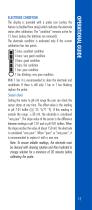
OPERATIONAL GUIDE ELECTRODE CONDITION The display is provided with a probe icon (unless the feature is disabled from setup) which indicates the electrode status after calibration. The “condition” remains active for 12 hours (unless the batteries are removed). The electrode condition is evaluated only if the current calibration has two points. 5 bars: excellent condition 4 bars: very good condition 3 bars: good condition 2 bars: fair condition 1 bar: poor condition 1 bar blinking: very poor condition With 1 bar it is recommended to clean the electrode and recalibrate. If there is still only 1...
Open the catalog to page 13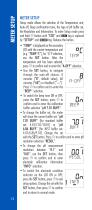
METER SETUP METER SETUP Setup mode allows the selection of the Temperature unit, Auto-off, Beep confirmation tone, the type of pH buffer set, the Resolution and Information. To enter Setup mode press and hold button until "STD" and tag is replaced by "SETUP" and EEHl tag. Release the button. • "TEMP" is displayed on the secondary LCD with the current temperature unit (e.g. "TEMP °C"), for °C/°F selection, use the SET button. After the temperature unit has been selected, press 4? to confirm and to enter the "A-OFF" selection. • Use the SET button, to navigate through the auto-off choices: 8 minutes...
Open the catalog to page 14All HANNA Instruments catalogs and technical brochures
 HI 3850
1 Page
 HI98103
2 Pages
 HI701
HI7012 Pages
 edge® pH•EC•DO
76 Pages
Archived catalogs
 HI 9125N Portable pH Meter
4 Pages
 HI84500
6 Pages
 HI84502
6 Pages
 General Catalog
772 Pages
 HI99151
4 Pages
 HI99191
4 Pages
 edge® dedicated Brochure
8 Pages
 Professional Waterproof Meters
12 Pages
 HI2202 edge blu
8 Pages
 HI5000 Series Benchtop Meters
12 Pages
 Hanna Titration Catalog
40 Pages
 edge pH EC DO Brochure
8 Pages
 HI4114
9 Pages
 HI98129
2 Pages


- Detection kit
- Solvent reagent
- Laboratory reagent
- Thermometer
- Laboratory agitator
- Optical test kit
- Dye reagent kit
- Benchtop laboratory agitator
- Digital thermometer
- Buffer solution reagent
- Quality control reagent
- Laboratory testing system
- Digital laboratory agitator
- Straight electrode
- Research detection kit
- Electrolyte reagent
- Magnetic laboratory shaker
- Gas sensor
- Spectrophotometer