
- Catalogs
- HORIBA Scientific
- LAQUAact-DO110 LAQUAact-DO120


LAQUAact-DO110 LAQUAact-DO120

LAQUAact-DO110 LAQUAact-DO120
This manual provides operational instructions for the Handheld Dissolved Oxygen Meter models LAQUAact-DO110 and LAQUAact-DO120, emphasizing the importance of reading the manual for safe use. Specifications and content may change.
HORIBA, Ltd. offers a two-year warranty against defects, excluding improper use or unauthorized modifications. The company is not liable for damages from malfunctions.
The product complies with EU regulations for electromagnetic compatibility and safety but is not intended for industrial environments. Proper disposal of electronic equipment and batteries is required.
Warnings and symbols are provided to prevent injury and damage. Users should avoid using unspecified adapters, disassembling the instrument, and mishandling chemicals. Battery safety is also highlighted.
Use the product only for its intended purpose, avoid physical impacts, and ensure proper waterproofing. Follow specified environmental conditions for use and storage, and proper disposal methods.
Details the names and functions of each part of the instrument, display, and operation keys. Basic operations include changing modes, using the backlight, and saving data.
Preparation involves confirming settings, turning on the instrument, and connecting electrodes. The measurement process includes setting the instrument, performing calibration, and saving values.
Data functions include displaying, saving, and deleting data. Measurement settings cover calibration and temperature adjustments. General settings involve auto stability, power-off settings, and date/time configuration.
Guidance is provided for maintaining the instrument and DO electrode, including storage conditions and contact information for support.
Instructions for resolving errors or troubleshooting issues during operation.
Common error codes include memory errors, empty battery, electrode sensitivity issues, printer errors, and memory full. Troubleshooting guides address fluctuating values, slow response, and power issues.
Includes detailed technical specifications, default settings, and technical notes on saturated DO levels at various temperatures. Options for accessories and components are also listed.
Temperature compensation, salinity correction, and air pressure correction are supported. Calibration procedures include saturated oxygen concentration mode and dissolved oxygen measurement mode.
Data functions allow saving, displaying, and deleting measurement data. General settings include auto stability, power settings, and factory resets. Data can be printed or transferred to a PC.
Manage calibration data by entering setting mode to display or delete data. A shortcut allows deletion by holding a key for three seconds in measurement mode.
Calibrate the temperature sensor using a known temperature solution. Resetting to factory defaults deletes all settings.
Auto stability and auto hold modes fix measured values based on stability criteria. These modes can be set in general settings.
Adjustable between 0 to 30 minutes, with '0' disabling the feature. Not active during data saving or remote operations.
Resets to factory defaults, deleting calibration data but retaining date, time, and saved data.
Set the date and time when first using the instrument or after battery replacement for correct data logging.
Test printing checks printer operation. Connect the printer, select the test print option, and verify output.
Data can be printed or transferred to a PC using a serial cable. Ensure correct setup and software for data transfer.
Operable remotely via RS-232C communication. Ensure matching transfer formats to avoid errors.
Regular maintenance involves cleaning and storing the instrument properly. The DO electrode requires careful cleaning and storage.
Common errors are listed with solutions. Check these before seeking further assistance.
Models: LAQUAact-DO110, LAQUAact-DO120. Measurement parameters include dissolved oxygen, oxygen concentration, saturated oxygen concentration, and temperature. Operating conditions are 0°C to 45°C, 80% relative humidity. Power options include AAA batteries or AC adapter.
Provides information on saturated DO levels at various temperatures.
Various electrodes and accessories are available, including printers, cables, and adapters, based on application needs.
Catalog excerpts
Handheld Dissolved Oxygen Meter LAQUAact-DO110 LAQUAact-DO120 Instruction Manual CODE:GZ0000427798
Open the catalog to page 1
Preface This manual describes the operation of the Handheld Dissolved Oxygen Meter LAQUAact-DO110, LAQUAact-DO120. Be sure to read this manual before using the product to ensure proper and safe operation of the product. Also safely store the manual so it is readily available whenever necessary. Product specifications and appearance, as well as the contents of this manual are subject to change without notice. ■ Warranty and responsibility HORIBA, Ltd. warrants that the Product shall be free from defects in material and workmanship and agrees to repair or replace free of charge, at option of HORIBA,...
Open the catalog to page 3
Regulations ■ EU regulations ●Conformable standards This equipment conforms to the following standards: EMC: Safety: RoHS: EN61326-1 Class B, Basic electromagnetic environment EN61010-1 EN50581 9. Monitoring and control instruments Warning: This product is not intended for use in industrial environments. In an industrial environment, electromagnetic environmental effects may cause the incorrect performance of the product in which case the user may be required to take adequate measures. ●Installation environment This product is designed for the following environment. ・Overvoltage Category II ・Pollution...
Open the catalog to page 4
Regulations ■ FCC rules Any changes or modifications not expressly approved by the party responsible for compliance shall void the user's authority to operate the equipment. ●WARNING This equipment has been tested and found to comply with the limits for a Class A digital device, pursuant to part 15 of the FCC Rules. These limits are designed to provide reasonable protection against harmful interference when the equipment is operated in a commercial environment. This equipment generates, uses, and can radiate radio frequency energy and, if not installed and used in accordance with the instruction...
Open the catalog to page 5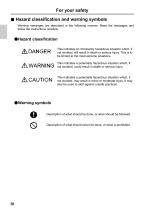
For your safety ■ Hazard classification and warning symbols Warning messages are described in the following manner. Read the messages and follow the instructions carefully. ●Hazard classification This indicates an imminently hazardous situation which, if not avoided, will result in death or serious injury. This is to be limited to the most extreme situations. This indicates a potentially hazardous situation which, if not avoided, could result in death or serious injury. This indicates a potentially hazardous situation which, if not avoided, may result in minor or moderate injury. It may also...
Open the catalog to page 6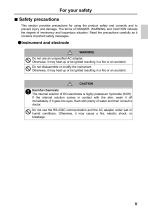
For your safety ■ Safety precautions This section provides precautions for using the product safely and correctly and to prevent injury and damage. The terms of DANGER, WARNING, and CAUTION indicate the degree of imminency and hazardous situation. Read the precautions carefully as it contains important safety messages. ●Instrument and electrode WARNING Do not use an unspecified AC adapter. Otherwise, it may heat up or be ignited resulting in a fire or an accident. Do not disassemble or modify the instrument. Otherwise, it may heat up or be ignited resulting in a fire or an accident. CAUTION Harmful...
Open the catalog to page 7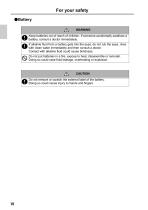
For your safety ●Battery WARNING Keep batteries out of reach of children. If someone accidentally swallows a battery, consult a doctor immediately. If alkaline fluid from a battery gets into the eyes, do not rub the eyes, rinse with clean water immediately and then consult a doctor. Contact with alkaline fluid could cause blindness. Do not put batteries in a fire, expose to heat, disassemble or remodel. Doing so could case fluid leakage, overheating or explosion. CAUTION Do not remove or scratch the external label of the battery. Doing so could cause injury to hands and fingers.
Open the catalog to page 8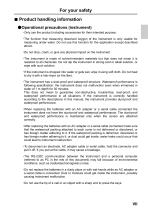
For your safety ■ Product handling information ●Operational precautions (instrument) ・Only use the product including accessories for their intended purpose. ・The function that measuring dissolved oxygen of the instrument is only usable for measuring under water. Do not use this function for the application except described above. ・Do not drop, crash, or give any physical impact on the instrument. ・The instrument is made of solvent-resistant materials but that does not mean it is resistant to all chemicals. Do not dip the instrument in strong acid or alkali solution, or wipe with such solution....
Open the catalog to page 9
For your safety ・If the power supply is interrupted while measurement data is being saved in the instrument, the data could be corrupted. ・A NiMH rechargeable battery can be used in this instrument, but the battery used in the instrument cannot be charged using the AC adapter. ●Operational precautions (battery) ・Do not short-circuit a battery. ・Set the + and side of the battery correctly. ・When the battery has run out or the instrument will not be used for a long time, remove the batteries. ・Of the specified battery types, make sure to use two batteries of the same type. ・Do not use a new...
Open the catalog to page 10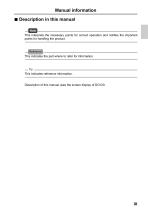
Manual information ■ Description in this manual Note This interprets the necessary points for correct operation and notifies the important points for handling the product. This indicates the part where to refer for information. This indicates reference information. Description of this manual uses the screen display of DO120.
Open the catalog to page 11
Part names and basic operation This section describes the name of each part and the main role, function, and basic operation method of each part.
Open the catalog to page 17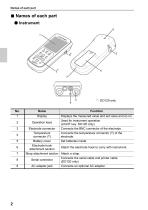
Names of each part ■ Names of each part ● Instrument Operation keys Displays the measured value and set value and so on. Used for instrument operation. (LIGHT key: DO120 only) Connects the BNC connector of the electrode. Connects the temperature connector (T) of the electrode. Set batteries inside. Electrode connector Temperature connector (T) Battery cover Electrode hook Attach the electrode hook to carry with instrument. attachment section Strap attachment section Attach a strap. Connects the serial cable and printer cable. Serial connector (DO120 only) AC adapter jack Connects an optional...
Open the catalog to page 18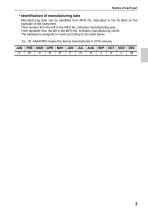
Names of each part • Identification of manufacturing date Manufacturing date can be identified from MFG No. described in the ID label on the backside of the instrument. Third number from the left in the MFG No. indicates manufacturing year. Forth alphabet from the left in the MFG No. indicates manufacturing month. The alphabet is assigned to month according to the table below. Ex.: ID: AA6A0000 means the device manufactured in 2016 January. JAN
Open the catalog to page 19All HORIBA Scientific catalogs and technical brochures
 Ultima Expert LT
3 Pages
 Tm PlstForm
7 Pages


Archived catalogs
 LSH
LSH2 Pages
 iHR
iHR6 Pages
 LabRAM Odyssey
2 Pages
 Aqualog®
2 Pages
 MicOS
MicOS2 Pages
 BRO ICP NEO
3 Pages
 FluoroMax Plus
20 Pages
 QuantaMaster
28 Pages
 SA-9600_Series_Brochure
2 Pages
 Ultima Expert LT
3 Pages
 Ultima Expert
5 Pages
 XploRA Series
8 Pages
 LabRAM HR Evolution
5 Pages
 MacroRAM™
2 Pages
 Modular Raman Spectrometers
5 Pages
 NanoRaman brochure
7 Pages
 Tunable PowerArc
2 Pages
 Tunable KiloArc
2 Pages
 PowerArc™
2 Pages
 KiloArc
2 Pages
 EasyLife L
2 Pages
 EasyLife X
2 Pages
 MicroHead 3000
4 Pages
 MINI-CCT+
2 Pages
 THz-Raman®
4 Pages
 UVISEL Plus In-Situ
4 Pages
 Duetta™
8 Pages
 OpenPlex
2 Pages
 SZ-100
8 Pages
 LA-960V2
8 Pages
 EMGA-920
4 Pages
 LAQUAtwin
12 Pages
 LA-350
4 Pages


- HORIBA microscope
- Compound microscope
- HORIBA laboratory microscope
- HORIBA benchtop microscope
- Laboratory testing system
- HORIBA spectrometer
- LED light source
- Control analyser
- Temperature testing system
- HORIBA benchtop spectrometer
- Research microscope
- Compact light source
- Fluorescence microscope
- Digital microscope
- High-resolution microscope
- Pressure testing system
- Achromatic microscope
- Microscope light source
- Compact spectrometer
- Inverted microscope