
- Catalogs
- IngMar Medical
- ASL 5000 Quick Reference

- Products
- Catalogs
- News & Trends
- Exhibitions
ASL 5000 Quick Reference

ASL 5000 Quick Reference
- ASL 5000 Main Unit
- Accessories Box
- External Options
- Computer
- Router
- Cables (RS-232, RS-232 to USB adapter, USB type A cable for units with serial number > 1400, Ethernet cables)
- Power cable/adapter
- SBLVM
- AGEC
- Connect the PC and ASL to the router using Ethernet patch cables, ensuring to use ports 1 to 4 and not the "Internet" port.
- Connect all devices to line power.
- For ASL (COM1, host), use an RS-232 cable and RS-232 to USB adapter to connect to the PC. For units with serial number > 1400, use a USB type A cable.
- Switch the ASL 5000 "ON" using the green power switch located at the back of the unit. For units with serial number > 1400, a blue LED on the front panel will also light up.
- Start the PC.
- Ensure the motor is enabled by checking that the disable-switch is in the depressed position and the red light in the switch turns off 20 seconds after power-up.
- Click the SW 3.5 icon on the desktop or in the Windows "Start" menu.
- Select either "Ethernet" or "RS-232" from the "Welcome" window for units with serial number > 1400.
Catalog excerpts
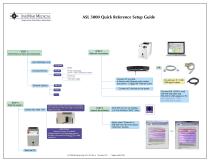
ASL 5000 Quick Reference Setup Guide STEP 2 Make all connections STEP 1 Check that you have all components ASL 5000 Main Unit Computer (ser.# > 1400: USB type A cable) Cables Connect PC and ASL to Router with Ethernet patch cables (use ports 1..4, NOT the "Internet" port!) Power cable / adapter External Options Connect all 3 devices to line power Connect ASL (COM1, host) with RS-232 cable and RS-232 to USB adapter to PC (for units ser.# > 1400: use USB type A cable) STEP 3 Start the system Switch ASL 5000 "ON" for units ser. # > 1400 USB type A cable Green power switch in the back of unit ON (lit) (On units ser.# >1400, blue LED on front panel lights up as well) STEP 4 Launch the software Click SW 3.5 icon on desktop or in the Windows "Start" menu Select either "Ethernet" or "RS-232" from the Full Choice "Welcome" window IMPORTANT Make sure motor is enabled! (disable-switch in the depressed position, red light in the switch will be OFF 20 s after power-up) Start the PC ASL 5000 QR Startup Guide, 80 31 182, Rev. 6,
Open the catalog to page 1All IngMar Medical catalogs and technical brochures
 RespiPro™
7 Pages
 Lung Kit for SimMan 3G
2 Pages
 Technical White Paper
5 Pages
 QuickLung Breather
2 Pages
 RespiSim-PVI System
4 Pages
 RespiPatient Manikin
2 Pages
 ASL 5000 Breathing Simulator
2 Pages
 Linear Test Lung
1 Page
 RespiTrainer_White Paper
5 Pages


Archived catalogs
 QuickLung Breather - 2014
2 Pages
- Training phantom
- Analysis software
- Treatment software
- Training software
- Surgery software
- Simulation software
- Monitoring simulator
- Test software
- Emergency care simulator
- Modeling software
- Emergency software
- Intensive care simulator
- Breathing simulator
- Test lung
- Artificial ventilation test lung
- General care test lung
- Lung software
- Artificial ventilation simulator
- Pediatric software
- Training test lung