

INSCOPER I.S
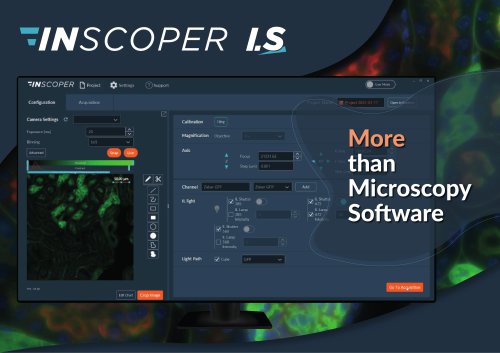
INSCOPER I.S
INSCOPER introduces a new software approach for microscopy imaging, offering a universal solution for image acquisition in fluorescence microscopy. The software is designed to enhance user experience, technical performance, and system integration.
Key Advantages
- Unique Interface: A single window with three tabs (Configuration, Acquisition, Visualization) ensures an intuitive user journey.
- Higher Temporal Resolution: Exclusive control technology eliminates software latency, synchronizing command signals for stable and repeatable acquisitions, tripling the acquisition framerate.
- Third-Party Software Compatibility: Compatible with analysis software using .tiff, .bigTiff, or Bio-Formats images, and integrates third-party software like Jetraw or Microvolution.
- All-Brand Compatibility: Works with camera-based microscopes from major brands and additional third-party devices.
Solutions for All Microscope Setups
Inscoper I.S. addresses various user needs and challenges, offering tailored solutions for different equipment levels, from simple to advanced setups.
Imaging Capabilities
- 1D-Imaging: Live imaging and time-lapse.
- 3D-Imaging: Z-stack imaging.
- 5D-Imaging: Multi-dimensional imaging.
- High-End: Laser illumination and custom setups.
Software Features
- Configuration: Automate and calibrate settings, manage camera presets, and access expert/user modes.
- Acquisition: Monitor and register data with drag-and-drop dimension management and real-time visualization.
- Visualization: Analyze and store data with options to export images and graphics, and replay features.
Breakthrough Technology
The Inscoper Device Controller communicates with devices using low-level protocols, eliminating software latency and ensuring optimal performance and reliability.
Device Controller Specifications
Available in models S, L, and XL, with varying analog outputs, inputs, and serial ports, tailored to the microscopy system's needs.
Warranty & Support
Inscoper I.S. includes a two-year warranty and support service, with options for extensions. Support includes training, diagnosis, troubleshooting, and updates.
Contact Information
For quotes, demos, or questions, contact INSCOPER via email or visit their website.
Catalog excerpts
'INSCOPER Q Project Q Settings (?) Support Magnification Objective
Open the catalog to page 1
NEW SOFTWARE APPROACH FOR MICROSCOPY IMAGING Inscoper I.S. is a complete, universal solution for image acquisition in fluorescence microscopy. Incorporating a specialized device controller, Inscoper I.S. provides a new user experience with improved technical performance, system integration and ease-of-use. ALL-BRAND COMPATIBILITY Inscoper I.S. is compatible with camera-based microscopes from Evident, Leica, Nikon, Zeiss and with all additional third-party devices: cameras, light sources, XYZ stages, confocal add-on modules, microfluidics, etc. HIGHER TEMPORAL RESOLUTION INSCOPER exclusive control...
Open the catalog to page 2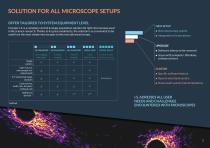
OFFER TAILORED TO SYSTEM EQUIPMENT LEVEL Inscoper I.S. is a complete control & image acquisition solution for light microscopes used in life science research. Thanks to its great modularity, the solution is as convenient to be used from the most simple microscopes to the most advanced setups. • Specific software feature • Open frame/stand system • Home-built system (industrialization) • Software latency to be removed • Issues with computer, Windows, software drivers
Open the catalog to page 3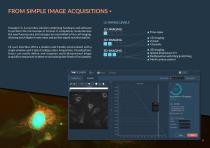
FROM SIMPLE IMAGE ACQUISITIONS4 I.S. RANGE LEVELS Inscoper I.S. is a turnkey solution combining hardware and software to perform the microscope at its best. It completely revolutionizes the way fluorescence microscopes are controlled in live cell imaging, allowing much higher frame rates and perfect signal synchronization. I.S. user interface offers a modern and friendly environment with a single window and 3 tabs (Configuration, Acquisition, Visualization). Users can easily define and organize multi-dimensional image acquisition sequences to observe and manipulate fixed or live samples. Time-lapse...
Open the catalog to page 4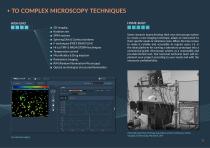
COMPLEX MICROSCOPY TECHNIQUES HOME-BUILT HIGH-END 5D-imaging Rotation axis SPIM systems Spinning Disk & Confocal systems F-techniques (FRET, FRAP, FLIM) Hi-Lo/TIRF & PALM/STORM techniques Temperature control Microfluidics & Drug injection Ratiometric Imaging RIM (Random Illumination Microscopy) Optical sectioning by structured illumination Live calcium imaging Some research teams develop their own microscopy system to create a new imaging technique, adapt an instrument to their specific needs or minimize costs. When the time comes to make it reliable and accessible to regular users, I.S. is the...
Open the catalog to page 5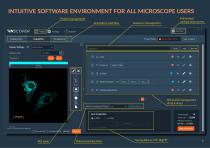
Project management Acquisition workflow Sequence management configuration access Acquisition Visualization Project Name Dimension management (drag & drop) Data Processing and Charts Save Acquisition Total images 30 Total size 251MB Minimal duration Start Acquisition | | Fire on Click 0 Preview FBaP Data processing tools Saving data as .tiff / .BigTiff
Open the catalog to page 6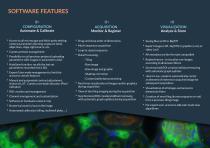
► Access to all microscope and third-party setting: camera parameters (binning, exposure time), objectives, stage, light source, etc. ► Camera presets management ► Possibility to call previous projects (uploading parameters with images or parameters only) ► AutoSave function: recalls the last set parameters recorded every 30s ► Expert/User mode management to limit the access to certain features ► Manual and automated contrast adjustment, choice of LUT, Camera overload indocator (Pixel indicator) ► Channel management and customization ► Software or hardware camera crop ► Numerical zoom in/out...
Open the catalog to page 7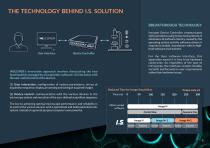
INSCOPER's innovative approach involves dissociating the two functionalities managed by all acquisition software: (1) Interaction with the user, and (2) control of the devices. Inscoper Device Controller communicates with each device using its low-level protocol. It eliminates all software latency caused by the operating system and the software drivers it requires to enable «translation» with its high-level software environment. For the User software interface, this separation means it is free from hardware constraints. So, regardless of the type of microscope, the interface remains flexible,...
Open the catalog to page 8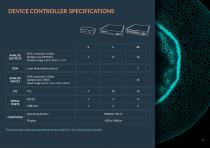
The microscopy system to equip determines the model (S, L, XL) of the Device Controller.
Open the catalog to page 9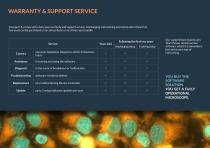
Inscoper I.S. comes with a two-year warranty and support service. Unchanging and evolving extensions after these first two years can be purchased on an annual basis or as a three-year bundle. Our support team mainly uses TeamViewer remote access software, which is a convenient, fast and secure way of intervening.
Open the catalog to page 10
LET’S KEEP IN TOUCH [email protected] www.inscoper.com GET A QUOTE, REQUEST A DEMO, ASK A QUESTION. Provide us with the list of your system’s devices and a short description of the application / manips that you carry out.
Open the catalog to page 11