
- Catalogs
- Intrasense
- Myrian Expert


Myrian Expert

Myrian Expert
Myrian® Expert is a 3D imaging software designed to enhance diagnostic capabilities by providing advanced visualization tools for medical professionals. It facilitates the integration of 3D imaging into clinical practice, improving communication with clinicians, specialists, and patients.
Key Features
- Volume Rendering and Virtual Endoscopy: Allows detailed examination of anatomical structures and lesions, enhancing diagnostic accuracy.
- Interactive Palette: Customizable color palettes for highlighting specific tissues, similar to windowing tools.
- AVI Movie Creation: Enables export of snapshots to AVI format for effective communication.
- 3D Reconstruction and MIP: Instantly reconstructs anatomical structures like the circle of Willis to check for vascular anomalies.
Advanced Post-Processing Tools
- Multimodality Visualization: Supports various imaging modalities including CR/DR, CT, MRI, PET, and US.
- Customizable Workspace: Offers integrated monitor calibration and dynamic display options.
- Protocol Creation and Modification: Provides six pre-defined protocols for smart image display and user interface customization.
- 3D Volume of Interest: Allows visual masking and bone removal for focused analysis.
Measurement and Reporting Tools
- Advanced Measurement Tools: Includes length, angle, surface, and density measurements.
- Automatic Report Generation: Generates reports with selected images and annotations.
Communication and Compatibility
- DICOM and Image Export: Supports printing to DICOM and Windows® printers, and exports images in multiple formats.
- Compatibility: Runs on Windows® XP, Vista®, and 7™, with DICOM connectivity for various operations.
User-Friendliness and Support
- Multilanguage Interface: Simplified user interface with customizable mouse functions and keyboard shortcuts.
- Integrated Support: Access to context help, wizards, clinical guides, and ISO 9001 certified hotline.
Conclusion
Myrian® Expert offers a comprehensive suite of tools for enhancing medical imaging diagnostics, providing user-friendly interfaces and advanced visualization capabilities to improve clinical outcomes.
Catalog excerpts
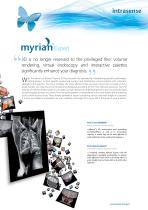
3D is no longer reserved to the privileged few: volume rendering, virtual endoscopy and interactive palettes significantly enhance your diagnosis. ith the advent of Myrian® Expert, 3D has become the standard for highlighting specific pathologies, setting lesions in their specific anatomical context and facilitating communication with clinicians, specialists and patients. For every modality the most efficient tools are never more than a couple of clicks away. Studies are instantly reconstructed and displayed according to the most relevant protocols. Use the volume of interest (VOI) to zoom in on targets at high resolution emphasising lesions and virtual endoscopy to easily explore airways or a colon. The interactive palette is manipulated in the same way as the windowing tool to show up any tissue. Then, simply generate a report containing all your selected images in a second. It is time you added a workstation to your modality or brought 3D to your PACS. Bring life to your practice. Prof. Yves GANDON Rennes University Hospital (France) «Myrian™’s 3D environment and astonishing user-friendliness, as well as its tremendous capacity to evolve help me be more effective at work and better share results with surgeons.» Prof. Benoît GALLIX Montpellier University Hospital (France) «I routinely combine Myrian® Expert with the department’s modality workstations to achieve more effective results and to do things that we quite simply have not been able to do with other software.»
Open the catalog to page 1
Interactive palette Visual masking and bone removal Thanks to 3D rendering in MIP mode, instantly reconstruct the circle of Willis and check for vascular anomalies The bare essentials: “carve” 3D images and get rid of all that is in the way so you can see target structures alone Endoscopy viewport Constrained navigation Curved reconstruction Draw a freehand path and switch to endoscopy mode to examine airways or a colon using the mouse For more effective communication, export to AVI format from your scrapbook snapshots in one click After reconstruction, navigate along a path in transversal mode,...
Open the catalog to page 2All Intrasense catalogs and technical brochures
 Myrian XT-Brain
2 Pages
 Myrian XP-Vessel
2 Pages
 Myrian XP-Prostate
2 Pages
 Myrian XP-LungNodule
2 Pages
 Myrian XP-Lung
2 Pages
 Myrian XP-Liver
2 Pages
 Myrian XP-FemalePelvis
2 Pages
 Myrian XP-Colon
2 Pages
 Myrian XP-Breast
2 Pages
 Myrian XL-Onco
2 Pages
 myrian for MRI
2 Pages
 myrian for Clinical Research
6 Pages
 myrian Application server
6 Pages
 Myrian Expert VL
2 Pages
 Myrian Advance
2 Pages
 Myrian Pro
2 Pages
- Software module
- Medical software module
- Analysis software module
- Medical imaging software module
- Management software module
- Visualization software module
- Planning software module
- Diagnostic software module
- Measurement software module
- Surgery software module
- Evaluation software module
- Simulation software module
- Acquisition software module
- Cardiology software module
- Automated software module
- CT software module
- Radiography software module
- 3D simulation software module
- Screening software module
- Mammography software module