1. Catalogs
  2. KNAUER
  3. Detector DAD 6.1L/DAD 2.1L/MWD 2.1L Instructions

Detector DAD 6.1L/DAD 2.1L/MWD 2.1L Instructions

Detector DAD 6.1L/DAD 2.1L/MWD 2.1L Instructions
1 / 83 PagesView full catalog

Detector DAD 6.1L/DAD 2.1L/MWD 2.1L Instructions

Product catalog summary
General Information: The document provides comprehensive instructions for the AZURA® Detector models DAD 6.1L, DAD 2.1L, and MWD 2.1L, emphasizing safety and the importance of retaining the manual for future reference. Users are advised to contact KNAUER or local distributors for support.
Basic Safety Instructions: This section details the intended use, operating ranges, and potential misuse of the detectors. It stresses user qualification, operator responsibility, and the use of personal safety equipment. Guidelines for handling solvents, contamination, and leaks are also included.
Product Information: Features, scope of delivery, and performance overview of the detectors are provided. Symbols and signs used in the document are explained for clarity.
Installation and Initial Startup: Instructions for unpacking, setting up ambient conditions, power supply, and connecting the leak management system are included. Computer control setup, including LAN configuration and IP address settings, is also covered.
Operation: Guidelines for initial startup, device operation, and software use are provided. LED indicators and default settings are explained, along with Good Laboratory Practice (GLP) considerations.
Optimizing the Detector: This section covers selecting the flow cell and wavelength, spectral range, time constant, data rate, and integration time. It also discusses baseline chromatogram subtraction and extended linear range.
Functionality Tests: Procedures for Installation Qualification (IQ) and Operation Qualification (OQ) are outlined to ensure proper detector function.
Troubleshooting: Common LAN issues and solutions are addressed. System messages are explained to assist in diagnosing issues.
Maintenance and Care: Regular maintenance tasks, cleaning protocols, and care for the device are detailed. Instructions for replacing flow cells and lamps, checking fittings, and handling leaks are included.
Transport and Storage: Guidelines for packing and transporting the device safely are provided to prevent damage during transit.
Declaration of Conformity and Views: Detailed descriptions of the AZURA® Detector models, including front and rear views, are provided, highlighting key components.
Performance Overview: The detectors are designed for HPLC systems, utilizing deuterium and halogen lamps for a wide UV-Vis wavelength range. Temperature control is emphasized for baseline stability.
Flow Cell Technology: Various flow cell cartridges are available, offering benefits like maximum light transmission and pressure stability.
Installation and Initial Startup: Steps for unpacking, setting up, and connecting the detector are outlined, emphasizing proper ambient conditions and power supply requirements.
Symbols and Safety: Various symbols indicating hazards are listed, along with compliance with international standards.
Power Supply and Space Requirements: Guidelines for ensuring a stable power supply and adequate ventilation are provided.
Conclusion: The AZURA® Detector models are sophisticated devices requiring proper installation, handling, and maintenance for optimal performance and safety.
Overview: Detailed instructions for setting up and configuring the detectors within a LAN and integrating them into a company network are provided.
Computer Control: IPv4 addresses are required for KNAUER HPLC devices, with static IP addresses necessary for certain software.
Setting up LAN: Steps for using a router to connect devices and computers are outlined, with emphasis on disabling power-saving features on Windows.
Configuring LAN Settings: The process for configuring LAN settings in Windows is detailed.
Connecting Devices with LAN: Instructions for connecting devices to the router using patch cables are provided.
Configuring the Router: The router is configured as a DHCP server, with IP address range adjustments if necessary.
Integrating LAN into the Company Network: A network administrator can integrate the LAN into the company network using the router's WAN port.
Controlling Multiple Systems: Different ports can be used to control multiple chromatography systems separately within the same LAN.
Setting IP Addresses via Software: Instructions for setting static and dynamic IP addresses using Mobile Control and Firmware Wizard are provided.
Remote Control: The use of an electrical connector socket for sending and receiving signals from other instruments is described.
Integrating the Detector into the System: The detector is integrated into the HPLC flow system by connecting the capillary to the flow cell and the HPLC system.
Pre-installed Capillaries: Available in stainless steel and PEEK materials, color-coded by inner diameter.
Operation Instructions: Initial startup, switching on, and software operation guidelines are provided.
LED Indicators: LEDs indicate status: red for errors, green for active operations, and blue for standby.
Default Settings: Include network configuration, lamp status, time constant, and channel settings.
GLP Data: Includes device information, firmware version, operating time, and optical properties.
Optimizing the Detector: Performance depends on HPLC system stability, flow cell cleanliness, and environmental conditions.
Data Rate Optimization: Recommendations for optimal data rates based on application needs are provided.
Integration Time: Affects signal intensity and sensitivity, automatically calculated based on spectral range.
Baseline Subtraction: Removes drift effects from solvents or gradients.
Extended Linear Range: Broadens the detector's linear range through stray light correction.
Functionality Tests: Regular testing is recommended to ensure device operation within specified ranges.
Troubleshooting: Initial checks and solutions for common issues are provided.
System Messages: A comprehensive list of system messages is provided, detailing problems and solutions.
Maintenance and Care: Regular maintenance is crucial for analysis success and result reproducibility.
Cleaning: Guidelines for cleaning device surfaces and handling flow cell cartridges are provided.
Cleaning the Flow Cell: Regular cleaning is necessary, especially when using acetonitrile.
Cleaning Protocol for KNAUER LightGuide Flow Cells: Recommended every two weeks when using acetonitrile-containing eluents.
Replacing the Flow Cell: Should be replaced after approximately 6000 operating hours.
Replacing the Lamps: Lamps should be replaced if malfunctioning or after their recommended operating time.
Checking Fittings and Removing Leaks: Ensure all fittings are tight and remove any leaks.
Decommissioning: Flush the flow cell and capillaries, remove solvents, and fill with isopropanol before storage.
Transport and Storage: Use original packaging for transport and ensure all hoses and capillaries are emptied or filled with flushing solution before storage.
Disposal: Dispose of old devices at certified waste facilities.
Technical Data: Detailed specifications for the AZURA® Detector models are provided.
Technical Specifications: Key parameters include wavelength accuracy, noise levels, and drift.
Communication and Control: Multiple communication interfaces and control options are available.
General Specifications: The detectors operate on a power supply of 100–240 V and are designed for indoor use.
Detection Capabilities: The DAD models use a diode array detector, while the MWD model is a multiwavelength detector.
Reorders and Accessories: Reorder information for spare parts and accessories is provided.
Chemical Compatibility: The document outlines the chemical compatibility of materials used in the detectors.
Chemical Compatibility of Wetted Materials: Detailed information on the chemical compatibility of various materials is provided.
Index and Additional Information: An extensive index and contact information for KNAUER are included.
See more

Catalog excerpts

Detector DAD 6.1L/DAD 2.1L/MWD 2.1L Instructions-2

Note:  For your own safety, read the instructions and follow the warnings and safety information on the device and in the instructions. Keep the instructions for future reference. Note:  In case you require this instruction in another language, please submit your request including the corresponding document number via e-mail or fax to KNAUER. Support: Do you have questions about the installation or the operation of your instrument or software? International Support: Contact your local KNAUER partner for support: www.knauer.net/en/Support/Distributors-worldwide Support in Germany (Austria & Switzerland...

 Open the catalog to page 2
Detector DAD 6.1L/DAD 2.1L/MWD 2.1L Instructions-3

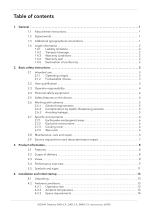
Table of contents 1. General . . . . . . . . . . . . . . . . . . . . . . . . . . . . . . . . . . . . . . . . . . . . . . . . . . . . . . . . . . . . . . . . . . . . . . . . . . . 1 1.1 About these instructions . . . . . . . . . . . . . . . . . . . . . . . . . . . . . . . . . . . . . . . . . . . . . . . . . 1 1.2 Signal words . . . . . . . . . . . . . . . . . . . . . . . . . . . . . . . . . . . . . . . . . . . . . . . . . . . . . . . . . . . . 1 1.3 Additional typographical conventions . . . . . . . . . . . . . . . . . . . . . . . . . . . . . . . . . . . . . . 1 1.4 Legal information . . . . ....

 Open the catalog to page 3
Detector DAD 6.1L/DAD 2.1L/MWD 2.1L Instructions-4

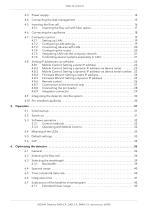
4.3 Power supply . . . . . . . . . . . . . . . . . . . . . . . . . . . . . . . . . . . . . . . . . . . . . . . . . . . . . . . . . . 14 4.4 Connecting the leak management . . . . . . . . . . . . . . . . . . . . . . . . . . . . . . . . . . . . . . . . 15 4.5 Inserting the flow cell . . . . . . . . . . . . . . . . . . . . . . . . . . . . . . . . . . . . . . . . . . . . . . . . . . . 16 4.5.1 Inserting the flow cell with fiber optics . . . . . . . . . . . . . . . . . . . . . . . . . . . . . . 17 4.6 Connecting the capillaries . . . . . . . . . . . . . . . . . . . . . . . . . . . . . . . . . . ....

 Open the catalog to page 4
Detector DAD 6.1L/DAD 2.1L/MWD 2.1L Instructions-5

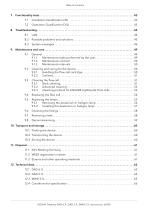
7.2 Operation Qualification (OQ) . . . . . . . . . . . . . . . . . . . . . . . . . . . . . . . . . . . . . . . . . . . . 43 8. Troubleshooting . . . . . . . . . . . . . . . . . . . . . . . . . . . . . . . . . . . . . . . . . . . . . . . . . . . . . . . . . . . . . . . . . . 44 8.1 LAN . . . . . . . . . . . . . . . . . . . . . . . . . . . . . . . . . . . . . . . . . . . . . . . . . . . . . . . . . . . . . . . . . . 44 8.2 Possible problems and solutions . . . . . . . . . . . . . . . . . . . . . . . . . . . . . . . . . . . . . . . . . 45 8.3 System messages . . . . . . . . . . . . . . . . . . ....

 Open the catalog to page 5
Detector DAD 6.1L/DAD 2.1L/MWD 2.1L Instructions-6

13. Reorders . . . . . . . . . . . . . . . . . . . . . . . . . . . . . . . . . . . . . . . . . . . . . . . . . . . . . . . . . . . . . . . . . . . . . . . . . 67 13.1 Devices and accessories . . . . . . . . . . . . . . . . . . . . . . . . . . . . . . . . . . . . . . . . . . . . . . . . . 67 13.2 Flow cells . . . . . . . . . . . . . . . . . . . . . . . . . . . . . . . . . . . . . . . . . . . . . . . . . . . . . . . . . . . . . 68 13.3 Flow cells with fiber optics . . . . . . . . . . . . . . . . . . . . . . . . . . . . . . . . . . . . . . . . . . . . . . . 69 13.4 Fiber optic cables . . . . . ....

 Open the catalog to page 6
Detector DAD 6.1L/DAD 2.1L/MWD 2.1L Instructions-7

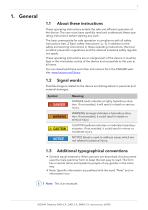
About these instructions These operating instructions enable the safe and efficient operation of the device. The user must have carefully read and understood these operating instructions before starting any work. The basic prerequisite for safe operation is compliance with all safety instructions (see „2 Basic safety instructions“, p. 3). In addition to the safety and warning instructions in these operating instructions, the local accident prevention regulations and the national industrial safety regulations apply. These operating instructions are an integral part of the device. It must be kept...

 Open the catalog to page 7
Detector DAD 6.1L/DAD 2.1L/MWD 2.1L Instructions-8

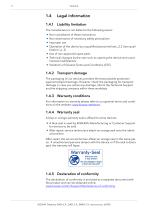
Legal information 1.4.1 Liability limitation The manufacturer is not liable for the following issues: Non-compliance of these instructions Non-observance of necessary safety precautions Improper use Operation of the device by unqualified personnel (see „2.2 User qualification“, p. 3) Use of non-approved spare parts Technical changes by the user such as opening the device and unauthorized modifications Violations of General Terms and Conditions (GTC) 1.4.2 Transport damage The packaging of our devices provides the best possible protection against transport damage. However, check the packaging...

 Open the catalog to page 8
Detector DAD 6.1L/DAD 2.1L/MWD 2.1L Instructions-9

2. Basic safety instructions The device has been developed and constructed in such a way that hazards arising from its intended use are largely excluded. Nevertheless, the following safety instructions must be observed in order to exclude residual hazards. Only use the device for applications that fall within the range of the intended use. Otherwise, the protective and safety equipment of the device could fail. 2.1.1 Operating ranges The device is intended to be used indoors for chromatographic applications. 2.1.2 Foreseeable misuse Refrain from the use of the device for the following purposes...

 Open the catalog to page 9

Detector DAD 6.1L/DAD 2.1L/MWD 2.1L Instructions-10

Basic safety instructions Operator responsibility The operator is any person who operates the device himself or leaves it to a third party for use and who bears the legal product responsibility for the protection of the user or third parties during operation. The obligations of the operator are listed below: Know and follow the applicable work safety regulations Identify hazards arising from the working conditions at the place of use in a risk assessment. Set up operating instructions for the operation of the device. Regularly check whether the operating instructions correspond to the current...

 Open the catalog to page 10
Detector DAD 6.1L/DAD 2.1L/MWD 2.1L Instructions-11

Basic safety instructions Working with solvents 2.6.1 General requirements The user is trained for handling different solvents. Note recommended solvents and concentrations in these instructions in order to avoid personal injury or damage to the device. For example, certain chemicals may cause PEEK capillaries to swell or burst (see „14 Chemical compatibility of wetted materials“, p. 71). Note that organic solvents are toxic above a certain concentration. For handling hazardous solvents see the following section. Mobile phases and samples may contain volatile or combustible solvents. Avoid the...

 Open the catalog to page 11
*Prices are pre-tax. They exclude delivery charges and customs duties and do not include additional charges for installation or activation options. Prices are indicative only and may vary by country, with changes to the cost of raw materials and exchange rates.