
- Catalogs
- Leica Microsystems
- ICC50 W, ICC50 E


- Company
- Products
- Catalogs
- News & Trends
- Exhibitions
ICC50 W, ICC50 E

ICC50 W, ICC50 E
Catalog excerpts

High Definition Cameras for Compound Microscopes IMAGE SHARING, CAPTURING, AND ARCHIVING MADE EASY Leica ICC50 W (Wi-Fi) and Leica ICC50 E (Ethernet)
Open the catalog to page 1
LEICA ICC50 W AND LEICA ICC50 E GOOD CONNECTION! GOOD CONNECTION! FAST HIGH RESOLUTION LIVE IMAGING The ability to share, capture, and archive images is an important part of the science laboratory. Keep students on topic and maximize learning time with the Leica ICC50 W wireless HD camera and the Leica ICC50 E network-capable camera. The complete system allows the user to view specimens on the display and through the binocular tube, with or without a computer connection for versatile science education. SEAMLESS DESIGN fits between the microscope stand and provides excellent image sharpness, viewing...
Open the catalog to page 2
›› In Ethernet mode, the connection to the camera is provided through your own network, allowing a maximum number of users to connect to the camera. To use this to full extent, all devices have to be on to same network as the microscope. ›› In USB mode you can connect your PC directly via USB cable to the camera, which is helpful when you aim for fastest live images e.g. of moving samples. ›› Computer users can use the Leica Imaging software to connect to the camera and work with the images. For PC use Leica Application Suite software, and use Leica Acquire for MAC. ›› Use lots of options with...
Open the catalog to page 3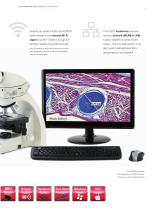
LEICA ICC50 W AND LEICA ICC50 E GOOD CONNECTION! Students can connect to the Leica ICC50 W The ICC50 E exclusively uses your either through its own internal Wi-Fi facilities' network (WLAN or LAN) signal using Wi-Fi mode or through the to allow students to connect to the facilities' network using Ethernet mode. camera. This is an ideal solution if you Note: The quantity of mobile device connections and their don't want to add additional Wi-Fi stability depends on the Wi-Fi traffic and network perfor- access points to your network. Leica DM750 microscope with integrated Leica ICC50 W camera, RC...
Open the catalog to page 4
LEICA ICC50 W AND LEICA ICC50 E GOOD CONNECTION! LEICA ICC50 W / LEICA ICC50 E Weight 700 g (camera only) Exposure time 1 msec - 500 msec Live image 30 fps maximum - depends on mode and resolution setting Full frame image acquisition 5.0 megapixels max. Data format JPEG / TIFF / BMP / MP4 (choices depend on capture device) Operating systems Windows 7, 8, Windows Vista, Macintosh OS X, Mobile devices (iOS 7, 8 and Android 4.2+) Software available Leica AirLab (mobile devices), Leica LAS EZ (PC), Leica LAS (PC), Leica Acquire (Mac) Min. computer config. PC / Mac, Intel Core 2 Duo, > 2.4 GHz, 4...
Open the catalog to page 5
8/19 · 13IDE38010EN · © 2019 by Leica Microsystems GmbH. Subject to modifications. LEICA and the Leica Logo are registered trademarks of Leica Microsystems IR GmbH. CONNECT WITH US! Leica Microsystems (Schweiz) AG · Max-Schmidheiny-Strasse 201 · 9435 Heerbrugg, Switzerland T +41 71 726 34 34 · F +41 71 726 34 44
Open the catalog to page 6All Leica Microsystems catalogs and technical brochures
 M620 F20
8 Pages
 M844 F40/F20
16 Pages
 EnFocus
12 Pages
 M822 F40 / F20
12 Pages
 M320 for ENT
12 Pages
 ARveo 8
16 Pages
 M320 Dental Brochure
12 Pages
 Emspira 3
4 Pages
 EM RAPID
8 Pages
 EM ICE
12 Pages
 EM TXP
10 Pages
 EM RES102
12 Pages
 EM TIC 3X
16 Pages
 TL4000 BFDF
16 Pages
 F12 I floor stand
6 Pages
 XL Stand
4 Pages
 TL3000 Ergo & TL5000 Ergo
4 Pages
 KL300 LED
8 Pages
 LED1000
16 Pages
 LED3000 BLI
20 Pages
 LED5000 NVI
20 Pages
 LED3000 NVI
20 Pages
 LED3000 DI
20 Pages
 LED5000 HDI
20 Pages
 LED5000 CXI
20 Pages
 LED2500
8 Pages
 LED5000 MCI
20 Pages
 LED3000 MCI
20 Pages
 LED5000 SLI
20 Pages
 LED3000 SLI
20 Pages
 LED2000
8 Pages
 LED5000 RL
20 Pages
 LED3000 RL
20 Pages
 MZ10 F
4 Pages
 M165 FC
16 Pages
 M205 FCA, M205 FA
16 Pages
 M125 C, M165 C, M205 C, M205 A
12 Pages
 A60 F, A60 S
16 Pages
 M50, M60, M80
12 Pages
 DVM6
DVM616 Pages
 HCS A
HCS A20 Pages
 TCS SPE
20 Pages
 DFC450 C
6 Pages
 DFC295
6 Pages
 MC170 HD
6 Pages
 DFC3000 G
6 Pages
 DMC4500
4 Pages
 DFC7000 T, DFC7000 GT
4 Pages
 DFC9000
2 Pages
 IC90 E
6 Pages
 DMC6200
8 Pages
 DMC5400
8 Pages
 SFL7000
4 Pages
 EL6000
4 Pages
 SFL100
4 Pages
 SFL4000
4 Pages
 DMi8 S Platform
2 Pages
 THUNDER Imager Live Cell
2 Pages
 DMi8 M / C / A
12 Pages
 DM IL LED
12 Pages
 DMi1
DMi16 Pages
 DM3 XL
7 Pages
 FS M
FS M4 Pages
 FS C
FS C4 Pages
 FS CB
FS CB4 Pages
 DM3000, DM3000 LED
16 Pages

Archived catalogs
 DM750 M
12 Pages
 DM750
DM75012 Pages
 DM500
DM50012 Pages
 DM300
DM3008 Pages
 DM12000 M
8 Pages
 DM8000 M
8 Pages
 DM1750 M
12 Pages
 DM4 M, DM6 M
12 Pages
 DM4 P, DM2700 P, DM750 P
12 Pages
 DM2000, DM2000 LED
16 Pages
 DM1000
16 Pages
 DCM8
DCM816 Pages
 DM1000 LED
16 Pages
 DM2500
16 Pages
 DM4 B & DM6 B
16 Pages
 DM6 M LIBS
2 Pages
 S9 Series
12 Pages
 Z6 APO
16 Pages
 Z16 APO
16 Pages
 Leica M530 OHX for ENT
4 Pages
 M220 F12
8 Pages
 Leica Application Suite X
4 Pages
 Proveo 8
16 Pages
 M525 F20
12 Pages
 EnVisu Leica Handheld OCT
8 Pages
 EM TRIM2
8 Pages
 EM UC7
16 Pages
 EM KMR3
8 Pages
 FLEXACAM C1
4 Pages
 Exalta
2 Pages
 PROvido
8 Pages
 Leica M530 OHX
16 Pages
 Leica TCS SP8 STED 3X
24 Pages
 Leica TCS SP8 Objective
24 Pages
 Leica AOBS
16 Pages
 Leica DMC2900
6 Pages
 Leica DMshare
2 Pages
 Leica_DMshare_ICC50-Flyer_en
2 Pages
 Leica_DMshare_EC3-Flyer_en
2 Pages
 Leica_SL801-Flyer
2 Pages
 Leica_SCN400-Flyer_Clinical
2 Pages
 DM2700 M
12 Pages
 Leica_SR_GSD-Brochure
10 Pages
 Leica_AF6000-Brochure
16 Pages
 Leica motCorr-Flyer_EN
4 Pages
 Leica TCS SP8-Flyer
2 Pages
 Leica TCS SP8-Brochure
40 Pages
 Leica TCS SP8 X-Flyer
2 Pages
 Leica TCS SP8 STED-Flyer
2 Pages
 Leica TCS SP8 HyD-Flyer
2 Pages


- Leica analysis software
- Leica optical microscope
- Leica laboratory microscope
- Leica benchtop microscope
- Leica sample preparation system
- Leica visualization software
- Leica automatic sample preparation system
- Control software
- Reporting software
- Windows software
- Leica laboratory software
- Laboratory sample preparation system
- CMOS camera
- Camera with USB port
- Leica LED microscope
- Benchtop sample preparation system
- Automated software
- Leica LED light source
- Acquisition software