
- Catalogs
- Lepu Medical
- ELISA 200


ELISA 200

ELISA 200
This manual is designed for operators and administrators of the Fully Automatic CLIA and ELISA processors by Yantai Addcare Bio-Tech Limited Company. It provides detailed guidance on software operations to ensure safe and correct usage across various models.
The document is proprietary to ADDCARE, prohibiting unauthorized modifications. Users are granted specific rights to use the software, with restrictions on copying and transferring beyond the agreement terms.
The software supports modular operations and requires Windows XP or Windows 7, with at least 1GB RAM and 100GB hard drive space. It is installation-free and can be copied directly to a hard drive.
Includes user login, system administration settings for language, user channels, temperature, and printer configurations.
Covers maintenance of components like pipette needles and robotic arms, and instructions for setting parameters and querying instrument limits.
Provides additional information on printing types for microplate and QC pictures, report types, and result collection reports.
Details on report printing options, liquid handling settings, and tube dilution methods to ensure accurate laboratory processes.
Instructions for managing methods, starting experiments, and handling test results, including QC chart management and result collection.
Guidance on setting up report templates, entering patient information, and printing reports.
Describes the pre-configured layout of the instrument and options for modifying it by adding or deleting components.
Details on managing reagent points and restrictions on using reagents not appointed for experiments.
Contact details for further assistance from Yantai Addcare Bio-Tech Limited Company.
Catalog excerpts

YANTAI ADDCARE BIO-TECH LIMITED COMPANY USER MANUAL 烟台艾德康生物科技有限公司 YANTAI ADDCARE BIO-TECH LIMITED COMPANY FULLY AUTOMATIC CLIA & ELISA PROCESSOR USER MANUAL
Open the catalog to page 1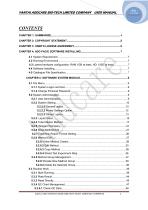
YANTAI ADDCARE BIO-TECH LIMITED COMPANY USER MANUAL
Open the catalog to page 2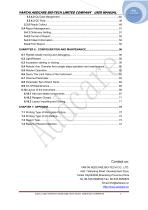
Contact us: YANTAI ADDCARE BIO-TECH CO., LTD. Add: 7Hanjiang Road, Development Zone, Yantai City264006,Shandong Province,China Tel: 86-535-6398536 Fax: 86-535-6958876 E
Open the catalog to page 3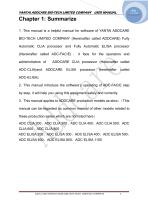
YANTAI ADDCARE BIO-TECH LIMITED COMPANY USER MANUAL Chapter 1: Summarize 1 .This manual is a helpful manual for software of YANTAI ADDCARE BIO-TECH LIMITED COMPANY (Hereinafter called ADDCARE) Fully Automatic CLIA processor and Fully Automatic ELISA processor (Hereinafter called ADC-FAC/E) , it face for the operators and administrators of ADC-CLIA)and ADDCARE CLIA processor (Hereinafter called ADC-ELISA). 2. This manual introduce the software’s operating of ADC-FAC/E step by step, it will help you using this equipment safely and correctly. 3. This manual applies to ADDCARE production models as...
Open the catalog to page 4
YANTAI ADDCARE BIO-TECH LIMITED COMPANY USER MANUAL Chapter 2: Copyright Statement This document is the manual that assort with ADC-FAC/FAE. You should keep this document intact during using process, and you are not allowed to modify and excerpt without the authority of ADDCARE. The copyright of this document belongs to ADDCARE, and ADDCARE keep all the rights within the scope of law. ©2012-2020 YANTAI ADDCARE BIO-TECH LIMITED COMPNAY
Open the catalog to page 5
YANTAI ADDCARE BIO-TECH LIMITED COMPANY USER MANUAL Chapter 3: User’s License Agreement ADDCAER award right of using this software to our users and users must promise to ADDCARE as below: you’ll not use, copy, modify, rent, and transfer this software or any part of it beyond items of this agreement. You must promise: 1. Only use this software in one computer. 2. In the condition that the third party agrees with this agreement, you can transfer this software and license agreement to him. If transfer happened, the original document and concomitant copy document should be transferred together to...
Open the catalog to page 6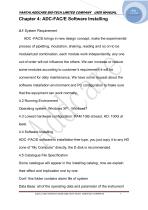
YANTAI ADDCARE BIO-TECH LIMITED COMPANY USER MANUAL Chapter 4: ADC-FAC/E Software Installing 4.1 System Requirement ADC -FAC/E brings in new design concept, make the experimental process of pipetting, incubation, shaking, reading and so on to be modularized combination, each module work independently, any one out of order will not influence the others. We can increase or reduce some modules according to customer’s requirement; it will be convenient for daily maintenance. We have some request about the software installation environment and PC configuration to make sure that the equipment can work...
Open the catalog to page 7
YANTAI ADDCARE BIO-TECH LIMITED COMPANY USER MANUAL exist in this folder, via changing data base you can change the some data. Sample Barcode: This folder includes sample barcode file. Plate Barcode: This folder includes microplate barcode file. Raw Data: This folder includes initial data. Trace: Instrument running and operating log file. Driver: This folder Contains driver of CAN communication equipment, two kinds: white and yellow. ©2012-2020 YANTAI ADDCARE BIO-TECH LIMITED COMPNAY
Open the catalog to page 8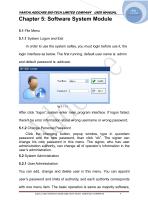
YANTAI ADDCARE BIO-TECH LIMITED COMPANY USER MANUAL Chapter 5: Software System Module 5.1 File Menu 5.1.1 System Logon and Exit In order to use the system safely, you must login before use it, the login interface as below. The first running, default user name is: admin and default password is: addcare. After click “logon”,system enter main program interface. If logon failed, there’ll be error information about wrong username or wrong password. 5.1.2 Change Personal Password Click the changing button, popup window, type in quondam password and the new password, than click “ok”. The signer can...
Open the catalog to page 9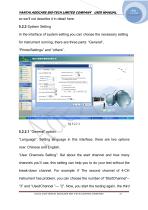
YANTAI ADDCARE BIO-TECH LIMITED COMPANY USER MANUAL so we’ll not describe it in detail here. 5.2.2 System Setting In the interface of system setting you can choose the necessary setting for instrument running, there are three parts: “General”, “PrinterSettings” and “others”. 5.2.2.1 “General” option “Language”: Setting language in this interface, there are two options now: Chinese and English. “User Channels Setting”: Set about the start channel and how many channels you’ll use, this setting can help you to do your test without the break-down channel. For example: If The second channel of 4-CH...
Open the catalog to page 10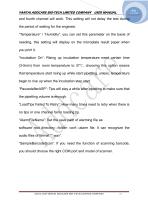
YANTAI ADDCARE BIO-TECH LIMITED COMPANY USER MANUAL and fourth channel will work. This setting will not delay the test during the period of waiting for the engineer. “Temperature” / “Humidity”: you can set this parameter on the basis of needing, this setting will display on the microplate result paper when you print it. “Incubation On”: Rising up incubation temperature need certain time (3-5min) from room temperature to 37℃, choosing this option means that temperature start rising up while start pipetting, unless, temperature begin to rise up when the incubation step start. “PausedafterASP”:...
Open the catalog to page 11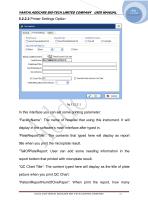
YANTAI ADDCARE BIO-TECH LIMITED COMPANY USER MANUAL 5.2.2.2 Printer Settings Option In this interface you can set some printing parameter: “FacilityName”: The name of hospital that using this instrument. It will display in the software’s main interface after typed in. ‘PlateReportTitle”: The contents that typed here will display as report title when you print the microplate result. “TailOfPlateReport: User can add some needing information in the report bottom that printed with microplate result. “QC Chart Title”: The content typed here will display as the title of plate picture when you print...
Open the catalog to page 12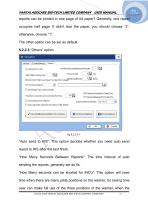
YANTAI ADDCARE BIO-TECH LIMITED COMPANY USER MANUAL reports can be printed in one page of A4 paper? Generally, one report occupies half page. If didn’t tear the paper, you should choose “2”, otherwise, choose “1”. The other option can be set as default. 5.2.2.3 “Others” option “Auto send to HIS”: This option decides whether you need auto send report to HIS after the test finish. “How Many Seconds Between Reports”: The time interval of auto sending the reports, generally set as 5s. “How Many seconds can be shorted for INCU”: This option will save time when there are many plate positions on the...
Open the catalog to page 13All Lepu Medical catalogs and technical brochures
 Cholesterol meter LP-M3-11
2 Pages
 Nexor 32
2 Pages
 Fluo-1800
28 Pages
 Lepgen-96
1 Page
 MemoPart Delivery System Ⅱ
2 Pages
 Neurovascular Products Catalogue
15 Pages
 Anesthesia Products Catalogue
28 Pages
 APTERIAL BLOOD SAMPLING KITS
2 Pages
 Buckle tourniquet Rayband™
2 Pages
 PTCA catheter Hoper™
2 Pages
 PTCA catheter Tadpole™
2 Pages
 PTCA catheter Vesselin®
2 Pages
 PTCA catheter NC Tadpole™
2 Pages
 PCI-Product Catalogue
55 Pages
 Coronary stent Partner
2 Pages
 LEPU Quant-fluo 800
21 Pages
 Nexor 96
2 Pages
 COVID-19 Related Products
23 Pages
 Coronary stent GuReater
2 Pages
 Guiding catheter Orien™
2 Pages
 Coronary stent Nano+™
2 Pages
 Coronary stent H-Stent™
2 Pages
 Prosthetic Heart Valve
2 Pages
 Blood sampling kit
2 Pages
 Fingertip Pulse Oximeter
2 Pages


- LEPU MEDICAL bone plate
- LEPU MEDICAL compression plate
- LEPU MEDICAL metallic compression plate
- LEPU MEDICAL catheter
- LEPU MEDICAL locking compression plate
- Syringe
- Cannula
- LEPU MEDICAL titanium compression plate
- Endoscope
- Sterile needle
- Infusion set
- Distal compression plate
- LEPU MEDICAL balloon catheter
- ECG cable
- Valve
- Stent
- Compression bone screw
- LEPU MEDICAL surgical stapler
- Digital radiography system
- Metallic compression bone screw