


- Products
- Catalogs
- News & Trends
- Exhibitions
OneTouch Verio Flex™

OneTouch Verio Flex™
The OneTouch Verio Flex™ Blood Glucose Monitoring System is designed for self-testing of blood glucose levels by individuals with diabetes. It is intended for use with fresh capillary whole blood samples from the fingertip and is not suitable for diagnosing diabetes or use in critically ill patients.
Setup Instructions
- Setting Time and Date: Use the meter's buttons to set the hour, minutes, AM/PM, year, month, and day. Confirm each setting to complete the setup.
- Taking a Test: Insert a test strip to turn on the meter. Apply a blood sample to the test strip channel and wait for the meter to count down from 5 to 1.
Reading Results
Your glucose reading will appear on the display, with a Range Indicator arrow showing if the reading is below, within, or above the set range limits. The pre-set range limits can be adjusted as needed.
Bluetooth Connectivity
The meter includes Bluetooth® Smart technology, allowing wireless transmission of readings to compatible mobile devices. To connect, turn on Bluetooth and enter the PIN displayed on the meter into your device.
Safety Instructions
- The meter and lancing device are for single-patient use only and should not be shared to prevent the risk of transmitting infectious diseases.
- All parts of the kit are considered biohazardous after use.
Contact Information
For assistance, contact customer support at 1 888 567-3003 (English) or 1 888 567-3010 (Español), or visit www.OneTouch.com.
Additional Information
Consult the Owner's Booklet for detailed instructions and information on changing range limits. The device is manufactured by LifeScan Europe, Division of Cilag GmbH International, Switzerland.
Catalog excerpts

Set the time and date on your meter Use this guide to get to know your meter, and follow the steps inside to get started. OneTouch Verio Test strip port Test SI rip Display Range Range Indicator color bars Ok huittm The OneTouch Verio Flex™ Blood Glucose Monitoring System is intended to be used for the quantitative measurement of glucose (sugar) in fresh capillary whole blood samples drawn from the fingertip. The OneTouch Verio Flex™ Blood Glucose Monitoring System is intended for self-testing outside the body (in vitro diagnostic use) by people with diabetes at home as an aid to monitor effectiveness of diabetes control. Limitations The OneTouch Verio Flex™ Blood Glucose Monitoring System is intended to be used by a single patient and should not be shared. The system is not to be used for the diagnosis of or screening of diabetes or for neonatal use. The system is not for use on critically ill patients, patients in shock, severely dehydrated patients or hyperosmolar patients. Turn it on O Press and hold © until the startup screen appears. Use © © buttons to edit each setting and press © to confirm. Set the time on the first SET screen > Hour flashes. Press © if correct or edit and confirm. > Minutes flash. Press © if correct or edit and confirm. > AM/PM flashes. Press © if correct or edit and confirm. Flashing blood drop appears. Insert a test strip (gold side and 2 silver prongs facing you) to turn the meter on. Set the date on the next SET screen > Year flashes. Press © if correct or edit and confirm. > Month flashes. Press © if correct or edit and confirm. > Day flashes. Press © if correct or edit and confirm. A IMPORTANT: Please read the Owner's Booklet that came with your system. Ready to test Your meter setup is complete when the screen with 3 dashes appears. Apply blood sample to the channel on either side of the test strip. Wait for the channel to fill. OneTouch• The channel turns red and the meter counts down Manufactured by: LifeScan Europe Division of Cilag GmbH International Gubelstrasse 34 6300 Zug Switzerland
Open the catalog to page 1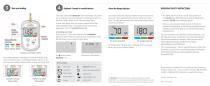
View your reading Optional: Connect to a mobile device Your meter comes with Bluetooth® Smart technology. This allows you to wirelessly send your readings to a mobile device such as a phone or a tablet, where you can view and graph them. To learn more about using your meter's wireless feature and view a complete listing of compatible devices and software applications, visit us at www.OneTouch.com. Connecting your meter Press and at the same time to turn the Bluetooth® feature on and off. When prompted by your mobile device, enter the PIN shown on your meter into your device. About the Range Indicator...
Open the catalog to page 2Archived catalogs
 OneTouch Verio® IQ meter
240 Pages
 SureStep®
5 Pages
 OneTouch® Verio? IQ
16 Pages
 one touch
102 Pages
 OneTouch® Basic
98 Pages
 SureStepFlexx
117 Pages
 one touch ultra
73 Pages