

Scepter™ 3.0 Handheld Automated Cell Counter Overview

Scepter™ 3.0 Handheld Automated Cell Counter Overview
- Menu Button: Used to turn on the instrument, access the menu screen, and power down the instrument.
- Arrow Buttons: Allow scrolling through fields and adjusting gates.
- OK Button: Initiates the cell counting process, accepts selected fields, and advances the process.
- Ejector Button: Ejects the sensor from the instrument.
Catalog excerpts
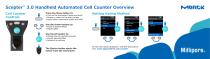
Handheld Automated Cell Counter Overview MGRCK Cell Counter Controls Press the Menu button to: • Turn on the instrument (press and hold) • Access or return to the menu screen • Power down instrument (press and hold) Setting Gating Method g'~\ r \ Use the Arrow buttons to: • Scroll to desired fields • Adjust gates Use the OK button to: • Initiate the cell counting process • Accept selected fields The Ejector button ejects the sensor from the instrument For full User Guide, Bluetooth®, and WiFi Instructions visit: www.sigmaaldrich.com/scepter
Open the catalog to page 1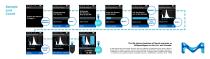
INSERT SENSOR REMOVE from The life science business of Merck operates as MilliporeSigma in the U.S. and Canada. SAVING DATA © 2020 Merck KGaA, Darmstadt, Germany and/or its affiliates. All Rights Reserved. Merck, Millipore, Sigma-Aldrich, Scepter, and the vibrant M are trademarks of Merck KGaA, Darmstadt, Germany or its affiliates. All other trademarks are the property of their respective owners. Detailed information on trademarks is available via publicly accessible resources. 20405558 Rev. 10/2020 | 2019 - 19468
Open the catalog to page 2All Merck catalogs and technical brochures
 Filters and Supporting Hardware
48 Pages

Archived catalogs
 Milli-Q HR 7000
12 Pages
 SDS 500
8 Pages
 Milli-Q® Integral system
22 Pages
 Elix® Advantage System
20 Pages
 AFS® 8D and 16D Systems
8 Pages
 ChromBook
406 Pages
 RiOs DI® Clinical
4 Pages
 Spectroquant® Prove
5 Pages
 Amnis® Imaging Flow Cytometers
36 Pages
 Provantage® Services
2 Pages


