
- Catalogs
- MICOBIOMED
- VERI-Q multi

VERI-Q multi

VERI-Q multi
- Lipid Profile Testing: Ensure the code chip number matches the test strip bottle. Insert the code chip and test strip correctly. Use a pipette to draw blood and transfer it to the strip. Results are displayed in the order: CHOL, TG, HDL, LDL, CHOL/HDL, LDL/HDL.
- Hemoglobin Testing: Similar steps as lipid profile testing. Results are displayed in 5 seconds.
- Lipid Profile: Total cholesterol (TC) range is 100-400 mg/dL, triglycerides (TG) 50-600 mg/dL, and HDL 20-80 mg/dL. Measurement time is less than 180 seconds with a sample volume of 15-45 ul. Precision is CV<4% for TC and TG, and CV<5% for HDL.
- Hemoglobin (Hb): Range is 5-25 g/dL with a measurement time of 5 seconds and a sample volume of 7 ul. Precision is CV<4%.
- Glucose: Range is 20-600 mg/dL with a measurement time of 5 seconds and a sample volume of 0.5 ul. Precision is CV≤5%.
- Precision and accuracy tests are provided with correlation coefficients (R²) indicating high reliability.
- Operating temperature is 10-40°C.
- The device can perform 1,000 tests with new batteries and stores up to 1,000 readings.
- Powered by 3×AAA 1.5V batteries.
Catalog excerpts
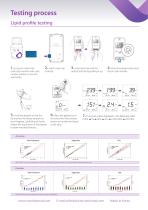
Testing processLipid profile testing 1. Ensure to match the code chip number with code number written on the test strip bottle. 2. Insert code chip correctly 3. Insert test strip into the 4. Press the power button and optical strip slot by pulling it up check code number. 5. Hold the pipette so that the tip touches the blood samples on your fingertip. Carefully and slowly release the top button of the pipette to draw the blood into tip. 6. Place the pipette tip in the strip inlet. Press shutter button to transfer the blood to the strip. 7. The result will be displayed in the following order:...
Open the catalog to page 2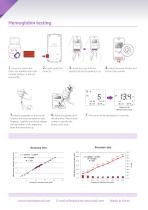
Hemoglobin testing Ensure to match the code chip number with code number written on the test strip bottle. 2. Insert code chip correctly Insert test strip into the optical strip slot by pulling it up Press the power button and check code number. Display of Hb Measurement result 7. The result will be displayed in 5 seconds. Place the pipette tip in the strip inlet. Press shutter button to transfer the blood to the strip. Precision test VERI-Q Multi measured value (g/dL) VERI-Q Multi measured value (g/dL) Company A reference value (g/dL) 10.2 12.9 15.1 17.1 19.9 Company A reference value (g/dL)...
Open the catalog to page 3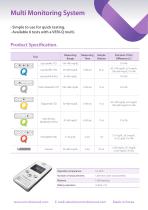
Multi Monitoring System · Simple to use for quick testing. · Available 6 tests with a VERI-Q multi. Product Specification. Measuring Range Measuring Time Sample Volume High density liproprotein (HDL) Operation temperature Number of measurements 1,000 tests (with new batteries) Battery operation
Open the catalog to page 4All MICOBIOMED catalogs and technical brochures
 micobiomed-COVID19
2 Pages
 Molecular Diagnostics
2 Pages
 VERI-Q opti96 plate
2 Pages
 VERI-Q balance
2 Pages


- Solvent reagent
- Molecular biology reagent
- Blood rapid screening test
- Immunoassay rapid diagnostic test
- Laboratory reagent
- Rapid virus test
- Sample preparation system
- Automatic sample processor
- Microtiter plate
- Rapid respiratory disease test
- PCR reagent
- Laboratory sample preparation system
- 96-well microplate
- COVID-19 rapid test
- PCR system
- Laboratory microplate
- Compact PCR machine
- Real-time PCR analyzer
- Tissue processor
- Immunoassay microplate