
- Catalogs
- Northgate Technologies
- AUTOLITH® Touch Quick Reference Guide

AUTOLITH® Touch Quick Reference Guide

AUTOLITH® Touch Quick Reference Guide
This document is a quick reference guide for the AUTOLITH® Touch Systems, designed for use in medical procedures involving biliary stones. It provides step-by-step instructions for setting up and operating the system.
Setup Instructions
- Connect the power cord to the unit and a grounded power source, then turn on the main power switch and activate the unit by touching the LCD screen.
- Attach the pneumatic foot-pedal connector to the designated port on the front panel.
- Prepare and connect the EHL probe using the extender cable, ensuring alignment of green lines for proper connection.
- Once connected, the 'READY' indicator will appear.
Operation Instructions
- Select the desired number of EHL pulses, starting with one pulse per foot-pedal depression. Typically, 3-5 pulses are ideal.
- Choose the power level, starting at LOW and adjusting as needed. Options include LOW, MEDIUM, and HIGH.
- Insert the EHL probe into the endoscopic environment, positioning the tip 1-2mm from the stone surface.
- Activate the EHL pulses by pressing the ACTIVE MODE / START icon and use .9% normal saline for irrigation.
- To pause, use the STANDBY / PAUSE icon to prevent accidental discharge.
- Reset the pulse count with the RESET VALUE icon as needed.
- Access the set-up menu for adjustments to program defaults, language settings, and service information.
Product Information
- The AUTOLITH® system includes an extender cable, pneumatic foot-switch, and power cord. Disposable EHL probes are sold separately.
- Accessories include a foot pedal, hospital-grade power cord, and extender cable.
Maintenance and Safety
- Monitor the EHL probe life based on pulse count and power level. Alerts will indicate when a new probe is needed.
- Power down the unit using the POWER DOWN icon when finished.
Important Notes
This guide is not a substitute for the operator’s manual. Users must read and understand the full manual before operating the system.
Catalog excerpts
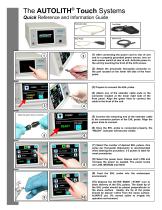
The AUTOLITH® Touch Systems Quick Reference and Information Guide Extender Cable Power Cord (1) After connecting the power cord to rear of unit and to a properly grounded power source, turn on main power switch at rear of unit. Activate power to the unit by touching the front of the LCD screen. (2) Attach the pneumatic foot-pedal connector to the port located on the lower left side of the front panel. (3) Prepare to connect the EHL probe. (4) Attach one of the extender cable ends to the connector located at the lower right side of the front panel. Align the green lines to connect the cable to the front of the unit. Align the green lines to connect (5) Connect the remaining end of the extender cable to the connector portion of the EHL probe. Align the green lines to connect. (6) Once the EHL probe is connected properly, the “READY” indicator will become visible. 6 (7) Select the number of desired EHL pulses. One pulse per foot-pedal depression is recommended when starting the procedure. 3-5 pulses is ideal for most procedures. (8) Select the power level. Always start LOW and increase the power as needed. The power levels are LOW, MEDIUM and HIGH. (9) Feed the EHL probe into the endoscopic environment. (10) Depress the ACTIVE MODE / START icon to allow delivery of the EHL pulses. The distal tip of the EHL probe should be placed perpendicular to the stone surface. Ideally, the tip of the probe should be placed 1-2mm from the stone surface. ALWAYS use .9% normal saline to irrigate the operative environmen
Open the catalog to page 1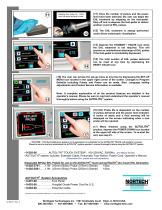
(11) Once the number of pulses and the power Keeping the probe tip 1-2mm from the stone surface is ideal. level have been selected, the user can begin the EHL treatment by stepping on the foot-pedal. Step off and re-depress the foot-pedal to deliver another round of EHL pulses. (12) The EHL treatment is always performed under direct endoscopic visualization. (13) Depress the STANDBY / PAUSE icon when the EHL treatment is not required. This will prevent an unintentional discharge of EHL pulses if the foot-pedal is accidentally depressed. (14) The total number of EHL pulses delivered can be reset...
Open the catalog to page 2All Northgate Technologies catalogs and technical brochures
 FLO-ASSIST-II
2 Pages
 CO2 Shuttle Valve System
1 Page
 The AUTOLITH® Touch
2 Pages
 AUTOLITH ®
1 Page


