
- Catalogs
- nu-beca & maxcellent
- PO8201

PO8201

PO8201
- Issues with ECG monitor and oximeter probe are highlighted, suggesting replacement or consulting the operator's manual for the ECG monitor.
- For the handheld pulse oximeter, missing segments in SpO2 or pulse rate displays may indicate defective LED displays, and electromagnetic interference (EMI) can disrupt performance. Solutions include discontinuing use or removing the device from EMI environments.
- If displays are off but an alarm sounds, the recommended action is to turn off the device and replace the batteries. Persistent issues should be referred to a local dealer.
- Low battery indicators require battery replacement.
- Symbols indicate the device is not defibrillator proof, resistant to liquid ingress, and conforms to EC directive No. 93/42/EEC for medical devices.
- Instructions for use and cautionary symbols are provided.
- Pulse Oximetry: Range is 0% to 100% with a resolution of 1%. Accuracy is ±2% for 70% to 100% range.
- Heart Rate: Range is 30 to 250 bpm with a resolution of 1 bpm and accuracy of ±1 bpm or ±1%.
- Displays: Segment LED type showing SpO2, pulse rate, and pulse bar. Includes status indicators for stable readings, probe fall-off, and battery status.
- Alarms: Urgent alarms for SpO2 and pulse rate deviations, and reminding alarms for low battery.
- Mechanical: Device weighs 240g with dimensions of 14cm x 7cm x 3.2cm. It is water and impact-resistant.
- Transmission: Bluetooth capability (PO-8201B).
- Uses 4 AA alkaline batteries with a typical operation life of 40 hours.
- Operating temperature ranges from -10ºC to 50ºC for the device and 5ºC to 40ºC for the probe. Storage temperature ranges from -20ºC to 55ºC.
- Operating humidity is below 95%, non-condensing.
- Device is classified as Type BF applied part with continuous operation mode.
- Safety and performance standards include IEC60601-1, IEC60601-1-2, ISO9919, EN300 328, and EN301 489.
Catalog excerpts

Handheld Pulse Oximeter Model: PO8201
Open the catalog to page 3
About the Manual The precautions, warnings and notes throughout this manual are very important. Please read this entire manual carefully before using the nu-beca Handheld Pulse Oximeter. The information in the manual has been carefully checked and is believed to be accurate.
Open the catalog to page 4
Handheld Pulse Oximeter Meter Appearance and Key Function 09
Open the catalog to page 5
• Federal law (USA) restricts this device to sale by or on the order of a physician. • Do not use the oximeter in an MRI environment. • The use of accessories, probes, and cables other than those listed in this manual may result in increased emission and/ or decreased immunity of the device. • The oximeter is intended only as an adjunct in subject assessment. It must be used in conjugation with other methods of assessing clinical signs and symptoms. • Explosion Hazard: Do not use the oximeter in an explosive atmosphere. • If subjects' monitoring sites have trauma, disability or other medical status...
Open the catalog to page 6
Handheld Pulse Oximeter • The oximeter is not an apnea monitor. • The oximeter determines the percentage of arterial oxygen saturation of functional hemoglobin. Significant levels of dysfunctional hemoglobin such as carboxyhemoglobin or methemoglobin may affect the accuracy of the measurement. • Cardiogreen and intravascular dyes, depending on the concentration, may affect the accuracy of SpO2 measurements. • The performance of the oximeter might be affected by the presence of a defibrillator. • The oximeter may not work on all subjects. If you are unable to achieve stable readings, discontinue...
Open the catalog to page 7
INTRODUCTION ►Intended for Use The nu-beca Handheld Pulse Oximeter is indicated for use in measuring and displaying functional oxygen saturation of arterial hemoglobin (SpO 2) and pulse rate. It is intended for patients during no-motion condition. The oximeter is suitable for use at home, in hospital, clinical sites and home care environment. This device is indicated for non-invasive spot checking or continuous monitoring. ►General Description The oximeter is a digital handheld that displays numerical values for blood oxygen saturation. It provides audible alarm for both medium and high priority...
Open the catalog to page 8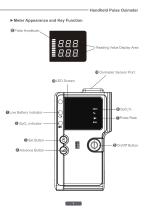
Handheld Pulse Oximeter ►Meter Appearance and Key Function 8 Pulse Amplitude 8 Reading Value Display Area Oximeter Sensor Port 7 Pulse Rate 2 SpO2 indicator 3 Set Button 5 On/Off Button
Open the catalog to page 9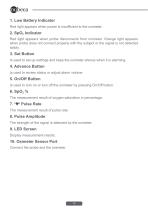
1. Low Battery Indicator Red light appears when power is insufficient to the oximeter. 2. SpO2 Indicator Red light appears when probe disconnects from oximeter. Orange light appears when probe does not connect properly with the subject or the signal is not detected stably. 3. Set Button Is used to set up settings and keep the oximeter silence when it is alarming. 4. Advance Button Is used to review status or adjust alarm volume. 5. On/Off Button Is used to turn on or turn off the oximeter by pressing On/Off button. 6. SpO2 % The measurement result of oxygen saturation in percentage. Pulse Rate...
Open the catalog to page 10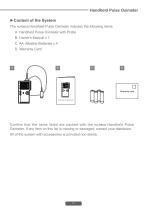
Handheld Pulse Oximeter ►Content of the System The nu-beca Handheld Pulse Oximeter includes the following items: A. Handheld Pulse Oximeter with Probe B. Owner's Manual x 1 C. AA Alkaline Batteries x 4 D. Warranty Card Owner's Manual Confirm that the items listed are packed with the nu-beca Handheld Pulse Oximeter. If any item on this list is missing or damaged, contact your distributor. All of the system with accessories is provided non-sterile.
Open the catalog to page 11
BEFORE USE Low battery capacity is indicated with a flashing red light. We recommend that you replace the new batteries if the low battery indicator turns red. ►Battery Replacement Make sure the oximeter is switched off when replacing the batteries. The oximeter is powered by 4 AA alkaline batteries. Replace new batteries by the following steps. STEP1. Loosen the screw at the back of the oximeter and remove the battery cover. STEP2. Remove the old batteries from battery compartment. STEP3. Insert four new AA alkaline batteries. Correctly align the polarities (+ and -) with battery indication marks...
Open the catalog to page 12
Handheld Pulse Oximeter ►Connecting the Probe Connect the probe to the top of the oximeter as shown below. Make sure that the probe is firmly plugged into the oximeter. ►Power On/Off • Turn on the oximeter by pressing and releasing the • Turn off the oximeter by pressing and holding the button. button for about 3 s
Open the catalog to page 13
► Set up the Oximeter Your oximeter comes with the alarm function including the upper/lower limit of SpO2 and heart rate, and the brightness of LED backlight preset. If you need to set these parameters, please follow below steps. Start with the oximeter is off. STEP 1. Press Button and (^) button at the same time to enter setting mode. The first screen shows SpO2 upper limit settings. The factory default is off. STEP 2. Press (3) button to change settings. You can press ^nS) the number from 91% to 100%. When the setting value goes to the upper limit, press (^) button again and the screen will...
Open the catalog to page 14
STEP 3. When the desired setting is displayed on the screen, press (^) button to enter SpO2 lower limit setting. The factory default is off. DELT OFF! STEP 4. Press @) button to change settings. You can press (^3) button to increase the number from 85% to 94%. When the setting value goes to the upper limit, press (^) button again and the screen will turn back “OFF” setting.
Open the catalog to page 15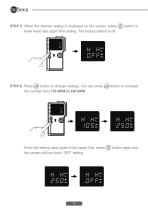
STEP 5. When the desired setting is displayed on the screen, press button to enter heart rate upper limit setting. The factory default is off. H HT DFFZ j STEP 6. Press (djj) button to change settings. You can press (3) button to increase the number from 105 BPM to 250 BPM. H HT DSD Z When the setting value goes to the upper limit, press (§) button again and the screen will turn back “OFF” setting.
Open the catalog to page 16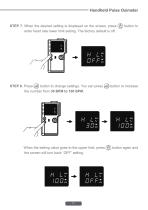
STEP 7. When the desired setting is displayed on the screen, press button to enter heart rate lower limit setting. The factory default is off. STEP 8. Press (djj) button to change settings. You can press (3) button to increase the number from 30 BPM to 100 BPM. When the setting value goes to the upper limit, press (§) button again and the screen will turn back “OFF” setting.
Open the catalog to page 17All Nu-beca & maxcellent catalogs and technical brochures
 CN-7013
18 Pages
 IT7278
1 Page
 150206-321FB-IM
11 Pages
 NCB360
8 Pages
 POE101-B
2 Pages
 Blood Glucose Meter 4117A
42 Pages
 Pacifier Thermometer MP9200
2 Pages
 Pacifier Thermometer MP9101
2 Pages
 Blood Pressure Monitor BA2219
17 Pages
 Blood Pressure Monitor BA2318
29 Pages
 2018DM_compress
15 Pages
 Catalogue 2017
17 Pages


- Detection kit
- Rapid chromatographic immunoassay test
- Rapid virus test
- Thermometer
- Blood pressure monitor
- Automatic blood pressure monitor
- Medical thermometer
- Rapid infectious disease test
- Protection mask
- Digital thermometer
- Nebuliser
- Medical pulse oximeter
- Rapid bacteria test
- Digital electrocardiograph
- EKG
- Blood glucose meter
- Fingertip pulse oximeter
- Infrared thermometer
- Nebulizer with mask