
- Catalogs
- Ocular Instruments
- Ocular Imaging Eye Model

Ocular Imaging Eye Model

Ocular Imaging Eye Model
The document details the specifications and usage of the Ocular Imaging Eye Model and its associated components, including the OEMI-7 (7mm Pupil), OEMB1 and OEMB3 (Brackets), OEMI-T (Spanner), and OEMI-KIT (Fill Kit).
Specifications
- OEMI-7 (7mm Imaging Eye Model): Designed to simulate the human eye, including natural surfaces like the anterior chamber and crystalline lens. It features pathological problems, a stable model for evaluation, and fluorescent arteries for imaging. Compatible with various ocular fundus imaging systems.
- OEMB1 & OEMB3 (Brackets): These brackets are designed to attach the eye model to slit lamp chin rests, with adjustable posts for different slit lamp requirements.
- OEMI-T (Spanner): Allows researchers to disassemble and reassemble the Eye Model for customization.
- OEMI-KIT (Fill Kit): Includes tools like a syringe and hex key for use with OEMI series eye models.
Cleaning and Maintenance
The eye model should be washed and rinsed with soap and water, then dried with a soft tissue.
Refill Procedure
- Remove the set screw using a 1/16” allen wrench.
- Align the eye model vertically and shake to remove bubbles.
- Fill a syringe with distilled water and inject into the posterior chamber to remove bubbles.
- Reinsert and tighten the set screw carefully.
Contact Information
Ocular Instruments, 2255 116th Ave NE, Bellevue, Washington 98004-3039 USA. Phone: 425-455-5200 or 800-888-6616. Email: [email protected]. Website: www.ocularinc.com.
Catalog excerpts

Ocular Imaging Eye Model, Bracket & Spanner Product Codes OEMI-T (Spanner) Design – 7mm Imaging Eye Model - (OEMI-7) Designed to accurately simulate human eye. Model includes natural surfaces of human eye including anterir chamber and crystalline lens Every effort has been made to duplicate pathological problems found in the human eye. Provides a stable fixed model for evaluation and training. Arteries emanate from the disc with a fluorescent character allowing simulated fluorescein imaging Optic disc has some fluorescent qualities Designed for use with ocular fundus imaging systems such as slit lamps, binocular indirect ophthalmoscopes (BIO), fundus cameras and scanning laser ophthalmoscopes (SLO). A peg on the back fits into the Ocular Eye Model Bracket (OEMB1 or OEMB3) which can be attached to any slit lamp. The eye has a retinal detachment showing an elevated retina and retinal tear. It also displays a foreign body, optic disc and blood vessels. A line at the 180 degree meridian designates the region of the equator. Design – Bracket - (OEMB1 & OEMB3) Designed with a position-adjustable post used to attach the eye model to the slit lamp chin rest. A second post is supplied for slit lamps which require a longer post. OEMB3 contains two pair of short and longer posts. Design – Spanner - (OEMI-T) Designed for the Researcher to disassemble & reassemble the Eye Model for customizing. Design – Fill Kit - (OEMI-KIT) Kit includes 3cc syringe, 21g blunt, 1/16 hex key, and distilled water. F
Open the catalog to page 1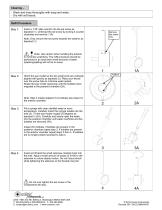
Cleaning – Wash and rinse thoroughly with soap and water. Dry with soft tissue. Refill Procedure Step 1: Insert a 1/16” allen wrench into the set screw as depicted (1). Unthread the set screw by turning it counter clockwise and remove. (1A) Remove this screw only Note: Only remove the set screw towards the anterior as depicted (1). Note: Use caution when handling the anterior to minimize scratching. The refill procedure should be performed in an area were small amounts of water splashing/spilling will not be an issue. Orient the eye model so the two small ports are vertically aligned with...
Open the catalog to page 2All Ocular Instruments catalogs and technical brochures
 Product Catalog
82 Pages
 OROCTS
1 Page
 Vitreolysis Sets
1 Page

- Anatomy model
- Training anatomy model
- Sterilization container
- Medical suitcase
- Sterilization tray
- Medical instruments support
- Eye anatomical model
- Custom medical suitcase
- Anatomical model kit
- Plastic medical suitcase
- Operating room support
- Medical imaging anatomical model
- Health education anatomical model
- Model holder
- Autoclavable sterilization tray
- Autoclavable sterilization container
- Lens sterilization tray