

TG-7 Industry Kit
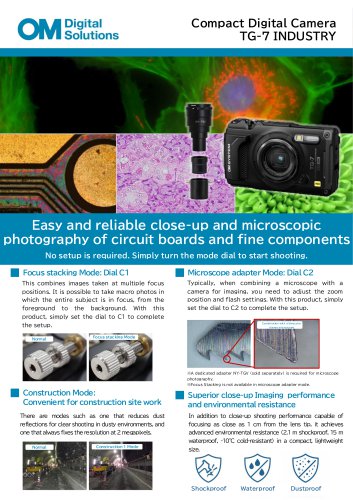
TG-7 Industry Kit
- Focus Stacking Mode (Dial C1): Allows macro photos with the entire subject in focus by combining images taken at multiple focus positions.
- Microscope Adapter Mode (Dial C2): Enables easy connection to microscopes using the NY-TGV Super Adapter (sold separately), with no additional setup required.
- Construction Mode: Ideal for construction site work, offering dust reflection reduction and fixed resolution settings.
- Environmental Resistance: Shockproof (2.1 m), waterproof (15 m), and cold-resistant (-10°C) with a dustproof and weatherproof rating of IP68.
- Resolution: 12.0 megapixels effective, 12.71 megapixels total.
- Maximum Magnification: 7x (35mm equivalent).
- Minimum Focusing Distance: 1 cm from the lens tip.
- Camera Body Size: 113.9 mm x 65.8 mm x 32.7 mm; Weight: 249g (including battery and memory card).
- NY-TGV Super Adapter: For mounting on microscopes, compatible with the TG series.
- RM-WR2 Wireless Remote Control: Supports wired/wireless remote shooting within 10 meters.
- U-OC Ultra C Mount: High-performance C-mount telescope for Olympus microscopes.
Catalog excerpts
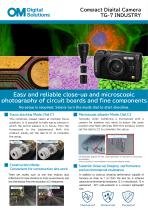
Compact Digital Camera TG-7 INDUSTRY Easy and reliable close-up and microscopic photography of circuit boards and fine components No setup is required. Simply turn the mode dial to start shooting. Focus stacking Mode: Dial C1 Microscope adapter Mode: Dial C2 This combines images taken at multiple focus Typically, when combining a microscope with a positions. It is possible to take macro photos in which the entire subject is in focus, from the camera for imaging, you need to adjust the zoom set the dial to C2 to complete the setup. position and flash settings. With this product, simply product, simply set the dial to C1 to complete Combinat ion wit h a binocula r Focus stac king Mode ※A dedic ated adapter NY-TGV (sold separately) is required for microscope photography. ※Focus Stacking is not available in microscope adapter mode. Construction Mode: Convenient for construction site work Superior close-up Imaging performance and environmental resistance There are modes such as one that reduces dust In addition to close-up shooting performance capable of reflections for clear shooting in dusty environments, and one that always fixes the resolution at 2 megapixels. focusing as close as 1 cm from the lens tip, it achieves advanced environmental resistance (2.1 m shockproof, 15 m waterproof, -10°C cold-resistant) in a compact, lightweight
Open the catalog to page 1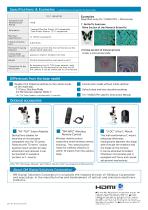
Specifications & Examples ^ Specifications are based on the base model. Specifications & Examples ^ Specifications are based on the base model. 2: Cross-section of mizuna sprouts Under a microscope slide Examples Magnified using TG-7 INDUSTRY + Microscope Register the following settings to the custom mode Construction mode without initial settings C1 :Focus Stacking Mode Default date and time recording settings ■X-NY-TGV Super Adapter (sold separately) is required. TG-7 INDUSTRY specific Instruction Manual “NY-TGV” Super Adapter Optical lens adapter for mounting on microscopes compatible with...
Open the catalog to page 2- CMOS camera
- Camera with USB port
- Sterilization container
- Instrument sterilization container
- Medical camera
- Microscope camera
- Surgical camera
- Portable camera
- Ultra-high resolution camera
- Aluminium sterilization container
- Inspection camera
- Camera with video processor
- Camera with zoom
- WiFi camera
- Camera for life sciences applications
- Dental instrument sterilization container
- Veterinary camera
- Monitoring camera
- Near-infrared camera
- Autoclavable sterilization container