Complete Planning Solution for Knee Procedures

Complete Planning Solution for Knee Procedures
Catalog excerpts

High Tibial Osteotomy Total Knee Arthroplasty Complex Primary Knee Total Knee Revision Partial Knee
Open the catalog to page 1
High Tibial Osteotomy Total Knee Arthroplasty Complex Primary Knee Total Knee Revision Partial Knee Quick and Easy Planning for Knee Procedures: n Plan with long leg or short knee images: up to 4 related images at a time Move seamlessly from whole leg to zoomed view for more precise template positioning Assess the need for an offset stem using a unique graphic for revision knees Modular systems for revision knees are templated as a complete, connected unit Planning for HTO with assessment of whole leg alignment
Open the catalog to page 2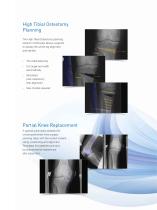
High Tibial Osteotomy Planning The High Tibial Osteotomy planning wizard in OrthoView allows surgeons to assess the whole leg alignment and identify: Cut angle and width automatically Simulated post-osteotomy limb alignment Size of plate required Partial Knee Replacement A special automated assistant for unicompartmental knee surgery planning helps with the correct implant sizing, positioning and alignment. Templates for patellofemoral and bicompartmental implants are also supported.
Open the catalog to page 3
Planning for Complex Primary Knee Replacements Surgeons worldwide use OrthoView to anticipate potential complications that can arise during surgery. Solutions can be formulated and communicated to the orthopaedic team in advance, for example: Is it tibial or femoral bone loss causing the misalignment? How will the arthroplasty affect leg alignment? Are wedges and stems required to promote a stable arthroplasty? SmartKnee is a set of tools and wizards dedicated to knee arthroplasty planning with the minimum of mouse clicks, including automated anatomy detection, template placement and reduction....
Open the catalog to page 4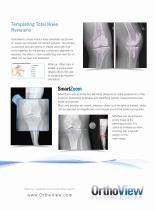
Templating Total Knee Revisions OrthoView’s unique revision knee templates are shown on screen as complete connected systems. The primary component plus any stems or offsets used with it all move together. As the primary component alignment is adjusted, the effect on stem positioning and need for an offset can be seen and assessed. When an offset stem is added, a unique polar display allows the user to visualize its required orientation. SmartZoom incorporates two elements designed to make assessment of the anatomy, positioning templates and identifying specific measurements even easier and quicker....
Open the catalog to page 5
At a Glance: The Benefits of OrthoView for Planning Knee Procedures “Being able to predict the component sizes and likely augments allows the scrub staff to organise the complex instrumentation, jigs and trials used for revision knee surgery. They can often put half of the trays to one side which streamlines the whole procedure and is particularly helpful for staff under training.” Grant Shaw, Orthopaedic Surgeon One-click image scaling Comprehensive digital template library Instantly corrects for image magnification when sizing templates and calculating measurements. Includes high quality, intuitive,...
Open the catalog to page 6