
- Catalogs
- Panda Scanner
- PANDA P4


PANDA P4

PANDA P4
- Metal Button Remote Control: Allows for easy control of the scanning process with functions like start/pause, switch modes, and model processing.
- Detachable Tips: Offers flexibility with different tips for various scanning scenarios.
- Wireless Connection: Eliminates the need for cables, enhancing mobility and efficiency.
- Built-in Battery: Supports continuous scanning and can be charged on the dock, ensuring 24/7 availability.
- 3-in-1 Dock: Functions as a charger, base, and dock, simplifying the setup process.
- Panda Center: A comprehensive case management and data scanning platform.
- Panda OrthoSim: Provides orthodontic simulation for improved doctor-patient communication.
- Cloud Services: Facilitates data storage and fast transmission.
- AI Intelligent Scan: Identifies tissues accurately and eliminates redundant data.
- Orthodontic Simulation: Generates animations for better communication and order promotion.
- Handpiece Dimensions: 238mm×42mm×35mm
- Weight: 237g
- Scan Field: 18mm×16mm
- Accuracy: ≤15 µm
- Precision: ≤10 µm
- Output Files: STL, PLY, PTY, OBJ
- Connection Method: Wireless
- Full Arch Scanning Time: Less than 2 minutes
- CPU: Intel i7-12700H/Intel i7-11800H or above
- RAM: 16G/32G
- Hard Disk: SSD 512G or above
- GPU: RTX2060/RTX3060 or above
- Operating System: Windows10/11 64bit
- Display: Resolution 1920×1080 and above
- Standard Warranty: 2 years
- Extended Warranty: Available for an additional fee
- Customer Support: Available via email, toll-free number, and WhatsApp
Catalog excerpts
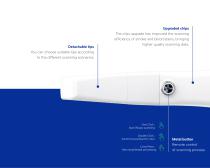
Detachable tips You can choose suitable tips according to the different scanning scenarios. Upgraded chips The chip upgrade has improved the scanning efficiency of smoke and blood stains, bringing higher quality scanning data. One Click: Start/Pause scanning Double Click: Switch buccal/Switch color Long Press: Next step/Model processing Metal button Remote control of scanning proce
Open the catalog to page 5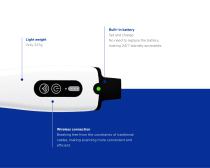
Light weight Only 237g Built-in battery Set and charge. No need to replace the battery, making 24/7 standby accessible. Wireless connection Breaking free from the constraints of traditional cables, making scanning more convenient and efficient.
Open the catalog to page 6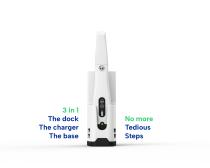
3 in 1 The dock The charger The base No more Tedious Steps
Open the catalog to page 7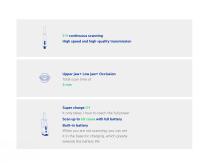
2 H continuous scanning High speed and high-quality transmission Upper jaw+ Low jaw+ Occlusion Total scan time of 2 min Super charge 1 H It only takes 1 hour to reach the full power Scan up to 60 cases with full battery Built-in battery When you are not scanning, you can set it in the base for charging, which greatly extends the battery life
Open the catalog to page 8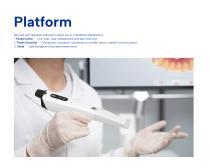
Platform We have self-designed software to assist you in completing digitalization 1. Panda Center One-stop case management and data scanning 2. Panda OrthoSim Orthodontic simulation contributes to a better doctor-patient communication 3. Cloud Data storage and fast data transmission
Open the catalog to page 9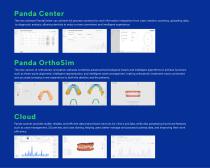
Panda Center The new software PandaCenter can achieve full process connectivity and information integration from case creation, scanning, uploading data, to diagnostic analysis, allowing dentists to enjoy a more convenient and intelligent experience. Panda OrthoSim The new version of orthodontic simulation software combines advanced technological means and intelligent algorithms to achieve functions such as three-point alignment, intelligent segmentation, and intelligent tooth arrangement, making orthodontic treatment more convenient and accurate, bringing a new experience to both the dentists...
Open the catalog to page 10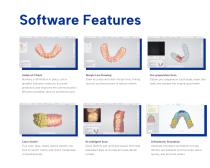
Software Features Undercut Check Margin Line Drawing Pre-preparation Scan Auxiliary confirmation in place, colour Draw accurate and clear margin lines, linking Obtain pre-preparation tooth state, retain bite gradient indicates undercut, accurate doctors and technicians to reduce rework. data, and reshape the original good teeth. prediction, and improves the communication efficiency between doctors and technicians. Color Switch Orthodontic Simulation True color jaws, clearly restore details, one Easily identify soft and hard tissues, eliminate Generate simulation animations to help click to switch...
Open the catalog to page 11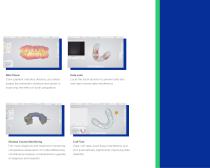
Bite Check Data Lock Color gradient indicates distance, accurately Locks the tooth position to prevent data loss judges the restoration distance and assists in and reject excess data interference. improving the effect of tooth preparation. Disease Course Monitoring Cuff Tool Full-cycle diagnosis and treatment monitoring, Clear cuff data, avoid tissue interference and comparative observation of model differences, lock automatically, significantly improving data simultaneous analysis, comprehensive upgrade
Open the catalog to page 12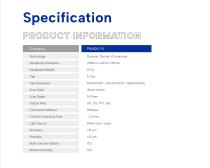
Specification Category Dynamic Staring 3D scanning Handpiece Dimension Handpiece Weight Tips Dimension Scan Field Scan Depth Output Files Connection Method Full Arch Scanning Time Light Source White LED+ Laser Multi-function Button Montion Sens
Open the catalog to page 14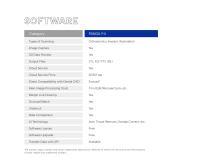
Orthodontics, Implant, Restoration Image Capture Output Files Cloud Service Cloud Service Price Direct Compatibility with Dental CAD Main Image Processing Tools Margin Line Drawing Occlusal Match Data Comparison Auto Tissue Remove, Overlap Correct, etc. Software License Software Upgrade Transfer Data with API *All names, logos, brands and other trademarks featured or referred to within this brochure are the property of their respective trademark holders.
Open the catalog to page 15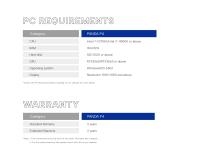
Hard disk Operating system *Check the PC Recommendation Catalog on our website for more detail. Standard Warranty Extended Warranty *Note: 1. Free maintenance during the first two years (No labor fee charged). 2. For the extend warrenty fee, please check the files on our website.
Open the catalog to page 16
Customer Support Email: [email protected] Toll Free Number (USA): 888-855-2562 WhatsApp (Global): +86 18108286761
Open the catalog to page 17
RUSSIA SWEDEN POLAND GERMANY UNITED STATES FRANCE PORTUGAL JAPAN EGYPT INDIA THAILAND PERU AUSTRALIA BRAZIL SOUTH AFRICA ARGENTINA PANDA SCANNER ALL OVER THE WORLD www.panda-scanner.com [email protected] Chengdu | Ziyang | Suzhou | Ningbo | Hong Kong | Brazil | USA
Open the catalog to page 18All Panda Scanner catalogs and technical brochures
 PANDA P3 & PANDA smart
16 Pages
 PANDA P2 Plus
10 Pages
 PANDA P2
10 Pages
 PANDA series
16 Pages
Archived catalogs
 PANDA-P3-CATALOG
20 Pages
 PANDA P2
17 Pages
 BAMBOO
1 Page