
- Catalogs
- Panpac Medical
- U-TEST saliva ovulation device for smartphone: IFU

U-TEST saliva ovulation device for smartphone: IFU
U-TEST saliva ovulation device for smartphone: IFU
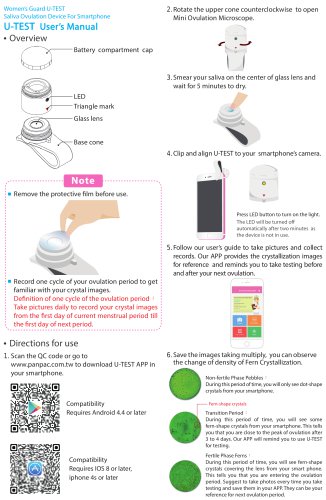
The document is a user manual for the Women’s Guard U-TEST Saliva Ovulation Device designed for smartphones. It provides instructions on how to use the device to determine ovulation periods by observing fern crystallization patterns in saliva.
Device Components
- Battery compartment cap
- LED
- Triangle mark
- Glass lens
- Base cone
Directions for Use
- Download the U-TEST APP from www.panpac.com.tw or scan the QC code.
- Ensure compatibility with Android 4.4 or later, or iOS 8 or later.
- Open the Mini Ovulation Microscope by rotating the upper cone counterclockwise.
- Apply saliva to the glass lens and wait 5 minutes for it to dry.
- Align U-TEST with the smartphone camera and turn on the LED.
- Follow the user guide to take pictures and record data.
- Observe changes in fern crystallization to determine fertility phases.
Fertility Phases
- Non-fertile Phase: Dot-shaped crystals.
- Transition Period: Some fern-shaped crystals, indicating proximity to ovulation.
- Fertile Phase: Fern-shaped crystals covering the lens, indicating ovulation.
Maintenance and Battery Replacement
- Clean the glass lens with a wet towel after each use.
- Replace the battery by rotating the compartment cap counterclockwise, removing the old battery, and inserting a new CR-1220 3V battery.
Cautions
- Use the device right after waking up before eating or brushing teeth.
- Avoid eating, drinking, or smoking 3 hours before use if not used in the morning.
- Apply saliva gently and evenly without bubbles.
- Do not use during menstrual periods, pregnancy, breastfeeding, or while taking hormone medication.
- Do not share the device to prevent disease transmission.
Detection Principle
The device detects ovulation by observing the density of fern crystallization in saliva, which contains NaCl.
Recycling and Awards
The device includes a WEEE Recycling Symbol and mentions an award, emphasizing its eco-friendly design and recognition.
Catalog excerpts
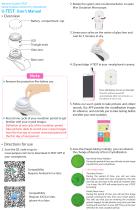
Women’s Guard U-TEST Saliva Ovulation Device For Smartphone U-TEST User’s Manual 2. Rotate the upper cone counterclockwise to open Mini Ovulation Microscope. Overview Battery compartment cap 3. Smear your saliva on the center of glass lens and wait for 5 minutes to dry. LED Triangle mark Glass lens Base cone 4. Clip and align U-TEST to your smartphone’s camera. Note Remove the protective film before use. Press LED button to turn on the light. The LED will be turned off automatically after two minutes as the device is not in use. Record one cycle of your ovulation period to get familiar with your crystal images. Definition of one cycle of the ovulation period Take pictures daily to record your crystal images from the first day of current menstrual period till the first day of next period. 5. Follow our user’s guide to take pictures and collect records. Our APP provides the crystallization images for reference and reminds you to take testing before and after your next ovulation. Directions for use 1. Scan the QC code or go to www.panpac.com.tw to download U-TEST APP in your smartphone. Compatibility Requires Android 4.4 or later Compatibility Requires IOS 8 or later, iphone 4s or later 6. Save the images taking multiply, you can observe the change of density of Fern Crystallization. Non-fertile Phase Pebbles During this period of time, you will only see dot-shape crystals from your smartphone. Fern-shape crystals Transition Period During this period of time, you will see some fern-shape crystals from your smartphone. This tells you that you are close to the peak of ovulation after 3 to 4 days. Our APP will remind you to use U-TEST for testing. Fertile Phase Ferns During this period of time, you will see fern-shape crystals covering the lens from your smart phone. This tells you that you are entering the ovulation period. Suggest to take photos every time you take testing and save them in your APP. They can be your reference for next ovulation p
Open the catalog to page 1
7. Apply a wet towel paper to clean the glass lens after each use. 8. Rotate the upper cone clockwise and align “Triangle mark” to embossed dot to close up the cone. Battery 1. Rotate counterclockwise toopen battery compartment cap. Cautions 1. Best time to use U-TESTRight after you wake up in the morning before brushing teeth and eating breakfast. 2. If you don't use U-TEST after waking up in the morning , do not eat, drink, or smoke for 3 hours before using the device. 3. Smear saliva on the glass lens gently. Do not spread back and forth, this may affect the clarity of images. 4. The result...
Open the catalog to page 2All Panpac Medical catalogs and technical brochures
 UterineInjector
2 Pages
 TheCurette
2 Pages
 RigidCurette
1 Page
 HSGCatherSet
1 Page
 Bellota
1 Page
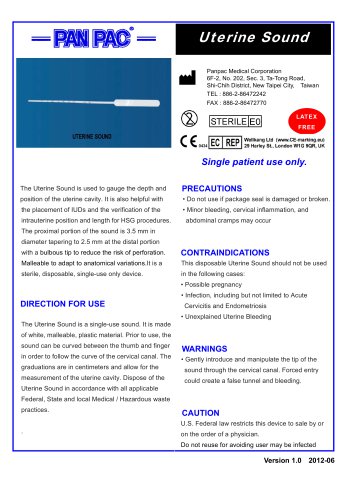
 UterineSound
1 Page
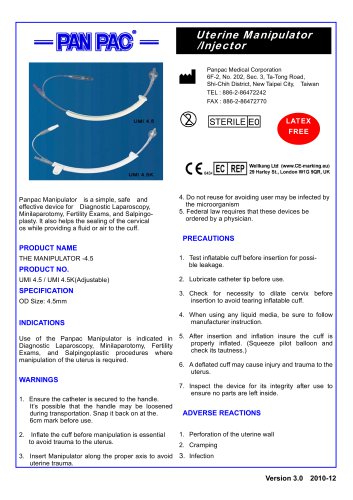 UterineManipulatorInjector
2 Pages
 Preferred Curette
2 Pages
 Word/Bartholin Catheter
1 Page
 Silicone Vaginal Dilators
2 Pages
 Cervical Dilators
1 Page




- Curette
- Vaginal pessary
- Dilatation sheath
- Gynecological curette
- Uterine manipulator
- Straight curette
- Ring-type vaginal pessary
- Cervical dilator
- Uterine manipulator with uterine injector
- Single-use uterine manipulator
- Vaginal pessary with knob
- Endometrial suction curette
- Dish-type vaginal pessary
- Vaginal dilator
- Gellhorn-type vaginal pessary
- Doughnut-type vaginal pessary
- Gehrung-type vaginal pessary