
- Catalogs
- Papenmeier
- BRAILLE-IN

- Products
- Catalogs
- News & Trends
- Exhibitions
BRAILLE-IN

1 / 2 PagesView full catalog
BRAILLE-IN
Product catalog summary
Introduction
Braille In 2 is an ergonomically designed external Braille keyboard for PCs, aimed at enhancing the computing experience for blind users, especially when editing grade two Braille, or writing mathematics and music Braille.
Installation and Compatibility
The keyboard connects to a PC via the standard keyboard port and supports national Braille codes with pre-installed keyboard emulation. It is compatible with Windows, Linux, and UNIX without requiring additional software. Users can update configurations by connecting to the serial port.
Functionality
Braille In 2 supports full 102 key keyboard emulation, including key combinations with Shift, CTRL, and ALT. It features 8 Braille keys, a space bar, 4 arrow keys, and 6 additional function keys for efficient and safe typing.
Ergonomics and Design
The keyboard is designed for ergonomic comfort, facilitating long periods of use without strain. It allows seamless integration with a standard QUERTY keyboard.
Manufacturer Background
Papenmeier, a specialist in Braille devices, has over 30 years of experience and is recognized for its contributions to improving opportunities for the visually impaired. The company adheres to ISO 9001 standards and collaborates with universities and international research projects.
Technical Specifications
- 8 Braille keys plus space
- 4 arrow keys and 6 function keys
- Connects via keyboard port
- Independent of operating system
- Full 102 key keyboard emulation
- Dimensions: 282 x 133 x 34 mm
- Weight: 560 g
Contact Information
F.H. Papenmeier GmbH & Co. KG, Reha Division, Talweg 2, 58239 Schwerte, Germany. Phone: +49 - 23 04 - 946 0, Fax: +49 - 23 04 - 946 246, Email: [email protected], Website: www.papenmeier.de
Braille In 2 is an ergonomically designed external Braille keyboard for PCs, aimed at enhancing the computing experience for blind users, especially when editing grade two Braille, or writing mathematics and music Braille.
Installation and Compatibility
The keyboard connects to a PC via the standard keyboard port and supports national Braille codes with pre-installed keyboard emulation. It is compatible with Windows, Linux, and UNIX without requiring additional software. Users can update configurations by connecting to the serial port.
Functionality
Braille In 2 supports full 102 key keyboard emulation, including key combinations with Shift, CTRL, and ALT. It features 8 Braille keys, a space bar, 4 arrow keys, and 6 additional function keys for efficient and safe typing.
Ergonomics and Design
The keyboard is designed for ergonomic comfort, facilitating long periods of use without strain. It allows seamless integration with a standard QUERTY keyboard.
Manufacturer Background
Papenmeier, a specialist in Braille devices, has over 30 years of experience and is recognized for its contributions to improving opportunities for the visually impaired. The company adheres to ISO 9001 standards and collaborates with universities and international research projects.
Technical Specifications
- 8 Braille keys plus space
- 4 arrow keys and 6 function keys
- Connects via keyboard port
- Independent of operating system
- Full 102 key keyboard emulation
- Dimensions: 282 x 133 x 34 mm
- Weight: 560 g
Contact Information
F.H. Papenmeier GmbH & Co. KG, Reha Division, Talweg 2, 58239 Schwerte, Germany. Phone: +49 - 23 04 - 946 0, Fax: +49 - 23 04 - 946 246, Email: [email protected], Website: www.papenmeier.de
See more
Catalog excerpts

Braille In 2 The Universal Braille Keyboard for PCs
Open the catalog to page 1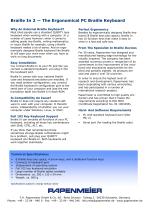
Braille In 2 — The Ergonomical PC Braille Keyboard Why An External Braille Keyboard? Most blind people use a standard QUERTY type keyboard when working with a computer. In a number of cases however, when it comes to editing grade two Braille, writing mathematics or music Braille for example, using a Braille keyboard makes a lot of sense. And an ergonomically designed Braille keyboard like Braille In will ease your work even when you have to work on long documents. Easy Installation You connect Braille In to your PC just like you connect a standard keyboard: you plug it into the keyboard port....
Open the catalog to page 2All Papenmeier catalogs and technical brochures
 BRAILLEX EL 40c
2 Pages
 BRAILLEX EL 80c
2 Pages
 BRAILLEX® Live-Models
2 Pages
Archived catalogs
 BRAILLEX live
2 Pages
 BRAILLEX live 20
2 Pages
 BRAILLEX Live+
2 Pages
 BRAILLEX EL 60c
2 Pages
*Prices are pre-tax. They exclude delivery charges and customs duties and do not include additional charges for installation or activation options. Prices are indicative only and may vary by country, with changes to the cost of raw materials and exchange rates.
About MedicalExpo
MedicalExpo is a marketplace that offers B2B players a complete experience, from product sourcing to purchase. MedicalExpo is an entity of VirtualExpo Group.
Are you a buyer?
Are you a supplier?
© 2026 All rights reserved - Terms - Privacy policy - General Terms - Manage cookies - 鄂ICP备2026053537号-3 -